
如何查看 TP-Link 路由器的 MAC 位址
從網頁式公用程式
步驟 1 開啟網頁瀏覽器並在網址列輸入路由器的 IP 位址 ( 預設值為 192.168.1.1) ,然後按下 [Enter] 。
步驟 2 在登入頁面輸入使用者名稱和密碼,預設的使用者名稱和密碼皆為小寫的 [admin] 。
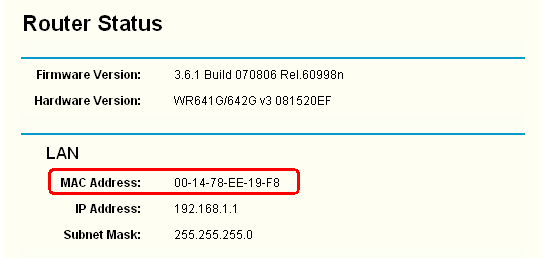
步驟 3 在左側按一下 [Status] ,然後您可以在 LAN 區塊看到 MAC 位址。
從標籤
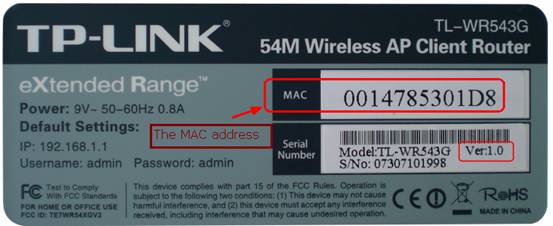
將路由器翻到背面,您會看到有一個標籤, MAC 位址就列印在標籤上。
更多相關文章
這篇faq是否有用?
您的反饋將幫助我們改善網站

TP-Link Community
Still need help? Search for answers, ask questions, and get help from TP-Link experts and other users around the world.