
için İndir Tapo C465
- Ürün Açıklama
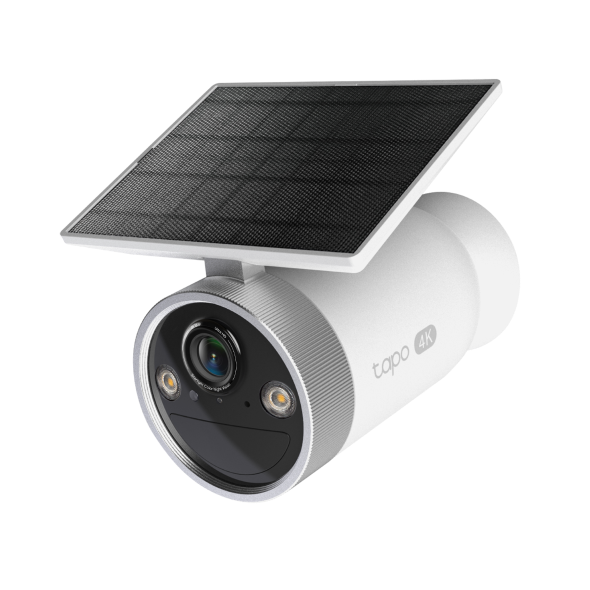 Pille Çalışan, Dahili Güneş Panelli Güvenlik Kamerası
Kurulum Videosu
-
How to Set Up Your Enhanced AI Solar Security Camera Ultra | Tapo C465
Featuring 4K Ultra HD resolution and Starlight Color Night Vision, this camera ensures crystal-clear details, both day and night. Its solar-powered, wire-free design offers flexibility, while AI detection and customizable alerts provide precise monitoring.
Daha Fazla Dosya -
How to Mount Your Enhanced AI Solar Security Camera Ultra | Tapo C465
Featuring 4K Ultra HD resolution and Starlight Color Night Vision, this camera ensures crystal-clear details, both day and night. Its solar-powered, wire-free design offers flexibility, while AI detection and customizable alerts provide precise monitoring.
Daha Fazla Dosya
SSS
- Tapo kamera nasıl kurulur
- Tapo Akıllı Hub Uyumlu Kamera Listesi
- Tapo Kamera için gizlilik alanı nasıl ayarlanır?
- How to check and improve the network connection stability of Tapo&Kasa smart devices
- How to Connect Tapo and Kasa Smart Devices to Google Home
- How to Factory Reset Your Tapo Camera: Two Methods
- Fail to sign up or activate the TP-Link ID
- Donanım Sürümünü Nasıl Öğrenebilirim?
- TP-Link cihazınızımın model numarasını nasıl bulabilirim?
- Fail to configure Tapo Camera
- Tapo Care cancellation and refund
- How to update or change the payment method for Tapo Care or Kasa Care
- How to add new cameras to my Tapo Care plan
- What if I can’t find my Tapo camera on Tapo app?
- How to fix no sound or audio quality issues on Tapo Camera/Doorbell
- What if I forget my TP-Link ID password for TP-Link Tapo/Kasa device
- Bulut hesabını kaydettiğimde veya şifremi sıfırladığımda e-posta almazsam ne yapmalıyım?
- How to make Tapo devices work with IFTTT
- Why do I need to give Local Network permission to TP-Link apps in iOS devices?
- What can I do if Tapo/Kasa Smart Devices fail to update the firmware?
- Tapo kameram için SD kart nasıl takılır?
- What should I do if the SD card cannot be formatted/recognized?
- How to view camera SD card recordings on a computer
- Tapo uygulamasında Tapo Kasa Kameralar için Ev ve Uzak Modu nasıl düzenlenir?
- What should I do if I encounter issues while playing back videos from an SD card?
- How to configure Home feature and Room feature in Tapo app
- Tapo Kameranın Canlı Görüntüleme özelliğinde titreme sorununu giderme
- Why do I receive a "We Noticed a New Login" email?
- What should I do if Tapo/Kasa notifications are delayed or not working?
- How to cast TP-Link Camera/Doorbell to TV via Tapo Smart HomeBase
- General Questions about Tapo/Kasa Geofencing
- How to find serial number on TP-Link devices
- Tapo uygulamasında Tapo ve Kasa cihazları için Bildirim özelliği nasıl yapılandırılır?
- How can I enable the 24/7 Capture on Battery Camera?
- What is Video Summary
- Cannot make my TP-Link smart devices work with Alexa
- How to set up routines for Tapo devices via Alexa app
- How to stream Tapo / Kasa Camera on Google device
- Tapo Wi-Fi Kameraları/kapı zilleri Tapo Hub'a nasıl bağlanır?
- TP-Link cloud Hesabimini Nasıl SİLEBİLİRİM
- Tapo Kamera'nın video netliğini ve kalitesini nasıl iyileştirebilirsiniz?
- Why cannot I receive the SMS verification code from Tapo app?
- Frequently asked questions about the SD Card Encryption feature
- How do I disable the Anti-theft alarm of my Battery-Powered Camera?
- The most frequent asked questions about TP-Link Sales
- How can I conduct 3DS authentication when purchasing Tapo Care
- How to unlink third-party accounts from your TP-Link ID
- How to verify if it’s the hardware issue of TP-Link smart home
- Why does TP-Link require my email address?
- How to create 3D Map in the Tapo App for Pad
- Cannot make TP-Link smart devices work with Google Home
- Tapo/Kasa Devices are showing offline after changing or resetting the router.
- TP-Link ID Explained: What It Is and How to Create One
Ürün Yazılımı Sürüm Notu
Ürün yazılımını güncellemek için SSS bölümüne bakın.
|
Tapo C465(EU)_V1_1.1.1 Build 251112 |
|---|
| Yayın Tarihi: 2025-12-11 |
|
Modifications and Bug Fixes: |
|
Tapo C465(EU)_V1_1.1.0 Build 250908 |
|---|
| Yayın Tarihi: 2025-10-10 |
|
Modifications and Bug Fixes: |