
Ethernet Cable Types: Cat5 to Cat8 Compared
Published: December 10, 2024 · Last Updated: September 18, 2026
Quick Answer
-
Cat6 is the practical standard for most homes and offices, delivering 1 Gbps at full distance and 10 Gbps over shorter runs.
-
Cat6a is the better long-term choice for full 10 Gbps at 100 meters, at a higher cost than Cat6.
-
Cat7 and Cat7a require proprietary connectors to reach their full rated speed; terminated with a standard RJ45, they perform at Cat6a levels.
Ethernet cables are categorized into Cat5 through Cat8, each offering a different combination of speed, bandwidth, and shielding, so the right choice depends on how fast and how far your network needs to run.
Table of Contents
The Different Types of Ethernet Cable
Ethernet Cable Shielding Types
How to Choose the Right Ethernet Cable
What Is an Ethernet Cable
An Ethernet cable is a physical medium used to connect devices such as routers, computers, switches, and modems to a network. It transmits data through electrical signals to ensure a fast and stable connection. Ethernet cables are essential for wired networks and provide better performance than wireless alternatives in terms of speed, latency, and security. Understanding the different types of Ethernet cables and your internet speed together helps you avoid overspending on a cable category your connection can't actually use.
The Different Types of Ethernet Cable
Grouped by performance capabilities such as data transmission speed, frequency (measured in MHz), and shielding, Ethernet cables fall into categories designated as Cat (short for "Category"), which play a critical role in determining how well the cable will perform in different network scenarios. Below are the main categories and their specific benefits.
1. Cat 5 (Category 5)
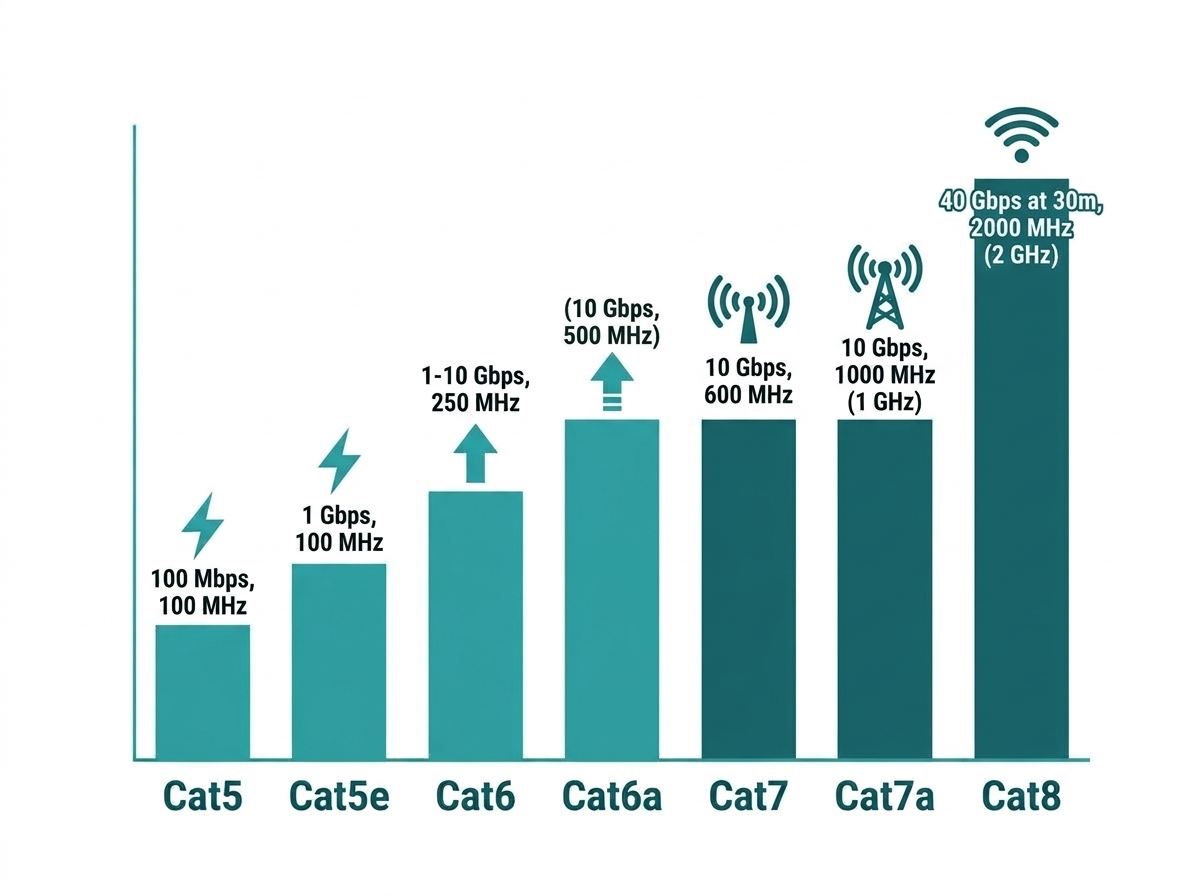
Cat 5 was the first widely adopted Ethernet cable standard, designed for basic networking tasks. Although it is now considered outdated, it laid the groundwork for future Ethernet cable advancements.
Speed: Up to 100 Mbps; Bandwidth: 100 MHz; Usage: Suitable for basic home networking and connecting peripherals like printers. Why it's outdated: Cat 5 cables are rarely used today due to their limited speed and bandwidth, which can't support modern high-speed internet or heavy data transfer.
2. Cat 5e (Category 5 Enhanced)
Cat 5e is an improved version of Cat 5, designed to reduce interference and improve performance. It remains a popular choice for home networks due to its affordability and reliability.
Speed: Up to 1 Gbps; Bandwidth: 100 MHz; Usage: Ideal for basic internet usage, movie streaming, and small office networks. Why choose Cat 5e: If you're on a budget and don't require ultra-high speeds, Cat 5e offers a reliable solution for everyday networking needs.
3. Cat 6 (Category 6)
Cat 6 cables offer a significant performance boost over Cat 5e, making them suitable for more demanding network environments. They also include improved shielding to reduce electromagnetic interference (EMI).
Speed: Up to 1 Gbps for longer distances and 10 Gbps for shorter distances (up to 55 meters). Bandwidth: 250 MHz. Usage: Ideal for gaming, HD streaming, and medium-sized business networks. Why choose Cat 6: If you need a cable that can handle higher speeds with minimal interference, Cat 6 is a solid option for both home and office environments.
4. Cat 6a (Category 6 Augmented)
Cat 6a is an enhanced version of Cat 6, designed to support higher speeds over longer distances. It also offers better shielding, making it more resistant to interference.
Speed: Up to 10 Gbps; Bandwidth: 500 MHz; Usage: Suitable for data-intensive applications, large businesses, and data centers. Why choose Cat 6a: For environments where speed and reliability are essential, Cat 6a provides excellent performance at full 100-meter distances, even in high-interference areas.
5. Cat 7 (Category 7)
Cat 7 cables are designed with advanced shielding to offer superior performance in environments with high electromagnetic interference. They feature a unique connector system, officially requiring GG45 or TERA connectors rather than the standard RJ45.
Speed: Up to 10 Gbps. Bandwidth: 600 MHz. Usage: Ideal for large corporate networks, data centers, and industrial settings. Why choose Cat 7: If you require a cable that can deliver stable, high-speed connections in environments with heavy interference, Cat 7 is worth considering, but be aware that most retail Cat 7 cable is terminated with standard RJ45 connectors instead of the official GG45 or TERA connector, which limits real-world performance to Cat 6a levels. For a genuine performance jump with guaranteed compatibility, Cat 6a is generally the more practical choice.
6. Cat 7a (Category 7 Augmented)
Cat 7a builds upon the strengths of Cat 7 by offering even higher bandwidth and shielding, making it suitable for the most demanding network environments.
Speed: Up to 10 Gbps (with higher theoretical ceilings possible at full rated bandwidth). Bandwidth: 1,000 MHz. Usage: Designed for future-proofing networks in industrial and commercial environments. Why choose Cat 7a: Although overkill for most home users, Cat 7a is an option for large-scale enterprise networks that require maximum performance and minimal interference, with the same GG45/TERA connector caveat that applies to Cat 7.
7. Cat 8 (Category 8)
The newest and most advanced Ethernet cable category, Cat 8, is designed for ultra-high-speed connections over short distances. It's primarily used in data centers and specialized networking environments.
Speed: Up to 40 Gbps, but only over runs of roughly 30 meters or less. Bandwidth: 2,000 MHz. Usage: Ideal for data centers, high-performance computing, and server rooms. Why choose Cat 8: If you need the fastest, most reliable cable available for short, high-speed runs between servers and switches, Cat 8 is the ultimate choice, though its short maximum distance makes it impractical for whole-building or whole-home cabling.
Ethernet Cable Shielding Types
In addition to category designations, Ethernet cables may come with different shielding types to protect against electromagnetic interference:
- Unshielded Twisted Pair (UTP): No shielding, suitable for low-interference environments.
- Shielded Twisted Pair (STP): Includes shielding to reduce interference, ideal for industrial settings.
- Foiled Twisted Pair (FTP): Features foil shielding around pairs for added protection in moderate-interference environments.
Choosing the right shielding depends on your environment and the amount of interference present.
How to Choose the Right Ethernet Cable
When selecting an Ethernet cable, consider the following factors:
- Speed Requirements: Higher categories like Cat 6, 7, and 8 support faster speeds.
- Distance: Longer distances may require cables with better shielding and bandwidth, such as Cat 6a, since Cat 7 and Cat 8 either need proprietary connectors or are limited to short runs to reach their top ratings.
- Environment: For environments with high interference, opt for shielded cables like Cat 6a or Cat 7, keeping the RJ45 caveat above in mind for Cat 7.
- Budget: Balance performance with cost; Cat 5e and Cat 6 are more affordable, while Cat 6a, Cat 7, and Cat 8 offer premium performance at a higher price.
One practical note: TP-Link's own standalone CAT5e patch cable line has been discontinued, so a Cat5e through Cat8 patch cable is not something TP-Link currently sells as a standalone item in the Philippines. Check TP-Link's networking accessories for current bundled options, or confirm with TP-Link support directly if you need a specific category cable paired with a TP-Link device.
Choose the Right Ethernet Cable for Your Network
Ethernet cables are essential for making sure that wired connections are fast, stable, and safe. They do this by sending data directly between devices, which cuts down on latency and signal interference compared to wireless networks.
TP-Link's wide selection of Ethernet cables and accessories ensures that your network can handle current demands while being scalable for future technological advancements, ultimately providing a more reliable and efficient connectivity experience.
Frequently Asked Questions
Does the type of Ethernet cable affect internet speed? The type of Ethernet cable can affect the speed and performance of your internet connection, especially for local network transfers. But if your internet speed is below 1 Gbps, Cat5e and Cat6 cables will perform similarly, so upgrading beyond Cat6 will not speed up an internet connection that is already the bottleneck.
What is the difference between flat and round Ethernet cables? Flat Ethernet cables are thinner and more flexible, making them easier to run under carpets or along walls. Round cables are more common, offer better protection from interference, and are more durable, making them the better choice for permanent in-wall installations.
What is shielded vs. unshielded Ethernet cable? Shielded Ethernet cables (STP) have extra shielding around the wires to reduce electromagnetic interference (EMI), making them ideal for environments with high interference. Unshielded cables (UTP) are more common and are suitable for most home and office setups where interference is minimal.
Is Cat7 worth buying over Cat6a for a home network? Not usually. Cat7 requires proprietary GG45 or TERA connectors to reach its full 600 MHz bandwidth, but nearly all Cat7 cable sold at retail uses standard RJ45 connectors, which caps real-world performance at Cat6a levels anyway. Cat6a delivers the same practical result at a lower cost and with guaranteed standard-connector compatibility.
How far can I run an Ethernet cable before performance drops? Cat5 through Cat6a are all rated for the standard 100-meter channel length at their listed speeds. Cat8 is the exception, dropping to roughly 30 meters to hit its 40 Gbps top speed, so it is not a practical choice for long in-wall or whole-building runs.
Final Thoughts
Not sure which cable your setup actually needs? For most homes and small offices, Cat6 hits the right balance of speed, cost, and future headroom, while Cat6a is worth the extra cost if you're planning for 10 Gbps or running cable through walls you don't want to redo later. Skip Cat7 unless you specifically need proprietary GG45 or TERA termination, and save Cat8 for short data-center runs where it belongs. Browse TP-Link's wide selection of Ethernet cables and networking accessories to build out a wired connection that matches your actual speed and distance needs.