
How to Choose the Best Home Internet Service in 2026
Published: August 28, 2024 · Last Updated: September 22, 2026
Quick Answer
-
Match your plan to usage: 25-50 Mbps for casual browsing, 100-200 Mbps for gaming and streaming, 500 Mbps+ for large households with many devices.
-
Fiber is the best connection type where available; cable, DSL, satellite, and 5G/4G LTE are the fallback options depending on your area.
-
Factor in the full cost, monthly fee, equipment, installation, and promo-rate expiration, not just the advertised price.
The best home internet service matches your household's actual usage, speed needs, connection type availability, and budget, and for most Philippine households in 2026, that means a fiber plan from PLDT, Globe, or Converge starting at 100 Mbps.
Table of Contents
Understanding Your Internet Needs
Types of Home Internet Connections
Factors to Consider When Choosing an Internet Plan
What Is Mbps and Why Is It Important
How to Choose an Internet Service Provider
Future-Proofing Your Home Internet
What's the Best Internet Provider in the Philippines
Understanding Your Internet Needs
The first step in selecting the right internet service is understanding your household's needs. Internet usage varies widely, depending on activities like gaming, browsing, streaming, and remote work, and the quality of your internet service can make or break how smoothly each of these works day to day. For example:
- Casual Browsers: If your household mainly checks emails, browses the web, and uses social media, a basic internet plan with speeds of 25-50 Mbps may suffice.
- Gamers and Streamers: Online gaming and streaming in HD or 4K require higher speeds and more bandwidth. A plan offering 100-200 Mbps is more suitable. The Archer C5400X gaming router previously recommended here has been discontinued; consider a current gaming router instead if you want to play games that require higher speeds and more bandwidth.
- Remote Workers: For video conferencing, large file uploads, and multiple users, you'll need a plan with at least 100 Mbps, with higher upload speeds being a plus.
Types of Home Internet Connections
Different types of internet connections offer various benefits and limitations. Understanding these can help you make a more informed choice:
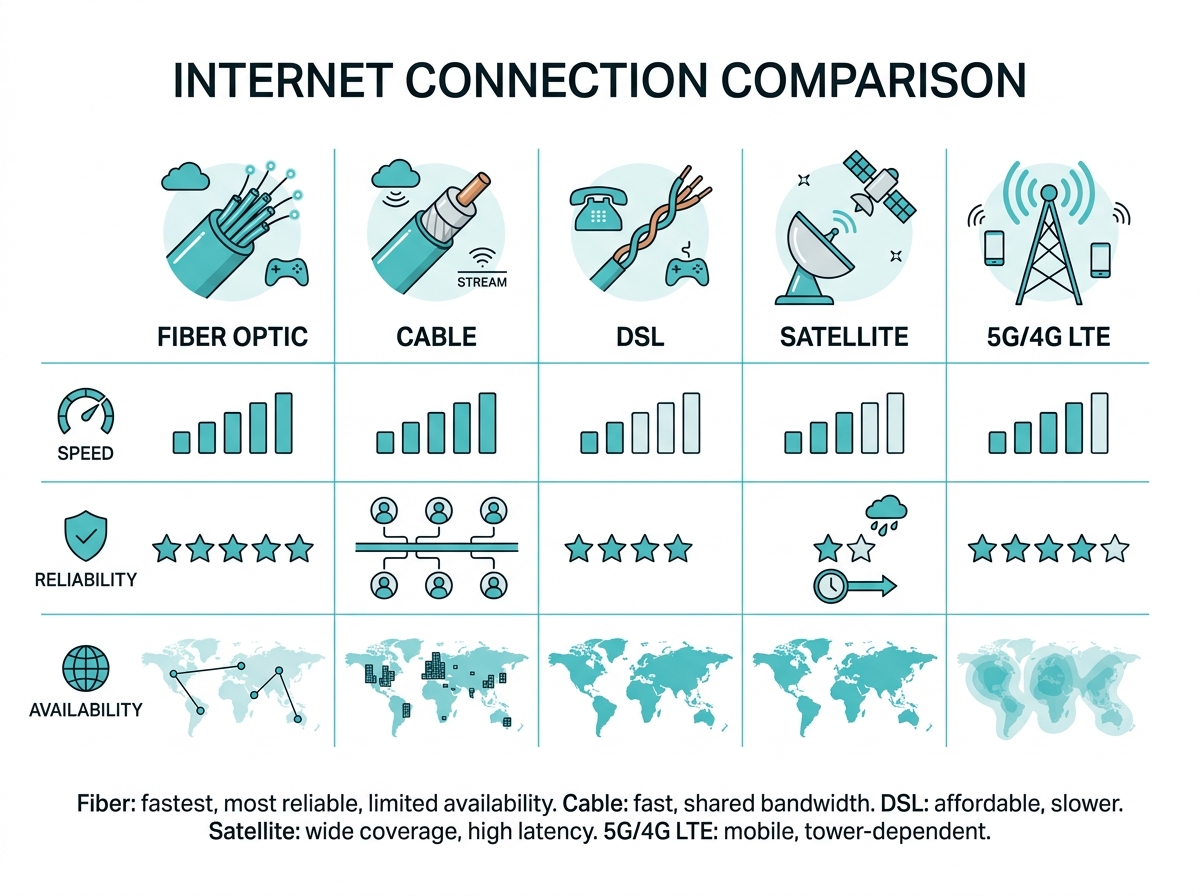
- Fiber Optic: Fiber-optic connections are known for their high speeds and reliability. They're ideal for heavy users who require fast download and upload speeds. However, fiber may not be available in all areas. In the Philippines, PLDT Fibr, Globe At Home Fiber, and Converge FiberX are the three major fiber providers, with the strongest coverage in Metro Manila and other urban centers.
- Cable: Different types of internet connections, like cable internet, offer good speeds. However, since it shares bandwidth with others in your area, speeds may fluctuate during peak times, and when it comes to speed consistency, fiber generally has the edge.
- DSL (Digital Subscriber Line): DSL is an affordable option as it offers slower speeds than cable or fiber. It's suitable for light users but may not meet the needs of larger households with many devices.
- Satellite: Satellite internet is an option for those in rural or remote areas where other types of connections aren't available. However, it tends to have higher latency and data limits.
- 5G/4G LTE: Wireless internet through 5G or 4G LTE can be a good option for those who need mobility. Coverage varies, and speeds can depend on your proximity to a cell tower.
Factors to Consider When Choosing an Internet Plan
Choosing an internet plan involves careful planning to make sure that the plan you choose suits your budget and needs. Here are some factors to consider:
Speed and Bandwidth
Internet speed is one of the most critical factors when choosing a home internet service. Speeds are typically measured in megabits per second (Mbps) and include both download and upload speeds.
- Download Speed: This affects how quickly you can receive data from the internet. It's essential for activities like streaming and downloading files.
- Upload Speed: This is the speed at which you can send data to the internet, crucial for video conferencing and uploading large files.
- 25-50 Mbps: Suitable for casual streaming in SD, browsing, and light online gaming.
- 100-200 Mbps: Good for HD streaming, online gaming, and households with multiple users.
- 500 Mbps+: Ideal for 4K streaming, heavy gaming, and households with many devices.
Data Caps and Limits
Data caps are limits on the amount of data you can use in a month. Exceeding these caps can result in additional charges or reduced speeds.
- Unlimited Data Plans: These plans allow you to use as much data as you need without worrying about extra fees. They are ideal for heavy internet users or large households.
- Capped Data Plans: If you opt for a plan with a data cap, be aware of how much data you typically use. Streaming video, especially in HD or 4K, can quickly consume data.
Cost
Understanding the full cost of your internet service is crucial for budgeting. Below are some of the fees that may come with your monthly subscription:
- Installation Fees: Some providers charge for installation, while others offer it for free.
- Monthly Service Fees: This is the regular cost of your internet plan. Be aware of promotional rates that increase after a certain period.
- Equipment Costs: Factor in the cost of renting or purchasing a modem and router.
- Additional Fees: These may include data overage fees, early termination fees, or taxes and surcharges.
Equipment and Installation
The right equipment is essential for getting the most out of your internet service. Below are some devices worth considering:
- Modem/Router Combo: Your ISP may provide a modem and router, but you might consider purchasing your own. This can save you money on rental fees and give you more control over your home network. For a full breakdown of the Modem/Router Combo distinction, see our dedicated guide.
- Rent vs. Buy: Renting equipment from your ISP is convenient but can add up over time. Buying your equipment involves a higher upfront cost but can be more economical in the long run.
- Installation: Some ISPs offer free installation, while others charge a fee. Consider whether you're comfortable with a self-installation kit or if you'd prefer professional installation.
What Is Mbps and Why Is It Important
Mbps stands for Megabits per second, and it's a unit of measurement used to describe data transfer speed, especially when talking about internet or network connections. Mbps directly affects how smooth your online experience is. The higher the Mbps, the faster the data transfer.
But the "right" Mbps depends on your needs. A family streaming, gaming, and working remotely will need more bandwidth than someone who just browses or checks emails, since every additional active device shares bandwidth from the same connection.
How to Choose an Internet Service Provider
Choosing the right ISP involves more than just comparing speeds and prices. Here are some things to remember:
- Availability: Not all ISPs are available in all areas. Start by researching which providers service your location.
- Customer Service: Reliable customer support is crucial if you encounter issues with your devices, such as WiFi routers or USB WiFi adapters. Look for ISPs with good reputations for customer service.
- Pricing and Contracts: Compare the costs of different plans, including any promotional rates and the regular price after the promotion ends. Be aware of contract terms, early termination fees, and price increases after the initial period.
- Reliability and Uptime: An unreliable connection can be frustrating. Check for ISPs with high uptime percentages and positive reviews regarding connection stability. Once you've settled on a provider, tips to secure your WiFi routers are worth following from day one, and pairing your plan with the best WiFi routers that offer reliable internet speed makes sure the speed you're paying for actually reaches your devices.
Future-Proofing Your Home Internet
When selecting an internet plan, choose one that can accommodate your household's growing usage needs. Keep an eye on emerging technologies like Wi-Fi 6 and expanding fiber networks, as these advancements can provide faster and more reliable connections. Stay informed about the potential need to adjust your plan or equipment, particularly as new devices and technologies become commonplace in households.
What's the Best Internet Provider in the Philippines
Selecting the best internet service for your home involves careful consideration of your specific needs, available options, and long-term costs. When you understand your internet usage, evaluate connection types, compare ISPs, and consider future growth, you can choose a service that will meet your household's needs for years to come.
With TP-Link, you'll benefit from its reliable network devices, accessories, and smart home products that are best for your home and office.
Frequently Asked Questions
What internet speed do I need? The speed you need depends on how you use the internet. For basic browsing and streaming, 10-15 Mbps is enough. For online gaming, streaming in 4K, or multiple users in the household, you may need 100 Mbps or higher. Consider the best WiFi routers that offer reliable internet speed for large homes or businesses.
Do ISPs offer any security features? Some ISPs include security features like antivirus software or parental controls, which add value to your service and help protect your home network. You can also follow these tips to secure your WiFi routers and other devices.
How do I choose the best service provider? Research the provider's reputation for speed, reliability, and customer service. Consumer review sites can also offer opinions about others' experiences, and checking availability in your specific barangay or building first will save time before comparing plans in detail.
What's better, fiber internet or cable internet when it comes to speed? Fiber internet is generally better than cable internet when it comes to speed, reliability, and long-term performance, but the right choice depends on your specific needs and what's available in your area. In the Philippines, fiber from PLDT, Globe, or Converge is the stronger default where it's available.
How much internet speed do most Philippine households actually use? As of 2026, the median fixed broadband speed in the Philippines is 109.86 Mbps, according to Ookla. That figure is well above what a single casual-use household needs, but a household with several people streaming, gaming, and working from home simultaneously will use closer to that full amount during peak hours.
Final Thoughts
Still not sure which plan actually fits your household? Choosing a home internet plan comes down to matching your real usage, connection type availability in your area, and total cost, not just the advertised headline speed. Explore TP-Link's reliable network devices, accessories, and smart home products to make sure whatever plan you choose is backed by equipment that can actually deliver it, and check out our full guide on download and upload speeds if your connection isn't performing the way it should, or our guide to heavy gaming setups specifically. And if you're managing IoT (Internet of Things) devices alongside all this, a reliable internet connection from a mesh system is worth considering once your household's device count grows past what a single router can comfortably handle.