Как устройства и клиенты VIGI подключаются к облаку VIGI VMS
Содержание
Обзор взаимодействия с VIGI VMS Cloud
Методы удалённой потоковой передачи
Процесс потоковой передачи через ретрансляцию
Исходящие подключения устройств VIGI
Исходящие подключения пользователя
Введение
Устройства VIGI и приложения VIGI подключаются к различным облачным сервисам VIGI VMS для управления устройствами, отчётности о событиях, удалённой потоковой передачи и других функций.
Пользователи могут получить доступ к VIGI VMS Cloud через веб-портал VIGI Cloud VMS, приложение VIGI App или клиент VIGI PC Client.
В этой статье описывается взаимодействие между устройствами VIGI, пользователями и облачными сервисами VIGI VMS. Также объясняется процесс потоковой передачи через ретрансляцию и перечисляются домены и порты, требующие исходящего доступа.
Требования
- VIGI Cloud VMS
- Камера VIGI, NVR VIGI или система солнечного питания VIGI
- Веб-портал VIGI Cloud VMS, или приложение VIGI APP, клиент VIGI PC Client
Обзор взаимодействия с VIGI VMS Cloud
Следующая диаграмма показывает основные подключения между устройствами VIGI, пользователями и облачными сервисами VIGI VMS.
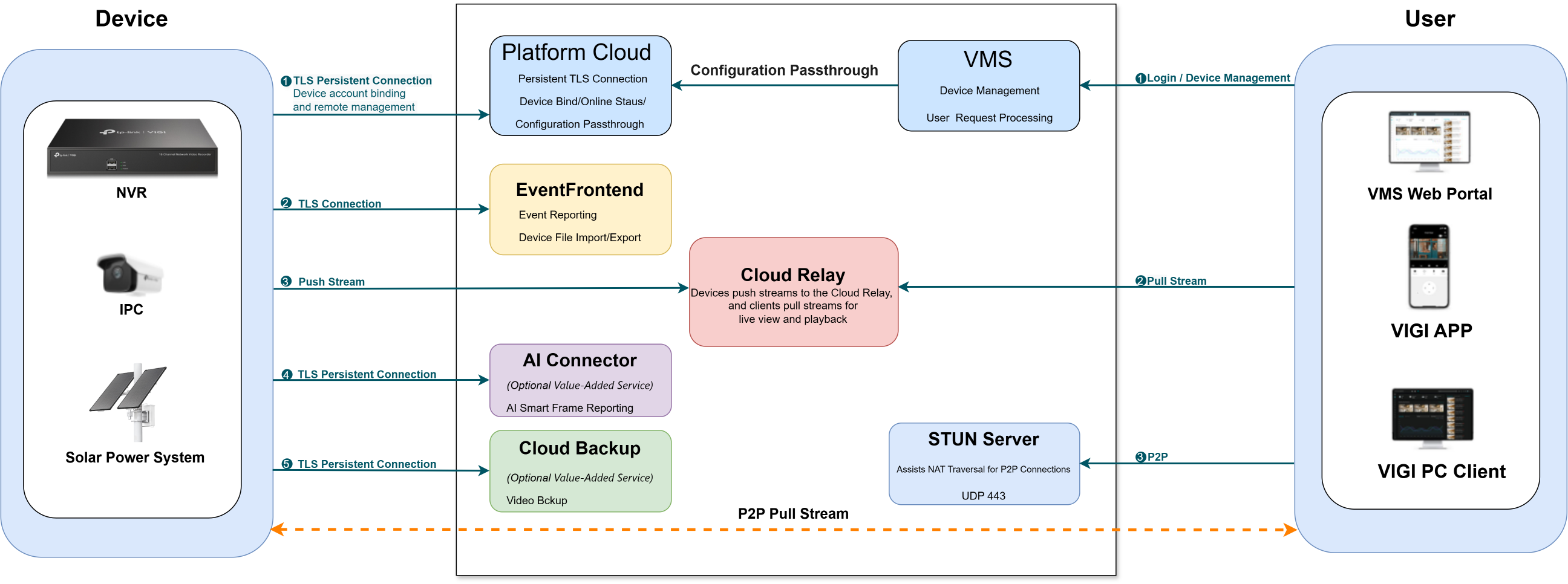
На диаграмме устройство VIGI может подключаться к следующим сервисам:
- Platform Cloud: Поддерживает привязку учётной записи устройства, отчётность о статусе онлайн, удалённое управление и сквозную передачу конфигурации.
- EventFrontend: Поддерживает отчётность о событиях, импорт/экспорт файлов устройства и локальные обновления прошивки.
- Cloud Relay: Принимает видеопотоки от устройства во время потоковой передачи через ретрансляцию.
- AI Connector: Передаёт smart-кадры, генерируемые поддерживаемыми расширенными функциями AI-обнаружения.
- Cloud Backup: Загружает записи NVR в облако.
На стороне пользователя веб-портал VIGI Cloud VMS, приложение VIGI App и клиент VIGI PC Client могут подключаться к следующим сервисам:
- VMS Cloud Service: Поддерживает вход пользователя, управление устройствами и запросы потоковой передачи.
- Cloud Relay: Пересылает видеопотоки между устройством VIGI и пользователем во время потоковой передачи через ретрансляцию.
- STUN Server: Помогает приложению VIGI App и клиенту VIGI PC Client устанавливать P2P-соединения.
Методы удалённой потоковой передачи
Когда устройство VIGI и пользователь находятся за разными NAT-шлюзами, удалённая потоковая передача может использовать либо потоковую передачу через ретрансляцию, либо P2P-потоковую передачу.
- Потоковая передача через ретрансляцию: Устройство VIGI отправляет видеопоток в Cloud Relay, а пользователь получает поток из Cloud Relay. Поскольку видео проходит через Cloud Relay, сеанс потоковой передачи ограничен по времени.
- P2P-потоковая передача: Облако помогает устройству VIGI и пользователю установить прямое соединение. После установления соединения видеопоток передаётся напрямую между ними и не проходит через Cloud Relay.
Процесс потоковой передачи через ретрансляцию
Следующая диаграмма показывает, как устройство VIGI и пользователь устанавливают свои соответствующие подключения к Cloud Relay.
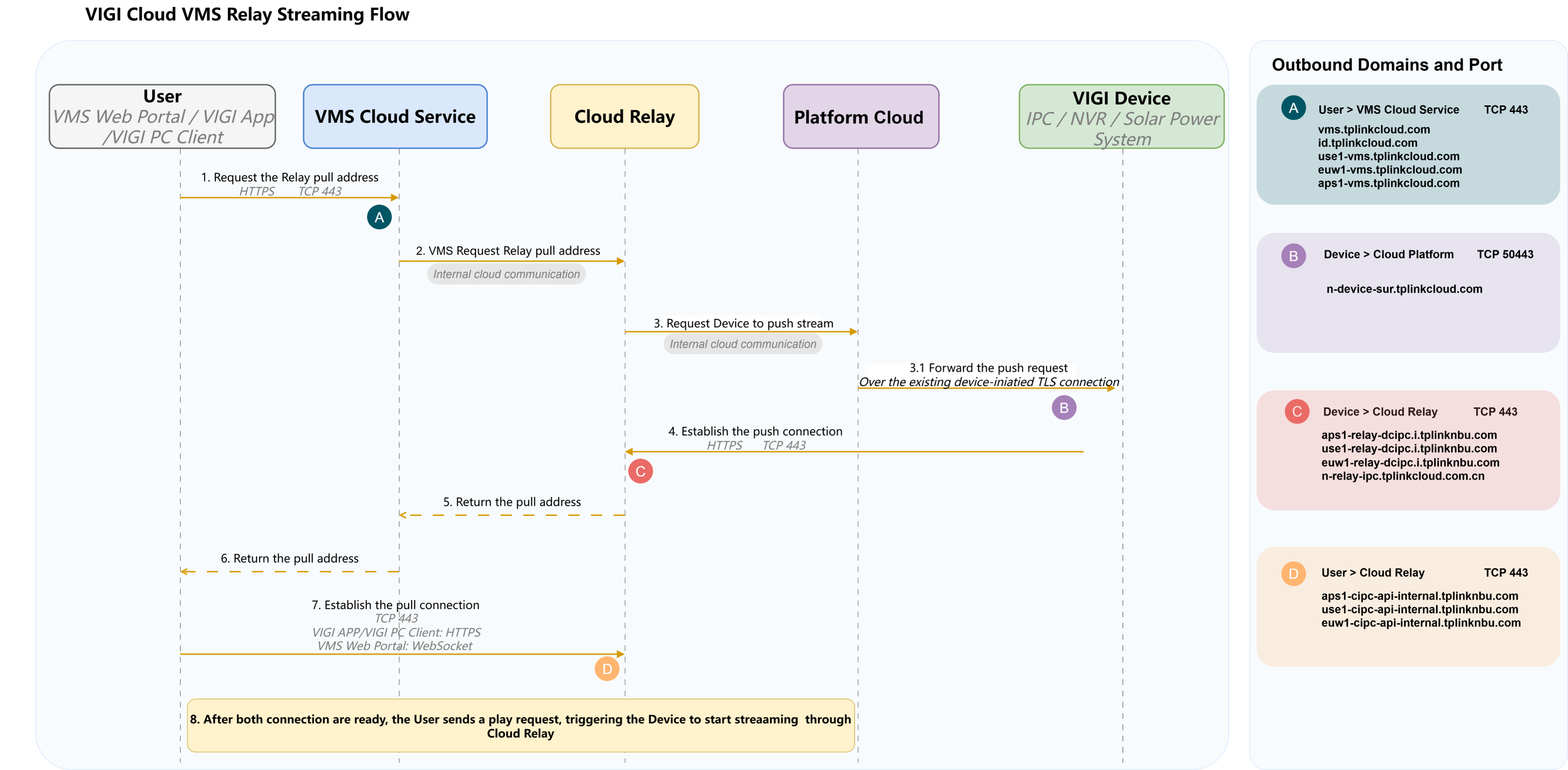
Примечания:
- Пользователь на диаграмме представляет доступ через веб-портал VIGI Cloud VMS, приложение VIGI App или клиент VIGI PC Client.
- Перед шагом 3.1 устройство VIGI уже установило постоянное исходящее TLS-соединение с Platform Cloud. Platform Cloud отправляет push-запрос по этому существующему соединению.
- После получения push-запроса устройство VIGI устанавливает отдельное исходящее HTTPS-соединение с Cloud Relay через TCP-порт 443.
- На шаге 7 пользователь устанавливает исходящее соединение с Cloud Relay через TCP-порт 443. Приложение VIGI App и клиент VIGI PC Client используют HTTPS, тогда как веб-портал VIGI Cloud VMS использует WebSocket.
- Метки A–D обозначают исходящие подключения, показанные на диаграмме:
- A: Пользователь к VMS Cloud Service
- B: Устройство VIGI к Platform Cloud
- C: Устройство VIGI к Cloud Relay
- D: Пользователь к Cloud Relay
Для доменов и портов, соответствующих меткам A–D, обратитесь к разделу Исходящие домены и порты.
Исходящие домены и порты
Исходящие подключения устройств VIGI
|
Сервис |
Доменное имя |
Протокол и порт |
Использование |
|
EventFrontend |
vms-api.i.tplinkcloud.com |
TCP 443 |
Отчётность о событиях, импорт/экспорт файлов устройства и локальные обновления прошивки |
|
aps1-vms-api.i.tplinkcloud.com |
|||
|
use1-vms-api.i.tplinkcloud.com |
|||
|
euw1-vms-api.i.tplinkcloud.com |
|||
|
aps1-vms-api.i.tplinknbu.com |
|||
|
use1-vms-api.i.tplinknbu.com |
|||
|
euw1-vms-api.i.tplinknbu.com |
|||
|
AI Connector |
aps1-vms-ai.i.tplinknbu.com |
TCP 443 |
Отчётность smart-кадров для поддерживаемых расширенных функций AI-обнаружения |
|
aps1-vms-ai.i.tplinkcloud.com |
|||
|
use1-vms-ai.i.tplinknbu.com |
|||
|
use1-vms-ai.i.tplinkcloud.com |
|||
|
euw1-vms-ai.i.tplinknbu.com |
|||
|
euw1-vms-ai.i.tplinkcloud.com |
|||
|
Cloud Backup |
aps1-cloud-backup-api.i.tplinkcloud.com |
TCP 443 |
Загрузка записей NVR при включённой функции Cloud Backup |
|
use1-cloud-backup-api.i.tplinkcloud.com |
|||
|
euw1-cloud-backup-api.i.tplinkcloud.com |
|||
|
aps1-cloud-backup-api.i.tplinknbu.com |
|||
|
use1-cloud-backup-api.i.tplinknbu.com |
|||
|
euw1-cloud-backup-api.i.tplinknbu.com |
|||
|
Platform Cloud |
n-device-entry-sur.tplinkcloud.com |
TCP |
Эти доменные имена предназначены для подключения к облачным серверам для обеспечения поддержки привязки учётной записи устройства и функций удалённого управления. |
|
n-device-sur.tplinkcloud.com |
|||
|
n-sur-api.tplinkcloud.com |
|||
|
n-deventry-sur.tplinkcloud.com |
|||
|
n-devs-sur.tplinkcloud.com |
|||
|
Cloud Relay |
aps1-relay-dcipc.i.tplinknbu.com |
TCP 443 |
Эти доменные имена используются для предоставления услуг потоковой передачи через ретрансляцию для обеспечения удалённого просмотра прямых трансляций. |
|
use1-relay-dcipc.i.tplinknbu.com |
|||
|
euw1-relay-dcipc.i.tplinknbu.com |
|||
|
n-relay-ipc.tplinkcloud.com.cn |
Исходящие подключения пользователя
|
Сервис |
Доменное имя |
Протокол и порт |
Использование |
|
VMS Cloud Service |
vms.tplinkcloud.com |
TCP 443 |
Вход пользователя, управление устройствами и запросы потоковой передачи |
|
id.tplinkcloud.com |
|||
|
use1-vms.tplinkcloud.com |
|||
|
euw1-vms.tplinkcloud.com |
|||
|
aps1-vms.tplinkcloud.com |
|||
|
Cloud Relay |
aps1-cipc-api-internal.tplinknbu.com |
TCP 443 |
Получение видеопотоков во время потоковой передачи через ретрансляцию |
|
use1-cipc-api-internal.tplinknbu.com |
|||
|
euw1-cipc-api-internal.tplinknbu.com |
|||
|
STUN Server |
stun.tplinkcloud.com |
UDP 443 |
NAT traversal для P2P-потоковой передачи в приложении VIGI App и клиенте VIGI PC Client |
|
sg-stun.tplinkcloud.com |
|||
|
us-stun.tplinkcloud.com |
|||
|
ie-stun.tplinkcloud.com |
Заключение
Устройства VIGI и пользователи подключаются к различным облачным сервисам VIGI VMS в соответствии с используемыми функциями. Соответствующие исходящие домены и порты должны быть разрешены, чтобы обеспечить правильную работу управления устройствами, удалённой потоковой передачи и связанных облачных функций.
Чтобы узнать больше о каждой функции и конфигурации, посетите Support Home, чтобы скачать или ознакомиться с руководством для вашего продукта.
Ищете больше информации?
Полезен ли этот FAQ?
Ваши отзывы помогают улучшить этот сайт.



TP-Link Community
Still need help? Search for answers, ask questions, and get help from TP-Link experts and other users around the world.
From United States?
Получайте информацию о продуктах, событиях и услугах для вашего региона.