
Comment utiliser votre code d'activation Tapo Care
Ce document est un guide pratique pour vous aider à utiliser vos codes de réduction Tapo Care. Si vous possédez un code de réduction Tapo Care valide et un identifiant TP-Link enregistré, il vous fournit des instructions claires et détaillées pour vous accompagner tout au long du processus, de la connexion à votre compte jusqu'à la finalisation.
Exigences
- Un code de réduction Tapo Care valide
- Un identifiant TP-Link enregistré
Étapes pour utiliser votre code de réduction Tapo Care
Étape 1 : Connectez-vous à la page Web Tapo Care
Connectez-vous à https://tapo.tplinkcloud.com/tapo_web avec votre identifiant TP-Link.
Étape 2 : Sélectionnez « Utiliser un code promo ».
Le code promotionnel est le code de réduction.
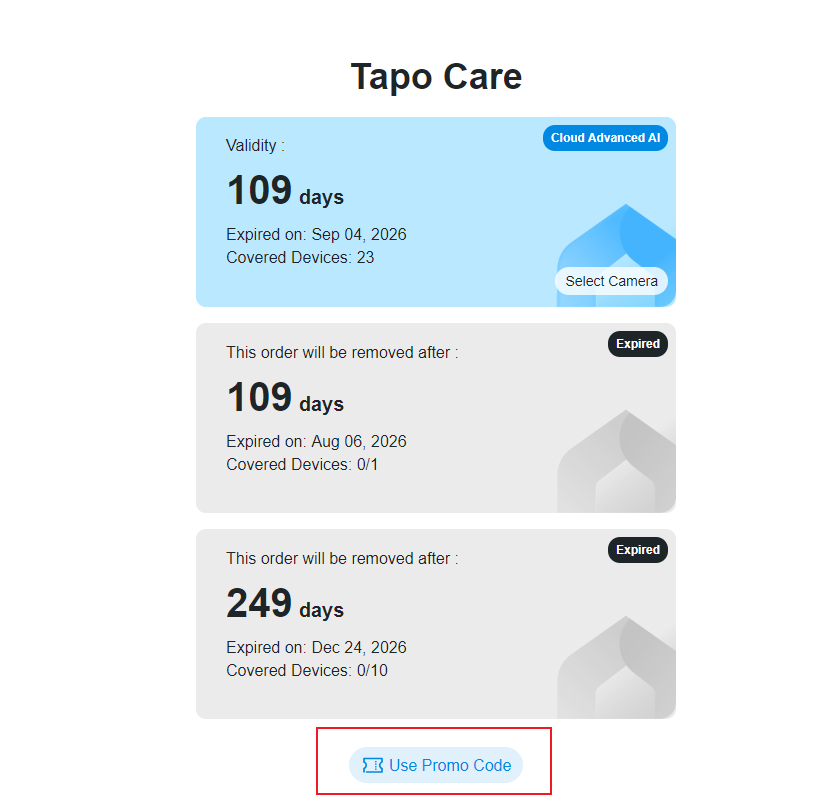
Étape 3 : Saisissez votre code.
Dans le champ prévu à cet effet, entrez votre code de remboursement Tapo Care (par exemple, W2GBJZT48TRNM) et cliquez sur Confirmer .
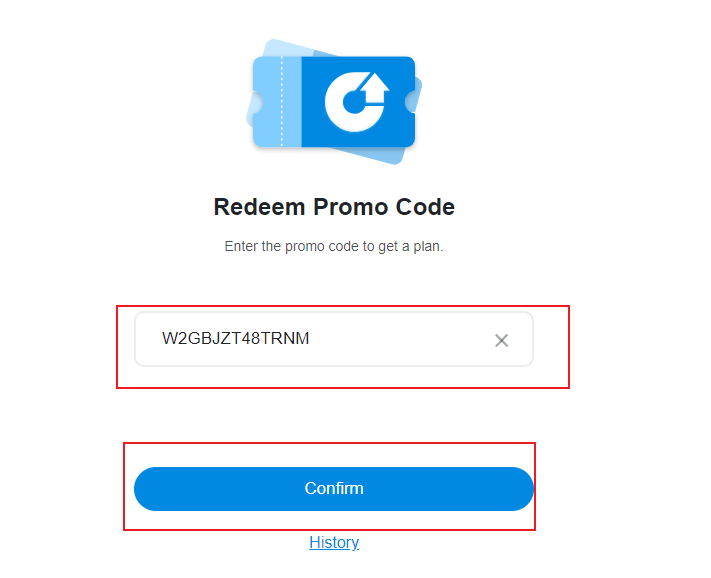
Étape 4 : Confirmer les détails du plan.
Une fois le code promotionnel saisi correctement, cliquez sur Confirmer pour continuer ; la durée de validité et le nombre d’appareils compatibles avec le code s’afficheront alors.
Étape 5 : Terminez l’échange et sélectionnez l’appareil photo.
Une fois l'échange réussi, suivez les instructions à l'écran pour ajouter la caméra .
Questions et réponses
Q1 : Comment obtenir un code de réduction Tapo Care ?
A1 : Les codes de réduction Tapo Care peuvent être achetés directement sur le site officiel de la boutique Tapo.
Veuillez noter que ces codes peuvent ne pas être disponibles dans tous les magasins Tapo. Consultez les informations spécifiques du produit pour plus de détails sur leur disponibilité.
Q2 : Le plan Tapo Care sera-t-il automatiquement renouvelé après l’expiration de mon code de réduction ?
A2 : Normalement, vous n'aurez pas besoin de fournir d'informations de carte de crédit pour utiliser votre code de réduction Tapo Care, et les abonnements obtenus via ces codes ne sont pas renouvelés automatiquement.
Cependant, les conditions et les détails variant selon le code de réduction, veuillez consulter attentivement les informations relatives au produit avant de finaliser votre achat.
Q3 : Si j’utilise plusieurs codes de réduction Tapo Care, seront-ils appliqués à un seul forfait ou créeront-ils plusieurs abonnements distincts ?
A3 :
- Si les codes de réduction concernent les mêmes formules Tapo Care, ils seront fusionnés en un seul abonnement et la validité sera prolongée.
- Si les codes de réduction correspondent à différents forfaits Tapo Care, chaque code activera un abonnement individuel.
Q4 : Puis-je obtenir un remboursement si je ne veux plus du code après l’avoir acheté ?
A4 : Les codes de réduction Tapo Care sont à usage unique et ne sont pas remboursables.
Looking For More
Est-ce que ce FAQ a été utile ?
Vos commentaires nous aideront à améliorer ce site.



TP-Link Community
Still need help? Search for answers, ask questions, and get help from TP-Link experts and other users around the world.