
Table of Contents
M7000 M7010 4.0 Installation and User Guide
About This Guide
This guide is a complement to Quick Installation Guide.
Note: Features available in the Mobile Wi-Fi may vary by model and software version. Mobile Wi-Fi availability may also vary by region or ISP. All images, steps, and descriptions in this guide are only examples and may not reflect your actual Mobile Wi-Fi experience.
Conventions
In this guide the following conventions are used:
|
Convention |
Description |
|---|---|
|
Underline |
Underlined words or phrases are hyperlinks. You can click to redirect to a website or a specific section. |
|
Bold |
Contents to be emphasized and texts on the web page are in bold, including the menus, items, buttons and so on. |
|
> |
The menu structures to show the path to load the corresponding page. For example, Settings > System Tools > Firmware Upgrade means the Firmware Upgrade page is under the System Tools menu that is located in the Settings tab. |
|
Note: |
Ignoring this type of note might result in a malfunction or damage to the device. |
|
Tip: |
Indicates important information that helps you make better use of your device. |
More Info
The latest software, management app and utility are available from Download Center at https://www.tp-link.com/support
The Quick Installation Guide can be found where you find this guide or inside the package of the extender.
Operating temperature, storage temperature, and other specifications can be found on the product page at https://www.tp-link.com
TP-Link Community is provided for you to discuss our products and share knowledge at https://community.tp-link.com/
Our Technical Support contact information can be found at the Contact Technical Support page at https://www.tp-link.com/support
Get to Know About Your Mobile Wi-Fi
This chapter introduces what the Mobile Wi-Fi can do and its appearance.
Product Overview
The Faster Connections, The More You Can Do
Just insert a 4G SIM card to create your reliable personal Wi-Fi hotspot and share instant 4G/3G connectivity with friends. The Mobile Wi-Fi, supporting the latest 4G LTE network, can reach a faster download speed so that users can enjoy HD movies without interruption, download files in seconds, and hold a video chat without dropouts.
Artful Little Gadget and Built-in Battery for Life on the Go
The TP-Link Mobile Wi-Fi features a compact, elegant design and built-in powerful battery very suitable for travel, business trips and outdoor activities. With added flexibility, the device can be charged via a USB cable connected to an adapter, laptop or portable charger for endless hours of 4G sharing.
Easy Management with the Tether App
With the Tether App, you can conveniently access and manage the Mobile Wi-Fi right on your iOS/Android devices. The Tether app allows you to set data limits, control which devices can access your Wi-Fi, send messages.
*Actual battery time may vary due to different user environments.
†Maximum wireless signal rates are the physical rates derived from IEEE Standard 802.11 specifications. Actual wireless data throughput and wireless coverage, and number of connected devices are not guaranteed and will vary as a result of network conditions, client limitations, and environmental factors, including building materials, obstacles, volume and density of traffic, and client location.
Physical Description
The Exterior
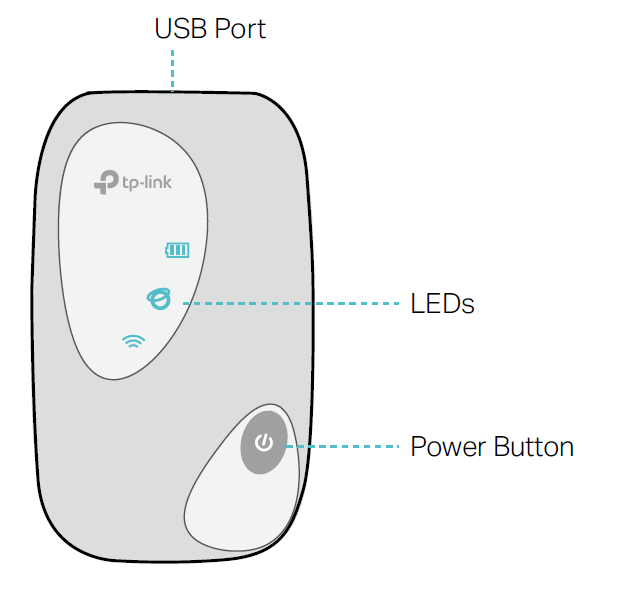
LED Explanation
|
LED |
Status |
Explanation |
|---|---|---|
|
(Wi-Fi) |
On/Off |
Wi-Fi is enabled or disabled. |
|
(Internet) |
On/Off Blinking |
Internet service is available or unavailable. Mobile Wi-Fi has connected to network, but internet service is unavailable. |
|
(Battery) |
Solid Green Solid Red Blinking Red Blinking Green Off |
Mobile Wi-Fi has enough power or is fully charged. The battery level is between 10% and 20%. The battery level is lower than 10%. Mobile Wi-Fi is charging. Power is off. |


Item Explanation
|
Item |
Description |
|---|---|
|
Power Button |
• Press and hold to power on/off the Mobile Wi-Fi. |
|
USB Port |
Plug in the USB cable to this port to charge your Mobile Wi-Fi device or connect it to a computer for internet access. |
The Interior
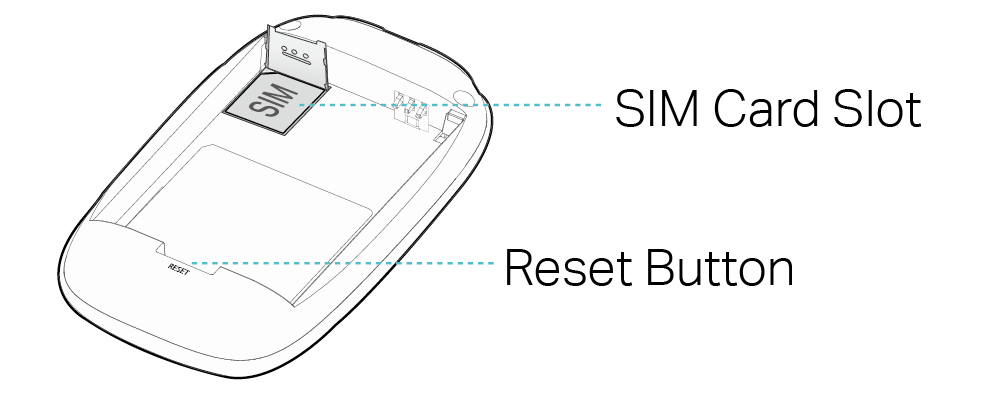
|
Item |
Description |
|
SIM Card Slot |
Insert a Nano SIM card into the slot. |
|
Reset Button (Hole) |
With the Mobile Wi-Fi powered on, use a pin to press and hold this button until all LEDs turn on momentarily to reset the Mobile Wi-Fi. |
Note:
1. The product label is under the battery pack.
2. Resetting the device to its factory defaults will clear all previous configuration.
Set Up Internet Connection
This chapter introduces how to install the hardware and set up the internet connection of your Mobile Wi-Fi.
Install the SIM Card and Battery
1.Remove the back cover
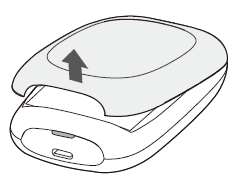
2. Insert the SIM card. Slide and lift up the slot cover, insert the SIM card and slide the cover back to lock.
Note:
please use a Nano SIM card.
The SIM card is not provided by TP-Link.
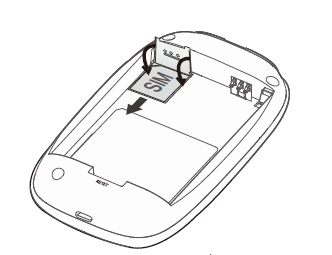

3. Install the provided battery
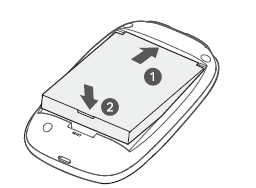
4. Replace the cover
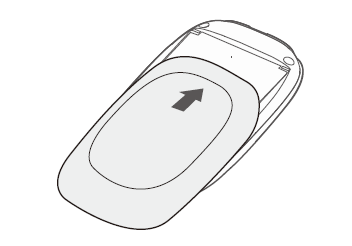
5. Press and hold the Power button to power on the Mobile Wi-Fi.
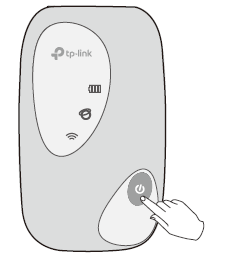
Connect to the Mobile Wi-Fi
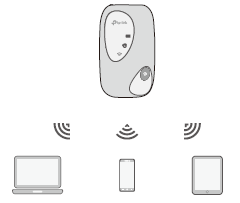
1. Connect your wireless device to the Mobile Wi-Fi using the default SSID and Wireless Password on the info card.
2. On your device, select the SSID and enter the wireless password.
Note: If you use a computer to connect to the Mobile Wi-Fi, please set it to obtain an IP address automatically.
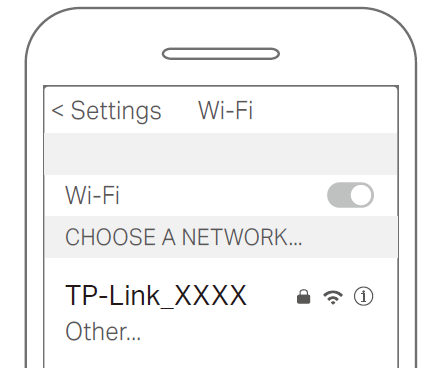
3. Now you can enjoy the internet!
Note: By default, Power Saving is enabled and the Mobile Wi-Fi will turn off Wi-Fi when no wireless devices are connected to it for 10 minutes. To resume the Wi-Fi connection, press the Power button.
FAQ
Q1. What should I do if I forget the login password of my Mobile Wi-Fi?
Reset your Mobile WiFi device and create a password to log into the device.
Q2. What should I do if the Internet LED doesn’t light up (I cannot access the internet)?
• Check PIN status
Log in to the web management page. If the current SIM card status is PIN Locked, you will need to unlock it using the PIN code provided by your mobile carrier.
• Verify the mobile carrier parameters
Go to Advanced > Dial-up > Dial-up Settings, then verify that the parameters (i.e. APN, username and password) provided by your mobile carrier are correct. If they are incorrect, enter the correct information or create a new profile, then save the settings.
• Check the Data Roaming settings
If your SIM card is operated in a roaming service area, go to Advanced > Dial-up > Dial-up Settings, enable Data Roaming and save the settings.
• Check Mobile Data
Go to Advanced > Dial-up > Dial-up Settings to verify that Mobile Data is On. If not, enable it and save the settings.
• Check Data Limit
Go to Advanced > Data Usage Settings to check whether your data usage has exceeded the Total/Monthly allowance.
Q3. How do I restore the Mobile Wi-Fi to its factory default settings?
With the Mobile Wi-Fi powered on, remove the cover, then use a pin to press and hold the Reset button until all LEDs turn on momentarily.
Note: Restoring the device to its factory defaults will clear all your settings.
Authentication
Use only power supplies listed in the user instructions:
Currently, the product only has requirements for the adapter output specifications: 5VDC/1A, and the input generally requires 100-240V/50-60Hz.
CE Mark Warning

OPERATING FREQUENCY (the maximum transmitted power)
2400 MHz -2483.5 MHz(20dBm)
WCDMA: B1/B5/B8 (24dBm+1.7/-3.7dB)
LTE: B1/B3/B5/B7/B8/B20/B28/B38/B40/B41 (23dBm±2.7dBm)
EU Declaration of Conformity
TP-Link hereby declares that the device is in compliance with the essential requirements and other relevant provisions of directives 2014/53/EU, 2009/125/EC, 2011 /65/EU and (EU) 2015/863.
The original EU Declaration of Conformity may be found at https://www.tp-link.com/en/support/ce/
RF Exposure Information
This device meets the EU requirements (2014/53/EU Article 3.1a) on the limitation of exposure of the general public to electromagnetic fields by way of health protection.
This device has been tested and meets the ICNIRP exposure guidelines and the European Standard EN 62209-2. SAR is measured with this device at a separation of 0.5 cm to the body, while transmitting at the highest certified output power level in all frequency bands of this device. Carry this device at least 0.5 cm away from your body to ensure exposure levels remain at or below the as-tested levels.
UKCA Mark

UK Declaration of Conformity
TP-Link hereby declares that the device is in compliance with the essential requirements and other relevant provisions of the Radio Equipment Regulations 2017.
The original UK Declaration of Conformity may be found at https://www.tp-link.com/support/ukca
Korea Warning Statements:
당해 무선설비는 운용중 전파혼신 가능성이 있음.
NCC Notice & BSMI Notice
注意!
取得審驗證明之低功率射頻器材,非經核准,公司、商號或使用者均不得擅自變更頻率、加大功率或變更原設計之特性及功能。
低功率射頻器材之使用不得影響飛航安全及干擾合法通信;經發現有干擾現象時,應立即停用,並改善至無干擾時方得繼續使用。
前述合法通信,指依電信管理法規定作業之無線電通信。
低功率射頻器材須忍受合法通信或工業、科學及醫療用電波輻射性電機設備之干擾。
減少電磁波影響,請妥適使用。
安全諮詢及注意事項
- 請使用原裝電源供應器或只能按照本產品注明的電源類型使用本產品。
- 清潔本產品之前請先拔掉電源線。請勿使用液體、噴霧清潔劑或濕布進行清潔。
- 注意防潮,請勿將水或其他液體潑灑到本產品上。
- 插槽與開口供通風使用,以確保本產品的操作可靠並防止過熱,請勿堵塞或覆蓋開口。
- 請勿將本產品置放於靠近熱源的地方。除非有正常的通風,否則不可放在密閉位置中。
- 不要私自拆開機殼或自行維修,如產品有故障請與原廠或代理商聯繫。
限用物質含有情況標示聲明書
| 設備名稱:4G LTE Mobile Wi-Fi 型號(型式):M7000/M7010 Equipment name Type designation (Type) |
||||||
|---|---|---|---|---|---|---|
| 單元 Unit |
限用物質及其化學符號 Restricted substances and its chemical symbols |
|||||
| 鉛 Lead (Pb) |
汞 Mercury (Hg) |
鎘 Cadmium (Cd) |
六價鉻 Hexavalent chromium (Cr+6) |
多溴聯苯 Polybrominated biphenyls (PBB) |
多溴二苯醚 Polybrominated diphenyl ethers (PBDE) |
|
| PCB | ○ | ○ | ○ | ○ | ○ | ○ |
| 外殼 | ○ | ○ | ○ | ○ | ○ | ○ |
| USB線 | ○ | ○ | ○ | ○ | ○ | ○ |
| 其他及其配件 | − | ○ | ○ | ○ | ○ | ○ |
| 備考1.〝超出0.1 wt %〞及〝超出0.01 wt %〞係指限用物質之百分比含量超出百分比含量基準值 Note 1:“Exceeding 0.1 wt %” and “exceeding 0.01 wt %” indicate that the percentage content of the restricted substance exceeds the reference percentage value of presence condition. 備考2.〝○〞係指該項限用物質之百分比含量未超出百分比含量基準值。 Note 2:“○” indicates that the percentage content of the restricted substance does not exceed the percentage of reference value of presence. 備考3.〝-〞係指該項限用物質為排除項目。 Note 3:The “−” indicates that the restricted substance corresponds to the exemption. |
||||||

Продукт сертифіковано згідно с правилами системи УкрСЕПРО на відповідність вимогам нормативних документів та вимогам, що передбачені чинними законодавчими актами України.

Safety Information
- Keep the device away from water, fire, humidity or hot environments.
- Do not attempt to disassemble, repair, or modify the device. If you need service, please contact us.
- Do not use any other chargers than those recommended
- Do not use the device where wireless devices are not allowed.
- This equipment can be powered only by equipments that comply with Power Source Class 2 (PS2) or Limited Power Source (LPS) defined in the standard of IEC 62368-1.
|
CAUTION! |
|
|
CAUTION! Risk of explosion if the battery is replaced by an incorrect type. |
• Operating Temperature: 0℃ ~ 35°C (32°F ~ 95°F)
• This product uses radios and other components that emit electromagnetic fields. Electromagnetic fields and magnets may interfere with pacemakers and other implanted medical devices. Always keep the product and its power adapter more than 15 cm (6 inches) away from any pacemakers or other implanted medical devices. If you suspect your product is interfering with you pacemaker or any other implanted medical device, turn off your product and consult your physician for information specific to your medical device.
Warnings
• Operating Temperature: 0℃ ~ 35°C (32°F ~ 95°F)
• Operating Humidity: 0~75%RH, Non-condensing
Handling Instructions for Lithium Ion Rechargeable Battery
Please read and follow the handling instructions for the battery before use. Improper use of the battery may cause heat, fire explosion, damage or capacity deterioration of the battery.
• Do not place or leave the battery and equipment in the reach of infants so that they are not able to swallow or mistreat the battery by mistake.
In case of ingestion, consult with a doctor immediately.
• Do not let leaked electrolyte come into contact with eyes or skin.
In such a case, immediately wash the area of contact with clean water and seek help from a doctor.
If not treated soon, prolonged contact may cause serious injury.
• Do not put the battery into a fire. Do not use it or leave it in a place near fire, heaters, or high temperature sources.
In such a case, the insulator in the battery may be melted, the safety vent and structure may be damaged, or the electrolyte may catch fire, all of which may cause heat generation, explosion, or fire.
• Do not submerge the battery in water, or wet the battery.
If the protecting device assembled in the battery is damaged, the battery may be charged with an abnormal current and voltage and may cause a chemical reaction within the battery, which may result in the cause of heat generation, explosion, or fire of the battery.
• Do not use any battery charger not specified by the manufacture, also follow the charge conditions specified by the manufacture.
If the battery is charged under other conditions (a high temperature, a high voltage / current, or an altered charger) not specified by the manufacture, the battery may become over-charged with an excessive current and cause heat, explosion, or fire with abnormal chemical reactions.
• Do not use, charge, or leave the battery near fire or in a car under the blazing sun. Such a high temperature may cause damage of the protecting device in the battery, which may result in an abnormal reaction, and then heat generation, explosion, or fire.
• Do not connect the battery reversed in positive (+) and negative (-) terminals in the charger or equipment.
In case the battery is connected and charged reversely, it may cause heat generation, explosion, or fire due to an abnormal chemical reaction.
• Do not let the battery terminals (+ and -) contact a wire or any metal (like a metal necklace or a hairpin) with which it carried or stored together.
In such a case, the battery will be shorted and cause an excessive current, which may result in heat generation, explosion, or fire.
• Do not connect the battery directly to an electric outlet or cigarette heater socket in car.
With a high voltage applied, the battery may overheat, explode, or cause fire.
• Do not throw or drop the battery.
Strong impact may damage the protecting device, which may cause an abnormal chemical reaction during charging and result in heat generation, explosion, or fire of the battery.
• Do not drive a nail in, hit with a hammer, or stamp on the battery.
In such a case, the battery may be deformed and shorted, which may cause heat generation, explosion, or fire of the battery.
• Do not solder the battery directly.
Heat applied during soldering may damage the insulator of the safety vent and mechanism, which may result in heat generation, explosion, or fire of the battery.
• Do not disassemble or alter the battery.
The battery employs a safety mechanism and a protecting device in order to avoid any danger.
If these are damaged, heat, explosion or fire may be caused.
CAUTION
• Do not put the battery in a microwave or a pressure cooker.
Sudden heat may damage the seal of the battery and may cause heat generation, explosion, or fire of the battery.
• Do not use the battery with other maker’s batteries, different types and / or models of batteries such as dry batteries, nickel-metal hydride batteries, or nickel-cadmium batteries, or new and old lithium ion batteries together.
In such a case, over-discharge during use, or over-charge during charge may occur abnormal chemical reactions and may cause heat generation, explosion, or fire of the battery.
• Do not leave the battery in a charger or equipment if it generates an odor and /or heat, changes color and / or shape, leaks electrolyte, or causes any other abnormality.
In such a case, immediately take the battery out of the charge or equipment and keep it away from fire, otherwise, the battery might overheat, explode, or cause fire.
• Discontinue charging after specified charging time even if the charge is not complete, otherwise, the battery might cause heat generation, explosion, or fire.
• Do not use the battery in the place where the static electricity (more than the limit of the manufacturer’s guarantee) occurs. Otherwise, the protecting device in the battery might be damaged and cause heat generation, explosion, or fire.
• Do not use the battery in other than the following conditions; otherwise, the battery might cause heat generation, damage, or deterioration of its performance.
Operating environment:
When the battery is charged: 0℃ ~ +45℃ (Humidity < 80%)
When stored 1 months: -20℃ ~ +50℃ (Humidity < 80%)
When stored 3 months: -20℃ ~ +45℃ (Humidity < 80%)
When stored 1 year: -20℃ ~ +20℃ (Humidity < 80%)
Please read and follow the above safety information when operating the device. We cannot guarantee that no accidents or damage will occur due to improper use of the device. Please use this product with care and operate at your own risk.
Explanation of the symbols on the product label
Note: The product label is on the bottom of the product. Symbols may vary from products.
注意:產品標籤可以在產品底部找到。符號可能因產品而異。
| Symbol 符號解釋 |
Explanation 解釋 |
|---|---|
 |
Class II equipment Class II 設備 |
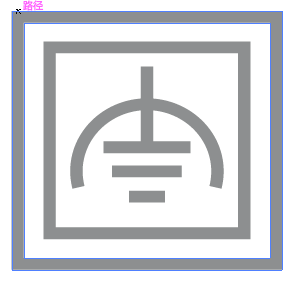 |
Class II equipment with functional earthing 具有功能接地的Class II 設備 |
 |
Alternating current 交流電 |
 |
DC voltage 直流電壓 |
 |
Polarity of output terminals 輸出端子極性 |
 |
Indoor use only 僅限室內使用 |
 |
Dangerous voltage 危險電壓 |
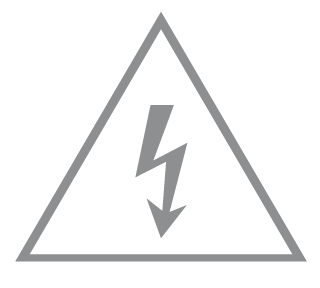 |
Caution, risk of electric shock 注意,有觸電危險 |
 |
Energy efficiency Marking 能源效率標示 |
 |
Protective earth 保護接地 |
 |
Earth 接地 |
 |
Frame or chassis 機架接地 |
 |
Functional earthing 功能接地 |
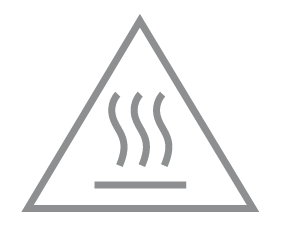 |
Caution, hot surface 警告,表面高溫 |
 |
Caution 警告 |
 |
Operator’s manual 操作手冊 |
 |
Stand-by 待機 |
 |
“ON”/”OFF” (push-push) 「開」/「關」 ( 按壓式) |
 |
Fuse 保險絲 |
 |
Fuse is used in neutral N 保險絲用於中性線N |
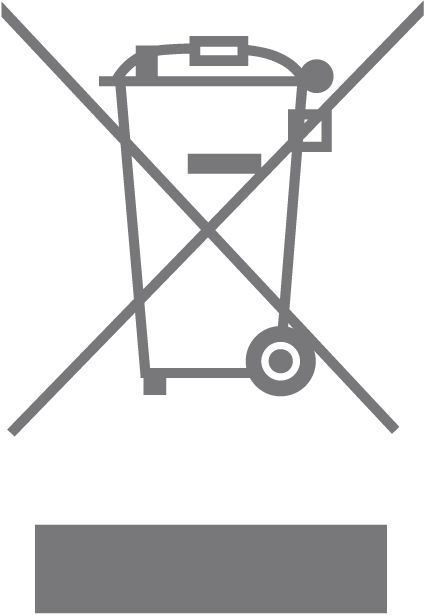 |
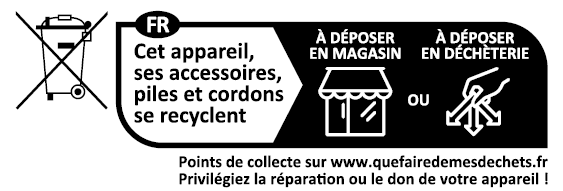
RECYCLING This product bears the selective sorting symbol for Waste electrical and electronic equipment (WEEE). This means that this product must be handled pursuant to European directive 2012/19/EU in order to be recycled or dismantled to minimize its impact on the environment. User has the choice to give his product to a competent recycling organization or to the retailer when he buys a new electrical or electronic equipment. 回收利用 本產品標示有「廢棄電氣電子設備(WEEE)」的分類回收標誌。這表示本產品必須依據歐盟指令 2012/19/EU 進行妥善回收或拆 解,以減少對環境的影響。 使用者可選擇將本產品交給合格的回收機構,或在購買新電器或電子設備時,交回給零售商進行回收處理。 |
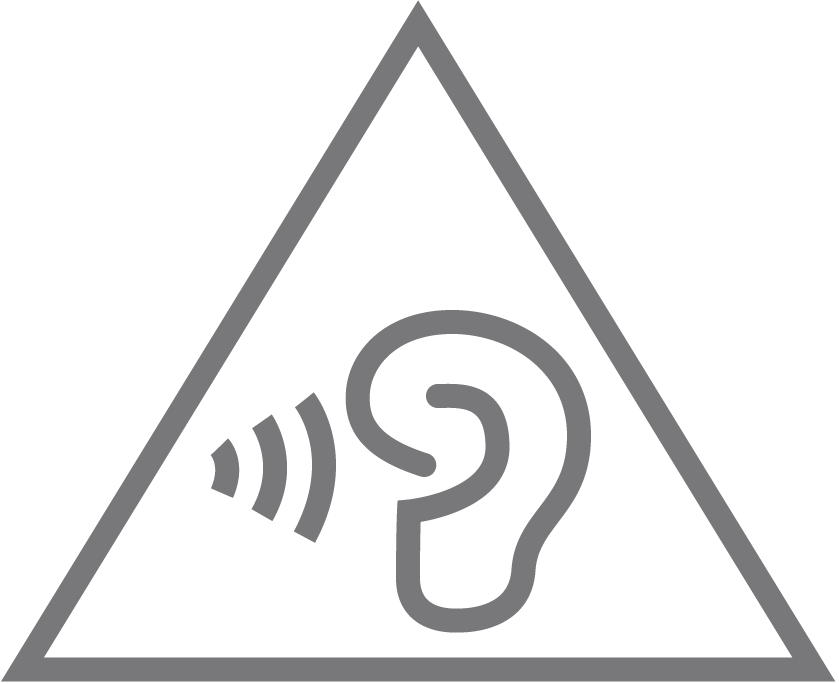 |
Caution, avoid listening at high volume levels for long periods 注意,避免長時間以高音量收聽 |
 |
Disconnection, all power plugs 斷開所有電源插頭 |
| m | Switch of mini-gap construction 微間隙結構的開關 |
| µ | Switch of micro-gap construction (for US version) Switch of micro-gap / micro-disconnection construction (for other versions except US) 微小間隙結構開關(適用於美國版) 微小間隙 / 微小斷開結構開關(適用於美國以外的其他版本) |
| ε | Switch without contact gap (Semiconductor switching device) 無接點間隙開關(半導體開關裝置) |