


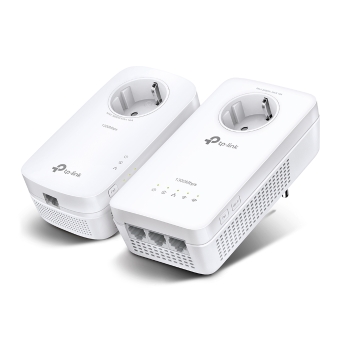
HARDWARE FEATURES
• Powerline: Up to 1428 Mbps• Ethernet: 10/100/1000 Mbps
• Powerline: Up to 1000 Mbps• Ethernet: 10/100/1000 Mbps
• Powerline: up to 1300 Mbps• Ethernet: 10/100/1000 Mbps
Up to 300 meters/1000 feet over existing electrical wiring
Up to 300 meters/1000 feet over existing electrical wiring
Up to 300 meters/1000 feet over existing electrical wiring
• G.hn MIMO• IEEE 802.3• IEEE 802.3u• IEEE 802.3ab• IEEE 802.11b/g/n/ax (2.4GHz)• IEEE 802.11a/n/ac/ax (5GHz)
• HomePlug AV2• IEEE 1901• IEEE 802.3• IEEE 802.3u• IEEE 802.3ab• IEEE 802.11b/g/n (2.4 GHz)• IEEE 802.11a/n/ac/ax (5 GHz)
• HomePlug AV2• IEEE 1901• IEEE 802.3• IEEE 802.3u• IEEE 802.3ab• IEEE 802.11b/g/n (2.4 GHz)• IEEE 802.11a/n/ac (5 GHz)
Compatible with all routers and G.hn Powerline adapters.Not compatible with HomePlug AV/AV2 Powerline adapters.
Compatible with all HomePlug AV & AV2 standard powerline adapters
Compatible with all HomePlug AV & HomePlug AV2 standardpowerline adapters
EU
EU
EU
• PGW2440: 1 Gigabit Port• PG2400P: 2 Gigabit Ports
• TL-WPA7817: 1× Gigabit Ethernet Port• TL-PA7017: 1× Gigabit Ethernet Port
• 3 Gigabit Ethernet Ports• 1 Power Socket
• PGW2440: Pair/Reset Button, Wi-Fi Button• PG2400P: Pair/Reset Button
• Pair• LED On/Off• Wi-Fi Clone• Reset
• Pair• LED On/Off• Wi-Fi• Reset
• PGW2440: Maximum: 15.9W, Typical: 9.2W• PG2400P: Maximum: 6.32W, Standby: 0.98W
• TL-WPA7817: Maximum: 11W, Typical: 6.5W• TL-PA7017: Maximum: 2.9W, Typical: 2.6W
• TL-WPA8631P: Maximum: 13.7W, Typical: 11W• TL-PA8010P: Maximum: 4.9W, Typical: 4.6W
• PGW2440: Powerline, Ethernet, Wi-Fi• PG2400P: Powerline, Ethernet
• Power• Powerline• Ethernet• Wi-Fi (2.4 GHz)• Wi-Fi (5 GHz)
• Power• Powerline• Ethernet• Wi-Fi (2.4 GHz)• Wi-Fi (5 GHz)
WIRELESS FEATURES
• PGW2440: IEEE 802.11a/n/ac/ax 5 GHz, IEEE 802.11b/g/n/ax 2.4 GHz• PG2400P: N/A
• TL-WPA7817: IEEE 802.11a/n/ac/ax 5 GHz, IEEE 802.11b/g/n/ac 2.4 GHz• TL-PA7017: N/A
• TL-WPA8631P: IEEE 802.11a/n/ac 5 GHz, IEEE 802.11b/g/n 2.4 GHz• TL-PA8010P: N/A
• PGW2440: 2.4 GHz and 5 GHz• PG2400P: N/A
• TL-WPA7817: 2.4 GHz and 5 GHz• TL-PA7017: N/A
• TL-WPA8631P: 2.4 GHz and 5 GHz• TL-PA8010P: N/A
• PGW2440: 574 Mbps at 2.4 GHz, 1201 Mbps at 5 GHz• PG2400P: N/A
• TL-WPA7817: 300 Mbps at 2.4 GHz, 1201 Mbps at 5 GHz• TL-PA7017: N/A
• TL-WPA8631P: 300 Mbps at 2.4 GHz, 867 Mbps at 5 GHz• TL-PA8010P: N/A
SOFTWARE FEATURES
EasyMesh-CompatibleWithout replacing your existing devices or buying a whole new WiFi ecosystem, EasyMesh helps you create a more flexible network that covers your entire home with EasyMesh-compatible products.Learn More>All EasyMesh Products>
EasyMesh-CompatibleWithout replacing your existing devices or buying a whole new WiFi ecosystem, EasyMesh helps you create a more flexible network that covers your entire home with EasyMesh-compatible products.Learn More>All EasyMesh Products>
OneMesh™ SupportedWithout replacing your existing devices or buying a whole new WiFi ecosystem, OneMesh™ helps you create a more flexible network that covers your entire home with TP-Link OneMesh™ products. Learn More>All OneMesh Products>
• ToS• Supports up to 4-level type QoS• Support up to 8-level VLAN priority field
• Wireless: WEP, WPA, WPA2, WPA3• Powerline: 128-bit AES Encryption
• Powerline: 128-bit AES Encryption• Wireless: WPA-PSK / WPA2-PSK, WEP Encrptions
• Wireless: WEP, WPA, WPA2, WPA3• Powerline: 128-bit AES Encryption
TP-Link tpPLC App, or download new tpPLC Utility on PCs.Download>.
TP-Link tpPLC App, or download new tpPLC Utility on PCs.Download>.
TP-Link tpPLC App, or download new tpPLC Utility on PCs.Download>
OFDMA
OFDM (PLC)
OFDM
IGMP v1/v2/v3
PHYSICAL
• PGW2440: 3.15 × 1.38 × 6.18 in (80 × 35 × 157 mm)• PG2400P: 2.68 × 1.65 × 5.43 in (68 × 42 × 138 mm)
• TL-WPA7817: 3.1 × 1.3 × 5.9 in (78 × 33.9 × 149 mm)• TL-PA7017: 2.0 × 1.1 × 2.6 in (52 × 28.5 × 65 mm)
• TL-WPA8631P: 3.0 × 1.7 × 6.0 in. (75 × 42 × 152 mm)• TL-PA8010P: 2.8 × 1.7 × 5.2 in. (72 × 42 × 131 mm)
• 1× G.hn2400 Powerline Wi-Fi Extender PGW2440• 1× G.hn2400 Passthrough Powerline Adapter PG2400P• 2× Ethernet Cables• Quick Installation Guide
• AX1500 Powerline Wi-Fi 6 Kit: TL-WPA7817 & TL-PA7017• 2× Ethernet Cables• 1× Quick Installation Guide
• AV1300 Gigabit Passthrough Powerline ac Wi-Fi KIT: 1× TL-WPA8631P, 1× TL-PA8010P;• 2× Ethernet Cables;• 1× Quick Installation Guide
OTHERS
CE, RoHS
CE, RoHS
CE, RoHS
Windows 11/10/8.1/8/7/Vista/XP, Mac OS, Linux
Windows 10/8.1/8/7/Vista/XP, Mac OS, Linux
• System Requirements:Windows 10/8.1/8/7/Vista/XP, Mac OS, Linux• System Requirements for tpPLC Utility:Windows 10/8.1/8/7/Vista/XP and Mac OS X (10.7 or later)
• Operating Temperature: 0°C~40°C (32°F~104°F)• Operating Humidity: 10%~90% non-condensing
• Operating Temperature: 0°C~40°C (32°F~104°F)• Operating Humidity: 10%~90% non-condensing
• Operating Temperature: 0°C~40°C (32°F~104°F)• Operating Humidity: 10%~90% non-condensing
OTHER
Web Server
Manage and configure device through web (HTTP/HTTPS)
• Port: 80/443 Protocol: TCP
DHCP Server
IP address assignment (DHCP)
• Port: 67 Protocol: UDP
Onemesh management
Onemesh Configuration (Synchronization & Communication)
• Port: 20001 Protocol: TCP
• Port: 20002 Protocol: UDP
App management
Manage and configure device through app
• Port: 1040 Protocol: UDP
Manage and configure device through web (HTTP/HTTPS)
• Port: 80/443 Protocol: TCP
DHCP Server
IP address assignment (DHCP)
• Port: 67 Protocol: UDP
Onemesh management
Onemesh Configuration (Synchronization & Communication)
• Port: 20001 Protocol: TCP
• Port: 20002 Protocol: UDP
App management
Manage and configure device through app
• Port: 1040 Protocol: UDP
Web Server
Manage and configure device through web (HTTP/HTTPS)
• Port: 80/443 Protocol: TCP
DHCP Server
IP address assignment (DHCP)
• Port: 67 Protocol: UDP
Onemesh management
Onemesh Configuration (Synchronization & Communication)
• Port: 20001 Protocol: TCP
• Port: 20002 Protocol: UDP
App management
Manage and configure device through app
• Port: 1040 Protocol: UDP
Manage and configure device through web (HTTP/HTTPS)
• Port: 80/443 Protocol: TCP
DHCP Server
IP address assignment (DHCP)
• Port: 67 Protocol: UDP
Onemesh management
Onemesh Configuration (Synchronization & Communication)
• Port: 20001 Protocol: TCP
• Port: 20002 Protocol: UDP
App management
Manage and configure device through app
• Port: 1040 Protocol: UDP