
How to Change the Wi-Fi Channel and Channel Width on Your TP-Link Deco
This guide explains how to manually change the Wi-Fi channel and channel width for both the 2.4 GHz and 5 GHz networks on a TP-Link Deco using the Deco app. If you need to deco change the Wi-Fi channel settings to reduce interference from nearby networks, the steps below walk you through the process. A wider channel width (such as 40MHz or 80MHz) can provide faster speeds, while a narrower width (such as 20MHz) reduces interference and is useful in congested areas with many nearby networks. The steps use the Deco BE85 as an example but apply to all supported Deco models listed in the Applies To section.
Note: Features available in the Deco app may vary by model and software version. All steps and images described here are examples only and may not reflect your actual Deco experience.
Key Takeaways
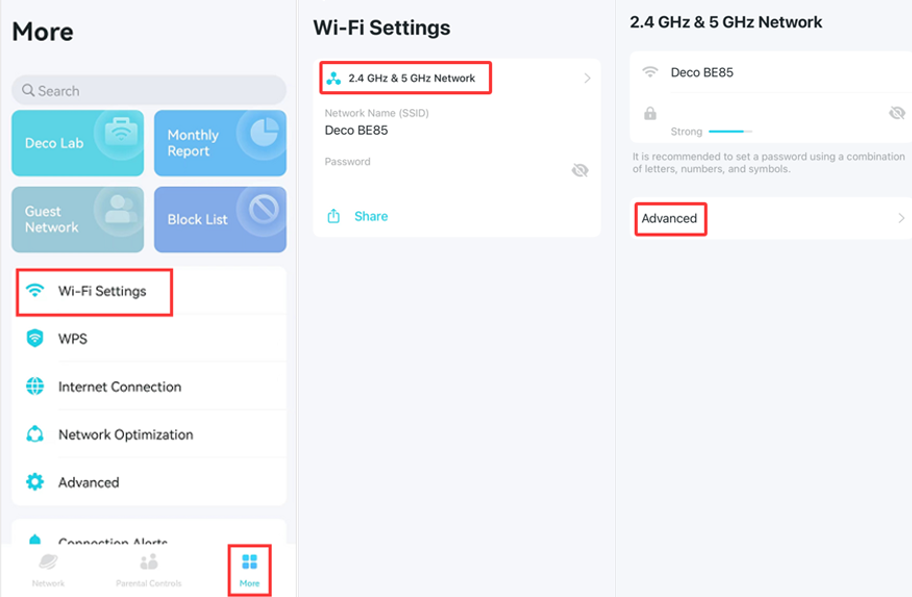
- To change the Wi-Fi channel on your TP-Link Deco, open the Deco app and go to More > Wi-Fi Settings > 2.4G & 5G Wireless Network > Advanced.
- Both the 2.4GHz and 5GHz networks have separate channel and channel width settings. Tap each band individually to configure them.
- After making changes, tap Apply to save, then return to the Advanced page to confirm the current channel and channel width for each band.
- Features available in the Deco app may vary by model and software version. The steps shown are examples and may not reflect your exact experience.
How to Change the Deco Wi-Fi Channel in the App
Step 1. Connect your phone to Deco’s Wi-Fi network, then open the Deco app.
Step 2. In the Deco app, tap More > Wi-Fi Settings > 2.4G & 5G Wireless Network > Advanced.
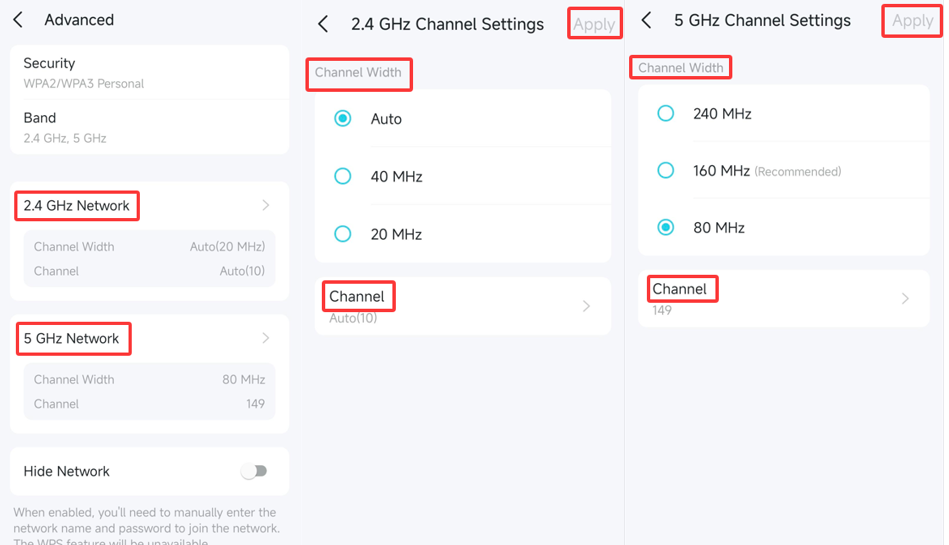
Step 3. Tap 2.4GHz Network or 5GHz Network to adjust the channel and channel width, then tap Apply to save. Return to the Advanced page to confirm the current channel and channel width for each Wi-Fi band.
For more details on each function and configuration, visit the Download Center to find the manual for your product.
Looking For More
Finden Sie diese FAQ hilfreich?
Mit Ihrer Rückmeldung tragen Sie dazu bei, dass wir unsere Webpräsenz verbessern.
_Overview_normal_20211130005706l.png)


TP-Link Community
Still need help? Search for answers, ask questions, and get help from TP-Link experts and other users around the world.
Von United States?
Erhalten Sie Produkte, Events und Leistungen speziell für Ihre Region