
Back-to-School Tech Philippines 2026: The Right Wi-Fi Setup for SY 2026-2027
By Laviet Joaquin, Head of Marketing, TP-Link Philippines | Published: June 18, 2026
_20260709092233i.png)
Quick Answer
-
For SY 2026-2027 opened in June, Filipino student households need at a minimum a Wi-Fi 6 router, either an Archer for single-floor homes or a Deco mesh system for multi-floor or concrete homes with dead zones configured with QoS to prioritize the student's device during class hours.
-
HomeShield parental controls on Archer and Deco routers let parents schedule internet access, block distracting sites, and pause Wi-Fi by device without touching the student's phone, all from the Tether or Deco app.
-
A Tapo P110 smart plug on the study PC, a Tapo C210 camera in the common area, and a Tapo L530E study bulb on a schedule cost under ₱3,000 combined and solve the three biggest back-to-school household problems: electricity cost, remote monitoring, and study environment.
The school year officially opened on June 8, and the most important purchase this back-to-school season is not a new school bag; it is a home Wi-Fi setup that can carry an entire academic year without dropping the class connection. This guide covers the right TP-Link router for every Filipino student household, how to configure it for school use, and the Tapo smart home devices that help parents stay in control even when they are not home.
Table of Contents
Stable Home Wi-Fi Is Now a School Requirement for Philippine Students
The Right TP-Link Router Depends on Your Home Size and Device Count
Five Router Configurations That Make a Real Difference for Students
HomeShield Lets Parents Schedule Online Time and Block Distractions Without Taking the Phone
Smart Home Devices That Help Filipino Parents Manage the Back-to-School Household
The Electricity Angle: Study Setups Cost More Than Parents Realize
Back-to-School Wi-Fi and Tech Checklist for Filipino Families
Stable Home Wi-Fi Is Now a School Requirement for Philippine Students
DepEd officially opened classes for SY 2026–2027 on June 8, 2026, and it will close on April 8, 2027, with 201 class days under the new three-term calendar implemented through DepEd Order No. 009, s. 2026.
For Filipino families whose children attend private schools or universities, at least some portion of the academic year will involve online learning from home. DepEd has allowed private schools to adopt blended learning arrangements during the national energy emergency, meaning schools may combine face-to-face classes with remote synchronous or asynchronous learning without prior approval as long as they notify their Schools Division Office at least five days before implementation. Colleges and universities have been authorized to shift to up to 100% online delivery under CHED guidelines for the same period.
SY 2026-2027 key dates: Classes opened on June 8, 2026. End of school year: April 8, 2027. 201 class days across three terms. Three-term calendar implemented under DepEd Order No. 009, s. 2026.
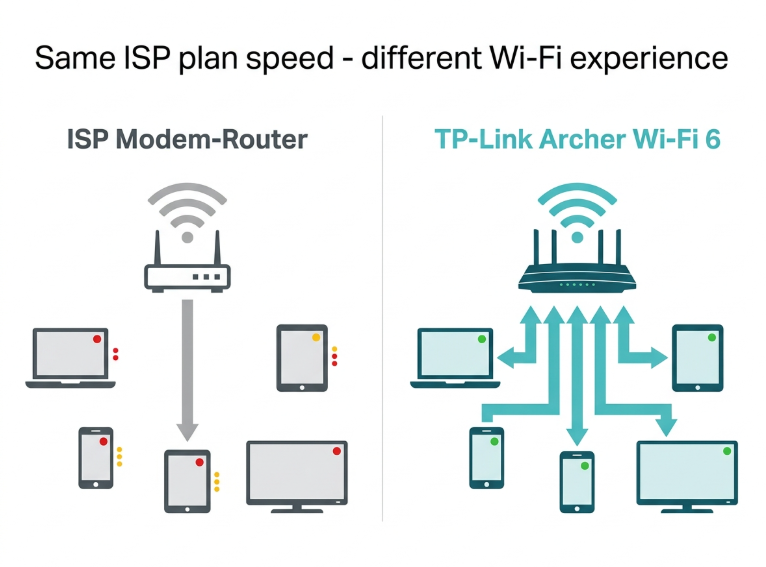
For public school students, online research, LMS submissions, and virtual teacher consultations happen regardless of whether the school day is in-person or remote. The practical result: every Filipino household with a school-age child needs a home Wi-Fi setup that can sustain video calls, LMS access, file uploads, and simultaneous family device use without degrading. The ISP modem-router that came free with your fiber subscription was not designed for this.
The Right TP-Link Router Depends on Your Home Size and Device Count
The number of devices trying to connect at once, not just the ISP plan speed, determines whether your home network keeps up during class hours. A 100 Mbps fiber plan shared across one laptop for class, one tablet for a sibling, two phones, and a smart TV can feel slower than a 50 Mbps plan running through a properly configured Wi-Fi 6 router. Wi-Fi 6 (the AX standard) handles multiple simultaneous connections more efficiently using OFDMA and MU-MIMO to serve several devices at once rather than one at a time.
Use the table below to match your household to the right TP-Link product.
|
Household Situation |
Best TP-Link Pick |
Why It Works for Filipino Students |
|---|---|---|
|
Apartment or condo - 1-2 rooms, single floor |
Archer AX1500 or AX1800 |
Wi-Fi 6 covers up to 1,500 sq ft from one router. Fast enough for video calls, file uploads, and simultaneous streaming. Budget-friendly entry into Wi-Fi 6. |
|
2-3 bedroom house, single floor with concrete walls |
Archer AX3000 or AX55 |
Higher throughput for more devices. Handles 4-6 students and parents online simultaneously without slowdowns. |
|
2-story house or large house with dead zones |
Deco X20 (2-pack) or Deco X55 (2-pack) |
Mesh eliminates the dead zone on the second floor or the back bedroom. One network name, seamless roaming from the study room to the sala to the bedroom. |
|
Large family home - 3+ floors or compound |
Deco X20 (3-pack) or Deco BE65 (2-pack) |
A 3-pack covers up to 5,800 sq ft with full-speed Wi-Fi 6 in every corner. More nodes can be added as needed. |
|
College student living in a dorm or boarding house |
Archer AX1500 or compact Archer model |
Creates a private network from a shared dorm LAN port. Setup takes under 10 minutes via the Tether app. |
Product models and coverage estimates were confirmed from official TP-Link Philippines listings as of June 2026. Verify availability at tp-link.com/ph or authorized resellers before purchasing.
Five Router Configurations That Make a Real Difference for Students
Buying the right router is step one. Configuring it correctly for a student household is step two, and most Filipino families skip this entirely. These five settings inside the Tether or Deco app take under 10 minutes to set up and significantly improve the network experience during class hours.
|
Challenge |
TP-Link Solution |
|---|---|
|
Lag or buffering during online classes |
Place the router centrally and elevate it. Switch the student's device to the 5 GHz band in the Tether app for a faster, less congested connection. If the study room is far from the router, add a Deco node or range extender. |
|
Siblings and parents competing for bandwidth |
Use QoS (Quality of Service) in the Tether or Deco app to prioritize the student's device during class hours. Assign their laptop or tablet the highest priority; it gets first access to bandwidth when the network is congested. |
|
Student distracted by social media during study time |
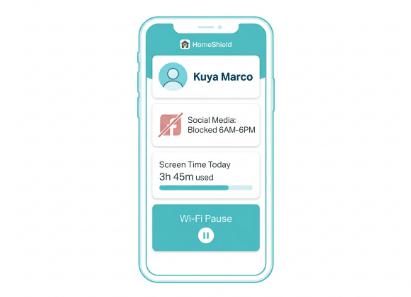
Set up a HomeShield parental control profile for the student's device. Schedule internet access to block social media platforms during class and study hours. Use the Family Time feature to pause their Wi-Fi instantly when needed. |
|
Unstable connection dropping mid-class |
Update router firmware via the Tether app; outdated firmware causes intermittent disconnects. If instability continues, check ISP signal quality by connecting directly via LAN cable during class. |
|
Shared family network feels slow for video calls |
Enable a dedicated SSID for student devices if your router supports it. Keep IoT devices (smart plugs, cameras) on the 2.4 GHz band and student devices on the 5 GHz band to reduce congestion. |
If your household is still experiencing buffering after optimizing these settings, the problem is likely the router itself, not the ISP plan. You can visit tp-link.com/ph/support/faq/ to guide you through device configuration for the school year starting in June.
HomeShield Lets Parents Schedule Online Time and Block Distractions Without Taking the Phone
Filipino parents know the struggle: the student needs the tablet for class from 8 AM to 12 PM, but after class, it becomes a TikTok machine and gaming device until midnight. Taking the device physically is a daily battle. HomeShield on TP-Link Archer and Deco routers offers a network-level alternative that works on any device connected to your home Wi-Fi, no app installed on the student's device required.
HomeShield works by creating a profile for each child and assigning their devices to that profile. Rules run at the router level: which websites and categories are blocked, what times internet access starts and ends, and when to pause all access instantly. Because the controls run at the router, they apply to every device on that profile: the school laptop, the tablet, and the gaming phone, without requiring access to each device individually.
Key HomeShield features for student households:
-
Content filtering by category: block social media, gaming sites, or adult content during class and study hours without affecting other household members
-
Screen time scheduling: Set an automatic internet cutoff at bedtime, which is useful for preventing late-night phone use on school nights
-
Wi-Fi Pause: instantly disconnect a specific device from the internet from the Tether or Deco app, useful during dinner, family time, or when the student needs to focus
-
Family Time: pause all household devices at once for a set duration, useful for family prayer time, meals, or study blocks
-
SafeSearch enforcement: forces SafeSearch mode on Google for devices on the student's profile, filtering explicit search results
Basic HomeShield features content filtering, time limits, and Wi-Fi Pause are included free with HomeShield-enabled Archer and Deco routers. Advanced features, including per-device time reporting, app blocking, and reward-based extra time, are available through the HomeShield Advanced Parental Controls subscription.
Here’s the full setup using tp-link.com/ph/support/faq/2996/ to have every child's profile configured before the school year starts.
Smart Home Devices That Help Filipino Parents Manage the Back-to-School Household
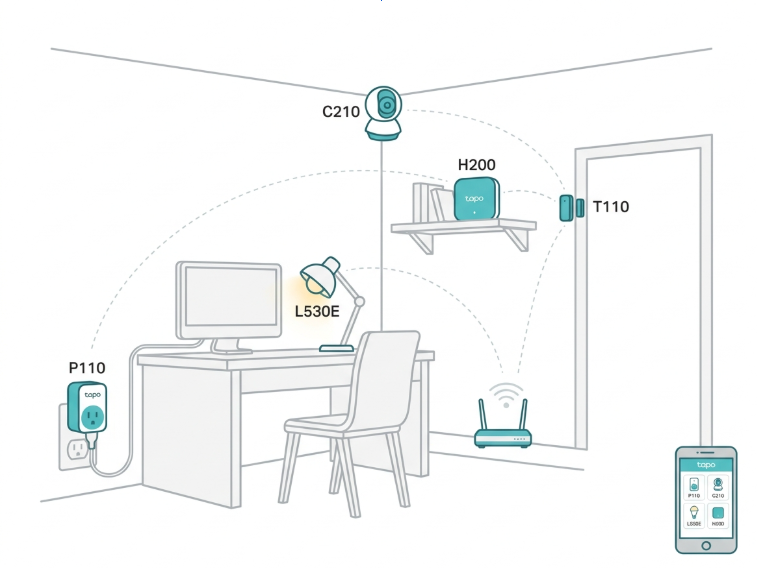
Beyond the router, a small set of Tapo smart home devices solves the specific daily friction points Filipino student households face during the school year. These are not luxury additions.
|
Device |
Model |
Best Use for Students in the Philippines |
|---|---|---|
|
Smart plug with energy monitor |
Tapo P110 / P110M |
Monitor the electricity cost of the study PC or gaming setup. Schedule auto-off for chargers and devices left on overnight. At current Meralco rates of ~₱14.48/kWh, a desktop PC left on 12 hours a day adds ₱600-₱900 to the monthly bill. |
|
Indoor security camera |
Tapo C210 |
Parents can check if children are actually studying, monitor helpers watching younger kids, or check the front door remotely. 2K resolution, 360-degree pan/tilt, night vision, free basic motion alerts, local microSD storage up to 512GB. |
|
Smart bulb |
Tapo L530E |
Set study-hour lighting schedules automatically. Warm white for reading, bright white for focus tasks, and dimmed at bedtime. No hub is needed; it screws into any E27 socket. |
|
Smart hub + motion sensors |
Tapo H200 + T100/T110 |
Know when kids arrive home from school (door sensor alert). Confirm kids are in their rooms studying (motion sensor). Peace of mind for OFW parents or parents working in another city. |
All Tapo devices connect to any 2.4 GHz Wi-Fi network and are managed through the free Tapo app. No additional hub required for smart plugs and cameras.
The Electricity Angle: Study Setups Cost More Than Parents Realize
The current Meralco rate for a typical household is ₱14.4833 per kWh as of June 2026. At that rate, a desktop PC drawing 150W running 8 hours daily for a school month adds roughly ₱520 to the monthly bill. A gaming desktop at 300W running for the same hours adds approximately ₱1,040. These are conservative estimates; GPU-heavy gaming setups draw far more. A Tapo P110 smart plug on the study PC shows parents exactly what each device costs monthly in pesos and enables scheduled auto-off when the student is supposed to be asleep rather than gaming.
Electricity cost formula: Wattage x Hours per day x 30 days / 1,000 x ₱14.48/kWh = monthly cost in pesos. The Tapo app calculates this automatically when you enter your Meralco rate.
Important: The Tapo P110 and P110M are for resistive loads only, such as lamps, fans, desktop PCs, monitors, and chargers. Do not use with motor-driven appliances (AC units, refrigerators, washing machines).
Back-to-School Wi-Fi and Tech Checklist for Filipino Families
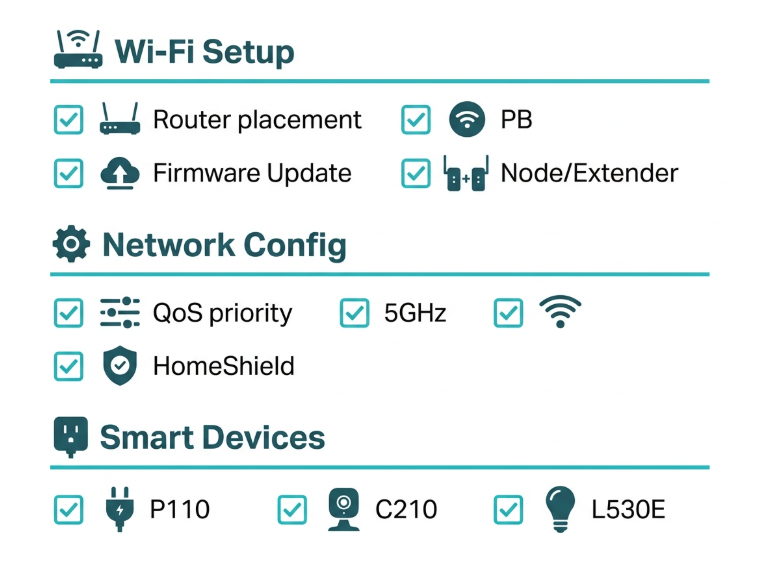
Run through this checklist before the school year opens. Most items take under 15 minutes each.
Wi-Fi setup
-
Upgrade from the ISP modem-router if more than three students or work-from-home family members will be online simultaneously during the same time window.
-
If upgrading, choose Wi-Fi 6 (AX series Archer or Deco) as the minimum standard for SY 2026-2027.
-
Place the router or primary Deco node centrally in the home, not in a corner or behind the TV, to maximize signal reach to study rooms.
-
If the student's study room is on a different floor or blocked by concrete walls, add a Deco node or range extender.
-
Update router firmware via the Tether or Deco app before the school year starts.
Student network configuration
-
In the Tether or Deco app, assign the student's laptop or tablet to the highest QoS priority.
-
Connect the student's primary study device to the 5 GHz band for faster, less congested performance.
-
Create a HomeShield profile for each school-age child and configure content filtering and time schedules appropriate to their age and school schedule.
-
Setting up a guest network for household helpers' devices and visiting relatives' phones keeps the main network less congested.
Smart devices
-
Place a Tapo P110 on the study desktop or PC to monitor electricity consumption and schedule auto-off at bedtime.
-
If working from another location during school hours, set up a Tapo C210 in the common area to confirm children are attending online classes as scheduled.
-
Set Tapo L530E bulb schedules: bright white (4,000K+) during study hours, warm white (2,700K) in the evening, and off at bedtime.
Frequently Asked Questions
Is Wi-Fi 6 worth it for a student household in the Philippines in 2026?
Wi-Fi 6 is the right baseline for any new router purchase in 2026. AX-series routers use OFDMA to serve multiple devices simultaneously rather than one at a time, reducing congestion noticeably when a student is in class while parents work from home and a sibling streams video. Wi-Fi 6 routers are now available at comparable prices to older Wi-Fi 5 models in the Philippines, making them the practical minimum for any household adding a new device to handle SY 2026-2027 school demands.
What minimum internet speed do I need for Google Classroom and Zoom?
Google Classroom is a lightweight document and form that uses minimal bandwidth. Zoom video at standard definition requires approximately 1.5 Mbps upload and download per participant; HD requires about 3 Mbps per participant. A household with three people on Zoom simultaneously needs roughly 10 Mbps upload and download, well within the 50 to 100 Mbps fiber plans available from PLDT, Globe, and Converge. The bottleneck in most Philippine households is not the ISP plan speed; it is the router distributing that speed through concrete walls.
Can I use HomeShield parental controls on a mobile data connection, not just Wi-Fi?
HomeShield runs at the router level and only applies when the device is connected to your home Wi-Fi network. A student who switches to mobile data bypasses the router and bypasses HomeShield entirely. For router-level controls to be fully effective, pair HomeShield with a household agreement about mobile data use during class hours, or use a dedicated parental control app alongside HomeShield for controls that follow the device regardless of network.
Which TP-Link router is best for a college student in a dorm or boarding house?
A compact Archer AX1500 or similar Archer model creates a private Wi-Fi network from a shared dorm LAN port. The student connects their laptop and phone to their own password-protected network, independent of the shared dorm Wi-Fi. Setup takes under 10 minutes via the Tether app. Check your dorm's acceptable use policy before setting up a personal router, as some dormitories restrict personal wireless devices.
Do TP-Link routers work during brownouts and power interruptions in the Philippines?
TP-Link routers lose power during brownouts, which drops the Wi-Fi connection, a real concern during peak demand periods and in the early weeks of June. Connecting the router to a UPS (Uninterruptible Power Supply) keeps Wi-Fi running during brief outages. Tapo smart devices also lose function during power outages but resume their schedules automatically when power is restored since schedules are stored locally on the device.
Can I monitor my child's screen time and block specific apps with HomeShield?
Basic HomeShield covers content filtering by category, time scheduling, and Wi-Fi Pause, all free on HomeShield-enabled Archer and Deco routers. Specific app blocking, per-device time reports, and reward-based extra internet time are part of the HomeShield Advanced Parental Controls subscription. For most Filipino households managing school-aged children during SY 2026-2027, the free tier handles the core use cases: blocking social media during class hours and cutting access at bedtime.
What is the Tapo P110, and is it safe to use with any appliance?
The Tapo P110 is a smart plug with a built-in energy monitor that tracks electricity consumption in real time and lets you schedule on/off times from the Tapo app. It is designed for resistive loads only, such as study lamps, desktop PCs, monitors, fans, and phone chargers. Do not use it with motor-driven appliances such as air conditioning units, refrigerators, or washing machines, as these have surge currents on startup that exceed the P110's safe operating range. For study setups, the P110 is an accurate and useful tool for tracking monthly electricity costs per device.
How do I know if my home needs a Deco mesh system instead of a single Archer router?
If any of these apply to your home, a Deco mesh system will outperform a single Archer: your house has more than one floor; your study room is separated from the router by two or more concrete walls; you regularly experience weak signal or dropped connections in certain rooms; or your household has more than eight devices connecting simultaneously at peak hours. A single Archer is sufficient for a studio apartment, a compact single-floor unit, or any space where the router can reach every corner without obstruction.
Final Thoughts
School has opened on June 8, and the three-term calendar means your home network will be tested more continuously than any previous school year. A router that drops during peak hours from 7 to 10 PM, when the student is finishing homework and the rest of the household is streaming, stops being a nuisance and starts costing your child class time.
The right setup is not complicated. A Wi-Fi 6 Archer for a single-floor home or a Deco mesh system for a two-story concrete house. QoS is configured so the student's device never loses bandwidth to a sibling's Netflix. A Tapo P110 on the study PC so you can see exactly what that setup costs on your Meralco bill every month and turn it off when the student is supposed to be sleeping.
Get set up before the first day of class:
-
Upgrading a single-floor apartment or condo? tp-link.com/ph/ to compare models by home size and device count
-
Need to configure QoS so the student's laptop gets priority during class? Follow the link: tp-link.com/ph/support/faq/
-
Setting up HomeShield profiles for each child this June? The tp-link.com/ph/support/faq/2996/ walks through every setting from content filters to bedtime cutoffs
Disclosure: Product specifications, DepEd school calendar dates, and blended learning policy details in this article are accurate as of the publication date (June 18, 2026) and may change. DepEd Order No. 009, s. 2026 governs SY 2026-2027 for public schools; private schools and universities operate under separate applicable CHED and DepEd memoranda. The blended learning flexibility for private schools under DepEd Memorandum No. 024, s. 2026 is tied to the national energy emergency period. Meralco rate of ₱14.48/kWh reflects the June 2026 rate (₱14.4833/kWh per Meralco advisory dated June 11, 2026) and changes monthly. Always verify on your current Meralco bill. Tapo P110/P110M is not compatible with inductive motor loads.
By Laviet Joaquin, Head of Marketing, TP-Link Philippines Published: June 18, 2026
_20260709091712i.png)