
TP-Link Wi-Fi 7 Router and Deco: Frequently Asked Questions
This page answers common questions about TP-Link Wi-Fi 7 routers and Deco products, covering everything from compatibility and setup to advanced features like Multi-Link Operation (MLO) and SFP+ ports. Whether you're new to Wi-Fi 7 or looking for technical details on your TP-Link Wi-Fi 7 router or Deco Wi-Fi 7 system, jump to the question that applies to your device or topic.
Key Takeaways
- Wi-Fi 7, also known as IEEE 802.11be, is the latest Wi-Fi standard. It operates across all three bands: 2.4GHz, 5GHz, and 6GHz, delivering faster speeds, lower latency, and more efficient use of available spectrum than previous standards.
- 6GHz Wi-Fi is supported only on Wi-Fi 6E and Wi-Fi 7 devices. Client devices manufactured before 2020 are unlikely to support it, but they can still connect to a Wi-Fi 7 router using the 2.4GHz or 5GHz band.
- All Deco products are designed to work together. You can use older Deco units alongside new Wi-Fi 7 Deco units, though features like MLO require compatible firmware across your entire network.
- MLO (Multi-Link Operation) performance depends on the client's MLO type. Devices supporting 5G+6G STR MLMR will see significantly greater performance gains than those supporting 2G+6G STR MLMR.
Q1. What is Wi-Fi 7?
Wi-Fi 7, also called IEEE 802.11be Extremely High Throughput (EHT), is the latest Wi-Fi standard supported by TP-Link Wi-Fi 7 routers and Deco products. It works across all three bands (2.4GHz, 5GHz, and 6GHz) to fully utilize spectrum resources
For more information about Wi-Fi 7, please refer to: What is Wi-Fi 7?
Q2. Which wireless client devices support 6 GHz Wi-Fi?
6GHz Wi-Fi is supported on Wi-Fi 6E and Wi-Fi 7 products. Since Wi-Fi 6E and Wi-Fi 7 are hardware-dependent, client devices manufactured before 2020 are not likely to support 6 GHz Wi-Fi. Here are some common wireless client devices that support 6GHz radio:
Common 6GHz Wireless client devices
Note: The above list might not include all device vendors or models that support 6GHz, and more will be added in the future. To ensure the device is 6GHz-capable, refer to the end device's official website or contact the device vendor. The following takes Intel’s AX211 network adapter as an example for reference; you may find the bands 6GHz in the specifications:
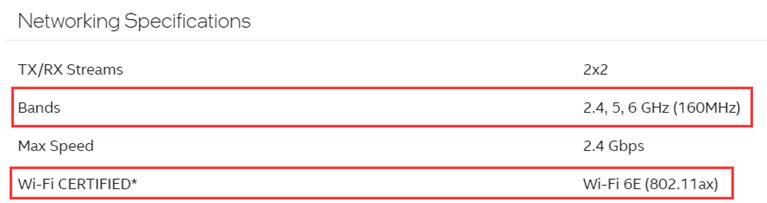
Q3. Which wireless client devices support Wi-Fi 7?
Since Wi-Fi 7 is hardware-dependent, client devices manufactured before 2022 are unlikely to support it. Currently, only a few new smartphones support Wi-Fi 7, and there will be more in the future. To make sure if your device supports Wi-Fi 7 or not, it is recommended to contact the device vendor or check the device specification on the vendor's official website.
Q4. What should I do if I cannot see or connect to the 6GHz Wi-Fi of my Router or Deco?
Please refer to the instructions here for troubleshooting: Can’t find or connect to 6GHz Wi-Fi?
Q5. Will my old phones and laptops work with a Wi-Fi 7 router or Deco?
Yes, Wi-Fi 7 products have 2.4GHz and 5GHz wireless radio as well. Your old phones and laptops can still connect to the traditional 2.4 GHz or 5 GHz bands. But if you want to connect your client device to a 6GHz wireless signal, please make sure your client devices are 6GHz capable.
Q6. Can the two ports of the Combo Port (RJ45 and SFP+) be used at the same time?
No, the two combo ports cannot work at the same time. When one port is used for data transfer, the other becomes inactive and cannot transmit or receive data.
Q7. Can I still use my older Deco units after getting a Wi-Fi 7 Deco?
Yes, all Deco products are designed to work together. You may add a Wi-Fi 7 deco to an existing network first and then set up the Wi-Fi 7 deco as the main node for your network. This will allow your most powerful node to manage your network while providing high-speed backhauls to satellites and devices.
How to Set up the Satellite Deco to be the Main Deco
Please note that the MLO network is only available on the Wi-Fi 7 Deco because other Wi-Fi 6/6E models don’t have MLO capability. Some other features, such as MLO, or Signal/ Band / Node Preference, require compatible firmware for models across your entire network.
Q8. I have a broadband subscription of over 1Gbps, why is the speed of my PC still lower than 1Gbps even when I am using the 10G port on the Router?
There are a few things that you may check to troubleshoot and identify the cause of your slowed connection:
1) First, make sure the Ethernet Adapter of your PC supports over 1Gbps.
2) Confirm that you are receiving 1Gbps+ from your ISP by connecting your PC directly to the modem,
3) Check the physical link speed between the Router and your PC:
How to check the associated/link speed on a wired client
4) We also recommend using a CAT6 or above Ethernet cable to achieve speeds over a gigabit.
5) Check your Quality of Service (QoS) for any settings or high-priority devices.
Q9. Will the MLO network improve my wireless performance?
It depends on the client's MLO type. If it’s 2G+6G STR MLMR, then the performance might not increase a lot; If the client supports 5G+6G STR MLMR, it will raise the performance more than pure 6G connection a lot.
Q10. How to use and connect the SFP+ port
We recommend using an “optical module (SFP+ LC Transceiver) + optical fiber” to connect the SFP+ port and ensure SFP+ port compatibility. Currently, we don’t recommend using DAC copper cables to connect to the SFP+ port.
Is this faq useful?
Your feedback helps improve this site.



TP-Link Community
Still need help? Search for answers, ask questions, and get help from TP-Link experts and other users around the world.