Router vs. Gateway: What's the Difference?
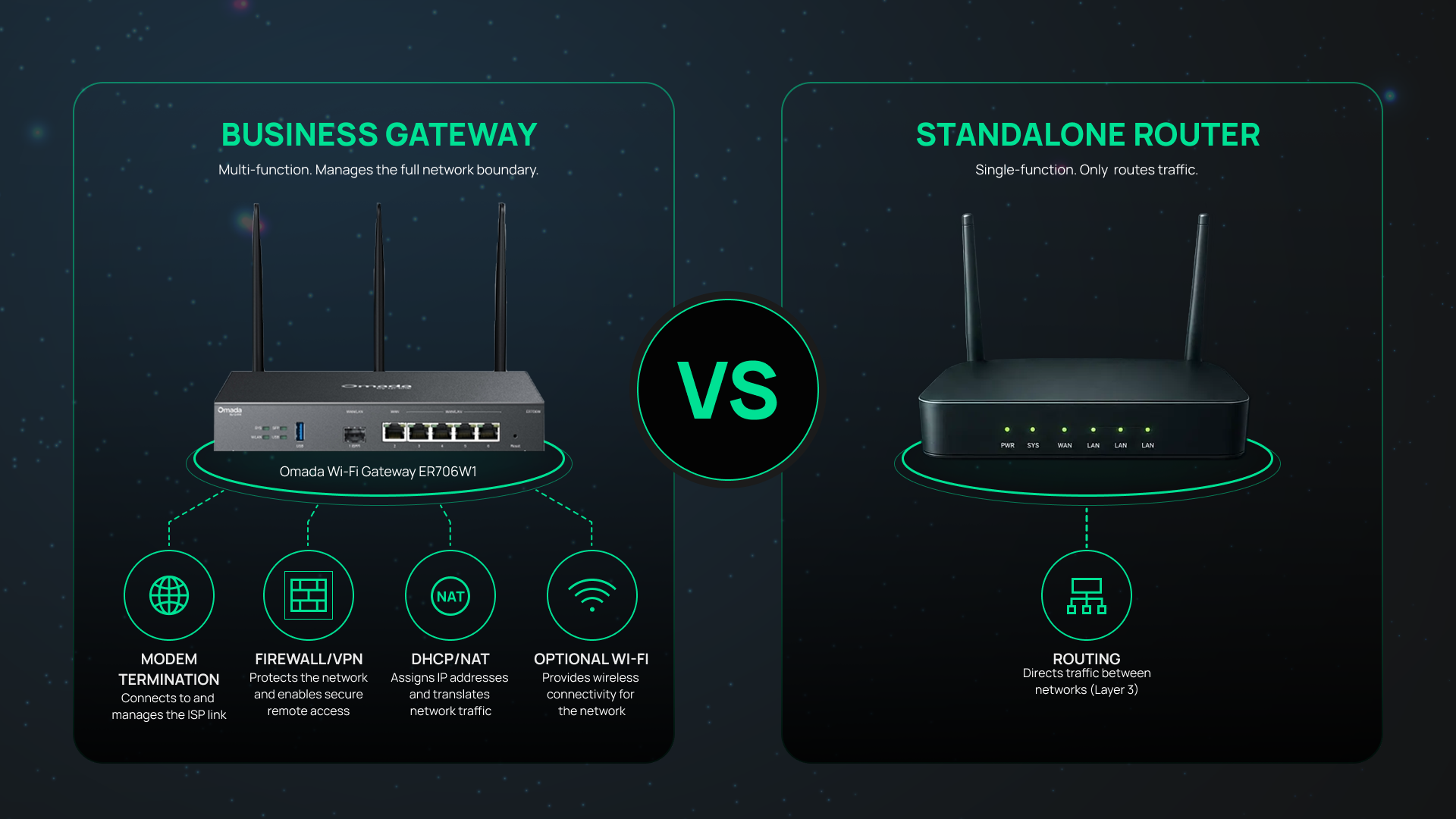
Router vs. gateway is a common networking question because the terms are often used interchangeably, even though they refer to different functions. A router directs traffic between networks, while a gateway combines routing with services such as security, WAN connectivity, and network management to control how traffic enters and leaves a network.
If you've ever shopped for networking equipment or reviewed an ISP-provided internet device, you've likely encountered the term “gateway.” Internet providers often describe their modem-router-Wi-Fi devices as gateways, while networking professionals use the term to describe the device sitting between a local network and the outside world. The result is understandable confusion about whether a router and a gateway are the same thing.
For small and medium-sized businesses, understanding the difference is important because the gateway is a core device in your network. It manages internet connectivity, security, VPN access, and traffic flow between internal systems and external services.
This guide focuses on gateways — what they do, what types exist, and how they differ from standalone routers — because for most business networks, a gateway is the device you actually need.
Key Takeaways
- A gateway combines routing with additional network services such as security, WAN management, VPN connectivity, and Wi-Fi functionality.
- A router has one core job: directing data traffic between two or more networks. It does not include modem or built-in WAN connectivity.
- ISPs commonly use the word "gateway" to describe their combination modem-router-Wi-Fi devices, which is the source of most router-vs-gateway confusion.
- For most small and medium business networks, a business-grade gateway replaces the need for a separate modem and router.
- Standalone routers still make sense for specific scenarios such as adding routing capacity behind an existing gateway, multi-WAN configurations, or specialized VPN deployments.
What Is a Gateway in Networking?
A gateway is a network device that connects one network to another and serves as the primary entry and exit point for data. In business environments, the gateway typically sits between the local area network (LAN) and the internet, controlling how traffic moves between internal systems and external destinations.
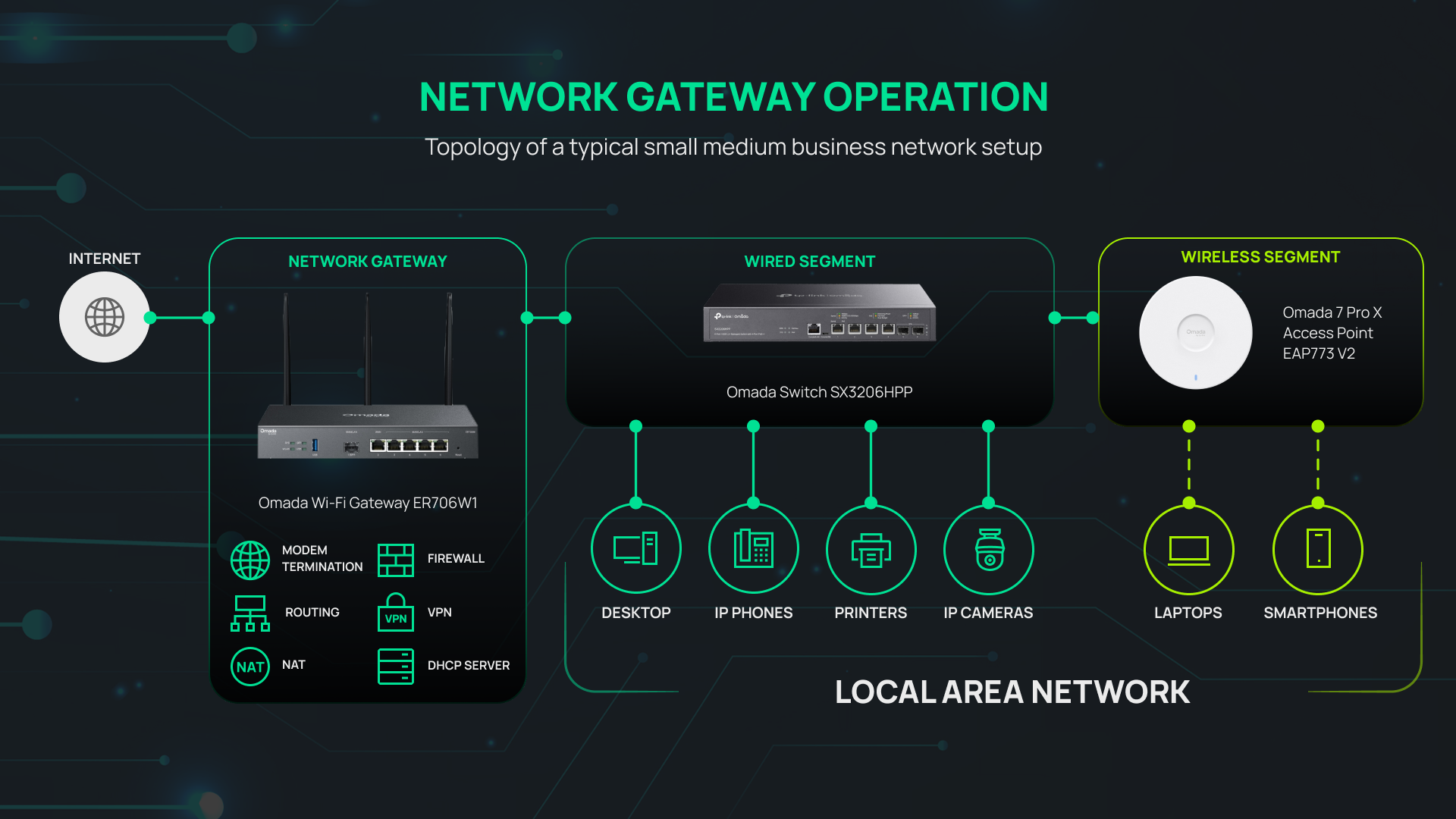
In most SMB deployments, the gateway is responsible for much more than internet access. It commonly handles routing, firewall protection, VPN connectivity, network address translation (NAT), Dynamic Host Configuration Protocol (DHCP), and WAN management from a single device.
How Does a Gateway Work?
When a laptop on your network opens a cloud application, that traffic passes through the gateway in sequence. The gateway terminates the ISP connection (modem function), checks the destination address, translates the private internal IP to your public IP, applies any active firewall rules or VPN encryption, then routes the packet out to the ISP.
On the return path, the gateway receives the response, checks it against its connection table (stateful firewall), reverses the NAT translation, and delivers the packet to the correct internal device. All of this happens for every connection crossing the network boundary, continuously.
What Does a Gateway Look Like?
A business-grade gateway is typically a rack-mount or desktop unit with multiple Ethernet ports — usually one dedicated WAN port and four or more WAN/LAN ports — plus an SFP slot for fiber uplinks. Some models include integrated Wi-Fi antennas.
These devices look noticeably different from consumer ISP combo boxes. They do not include a coax or DSL modem (SMBs typically connect to fiber via a separate ONT provided by the ISP). They offer more ports, often support 2.5G or 10G uplinks, and are built for rack-mount deployment in a network closet or server room.
What Does a Gateway Do? Core Functions
A gateway absorbs several discrete network functions into one device. Understanding each function separately makes it easier to evaluate gateways against your deployment requirements.
Routes Traffic Between Networks
Routing is the function a gateway and a standalone router share. The gateway maintains routing tables and directs packets to their correct destinations, whether inside the LAN, across a site-to-site VPN, or out to the internet. Business-grade gateways support both static routing (manually defined paths) and dynamic routing via protocols like OSPF or RIP for more complex multi-site environments.
Translates Network Addresses (NAT) and Assigns Local IPs (DHCP)
NAT allows every device on your internal network to share a single public IP address. When your employee's laptop connects to a cloud service, the gateway swaps the private IP for your organization's public IP before sending the packet out, then reverses the translation when the response arrives.
DHCP handles IP assignment automatically. When a device joins the network, the gateway assigns it an IP address, a default gateway route, and DNS server information, eliminating the need to configure each device manually.
Provides Network Security
A business-grade gateway includes a stateful firewall that tracks active connections and blocks unsolicited inbound traffic. Most also support access control lists (ACLs) for granular traffic rules, intrusion prevention and detection (IPS/IDS), and DoS defense.
VPN (Virtual Private Network) termination is a gateway function for businesses with multiple locations or remote workers. Omada gateways support IPsec, OpenVPN, WireGuard, L2TP, and PPTP VPN protocols, enabling secure site-to-site and remote access connections.
For environments where VLAN segmentation is part of the security architecture, see our guide on how to configure VLANs with Omada.
Enables WAN Connectivity and Failover
Most business-grade gateways support multiple WAN connections simultaneously, enabling load balancing across two or more ISP circuits and automatic failover if one connection drops. This is one of the most operationally significant differences between a consumer ISP combo box and a business gateway.
For MSPs and multi-site SMBs, WAN failover means an internet outage on one circuit doesn't take down the location. Select Omada gateway models support sub-3-second WAN failover to maintain connection continuity across primary and backup links, keeping critical applications running through an ISP disruption.
Optionally Provides Wi-Fi Access
Some gateways include integrated Wi-Fi radios, acting as both the network boundary device and the Wi-Fi access point. This simplifies deployment in smaller offices where a single device can cover the space adequately.
The trade-off is coverage. A single gateway unit can only place its Wi-Fi radio in one location, which limits flexibility in larger or multi-room environments. For anything beyond a small office, dedicated access points distributed across the space will deliver better coverage and capacity. If you're evaluating Wi-Fi gateways, understanding the difference between 2.4 GHz and 5 GHz Wi-Fi will help you match the gateway's radio to your environment.
Router vs. Gateway: How They Differ
A router is one of the functions a gateway performs. Every gateway routes; not every router is a gateway. The difference is scope: a gateway is a multi-function device managing the full network boundary, while a standalone router is a single-function device that only directs traffic between networks.
| Feature | Router | Gateway |
|
Primary function |
Directs traffic between networks |
Manages the full network boundary |
|
OSI layer |
Layer 3 |
Layer 3 and above (up to Layer 7) |
|
Includes modem |
No | No in business deployments; yes in ISP combo boxes |
|
Includes firewall |
No | Yes |
|
Includes VPN |
No | Yes |
|
Includes Wi-Fi |
No |
Optional (select models) |
|
Typical SMB use case |
Adding routing behind an existing gateway |
Primary network boundary device |
Is a gateway the same as a router? No, but they share the routing function, which is why the terms get conflated. A gateway always routes; a router never does everything a gateway does.
Gateway vs. Modem: Where Modems Fit In
A modem (modulator-demodulator) converts your ISP's signal — whether DSL, cable, or fiber — into Ethernet that local network devices can use. A modem alone provides no routing, DHCP, or firewall. It simply bridges the physical ISP medium to your LAN.
In a typical SMB fiber setup, the ISP provides an ONT (optical network terminal, essentially a fiber modem), and the business connects a dedicated gateway behind it. In a cable setup, the ISP-provided box is usually a combined modem-gateway, which is where the gateway vs. modem distinction blurs in practice.
For most SMBs, modems aren't a separate purchasing decision. Either the ISP provides one, or the gateway handles the WAN connection directly.
Types of Gateways for Business Networks
Business gateways are available in several categories to suit different connectivity requirements and deployment scenarios.
Fusion Gateways
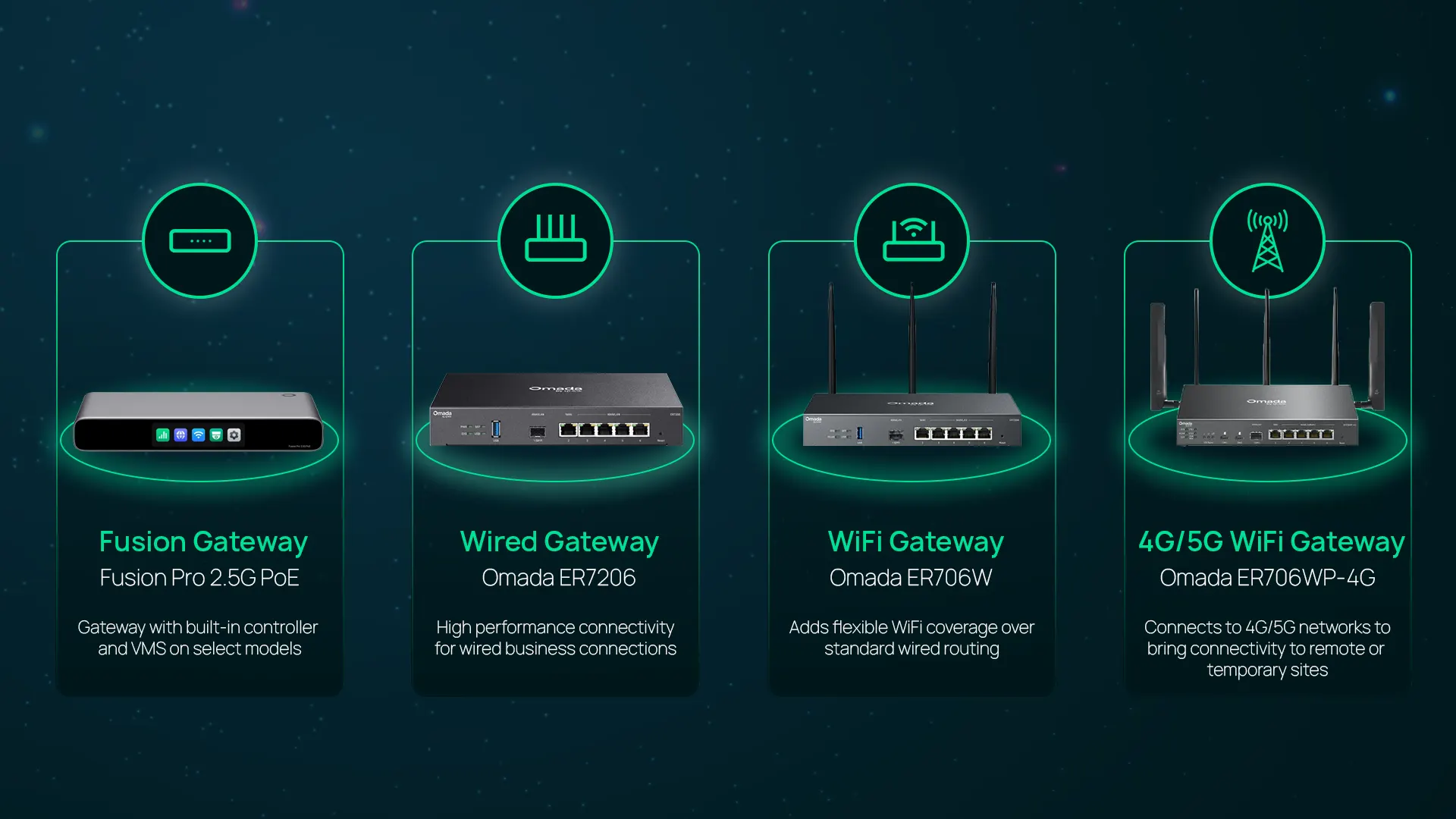
Fusion Gateways combine a business gateway with a built-in controller and, on select models, a video management system (VMS), enabling centralized management for networking and surveillance from a single platform. License-free cloud management, Bluetooth-guided onboarding, and simplified deployment help businesses save time, reduce hardware requirements, and scale more easily as they grow.
The Fusion G+ is ideal for growing businesses that need high-performance networking with centralized management, while the Fusion Pro 2.5G adds integrated video management, AI-powered surveillance features, and 2.5G connectivity for organizations with more demanding operational requirements.
Explore the Omada Fusion Gateway collection to compare these integrated gateway models and find the right fit for your business.
Wired Gateways
Wired gateways handle WAN connectivity and routing over Ethernet, relying on separate access points for Wi-Fi. This is the right choice for most SMB deployments where Wi-Fi coverage needs to extend across multiple rooms or floors.
Omada wired gateways include the ER605 (five Gigabit RJ45 ports, up to three WAN connections) for smaller locations, and the ER7206 (five Gigabit RJ45 ports plus a Gigabit SFP slot, up to five WAN connections) for mid-size deployments requiring more WAN flexibility. For high-throughput environments, the ER8411 supports two 10G SFP+ ports and up to ten simultaneous WAN connections.
Explore the Omada wired gateway collection to compare port configurations and WAN capacity.
Wi-Fi Gateways
Wi-Fi gateways add an integrated wireless radio to the gateway's core routing and security functions. The ER706W, for example, includes AX3000 Wi-Fi 6 (574 + 2,402 Mbps) alongside five Gigabit ports, a Gigabit SFP slot, and support for up to five WAN connections, consolidating the gateway and the access point into one device for smaller deployments.
4G/Cellular Gateways
Cellular gateways connect to 4G LTE or 5G networks rather than a fixed wired ISP circuit. They're useful for locations without wired internet access, such as pop-up retail, construction sites, temporary deployments, or as a backup WAN path for business continuity when the primary connection fails.
The ER706W-4G includes 4G+ Cat6 connectivity (up to 300 Mbps) alongside AX3000 Wi-Fi 6, five Gigabit ports, and dual Nano SIM slots for carrier redundancy. The outdoor-rated ER703WP-4G-Outdoor extends the same capability to pole-mounted or exterior installations with IP55 weatherproofing and PoE output for connected devices.
VPN Gateways
For multi-site businesses and MSPs managing multiple client networks, purpose-built gateways for VPN performance offer higher-capacity connectivity. The ER8411 supports IPsec, OpenVPN, WireGuard, SSL VPN, L2TP, and PPTP protocols across two 10G SFP+ ports and up to ten WAN connections, with redundant power supply support for high-availability deployments.
See the full Omada VPN gateway lineup for options suited to enterprise-scale and MSP environments.
When Does a Business Need a Gateway vs a Standalone Router?
In most SMB deployments, the right choice is a business-grade gateway. But there are specific scenarios where a standalone router makes more sense.
Choose a business gateway when:
- You're replacing an ISP consumer combo box at a single location and need a device that provides routing, firewall, NAT, and VPN in one unit.
- You're connecting multiple office locations and need site-to-site VPN managed centrally.
- Your network requires multi-WAN load balancing or failover for business continuity.
Consider a standalone router when:
- You need to add routing capacity or VLAN segmentation behind an existing ISP gateway that you can't replace.
- Your modem and security functions are handled by separate devices, and you only need Layer 3 routing.
- You're building a high-throughput core network where switching and routing are separated by design.
Browse the Omada Fusion gateway collection and the Omada standard gateway collection to compare models by WAN capacity, throughput, and form factor.
Choosing the Right Network Boundary Device
The difference between a router and a gateway comes down to scope. A gateway combines routing with WAN management, NAT, DHCP, firewall, and VPN in one device. A standalone router handles only the routing function. For most business networks, that means a gateway is the more relevant choice: it's the device that actually sits at the network boundary and manages everything crossing it.
When you're ready to evaluate options, explore the Omada Fusion gateway collection and the Omada standard gateway collection to find the right solution for your business. Whether you need wired, Wi-Fi, cellular, or an all-in-one platform with built-in management, both collections are designed to deliver the security, reliability, and VPN capabilities modern business networks require.
Frequently Asked Questions
Is a gateway the same as a router?
No. A router directs traffic between networks — that's its only function. A gateway does that and also handles WAN connectivity, NAT, DHCP, firewall, and often VPN. Every gateway includes a router; not every router is a gateway.
Do I need a router if I have a gateway?
In most cases, no. A business-grade gateway handles routing as one of its core functions, so a separate router is redundant. You might add a standalone router to increase routing capacity in a more complex network, or to segment internal traffic behind an existing gateway.
Can a router be used as a gateway?
A standard router cannot replace a gateway. It lacks the modem function, NAT, DHCP, and built-in firewall that a gateway provides. You'd still need separate devices to handle those functions. Some advanced enterprise routers include firewall features, but they're architected differently from purpose-built gateways and typically require additional infrastructure.
What is the difference between a gateway and a modem?
A modem converts your ISP's physical signal into Ethernet. It provides no routing, no IP assignment, and no security. A gateway sits behind the modem (or replaces it in ISP combo devices) and adds routing, NAT, DHCP, and firewall. In most SMB fiber setups, the ISP provides the modem (ONT), and a business gateway connects behind it.
Why do ISPs call their devices gateways?
Because in the technical networking definition, they are. ISP combo boxes terminate the ISP signal, assign local IPs, route traffic, and connect the local network to the internet — all functions of a network gateway. The consumer usage of the word is technically accurate, but it conflates the gateway with the modem function in a way that confuses business networking conversations.
Do I need a separate gateway for a small business network?
Yes, in most cases. An ISP-provided consumer gateway handles basic connectivity but lacks the multi-WAN failover, VPN termination, intrusion prevention, and centralized management that business environments require. A dedicated business gateway gives you the security controls and operational visibility to manage your network professionally and recover quickly from connectivity issues.