How Do VIGI Devices and Clients Connect to VIGI VMS Cloud
Contents
VIGI VMS Cloud Interaction Overview
VIGI Device Outbound Connections
Introduction
VIGI devices and VIGI applications connect to different VIGI VMS Cloud services for device management, event reporting, remote streaming, and other functions.
Users can access VIGI VMS Cloud through VIGI Cloud VMS Web Portal, VIGI App, or VIGI PC Client.
This article introduces the interaction among VIGI devices, users, and VIGI VMS Cloud services. It also explains the Relay streaming process and lists the domains and ports that require outbound access.
Requirements
- VIGI Cloud VMS
- VIGI Camera, VIGI NVR, or VIGI Solar Power System
- VIGI Cloud VMS Web Portal, or VIGI APP, VIGI PC Client
VIGI VMS Cloud Interaction Overview
The following diagram shows the main connections among VIGI devices, users, and VIGI VMS Cloud services.
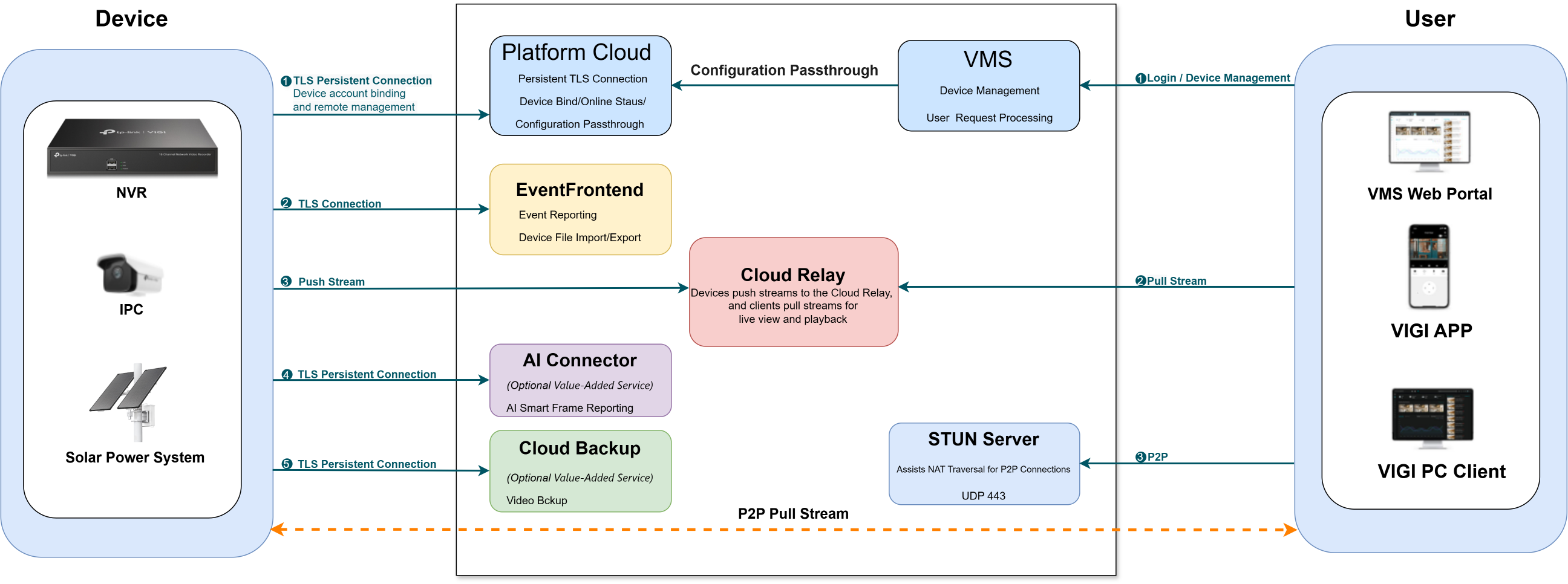
In the diagram, the VIGI device may connect to the following services:
- Platform Cloud: Supports device account binding, online status reporting, remote management, and configuration passthrough.
- EventFrontend: Supports event reporting, device file import/export, and local firmware upgrades.
- Cloud Relay: Receives video streams from the device during Relay streaming.
- AI Connector: Reports smart frames generated by supported advanced AI detection features.
- Cloud Backup: Uploads NVR recordings to the cloud.
On the user side, VIGI Cloud VMS Web Portal, VIGI App, and VIGI PC Client may connect to the following services:
- VMS Cloud Service: Supports user login, device management, and streaming requests.
- Cloud Relay: Forwards video streams between the VIGI device and the User during Relay streaming.
- STUN Server: Assists VIGI App and VIGI PC Client in establishing P2P connections.
Remote Streaming Methods
When a VIGI device and the User are behind different NAT gateways, remote streaming can use either Relay streaming or P2P streaming.
- Relay streaming: The VIGI device pushes the video stream to Cloud Relay, and the User pulls the stream from Cloud Relay. Because the video passes through Cloud Relay, the streaming session is subject to a time limit.
- P2P streaming: The cloud assists the VIGI device and the User in establishing a direct connection. After the connection is established, the video stream is transmitted directly between them and does not pass through Cloud Relay.
Relay Streaming Process
The following diagram shows how a VIGI device and the User establish their respective connections to Cloud Relay.
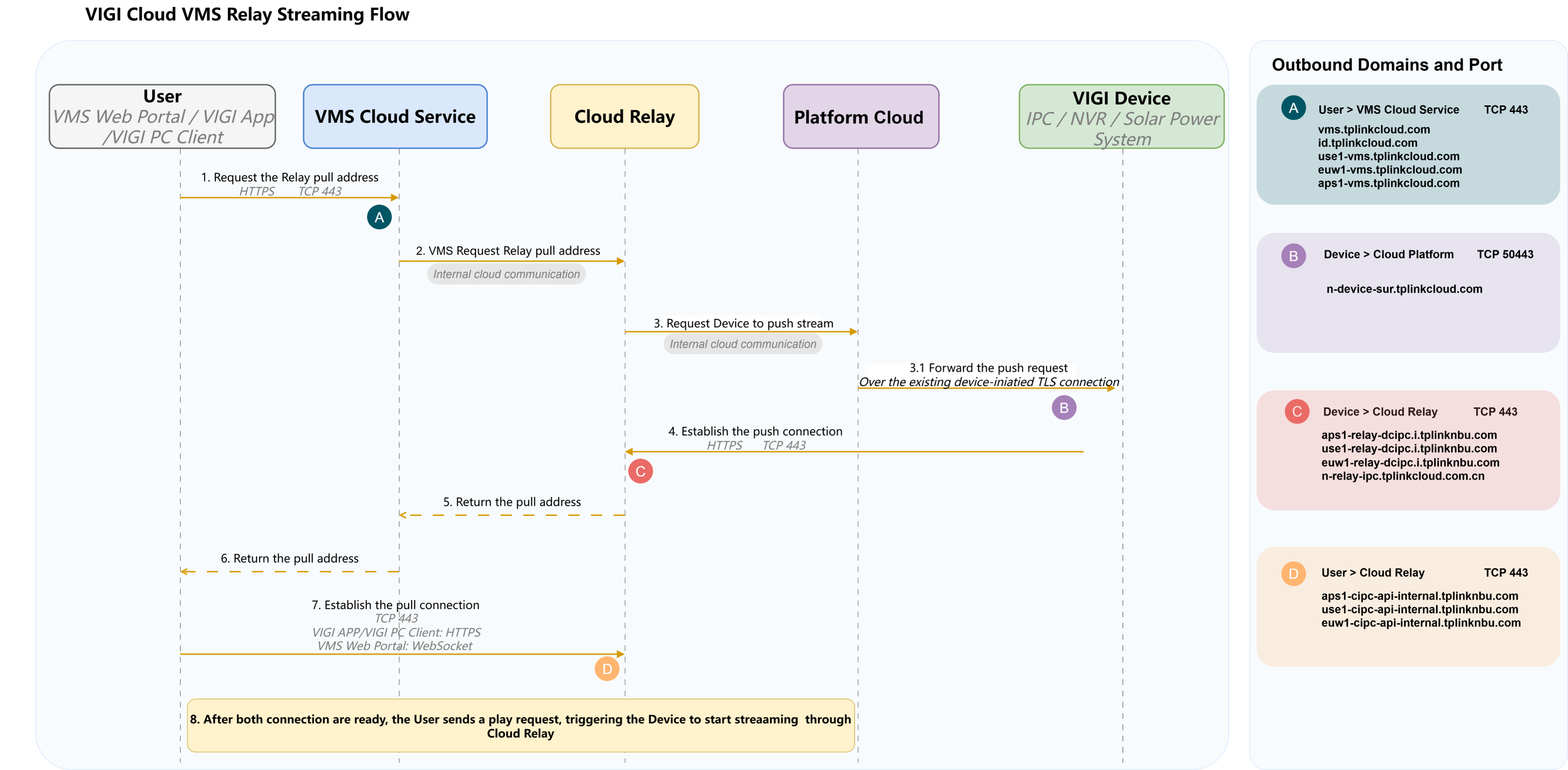
Notes:
- User in the diagram represents access through VIGI Cloud VMS Web Portal, VIGI App, or VIGI PC Client.
- Before Step 3.1, the VIGI device has already established a persistent outbound TLS connection to Platform Cloud. Platform Cloud sends the push request over this existing connection.
- After receiving the push request, the VIGI device establishes a separate outbound HTTPS connection to Cloud Relay through TCP port 443.
- In Step 7, the User establishes an outbound connection to Cloud Relay through TCP port 443. VIGI App and VIGI PC Client use HTTPS, while VIGI Cloud VMS Web Portal uses WebSocket.
- Labels A–D identify the outbound connections shown in the diagram:
- A: User to VMS Cloud Service
- B: VIGI Device to Platform Cloud
- C: VIGI Device to Cloud Relay
- D: User to Cloud Relay
For the domains and ports corresponding to labels A–D, refer to the Outbound Domains and Ports section.
Outbound Domains and Ports
VIGI Device Outbound Connections
|
Service |
Domain Name |
Protocol and Port |
Usage |
|
EventFrontend |
vms-api.i.tplinkcloud.com |
TCP 443 |
Event reporting, device file import/export, and local firmware upgrades |
|
aps1-vms-api.i.tplinkcloud.com |
|||
|
use1-vms-api.i.tplinkcloud.com |
|||
|
euw1-vms-api.i.tplinkcloud.com |
|||
|
aps1-vms-api.i.tplinknbu.com |
|||
|
use1-vms-api.i.tplinknbu.com |
|||
|
euw1-vms-api.i.tplinknbu.com |
|||
|
AI Connector |
aps1-vms-ai.i.tplinknbu.com |
TCP 443 |
Smart frame reporting for supported advanced AI detection features |
|
aps1-vms-ai.i.tplinkcloud.com |
|||
|
use1-vms-ai.i.tplinknbu.com |
|||
|
use1-vms-ai.i.tplinkcloud.com |
|||
|
euw1-vms-ai.i.tplinknbu.com |
|||
|
euw1-vms-ai.i.tplinkcloud.com |
|||
|
Cloud Backup |
aps1-cloud-backup-api.i.tplinkcloud.com |
TCP 443 |
Uploading NVR recordings when Cloud Backup is enabled |
|
use1-cloud-backup-api.i.tplinkcloud.com |
|||
|
euw1-cloud-backup-api.i.tplinkcloud.com |
|||
|
aps1-cloud-backup-api.i.tplinknbu.com |
|||
|
use1-cloud-backup-api.i.tplinknbu.com |
|||
|
euw1-cloud-backup-api.i.tplinknbu.com |
|||
|
Platform Cloud |
n-device-entry-sur.tplinkcloud.com |
TCP |
These domain names are intended for connecting to cloud servers to provide support for device account binding and remote management functionality. |
|
n-device-sur.tplinkcloud.com |
|||
|
n-sur-api.tplinkcloud.com |
|||
|
n-deventry-sur.tplinkcloud.com |
|||
|
n-devs-sur.tplinkcloud.com |
|||
|
Cloud Relay |
aps1-relay-dcipc.i.tplinknbu.com |
TCP 443 |
These domain names are utilized for providing Relay streaming services to ensure remote viewing of live broadcasts. |
|
use1-relay-dcipc.i.tplinknbu.com |
|||
|
euw1-relay-dcipc.i.tplinknbu.com |
|||
|
n-relay-ipc.tplinkcloud.com.cn |
User Outbound Connections
|
Service |
Domain Name |
Protocol and Port |
Usage |
|
VMS Cloud Service |
vms.tplinkcloud.com |
TCP 443 |
User login, device management, and streaming requests |
|
id.tplinkcloud.com |
|||
|
use1-vms.tplinkcloud.com |
|||
|
euw1-vms.tplinkcloud.com |
|||
|
aps1-vms.tplinkcloud.com |
|||
|
Cloud Relay |
aps1-cipc-api-internal.tplinknbu.com |
TCP 443 |
Receiving video streams during Relay streaming |
|
use1-cipc-api-internal.tplinknbu.com |
|||
|
euw1-cipc-api-internal.tplinknbu.com |
|||
|
STUN Server |
stun.tplinkcloud.com |
UDP 443 |
NAT traversal for P2P streaming on VIGI App and VIGI PC Client |
|
sg-stun.tplinkcloud.com |
|||
|
us-stun.tplinkcloud.com |
|||
|
ie-stun.tplinkcloud.com |
Conclusion
VIGI devices and users connect to different VIGI VMS Cloud services according to the functions being used. The corresponding outbound domains and ports should be allowed to ensure that device management, remote streaming, and related cloud functions operate properly.
To learn more about each function and configuration, please visit Support Home to download or check the manual for your product.
ค้นหาเพิ่มเติม
คำถามที่พบบ่อยนี้มีประโยชน์หรือไม่?
ความคิดเห็นของคุณช่วยปรับปรุงเว็บไซต์นี้



TP-Link Community
Still need help? Search for answers, ask questions, and get help from TP-Link experts and other users around the world.