
Where to Buy TP-Link in the Philippines: Authorized Stores and Online Shops
By Laviet Joaquin, Head of Marketing, TP-Link Philippines | Published: June 2026
|
Quick Answer Buy TP-Link in the Philippines from the official Lazada or Shopee store, from the TP-Link Flagship Store at SM North EDSA, or from authorized kiosks at SM Southmall and SM City Palawan. Only products purchased from TP-Link's official stores or authorized distributors are covered by the Philippine warranty. Buying from unauthorized third-party sellers, whether in a market stall or an unverified online shop, risks getting a counterfeit or gray-market unit with no warranty support. |
Where can I buy TP-Link Online in the Philippines?
TP-Link Philippines is one of the most widely distributed networking brands in the country, which also makes it one of the most frequently counterfeited. The same Wi-Fi router that costs ₱2,500 from an authorized reseller might appear for ₱1,200 from an anonymous seller on Shopee or Facebook Marketplace, and that ₱1,300 difference almost certainly comes at the cost of genuineness, warranty coverage, or both.
TP-Link Philippines operates official flagship stores on both Lazada and Shopee, the two largest e-commerce platforms in the country. These are the safest online purchasing options because both platforms carry buyer protection, platform-verified authenticity guarantees on mall-tier stores, and a clear escalation path if a product arrives not as described.
|
Platform |
Official TP-Link Store URL |
What to look for |
|---|---|---|
|
Lazada |
The official 'TP-Link Philippines' LazMall store with the orange Mall badge |
|
|
Shopee |
The Shopee Mall verified badge on the official TP-Link Philippines store |
Store URLs confirmed from the official TP-Link Philippines Where to Buy page. Always verify the Shopee Mall or LazMall badge before purchasing.
When shopping on Lazada, look for the orange LazMall badge on the TP-Link store listing. When on Shopee, confirm the Shopee Mall verified badge. Both badges indicate the store has passed the platform's authentication requirements and the brand has verified the seller as its official channel. A TP-Link product listed by a seller without these badges, even if the product photos look identical, is not guaranteed to be an authorized sale.
TP-Link Philippines' official TikTok account (@tplinkph) also runs live selling sessions daily from 10 AM to 2 PM and 6 PM to 10 PM. Follow tiktok.com/@tplinkph for live deals and product launches.
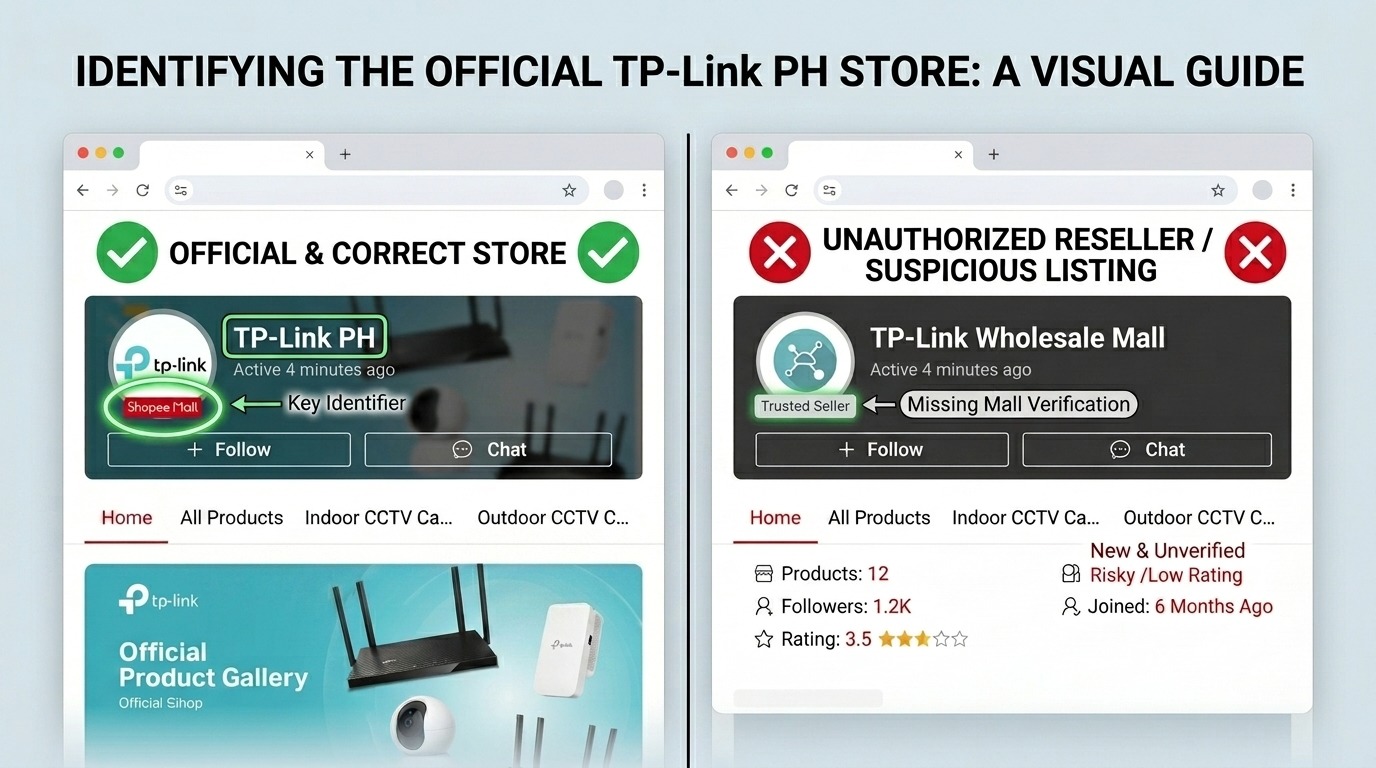
Key takeaway: The LazMall and Shopee Mall badges are the fastest way to confirm you are on an authorized channel. No badge, no guarantee.
Where are TP-Link's Physical Stores in the Philippines?
TP-Link Philippines opened its first physical flagship store in August 2023 at SM North EDSA, the first dedicated TP-Link retail space in the country. Since then, exhibit kiosks have expanded to SM malls in other regions. Physical stores are the right option when you want to see hardware in person before buying, need on-site help choosing the right product for your setup, or want to handle a purchase that involves multiple units for a business or multi-device deployment.
|
Store |
Address |
Details |
|---|---|---|
|
TP-Link Flagship Store SM North EDSA |
3F Annex Building, SM North EDSA, Quezon City |
Mon–Sun, 10 AM–9 PM · Tel: +639500612311 · Full product range, demo units, on-site support |
|
TP-Link Kiosk SM Southmall |
SM Cyberzone, SM City Southmall, Alabang–Zapote Rd, Almanza, Las Piñas |
Mon–Sun, 10 AM–9 PM · Tel: 09277437300 · South Metro Manila coverage |
|
TP-Link Kiosk SM City Palawan |
SM Cyberzone, SM Puerto Princesa City, Palawan |
Mon–Sun, 10 AM–9 PM · Tel: 09508807000 · Palawan regional coverage |
Store information sourced from the official TP-Link Philippines Where to Buy page as of June 2026. Hours and contact numbers may change; verify before visiting.
TP-Link continues to expand its physical retail presence in the Philippines. Additional kiosks and authorized partner stores may be available in your area. Always check the live Where to Buy page for the complete, up-to-date directory: tp-link.com/ph/where-to-buy/
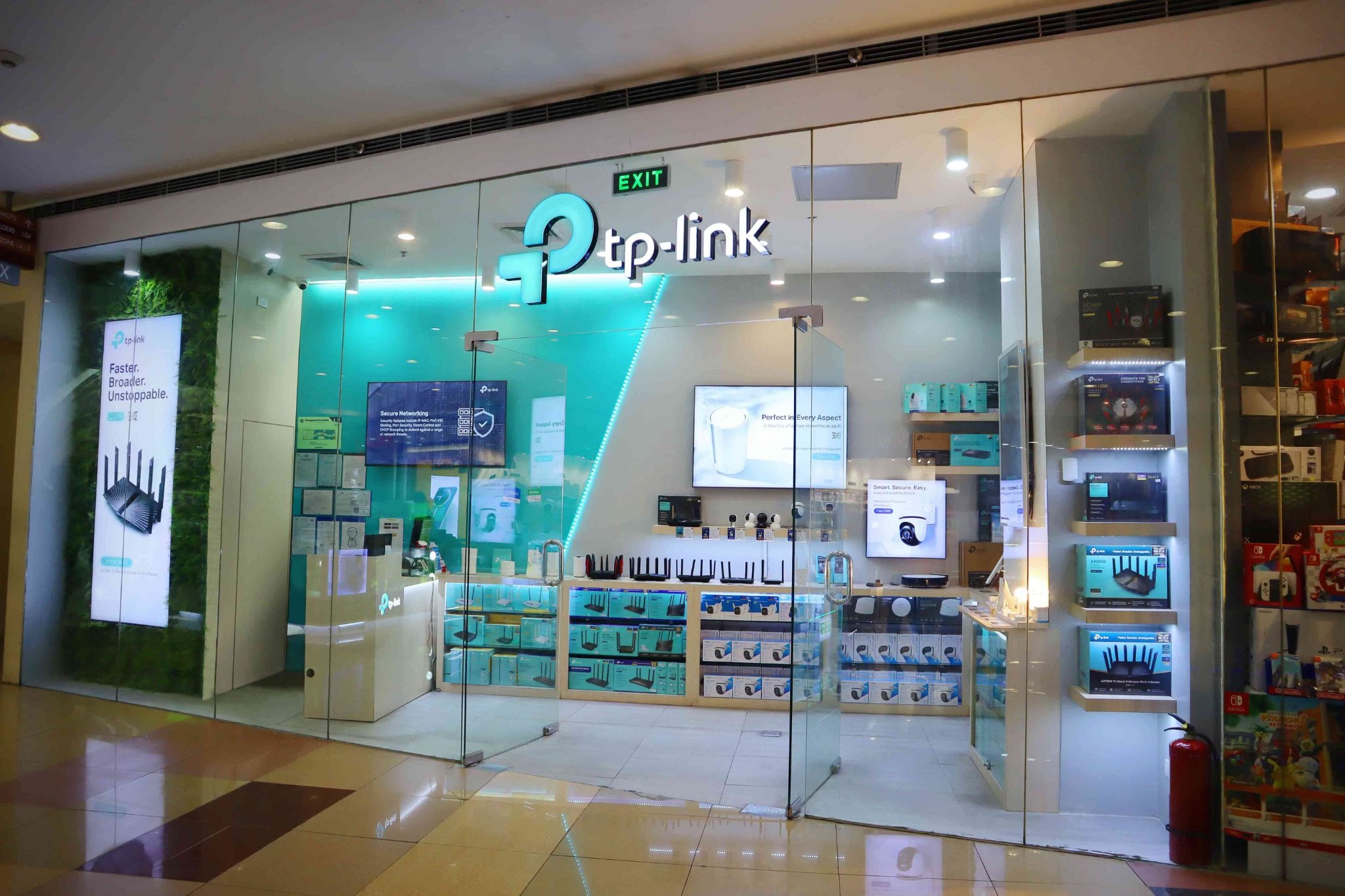
TP-Link Flagship Store at SM North EDSA
Key takeaway: The SM North EDSA flagship is the only location with demo units and full on-site specialist support. For Visayas and Mindanao coverage, check the live Where to Buy page. Regional availability continues to expand.
Who are TP-Link's Authorized Distributors?
TP-Link Philippines works through authorized distributors who supply products to resellers, IT shops, system integrators, and retail chains nationwide. If you are buying TP-Link for a business deployment of multiple units, network infrastructure, or Omada access points for a commercial installation going through a distributor or a reseller in their network, is the correct procurement path.
|
Distributor |
Website |
Who they serve |
|---|---|---|
|
Philteq Enterprise Inc. |
IT resellers, system integrators, retail chains, and corporate accounts across the Philippines |
|
|
Iontech Enterprise |
IT products distributor serving resellers and retail outlets nationwide |
These distributors supply the authorized resellers you find at PC Express, Villman, EasyPC, DataBlitz, Electroworld, and other established Philippine IT retailers. When you buy TP-Link from any of these retail chains, the product has come through the authorized distributor network and carries the Philippine warranty.
For businesses requiring Omada or VIGI product procurement and installation, contact TP-Link Philippines directly through the business networking page: omadanetworks.com/ph/
Key takeaway: For business-grade purchases of Omada access points, switches, or multi-unit deployments, go through the authorized distributor network or contact TP-Link Philippines directly. This is the procurement path that guarantees genuine products and enterprise-level after-sales support.
Which Authorized Resellers carry TP-Link across the Philippines?
Beyond TP-Link's own stores and official online channels, a wide network of authorized IT retailers carries genuine TP-Link products nationwide. These stores source through the authorized distributor network and honor the Philippine warranty.
Mall-based IT retail chains
The following Philippine IT retail chains carry TP-Link as an authorized reseller. Look for them in the Cyberzone sections of SM malls, Robinsons, and other major commercial centers across Metro Manila, Cebu, Davao, and other urban centers:
-
PC Express (pcx.com.ph) - multiple SM Cyberzone and mall locations nationwide
-
Villman Computers (villman.com) - multi-branch presence across Metro Manila and key provincial cities
-
EasyPC (easypc.com.ph) - online and physical store presence
-
DataBlitz - SM Cyberzone and mall locations nationwide
-
Electroworld - SM mall locations
The above retailers are known authorized TP-Link resellers based on their listed product catalogs and industry standing. Always confirm TP-Link authorization with the individual store if purchasing high-value items such as Omada business networking equipment.
Online resellers beyond the official Lazada and Shopee stores
Several authorized TP-Link resellers also sell on Lazada and Shopee as third-party sellers on the main marketplace, separate from the official TP-Link Philippines store. These can be legitimate authorized channels, but identifying them requires checking whether the store is listed on the TP-Link Philippines Where to Buy page, whether they carry a Shopee Mall or LazMall badge, and whether they provide an official TP-Link Philippines warranty card with purchase.
The safest practice when buying from any online seller that is not the official TP-Link Philippines store: message them before purchasing and ask specifically whether the unit comes with a Philippine warranty card and whether the serial number is registrable on the TP-Link Philippines support portal. A legitimate authorized reseller can confirm both instantly. One that cannot or does deflect the question is a red flag.
Key takeaway: PC Express, Villman, EasyPC, DataBlitz, and Electroworld are the authorized retail chains to look for in SM Cyberzone and major malls. Outside Metro Manila, always cross-check with the official Where to Buy page.
Six Red Flags for Fake or Gray-Market TP-Link Products in the Philippines
Gray-market and counterfeit TP-Link products are common in the Philippines, particularly on Facebook Marketplace, Carousell, and unverified Shopee and Lazada third-party stores. The risk is not just a product that underperforms; it is a product with no Philippine warranty, potentially flashed with non-Philippine firmware, and in some cases, a genuine safety risk from non-standard power components.
TP-Link Philippines' warranty policy is explicit: warranty is honored only for products purchased from TP-Link's official stores or authorized distributors. A counterfeit or gray-market unit purchased from an unauthorized seller is not eligible for warranty service, regardless of how genuine it looks.
|
Red flag |
What it usually means |
|---|---|
|
Price is 30–50% below the typical market price |
The unit is likely a counterfeit, a refurbished return, or a gray-market import with no Philippine warranty |
|
Seller has no Shopee Mall or LazMall badge |
Not an authorized TP-Link store; warranty may not be honored |
|
No original box or packaging listed in the photos. |
The product may be repackaged, opened, or not genuine |
|
The serial number sticker is missing or looks reprinted |
Tampered unit TP-Link Philippines will void warranty on tampered serial numbers |
|
Seller insists on chat-based or off-platform payment |
Major red flag for a fraudulent transaction: never pay outside the platform |
|
The product shows as shipped from China, not the Philippines |
Gray-market import, no local distributor warranty, firmware may not match Philippine specs |
Verify your TP-Link product's warranty status and serial number authenticity: tp-link.com/ph/support/replacement-warranty/
Key takeaway: If any one of these six flags appears, treat the listing as unverified and buy from an authorized channel instead. The savings from a suspicious listing are never worth the warranty void and potential firmware risk.
How to Verify a TP-Link Product is Genuine before You Complete the Purchase
Whether buying online or in a physical store, three checks are worth doing before any TP-Link purchase over ₱1,000.
Check 1: Confirm the seller on the Where to Buy page. Before buying from any seller, confirm they appear on tp-link.com/ph/where-to-buy/ as an authorized store. The page lists all confirmed official channels. If a seller is not on that list and does not have a Shopee Mall or LazMall badge, treat them as unverified.
Check 2: Inspect the serial number format on the box. Every genuine TP-Link product has a serial number printed on the bottom label, formatted consistently with the model's known pattern. If the box does not show a serial number, or the number appears to be a sticker placed over another sticker, do not purchase.
Check 3: Confirm the warranty card is inside. Genuine Philippine-market TP-Link products include a warranty card valid for the Philippines with a claim path through TP-Link Philippines. If the seller says "no warranty card" or "international warranty only," the product is either gray market or counterfeit.
If a product passes all three checks and you still want additional assurance, TP-Link Philippines' official Facebook page (@tplinkphilippines) and customer support channels can verify whether a specific reseller is authorized. This is especially worth doing for Omada business networking equipment, where a single non-genuine unit in a deployment can cause network-wide authentication failures.
Key takeaway: Three checks, under five minutes. Where to Buy page, serial number on the box, and warranty card inside. All three should pass before any purchase over ₱1,000.
Frequently Asked Questions
Can I buy TP-Link products at Divisoria or Quiapo?
Divisoria and Quiapo have vendors selling items labeled as TP-Link, but these markets are not authorized distribution channels, and TP-Link Philippines does not have authorized stores there. Products purchased from these markets carry a high risk of being counterfeit or gray-market imports. They will not be covered by the Philippine warranty, and firmware may not be calibrated for Philippine voltage and ISP standards. Purchase from authorized stores only.
Is TP-Link on Facebook Marketplace safe to buy?
Facebook Marketplace is not an authorized TP-Link Philippines sales channel. Individual sellers there may be selling genuine second-hand units, gray-market imports, or counterfeits, and there is no reliable way to distinguish between them without physically inspecting the serial number and warranty card. For new purchases, use the official Lazada or Shopee store, or visit a physical authorized retailer. For second-hand units, inspect the serial number and verify it against TP-Link's support portal before completing the transaction.
Do TP-Link products sold on Lazada or Shopee by non-official sellers carry a warranty?
Only if the seller is an authorized TP-Link Philippines reseller. An authorized reseller can provide a warranty card valid in the Philippines and can have the product serviced at TP-Link's authorized service center. An unauthorized seller cannot. The safest approach is always to purchase from the official TP-Link Philippines store on Lazada (LazMall) or Shopee (Shopee Mall), where the authenticity guarantee is backed by the platform itself.
What is the warranty period for TP-Link products purchased in the Philippines?
TP-Link Philippines provides a limited warranty on products purchased from its official stores or authorized distributors. Warranty periods vary by product category. Most consumer networking products carry a one-year warranty, while Omada business networking products may carry longer coverage. The warranty is honored only upon presentation of the original purchase invoice and requires that the product's serial number be intact and unaltered. Check the warranty card included with your specific product for the exact terms.
Where do I go for TP-Link warranty service or repair in the Philippines?
Warranty service is processed through TP-Link's authorized service center. The process begins by contacting TP-Link Philippines through the official support page at tp-link.com/ph/support/ with your serial number and proof of purchase. Do not attempt to repair TP-Link products at unauthorized repair shops; opening the unit or having it serviced by a non-authorized technician voids the warranty under TP-Link Philippines' policy.
Can I buy TP-Link in the provinces outside Metro Manila?
Yes. PC Express, Villman, DataBlitz, and EasyPC have branches in major provincial cities, including Cebu, Davao, Iloilo, and Cagayan de Oro. Lazada and Shopee ship nationwide from the official TP-Link Philippines store with standard delivery to most Philippine provinces. For the most current list of physical stores in your area, check the live Where to Buy page.
What should I do if I suspect I already bought a counterfeit TP-Link product?
Contact TP-Link Philippines through the official support page and provide the serial number. TP-Link Philippines can confirm whether a serial number is registered to a genuine unit sold through the Philippine distribution network. If the unit is counterfeit, file a report with the Department of Trade and Industry (DTI) or the platform where the purchase was made. Both Lazada and Shopee have buyer protection processes for counterfeit goods.
Buy authorized, get warranted. It is that simple.
The official Lazada and Shopee stores are the fastest and most convenient way to buy TP-Link in the Philippines. The SM North EDSA flagship store is the right option when you want to see products in person, talk to a specialist, or handle a purchase that involves multiple units for a business setup. The kiosks at SM Southmall and SM City Palawan extend that physical coverage to the south of Metro Manila and Palawan.
For any purchase channel other than these, the rule is simple: check the Where to Buy page, verify the warranty card is included, and confirm the serial number is genuine. The Philippine networking market has plenty of unauthorized sellers, none of whom offer the warranty, the firmware, or the after-sales support that comes with an authorized purchase.
Find the complete and always-current list of authorized TP-Link Philippines sellers: tp-link.com/ph/where-to-buy/
Disclosure: Store information, contact numbers, and business hours listed in this article are accurate as of the publication date and may change. Always verify current store details and the complete list of authorized sellers on the official TP-Link Philippines Where to Buy page at tp-link.com/ph/where-to-buy/ before visiting.
Last reviewed and updated June 2026 by Laviet Joaquin, Head of Marketing, TP-Link Philippines.