
Best Smart Home Setup for a Small Apartment in the Philippines
By Laviet Joaquin, Head of Marketing, TP-Link Philippines | Published: June 26, 2026
|
Quick Answer The best starter smart home setup for a Philippine condo or studio is a Tapo P110 smart plug for energy monitoring, a Tapo C210 camera for security, and a Tapo L530E smart bulb for lighting, all connected through the free Tapo app with no hub required. These three devices cover the three things apartment renters in the Philippines care about most: controlling the electricity bill, monitoring the unit when away, and setting the right lighting without rewiring anything. Total cost for the starter three lands well under ₱7,000 at authorized TP-Link Philippines resellers and on Lazada and Shopee.
|
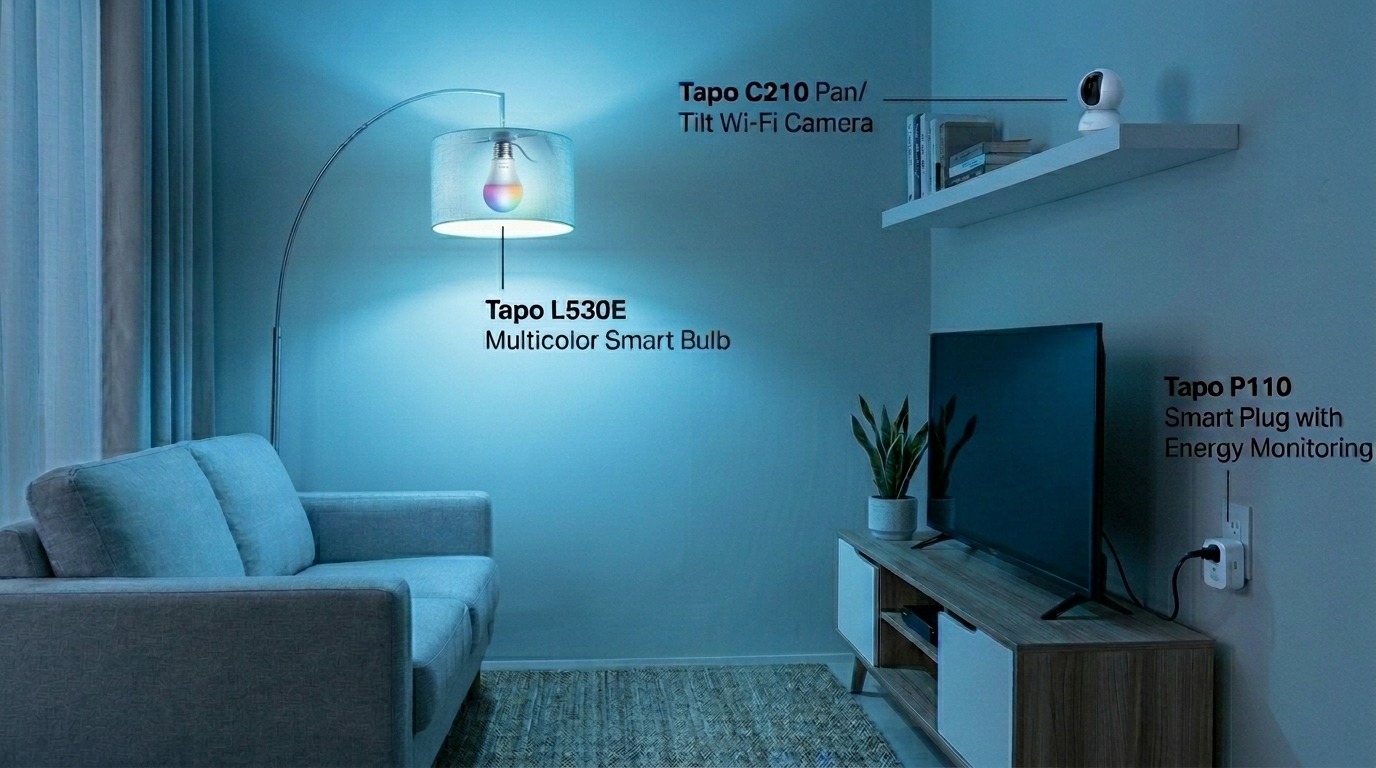
What Setup is Right for My Apartment?
Setting up a smart home in a Philippine apartment is simpler than most people expect and cheaper than it has ever been. You do not need to own the unit, rewire the walls, or buy a central hub. The entire Tapo ecosystem connects directly to your 2.4 GHz Wi-Fi, controlled through one free app, and most devices take under five minutes to set up.
With Meralco's May 2026 rate at ₱14.3345 per kWh, a studio or one-bedroom condo in Metro Manila already has every incentive to automate. The smart plugs monitor your consumption per outlet. The smart bulbs cut wasted standby draw from lighting. The camera watches the front door while you are at work in BGC or Ortigas.
|
Device |
Best for in a condo |
Key feature |
Hub required? |
|---|---|---|---|
|
Tapo P110 / P110M Smart Plug |
TV, PC, desk lamp, charger station |
Energy monitoring + schedules tracks cost per outlet in pesos |
No |
|
Tapo C210 Camera |
Living room or front door |
2K (3MP), 360° pan/tilt, night vision to 30 ft, local microSD up to 256GB |
No |
|
Tapo L530E Smart Bulb (multicolor) |
Bedroom, living area accent lighting |
16 million colors, 8.7W, dimmable, no hub, screw-in, and connect |
No |
|
Tapo L510E Smart Bulb (dimmable white) |
Study area, main overhead light |
Dimmable warm white, energy-efficient LED, voice control |
No |
|
Tapo P100 Smart Plug (basic) |
Electric fan, desk lamp, appliances that don't need energy monitoring |
Remote on/off and scheduling; most affordable entry point |
No |
Specifications sourced from official TP-Link Philippines product pages. Prices vary by retailer and may change.
Key takeaway: Every device in this table requires no hub, no subscription, and no permanent modification to the unit. That is the foundation of a Tapo smart home setup for Philippine renters.
Can I Set Up a Smart Home if I am Renting and cannot Modify the Unit?
Yes, and this is where the Tapo ecosystem is specifically well-suited to Philippine apartment living. None of the recommended devices requires drilling, permanent wiring changes, or landlord approval because none of them modify the unit itself.
Smart plugs sit between your existing outlet and your appliance. Smart bulbs screw into the existing socket. The Tapo C210 camera sits on a shelf, a dresser, or a TV console using its own adjustable base, with no mounting screws required for indoor placement. The Tapo app connects all of them over your apartment's existing Wi-Fi, whether it is the building-provided connection or your own Globe, PLDT, or Converge plan.
The one meaningful constraint for renters is the smart switch. The Tapo S220 and similar wall switch models require access to the wiring behind the switch plate, which means landlord permission and ideally a licensed electrician. Skip the wall switch in a rental. Smart bulbs and smart plugs accomplish everything a wall switch does without touching any wiring.
Key takeaway: Renters can build a fully functional Tapo smart home without a single permanent modification. Smart plugs and smart bulbs are all you need to start.
Room-By-Room Setup: Living Area, Bedroom, and WFH Corner
Living area and front door
The Tapo C210 belongs in the living area, angled toward the front door. Its 360° pan and tilt means one camera covers the door, the kitchen pass, and the main living space without needing to be repositioned. Motion detection sends a Tapo app notification within seconds of activity, and the built-in microphone and speaker allow two-way audio so you can speak to a delivery rider or check on a family member from anywhere. Local microSD storage up to 256GB holds approximately 512 hours of footage without a subscription.
Pair the camera with a Tapo P110 plugged into the extension cord powering your entertainment setup. Most Philippine apartments have a TV, a fiber modem or router, a set-top box, and a game console, all sharing one extension cord. That single P110 gives you a peso-denominated breakdown of what all those devices cost per day and lets you cut power to the entire rack on a schedule overnight.
Bedroom
The Tapo L530E in the bedroom overhead or bedside lamp gives you remote dimming and warm-to-cool color temperature adjustment (2,500–6,500K) from your phone in bed, without physically touching a switch. Set a schedule for the light to slowly warm to a soft yellow at 10 PM and turn off completely at midnight. Wake-up automation in the Tapo app can reverse this in the morning, gradually brightening the room 15 minutes before your alarm.
A second Tapo P110M on the nightstand side of the room monitors your phone charger, laptop charger, and any other devices charging overnight. Set Auto-Off to cut power three hours after your usual plug-in time, eliminating the standby draw that runs from 2 AM until you unplug in the morning.
Study or WFH corner
Work-from-home setups in Philippine apartments often involve a desktop or laptop, an external monitor, a small desk lamp, and a router, all running simultaneously. A Tapo P110 on the desk setup gives you daily kWh cost visibility, and a schedule that cuts power to the setup at a set time prevents the common pattern of leaving everything on after signing off for the day.
If your building's Wi-Fi is the shared connection for the apartment, a TP-Link router running on your own broadband plan gives the Tapo devices a dedicated, stable 2.4 GHz network for more reliable automation. All Tapo smart devices require a 2.4 GHz connection. If your router broadcasts only a single 5 GHz band, the devices will not connect.
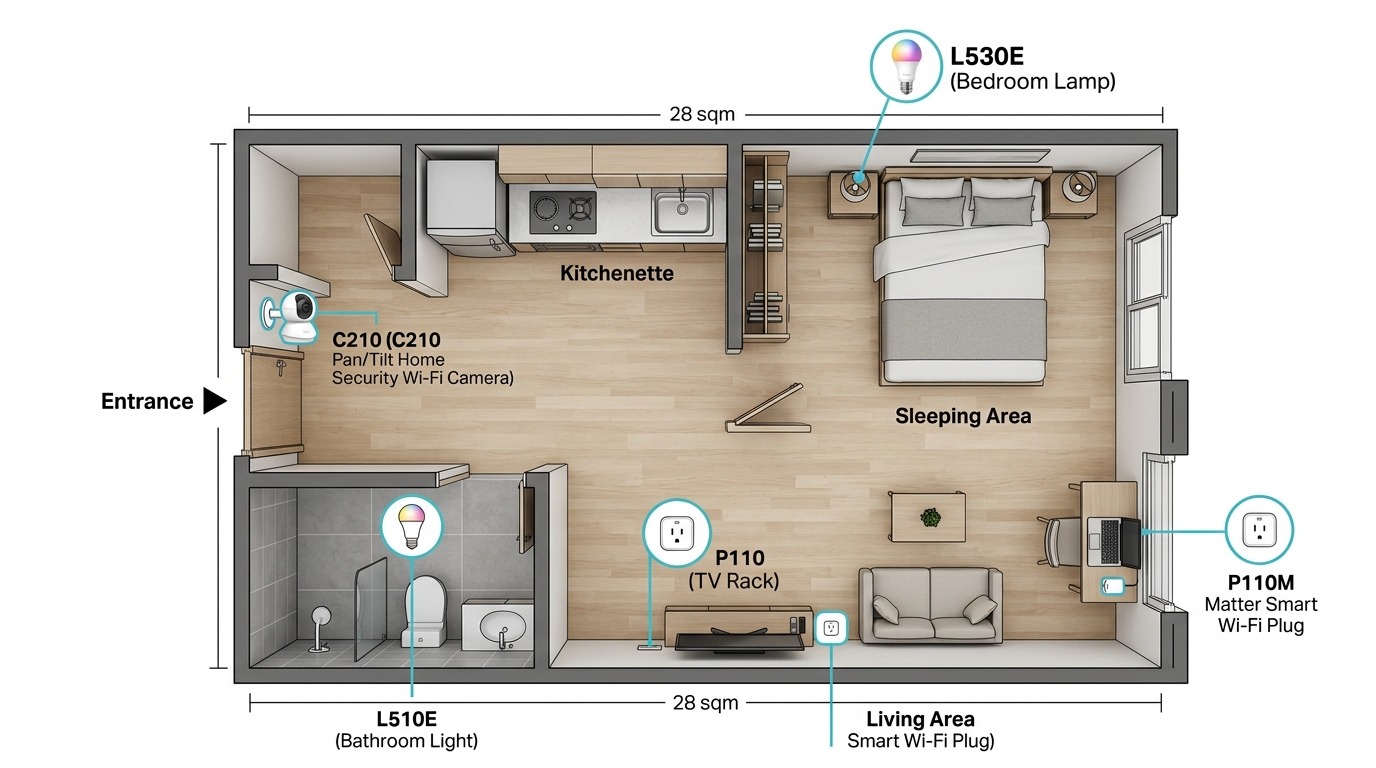
Key takeaway: One camera, one smart plug, and one smart bulb per room is enough to cover visibility, energy control, and lighting, the three things that matter most for daily apartment life.
Three Tapo Automations that Make the Most Practical Difference
The Tapo app supports custom automations that trigger one device based on the state of another or based on time, location, and sensor input. For a Philippine apartment, three automations consistently deliver the most value given local conditions.
1. Away Mode on the camera and lights when you leave for work
Set a Tapo automation: when you leave the apartment between 7 and 9 AM on weekdays, the Tapo C210 activates motion detection alerts and the Tapo L530E switches into Away Mode, randomly turning on and off at intervals to simulate occupancy. This is specifically useful in Philippine urban contexts where apartment security depends heavily on the appearance of presence rather than physical locks alone. The automation runs without manual input once set, remembering to arm anything.
2. Schedule-based power cut on the TV rack at midnight
Peak Filipino streaming hours run from 6 PM to midnight. A Tapo P110 scheduled to cut power to the TV rack at midnight eliminates the standby draw from the smart TV, set-top box, and soundbar that would otherwise run until someone physically unplugs them. At ₱14.33 per kWh and a combined 25W standby draw, that six-hour overnight cut saves roughly ₱390 per year on that outlet alone before any other automations are applied.
3. Morning light ramp before your alarm
The Tapo L530E is scheduled to shift from off to a soft, warm white at 20 percent brightness, 15 minutes before your alarm starts, preparing your eyes for waking before the alarm sounds. Filipinos working in BPO, government, or Metro Manila offices with 7 to 9 AM start times consistently report this as the automation that feels most immediately useful on the first morning it runs. It requires zero hardware beyond the smart bulb already in the bedroom socket.
Key takeaway: These three automations run on their own once configured. Taken together, they add up to a home that secures itself, saves power, and wakes you up gently with no daily manual input.
Budget Tiers for Building Your Tapo Smart Home in a Philippine Apartment
The right starting point depends on what matters most for your unit. Below are three tiers built for Philippine apartment conditions.
|
Tier |
Devices |
What it covers |
Approx. budget |
|---|---|---|---|
|
Starter (1–2 devices) |
1x Tapo P110 + 1x Tapo L530E |
Energy monitoring on one outlet, smart lighting in the bedroom |
₱1,500–₱2,500 |
|
Core setup (3–5 devices) |
2x Tapo P110M + 1x Tapo C210 + 2x Tapo L530E |
Security camera, smart plugs on main appliances, mood lighting |
₱4,000–₱7,000 |
|
Full apartment setup (6–9 devices) |
3x Tapo P110M + 1x Tapo C210 + 3x Tapo L530E + 1x Tapo P100 + 1x Tapo L510E |
Full energy visibility, all-room lighting, security, fan, and charger control |
₱8,000–₱14,000 |
Budget ranges are approximate and based on typical Philippine retail pricing as of the publication date. Prices vary by seller and platform.
The starter tier is the right entry point for renters who are unsure whether smart home devices fit their lifestyle. A single Tapo P110 on the device that costs the most to run, usually the TV setup or desktop, delivers immediate peso visibility into a real cost. Once you see the monthly projection in the Tapo app, the decision to add more devices becomes much easier.
Key takeaway: Start with one device, not a complete system. The Tapo P110 on your highest-draw outlet teaches you more about your electricity habits in one month than any amount of planning.
Frequently Asked Questions
Do Tapo smart home devices work with the Wi-Fi provided by my condo building?
Yes, as long as the building's Wi-Fi network broadcasts in the 2.4 GHz band and allows device connections. Most shared condo Wi-Fi systems work with Tapo devices. The one scenario where they may not is if the building network uses client isolation, a security setting that prevents devices on the same network from communicating with each other. If your Tapo device fails to connect to a building network, switching to your own mobile broadband plan or a dedicated home router resolves the issue in most cases.
Will a Tapo smart plug work safely with a Philippine extension cord or power strip?
A Tapo P110 plugged into a power strip is acceptable, but only if the combined load of all devices on the strip does not exceed the strip's rated amperage and the plug's maximum rated load. Do not plug a power strip into a Tapo smart plug and then into another power strip. Daisy-chaining power strips creates a fire risk, regardless of the smart plug in between. For heavy appliances, always plug directly into a wall outlet.
Can I control my Tapo devices if I do not have internet at home?
Basic local control, such as the physical button on the smart plug, continues to work without internet. Schedules and automations stored on the device also continue to run locally even during a service interruption. Remote control via the Tapo app from outside the apartment requires an active internet connection. The Tapo C210 camera requires Wi-Fi for live streaming; local microSD storage continues to record even during internet outages as long as the camera has power and local Wi-Fi connectivity within your apartment.
Is there a subscription fee for the Tapo app or for cloud storage?
The Tapo app is free, and basic cloud storage for camera footage is included at no charge with your Tapo account. Extended storage history and premium features are available under Tapo Care, TP-Link's optional subscription service. For Philippine apartment users who prefer not to pay a recurring fee, the Tapo C210 supports local storage via a microSD card up to 256GB, which holds approximately 512 hours of footage based on laboratory conditions.
What happens to my Tapo devices if I move to a new apartment?
All Tapo devices are portable. Unplug them, carry them to the new unit, and reconnect them to the new Wi-Fi network through the Tapo app. Your schedules, automations, and device names are stored in your TP-Link ID account, so the setup transfers with you. The only configuration you need to update is the Wi-Fi network the devices connect to, which takes under two minutes per device.
Which single device gives the fastest return on investment for a Philippine renter?
For most Metro Manila apartments, the Tapo P110 on the TV and entertainment rack delivers the fastest return. A typical Philippine entertainment setup, smart TV, fiber set-top box, game console, and soundbar draw 20 to 35W in standby overnight. Scheduling the P110 to cut power from midnight to 6 AM eliminates six hours of overnight standby every day. At ₱14.33 per kWh, that alone saves ₱300 to ₱550 per year on one outlet. The plug pays for itself within months, and every additional plug after that adds to the return.
Does the Tapo C210 work with both Globe and PLDT Home Broadband?
Yes. The Tapo C210 connects over standard 2.4 GHz Wi-Fi, which both Globe At Home and PLDT Home Fibr routers broadcast by default. If your router shows two network names, one standard and one ending in "5G," connect the camera to the standard (non-5G) network. The camera requires a continuous Wi-Fi connection for live streaming and motion alerts; local microSD recording continues independently if the internet drops.
Start with one device, not a complete system.
The most common mistake with smart home setups in Philippine apartments is trying to automate everything at once. One Tapo P110 on the outlet that costs the most to run teaches you more about your electricity habits in one month than any amount of planning. One Tapo C210 in the living area changes how you think about apartment security when you see your first motion alert from work.
Build from there. The Tapo ecosystem is designed so that every device you add connects to the same app, the same automations, and the same TP-Link ID you set up on day one. A studio apartment fully set up with five to seven Tapo devices becomes manageable from one screen with habits that pay back their cost in lower Meralco bills and fewer security worries within the first year.
Disclosure: Rates and product specifications mentioned in this article are accurate as of the publication date and may change. Always refer to your latest Meralco bill and the official TP-Link Philippines product page for current information.
Last reviewed and updated June 2026 by Laviet Joaquin, Head of Marketing, TP-Link Philippines.
_20260709085155a.png)
_20240115095948u.jpg)


