
How to Use Tapo Smart Plugs to Save on Electricity Bills in the Philippines
Published: June 1, 2026
|
Quick Answer Plug a Tapo P110 or P110M into any outlet, connect it to the Tapo app, and set schedules or Auto-Off timers to stop appliances from drawing power when you are not using them. At ₱14.33 per kWh (Meralco rate as of May 2026), cutting 30 minutes of daily standby waste per appliance saves roughly ₱130–₱350 per year per device. Multiple plugs across your home add up faster than most people expect. |
How Much is Standby Power Actually Costing You at ₱14.33 Per kWh?
Philippine households pay among the highest electricity rates in Southeast Asia, and Meralco's May 2026 rate of ₱14.3345 per kWh is a number that stings at the end of every billing cycle. A Tapo smart plug is one of the few practical tools that cuts your bill without requiring you to use your appliances less.
Standby power, also called phantom load, is the electricity your appliances consume when they are switched off but still plugged in. The U.S. Department of Energy estimates that standby power accounts for 5 to 10 percent of a household's total electricity consumption. At Meralco's May 2026 rate of ₱14.3345 per kWh, a household using 200 kWh per month, Meralco's standard reference consumption, pays roughly ₱860 to ₱1,720 per year on electricity it never actually uses.
This is the exact problem a Tapo smart plug solves. When you set a schedule or use Auto-Off, the plug cuts power to the outlet entirely, dropping consumption on that circuit to zero. The Tapo P110 and P110M also measure real-time wattage so you can see exactly how much each appliance costs per day, per month, and projected annually with your actual Meralco rate entered directly into the Tapo app.
|
Appliance |
Typical Standby Draw |
Monthly Cost @ ₱14.33/kWh |
|---|---|---|
|
Smart TV (screen off, not unplugged) |
5–15 W |
₱50–₱150 |
|
Desktop PC (sleep mode) |
5–10 W |
₱50–₱100 |
|
Laptop charger (no laptop) |
2–5 W |
₱20–₱50 |
|
Game console (standby/rest mode) |
10–15 W |
₱100–₱150 |
|
Microwave oven (clock only) |
3–5 W |
₱30–₱50 |
|
Cable/fiber modem box (always on) |
10–20 W |
₱100–₱200 |
|
Air purifier (standby) |
2–5 W |
₱20–₱50 |
Standby figures based on published manufacturer ranges. Monthly cost calculated at ₱14.33/kWh for 24-hour standby, 30 days. Actual draw varies by appliance age and model.
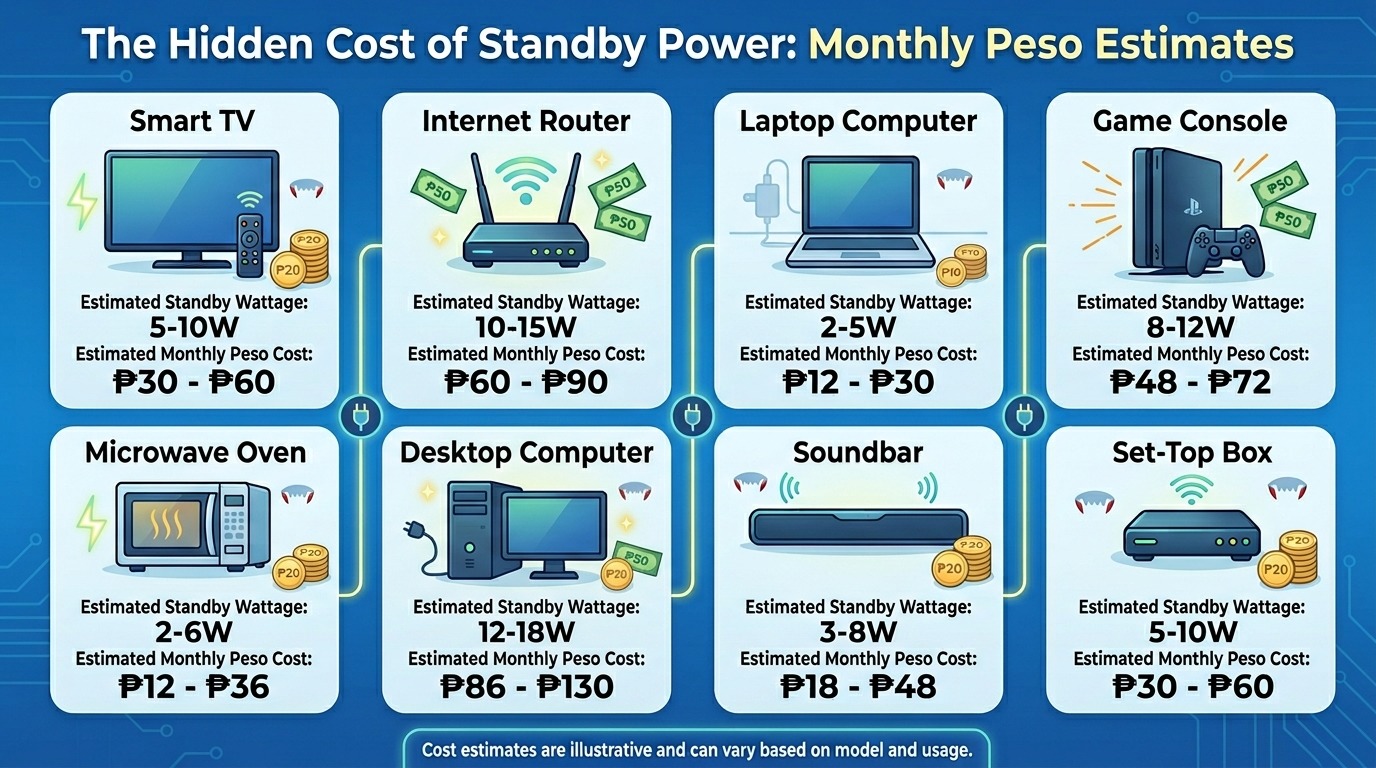
Key takeaway: The average Filipino household pays ₱860 to ₱1,720 per year on electricity it never actually uses. Standby power is a real line item, and it's fully preventable.
Which Tapo Smart Plug Works Best for a Philippine Home?
TP-Link offers two energy-monitoring smart plugs in the Philippines: the Tapo P110 and the newer Tapo P110M. Both connect to the Tapo app over 2.4 GHz Wi-Fi; support schedules, Auto-Off timers, and energy monitoring; and are compatible with Alexa and Google Assistant for voice control. The P110M adds Matter certification, which lets it work natively with Apple Home and other Matter-compatible ecosystems without needing the Tapo app as an intermediary.
For most Filipino households, the Tapo P110 is the practical starting point. It handles loads up to 3,300W (15A at 220V for the Philippine version), which covers everything from electric fans and lamps to desktop computers, game consoles, and rice cookers. The P110M's compact size is the better choice when you need to plug into a multi-outlet strip without blocking the adjacent socket, a common problem in Philippine homes where extension cords carry four or five appliances at once.
Both models require a 2.4 GHz Wi-Fi connection. If your router broadcasts only 5 GHz, or if you use the 5 GHz band on a dual-band router without a separate 2.4 GHz SSID, the plug will not connect. Most TP-Link routers in the Philippines broadcast both bands, so this is rarely an issue, but it is worth confirming before setup.
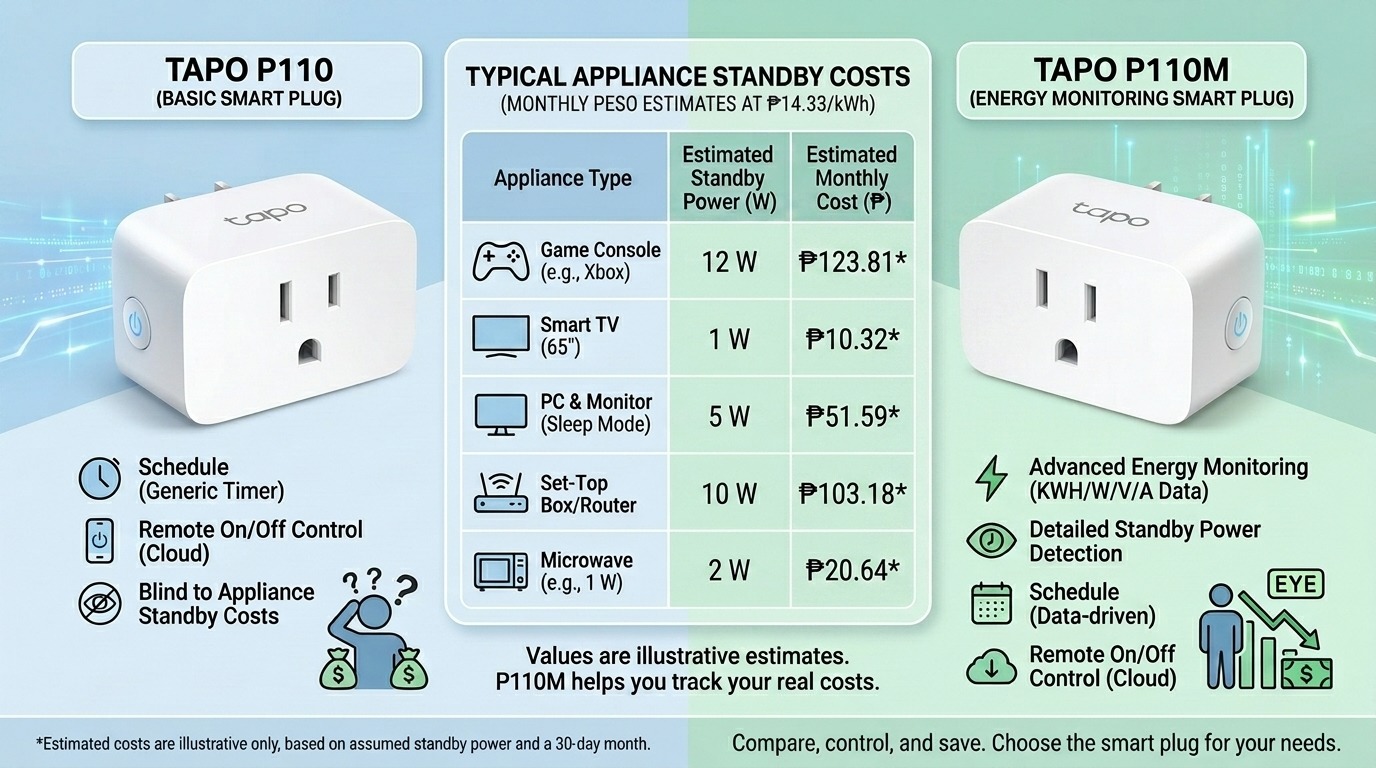
Key takeaway: P110 for most households. P110M when you need Matter compatibility with Apple Home or when outlet space on a multi-socket extension cord is tight.
How To Set Up Your Tapo Smart Plug and Enter Your Meralco Rate in Four Steps
Setup takes under five minutes. No hub or additional hardware is required.
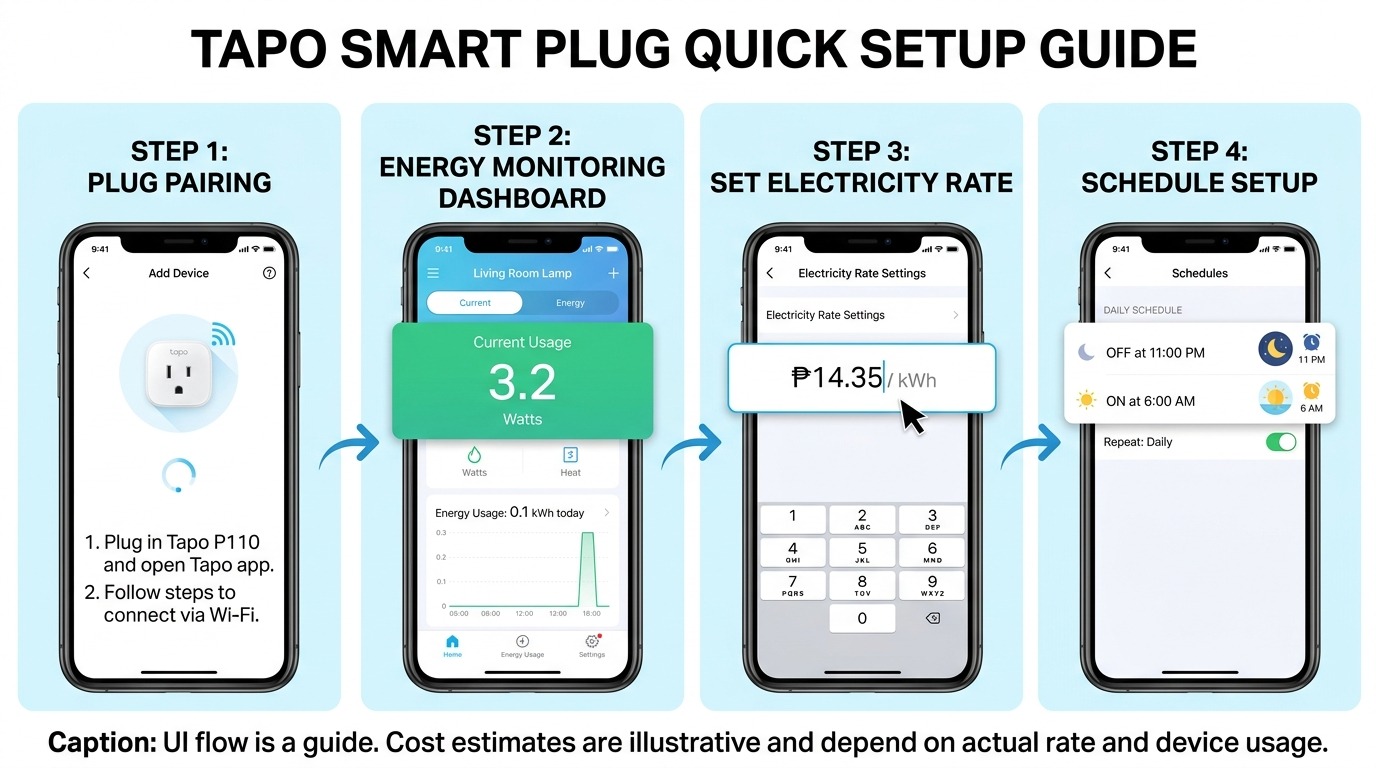
Step 1: Download the Tapo app and create your account. Get the app from the Google Play Store or Apple App Store. Create a free TP-Link ID or log in if you already have one.
Step 2: Plug in and pair. Plug the Tapo P110 or P110M into your outlet. The LED will blink orange and green, indicating it is ready to pair. In the Tapo app, tap the + icon and select your plug from the list of detected devices. Follow the on-screen prompts to connect it to your 2.4 GHz Wi-Fi network.
Step 3: Enter your Meralco rate. Open the device page for your plug and tap the Energy Monitoring section. Tap Show More, then tap the edit button next to Monthly Bill. Enter your electricity rate. For Meralco subscribers, use ₱14.33 per kWh as a close current approximation, or check your latest bill for the exact rate printed under Generation Charge plus all other components. The Tapo app supports both single billing and time-of-use billing input.
Step 4: Set a schedule or Auto-Off timer. Tap Schedule to configure specific on and off times for the appliance. Tap Device Settings, then Auto-Off Timer to cut power automatically after a set duration, useful for phone chargers left plugged in overnight or rice cookers whose keep-warm mode runs for hours after cooking ends.
|
Pro tip: After setup, leave the plug running for 24 to 48 hours before reading the data. The Tapo P110 refreshes energy readings every 5 seconds, but the daily and monthly projections become accurate only after at least one full day of real usage data. |
Key takeaway: The entire setup from unboxing to first schedule takes under five minutes and requires no hub, no subscription, and no technical background.
Five Appliances in a Filipino Home Where a Tapo Smart Plug Pays for Itself the Fastest
Not every outlet is worth automating. The best return comes from appliances that draw meaningful standby power and are left plugged in for hours after active use ends. In the Philippine context, with high electricity rates and households where multiple family members have different schedules, these five are consistently the highest-impact targets.
1. Game consoles left in rest mode
A PlayStation or Xbox in standby draws 10 to 15 W continuously to enable background downloads and quick-start. At ₱14.33 per kWh, running 18 hours a day in standby, that is ₱1,160 to ₱1,740 per year, from a console that might be actively played for two hours daily. A Tapo smart plug scheduled to cut power between midnight and 4 PM recovers most of that cost automatically.
2. The TV and entertainment system left in standby overnight
A smart TV in standby plus a cable or fiber set-top box continuously running draws 15 to 35 W combined. That setup runs 24 hours a day, including the 8 hours overnight when nobody is watching. A Tapo P110 plugged into the extension cord powering your entertainment rack, scheduled to cut power between midnight and 6 AM, eliminates that overnight draw. At ₱14.33 per kWh, that 6-hour nightly cut on a 25 W system saves roughly ₱390 per year at zero inconvenience since the TV still turns on normally each morning.
Important: The Tapo P110 is designed for resistive loads, not motor-driven appliances like air conditioners, refrigerators, or washing machines. For aircon management, use the aircon's built-in timer or a dedicated smart aircon controller instead.
3. The desktop PC that idles at night
Work-from-home households in the Philippines often leave desktops running in sleep mode overnight to avoid startup time in the morning. Sleep mode draws 5 to 10 W. A Tapo plug scheduled to cut power at 11 PM and restore it at 7 AM eliminates that draw. Over a year at ₱14.33 per kWh, that eight-hour overnight cut saves ₱210 to ₱420.
4. The rice cooker is in keep-warm mode
Filipino households cook rice one to three times a day, and keep-warm mode consumes 30 to 50 W continuously until someone remembers to unplug it. The Tapo P110's Auto-Off timer is the cleanest solution: set it to cut power 45 minutes after the cooking cycle ends, long enough to keep the rice warm for a meal without running keep-warm for three hours into the afternoon.
5. The phone charging station
Overnight phone charging finishes in two to three hours, but chargers stay plugged in and drawing power until morning. A household with four family members charging overnight loses roughly 20 to 40 Wh per night to chargers that finished hours earlier. An Auto-Off timer set for three hours after a standard plug-in time recovers that waste automatically, without anyone needing to remember to unplug.
If slow Wi-Fi is adding to your household frustration alongside a high electricity bill, 12 Wi-Fi Speed Hacks for Philippine Homes covers the free fixes worth trying before any hardware upgrade.
Key takeaway: Start with the game console and the entertainment rack. Those two outlets alone can save ₱1,500 or more per year, often enough to recover the cost of both plugs within six months.
How to Read Your Electricity Savings in Pesos inside the Tapo App
Once your Meralco rate is entered and the plug has run for at least one full day, the Tapo app's energy dashboard shows three data views: today's consumption in kWh, the past 30 days, and the current month's projected bill in pesos. These figures update in real time as the plug measures wattage every five seconds.
The most useful view for tracking actual savings is the Past 30 Days graph. Compare the first month after setup against the second. If you have set schedules and Auto-Off timers correctly, the second month's projected bill should be lower for that specific outlet. The difference is your savings stated in pesos, not percentages.
The Tapo app also supports up to 32 schedules per device, which is more than enough to cover daily and weekend variations. A household where children are home from school on weekends can set a different schedule for Saturday and Sunday than for weekdays, ensuring the plug behaves appropriately for each day's actual usage pattern.
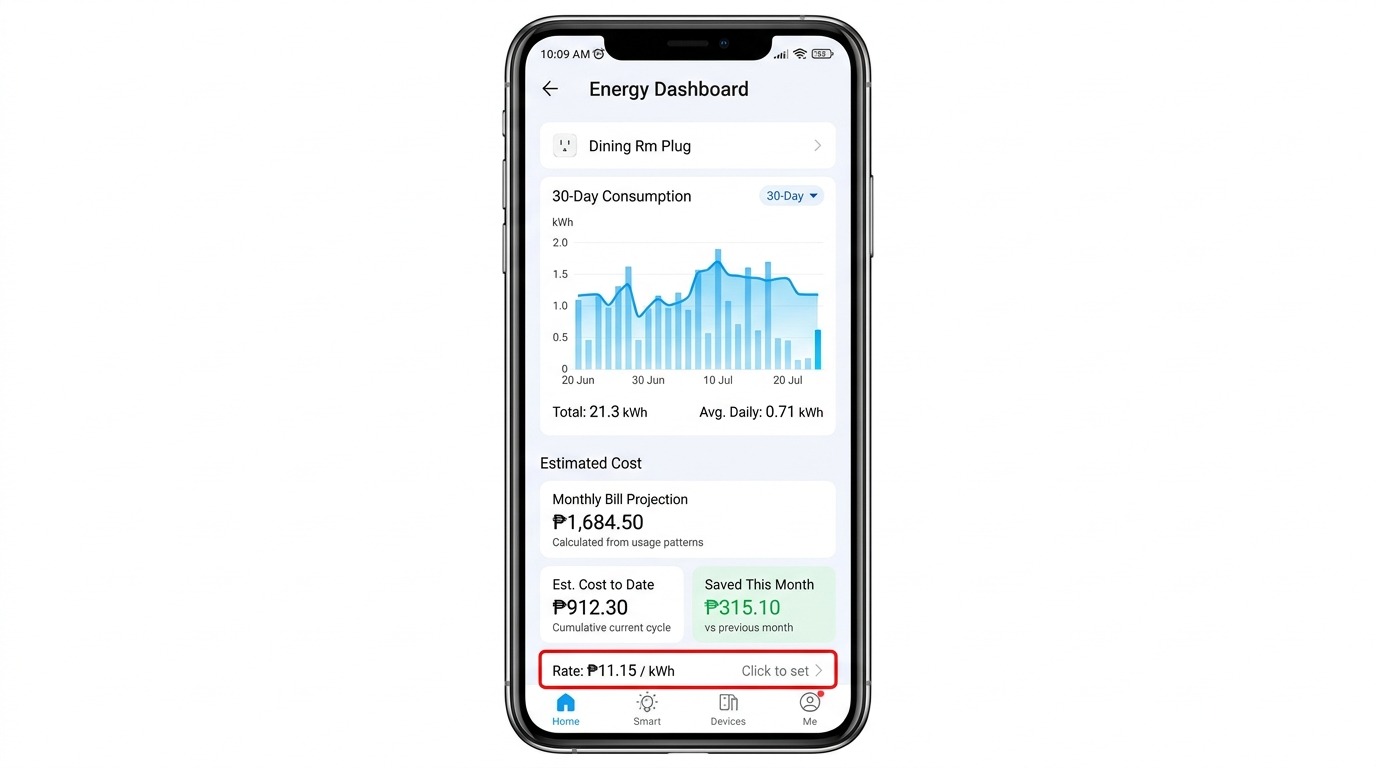
Full guide to the energy monitoring feature, including how to input time-of-use billing rates: Introduction to Tapo Plug Energy Monitoring
Key takeaway: The peso savings number in the Past 30 Days view is the clearest signal. If it's lower than the previous month, the schedules are working.
Frequently Asked Questions
Can I use a Tapo smart plug with a Philippine outlet even though the plug design looks different?
Yes. The Tapo P110 sold in the Philippines is designed for Type A and Type B outlets, which are standard in Philippine homes and covered by the Philippine Electrical Code. It operates at 220V, which matches the Philippine grid voltage. Do not use a plug imported from the US or Europe without confirming its voltage and outlet compatibility, as those markets use 110V or different outlet types.
What is the maximum wattage a Tapo P110 can handle for Philippine appliances?
The Tapo P110 supports up to 15A at 220V for the Philippine version, which equates to a maximum load of 3,300W. This covers most Philippine household appliances: a 1-HP air conditioner draws approximately 746W, a standard electric fan draws 35 to 60W, and a desktop PC draws 150 to 300W under load. Appliances with very high wattage, such as electric water heaters (3,000W or more), should be verified against this limit before connecting.
Will a Tapo smart plug work with my Globe, PLDT, or Converge router in the Philippines?
Yes, as long as your router broadcasts a 2.4 GHz Wi-Fi network. All three major Philippine ISPs, Globe, PLDT, and Converge, provide modems or routers that include a 2.4 GHz band. If your router shows two network names, one standard and one ending in "5G" or "_5GHz," connect the Tapo plug to the standard (non-5G) network during setup. The Tapo P110M also supports setup via Bluetooth for devices that cannot connect directly to 2.4 GHz during the pairing process.
How much does a Tapo P110 cost in the Philippines, and how long until it pays for itself?
The Tapo P110 is available at authorized TP-Link resellers and on Lazada and Shopee. At typical usage on a high-standby appliance like a game console drawing 12W for 20 hours daily in standby, the plug can offset its own purchase cost within six to twelve months, depending on actual standby draw and schedule effectiveness. The P110M, with Matter support, is priced slightly higher but follows similar payback timelines on high-load appliances.
Is it safe to leave a Tapo smart plug running 24/7 in a Philippine home?
Yes, within its rated specifications. The Tapo P110 includes overcurrent protection that automatically shuts off if the connected appliance exceeds the safe power threshold, protecting both the plug and the appliance from damage. The operating temperature range is 0°C to 35°C, which covers standard indoor conditions in Philippine homes. Do not connect appliances that exceed the maximum load rating, and ensure the plug is used in a well-ventilated area during the March to May peak heat season.
Does the Tapo P110 work without an internet connection?
The Tapo P110 supports local control, meaning your scheduled on/off times continue to run even if your internet connection drops. Schedules set in the Tapo app are stored on the device itself. Remote access and push notifications require an internet connection, but the plug will not lose its schedule during a Converge, Globe, or PLDT service interruption.
What is the difference between the P110 and the P110M for a Filipino household?
The P110 is the straightforward energy-monitoring smart plug for most Filipino homes connected over Wi-Fi, and it works with the Tapo app, Alexa, and Google Assistant. The P110M adds Matter certification, which allows it to work natively with Apple Home via the Home app without relying on the Tapo app as a bridge. If you use an iPhone and want your smart plug to work inside Apple's ecosystem directly, the P110M is the right choice. For Android users or anyone not invested in Apple Home, the P110 covers all the same core functions at a lower price.
The cheapest way to lower your Meralco bill is to stop paying for electricity you are not using.
With the May 2026 Meralco rate at ₱14.3345 per kWh, every watt of standby power is real money. A Tapo P110 on your game console, desktop, or entertainment rack does not reduce your comfort. It cuts the hours your appliances spend consuming power while you are asleep, at work, or simply not in the room.
Start with the two appliances in your home that stay plugged in the longest after active use ends. Set schedules in the Tapo app, enter your exact Meralco rate, and compare month-on-month in the energy dashboard. The savings will be stated in pesos, and they compound as you add more plugs across the household.
See the full Tapo smart plug lineup available in the Philippines.
Disclosure: Rates and product specifications mentioned in this article are accurate as of the publication date and may change. Always refer to your latest Meralco bill and the official TP-Link Philippines product page for current information.