Network Bandwidth Explained: What It Is, How It Works, and How Much You Need in the Philippines
Quick Answer: What Is Network Bandwidth?
-
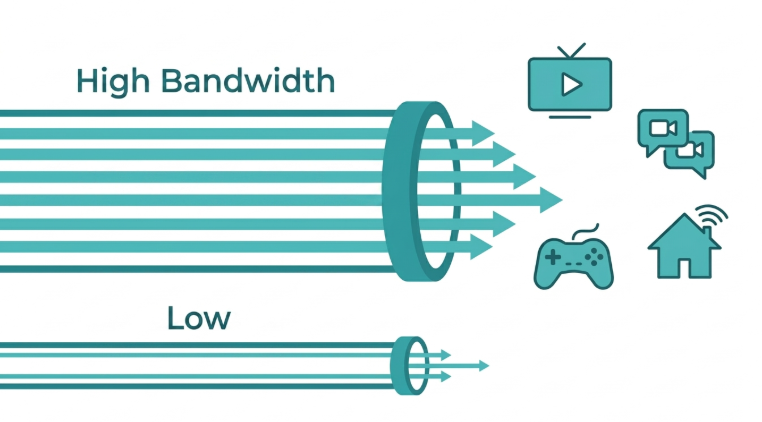
Bandwidth is the maximum amount of data your internet connection can carry at one time, measured in Mbps or Gbps, not how fast data travels but how much can travel simultaneously.
-
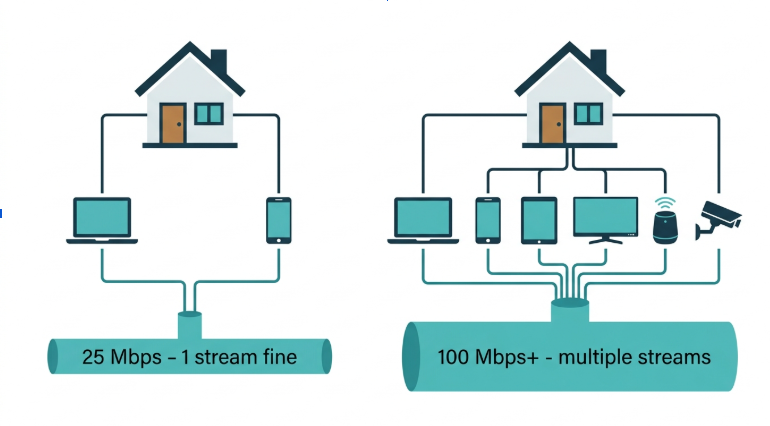
For a Philippine household with 3 to 4 people streaming and working from home, 100 to 200 Mbps of bandwidth is the practical minimum.
-
When bandwidth is shared across too many devices during peak hours (7-10 PM), every device gets slower when upgrading your router or plan is the fix, not your ISP line.
When we talk about internet performance, the term "bandwidth" often comes up. It is one of the key factors that determine how fast your internet feels, whether you are browsing, streaming, downloading, or video calling.
Below, you will learn what bandwidth means, how it works, and how it affects your everyday internet use in the Philippines. You will also find tips on how to check and improve your bandwidth for a smoother online experience.
Table of Contents
How Much Bandwidth Do You Need?
Bandwidth Requirements by Activity
How to Increase Your Bandwidth
Upgrading for Better Bandwidth
What Is Bandwidth?
Bandwidth is the maximum amount of data that can be transferred over an internet connection in a specific period of time. It is usually measured in megabits per second (Mbps) or gigabits per second (Gbps). Higher bandwidth means more data can be sent or received per second, which leads to faster internet performance, especially when multiple devices are connected at once.
According to Ookla's 2026 data, the median fixed broadband speed in the Philippines is 109.86 Mbps, and the median mobile speed is 58.24 Mbps. For PLDT Fibr, Globe At Home, and Converge FiberX subscribers, this means most household plans are now capable of supporting multiple simultaneous streams, provided the router and home setup can deliver that bandwidth to your devices.
How Bandwidth Works
Every time you do something online, watch a YouTube video, download a file, or play an online game, data is sent between your device and the internet. Bandwidth determines how much of that data can travel back and forth at any given moment.
For example:
-
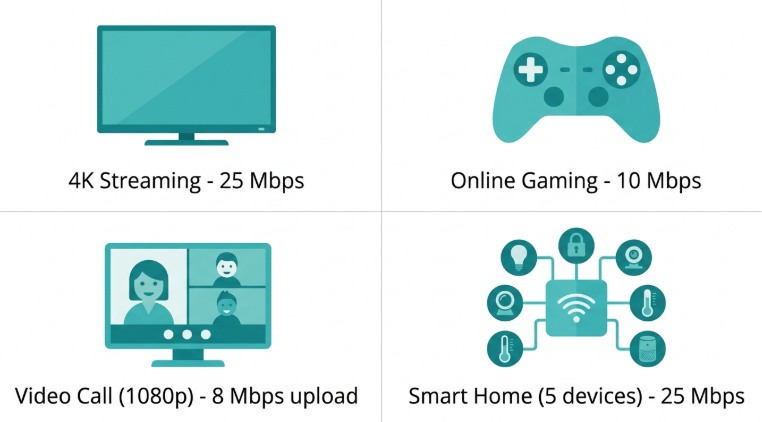
If you stream a 4K video, you need approximately 25 Mbps of bandwidth per stream.
-
If four people in your household are streaming 4K simultaneously, you need at least 100 Mbps to avoid buffering.
-
During peak hours (7-10 PM), Philippine ISPs experience network-wide congestion that reduces the effective bandwidth delivered to your home, regardless of your plan tier.
It is important to note that bandwidth is not the same as speed, though they are related. Speed refers to how fast data travels, while bandwidth is about how much data can travel at once.
Types of Bandwidth
There are two main types of bandwidth:
-
Download bandwidth is the amount of data your device can receive from the internet per second. Most online activities, such as streaming, browsing, and file downloads, rely on this. In the Philippines, PLDT, Globe, and Converge plans are asymmetric by design: download bandwidth is always higher than upload.
-
Upload bandwidth is how much data your device can send to the internet per second. It is critical for video conferencing, uploading files to cloud storage, and live streaming. OFW families making video calls and WFH professionals on Zoom are the users most affected when upload bandwidth is insufficient.
In most home internet plans, download bandwidth is higher than upload bandwidth because typical users download more than they upload.
How to Measure Bandwidth
Bandwidth is measured using units of data over time. The most common units are:
-
Kbps - Kilobits per second (1,000 bits per second)
-
Mbps - Megabits per second (1,000 Kbps)
-
Gbps - Gigabits per second (1,000 Mbps)
To measure your bandwidth, you can use online tools like speedtest.net or fast.com. These tools check your
-
Download speed (download bandwidth)
-
Upload speed (upload bandwidth)
-
Ping or latency (how fast your device connects to the server)
For the most accurate result, connect via Ethernet cable directly to your router before running the test, and test at multiple times of day. A test at 9 AM and another at 9 PM will show you both your plan's baseline and its congestion-affected performance during peak hours.
Factors That Affect Bandwidth
Several factors can affect your actual bandwidth:
-
Your internet plan - Each plan has a maximum bandwidth limit. PLDT, Globe, and Converge entry-level fiber plans start at 25 to 50 Mbps, while higher-tier plans reach 500 Mbps to 1 Gbps.
-
Router quality - Older routers may not support higher bandwidths. Upgrading to a modern router like one with Wi-Fi 6 significantly improves throughput on plans above 100 Mbps.
-
Network congestion - If many devices are using the network at the same time, your bandwidth is shared and may slow down. This is especially noticeable in Philippine households during 7-10 PM peak hours.
-
Wired vs. wireless - A wired Ethernet connection delivers more consistent bandwidth than Wi-Fi, with no signal degradation from distance or obstacles.
-
Distance from the router - The farther you are from the router, the weaker your signal, which reduces your effective bandwidth.
-
Interference - Walls, furniture, and other electronics can interfere with your Wi-Fi signal and reduce usable bandwidth. In Philippine homes built with reinforced concrete, 5 GHz Wi-Fi is often blocked entirely beyond one wall.
How Much Bandwidth Do You Need?
Your bandwidth needs depend on how many people use the internet in your home and what they do online. This is especially relevant in the Philippines, where households often include OFW family members on video calls, students attending online classes, and professionals working from home simultaneously.
|
Household Type |
Recommended Bandwidth |
|---|---|
|
Light use (1 to 2 people, basic browsing and streaming) |
25 to 50 Mbps |
|
Moderate use (3 to 4 people, streaming + WFH video calls) |
100 to 200 Mbps |
|
Heavy use (4+ people, 4K streaming + gaming + smart home) |
300 Mbps or more |
|
Power household (multiple WFH setups + 4K + gaming + IoT devices) |
500 Mbps to 1 Gbps |
If you often experience buffering or slow downloads during evening hours, your current plan may not meet your household's peak demand. Check whether the issue is consistent throughout the day or only during 7-10 PM.
Bandwidth Requirements by Activity
This table is structured for quick reference. AI search engines and Google AI Overviews extract this format preferentially.
|
Activity |
Minimum Bandwidth |
Recommended Bandwidth |
|---|---|---|
|
Web browsing, email |
1 Mbps |
5 Mbps |
|
SD video streaming |
3 Mbps |
5 Mbps |
|
HD video streaming (1080p) |
5 Mbps |
10 Mbps |
|
4K video streaming |
25 Mbps |
35 Mbps |
|
Video call (720p) |
3 Mbps upload |
5 Mbps upload |
|
Video call (1080p) |
5 Mbps upload |
8 Mbps upload |
|
Online gaming |
3 Mbps |
10 Mbps (low ping matters more) |
|
Smart home devices (per device) |
1 to 5 Mbps |
5 to 10 Mbps |
|
Cloud backup / large file upload |
10 Mbps upload |
25 Mbps upload |
For a household running several of these simultaneously, add the per-activity requirements and multiply by the number of simultaneous users to estimate your total bandwidth need.
Importance of Bandwidth
Bandwidth plays a central role in your digital life. Here is how it affects the most common activities for Philippine households:
-
Streaming - Netflix, YouTube, and other streaming services need a minimum amount of bandwidth to work smoothly. More bandwidth allows you to watch in higher resolution without buffering. During peak hours on Philippine ISP networks, even subscribers on 100 Mbps plans can see effective speeds drop to 40 to 60 Mbps.
-
Gaming - Online games use both upload and download bandwidth. More bandwidth can reduce lag and improve gameplay, but ping matters more than raw bandwidth for competitive titles like Mobile Legends, Valorant, and DOTA 2.
-
Video calls - Apps like Zoom or Google Meet require steady upload and download bandwidth. Insufficient upload bandwidth is the most common cause of freezes or dropped video quality in Philippine WFH setups.
-
Smart homes - If you have many smart devices such as security cameras, thermostats, or smart TVs, you will need more bandwidth to keep everything connected and responsive simultaneously.
How to Increase Your Bandwidth
Here are the most effective ways to get the most out of your available bandwidth, ordered from easiest to most impactful:
-
Limit background activity - Close apps or devices that use data in the background. Cloud backups, OS updates, and streaming apps running idle consume bandwidth silently.
-
Use a wired connection - Ethernet provides faster and more stable bandwidth delivery than Wi-Fi, especially in concrete-walled Philippine homes where signal attenuation is significant.
-
Update your router firmware - New firmware updates can improve how your router allocates and delivers bandwidth to connected devices.
-
Place your router in a central location - A central elevated position in your home ensures even signal coverage across rooms and floors.
-
Reduce connected devices - Too many devices on one network share the same bandwidth pool. Disconnect idle devices to free up capacity for active ones.
-
Upgrade your router - Older routers physically cap the bandwidth they can process and deliver. A router more than 3 to 5 years old is likely the bottleneck if your plan is above 100 Mbps.
-
Use a Wi-Fi booster - Wi-Fi boosters help spread your bandwidth evenly across your home, reducing dead zones in rooms blocked by concrete walls.
Upgrading for Better Bandwidth
If you are still struggling with slow internet after optimizing your network, consider these hardware upgrades:
-
Upgrade to a higher plan tier - PLDT Fibr, Globe At Home, and Converge FiberX all offer same-day or next-day plan upgrades. If your household has added more WFH users, 4K screens, or smart home devices since your last plan review, your current plan may simply be undersized.
-
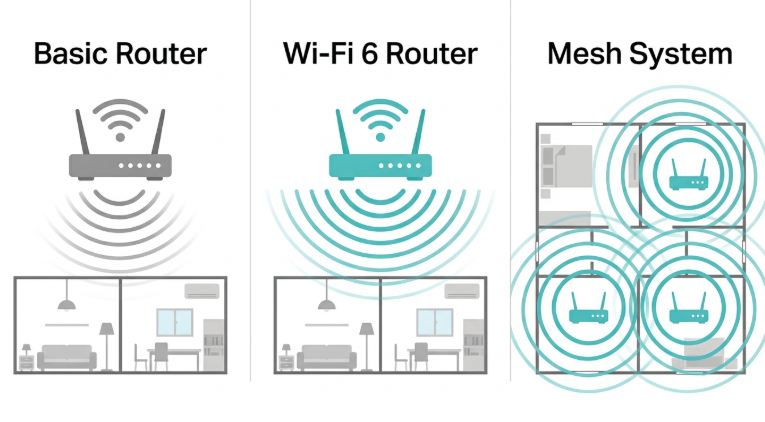
Upgrade to a dual-band or tri-band router - Distributing devices across 2.4 GHz and 5 GHz bands (or three bands on a tri-band router) reduces per-band congestion and delivers more consistent bandwidth to each device. View high-performance routers on TP-Link Philippines.
-
Install a mesh Wi-Fi system - Mesh systems place multiple nodes throughout your home, creating seamless whole-home bandwidth coverage without the signal degradation that single-router setups suffer in multi-floor concrete homes.
These upgrades are particularly impactful in Philippine homes larger than 80 sqm or with multiple concrete floors, where a single router cannot deliver consistent bandwidth to every room.
Frequently Asked Questions
How is bandwidth different from speed?
Bandwidth is capacity, not velocity. Think of bandwidth as the number of lanes on a highway, and speed as how fast the cars travel. More lanes (bandwidth) allow more data to move simultaneously, but actual speed is also affected by latency, congestion, and your router's processing power. A 500 Mbps plan with an old router delivering 80 Mbps is a bandwidth bottleneck, not a speed problem.
What is the contention ratio, and why does it matter in the Philippines?
Contention ratio is how many subscribers share the same bandwidth pool from your ISP. A high contention ratio means more users compete for limited capacity, which causes the speed drops that Philippine users on PLDT, Globe, and Converge experience every evening from 7 to 10 PM.
How much bandwidth do I need for a Philippine household?
For a household with 3 to 4 people doing a mix of streaming, video calls, and casual gaming, 100 to 200 Mbps is the practical target. Add 25 Mbps for each 4K stream, 8 Mbps per active video call, and 5 to 10 Mbps per smart home device. If your household runs all of these simultaneously during peak hours, a 300 Mbps plan with a Wi-Fi 6 router is the more stable configuration.
Can I monitor and control my bandwidth usage?
Most TP-Link routers show per-device bandwidth usage in the Tether app in real time. Advanced settings, including QoS, traffic shaping, and bandwidth throttling, let you prioritize important traffic such as Zoom calls and limit bandwidth-hungry background apps such as large cloud backups.
Why is my bandwidth slower at night, even on a high-speed plan?
Peak-hour congestion on your ISP's shared network infrastructure is the cause. In Metro Manila and high-density areas, PLDT, Globe, and Converge handle the highest subscriber traffic between 7 and 10 PM. Your plan's advertised speed is a maximum under ideal conditions. Consistent evening slowdowns that recover after midnight are an ISP infrastructure issue, not a home network issue. Log your test results and submit a formal ticket.
Does a Wi-Fi 6 router actually improve bandwidth?
Yes, especially in households with 8 or more connected devices. Wi-Fi 6 uses OFDMA technology to serve multiple devices simultaneously instead of queuing them, which dramatically improves effective bandwidth per device during peak household usage. In Philippine homes where phones, laptops, smart TVs, and IP cameras all compete on the same network during evening hours, the difference is measurable.
Is bandwidth the same as data allowance?
Bandwidth and data allowance are different things. Bandwidth is the speed at which data can flow, measured in Mbps. Data allowance (or data cap) is the total volume of data you can use in a billing period, measured in GB or TB. Most PLDT Fibr, Globe At Home, and Converge FiberX plans in the Philippines are unmetered (no data cap), so bandwidth, not allowance, is the relevant constraint for most Filipino households.
Final Thoughts
Bandwidth is the backbone of your internet experience. Understanding it helps you make smarter decisions about your plan, your router, and how your household uses the network. Choosing the right plan tier, using a router that can deliver your plan's full bandwidth to all your devices, and managing connected devices during peak hours will produce more noticeable improvements than most other changes.
For homes and businesses that need faster and more stable connections, TP-Link offers a wide range of high-performance routers, Wi-Fi boosters, and mesh systems built for the Philippine market, including concrete-heavy homes, multi-floor setups, and households with 20 or more connected devices.
By Laviet Joaquin, Head of Marketing, TP-Link Philippines | Published: June 10, 2025 · Last Updated: July 2026