What Is Mesh WiFi? How It Works and Why It Matters
Published: November 6, 2024 | Last Updated: July 2026
Published: November 6, 2024 · Last Updated: July 2026
Quick Answer: What Is a Mesh WiFi Network?
-
A mesh WiFi network uses multiple connected nodes placed around your home to deliver one continuous WiFi signal under a single network name and password.
-
Mesh nodes communicate with each other and automatically route your connection through the strongest available path, unlike a traditional router that broadcasts from one fixed point.
-
Mesh WiFi eliminates dead zones, supports seamless roaming between rooms, and scales easily by adding more nodes as your home or needs grow.
A mesh WiFi network uses multiple connected nodes to blanket your home in one continuous WiFi signal, eliminating the dead zones that a single router cannot reach. If certain rooms in your house lose signal or slow down the moment you walk away from your router, this is the technology built to fix exactly that problem.
Table of Contents
Why Mesh WiFi Matters for Filipino Homes
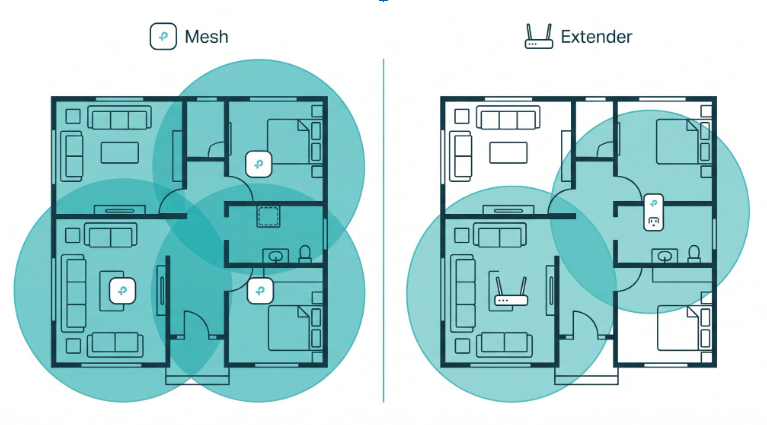
Mesh WiFi vs Traditional Router vs WiFi Extender
What Are the Benefits of Using a Mesh WiFi Network
How Do You Set Up a Mesh WiFi Network
How Is Mesh WiFi Different From a Traditional Router
Do You Really Need a Mesh WiFi Router
Which TP-Link Mesh WiFi System Is Best for Your Home
What Is a Mesh WiFi Network
A mesh WiFi network is a system of two or more interconnected wireless nodes that work together as a single network to provide consistent, whole-home WiFi coverage. Each node talks to the others to form a self-managing web of wireless access points, closing the dead zones and signal drops that one router on its own cannot solve.
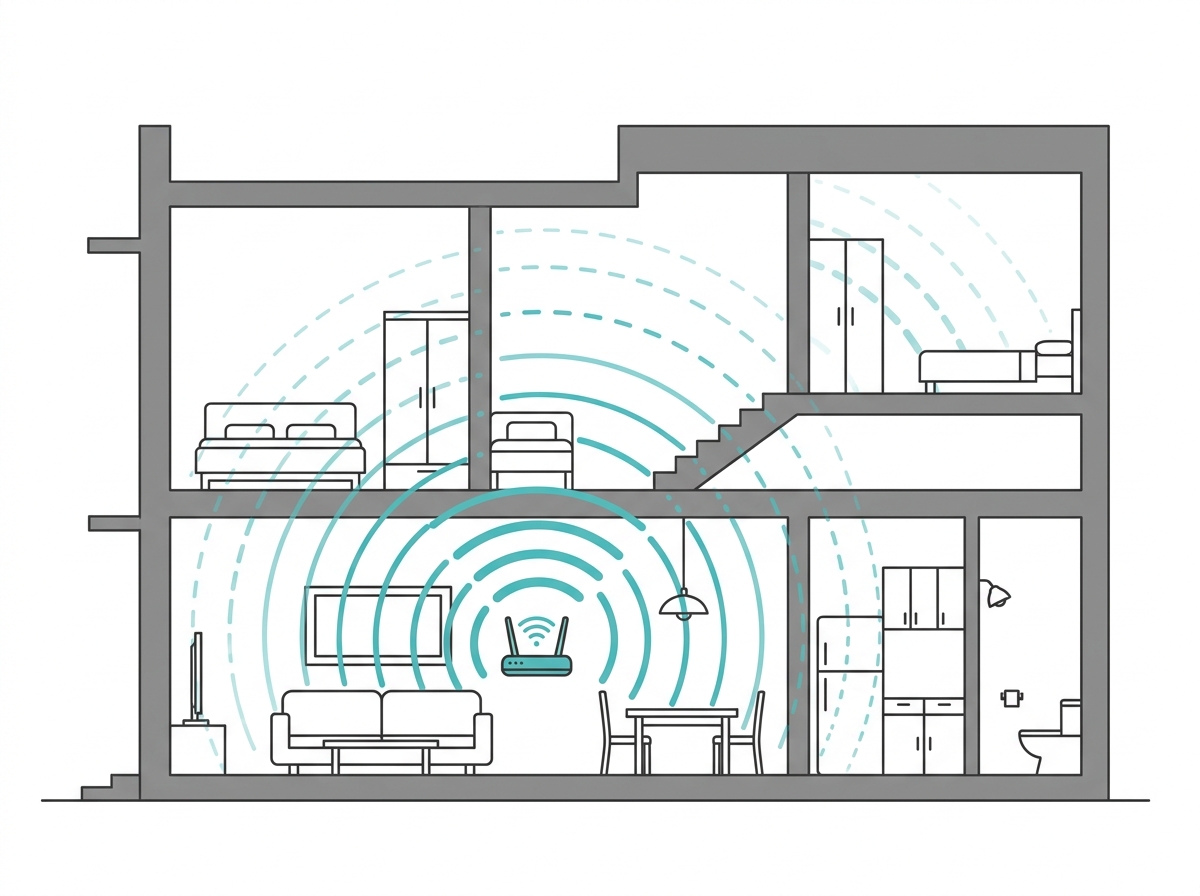
The core difference from a traditional WiFi router is coverage architecture. A standard router broadcasts from a single fixed point, and signal strength weakens the further you move from it and the more walls it has to pass through. A mesh system spreads that signal across multiple nodes, typically placed 9 to 15 meters apart, so every part of your home gets a direct, strong signal instead of a faded one from a distant router.
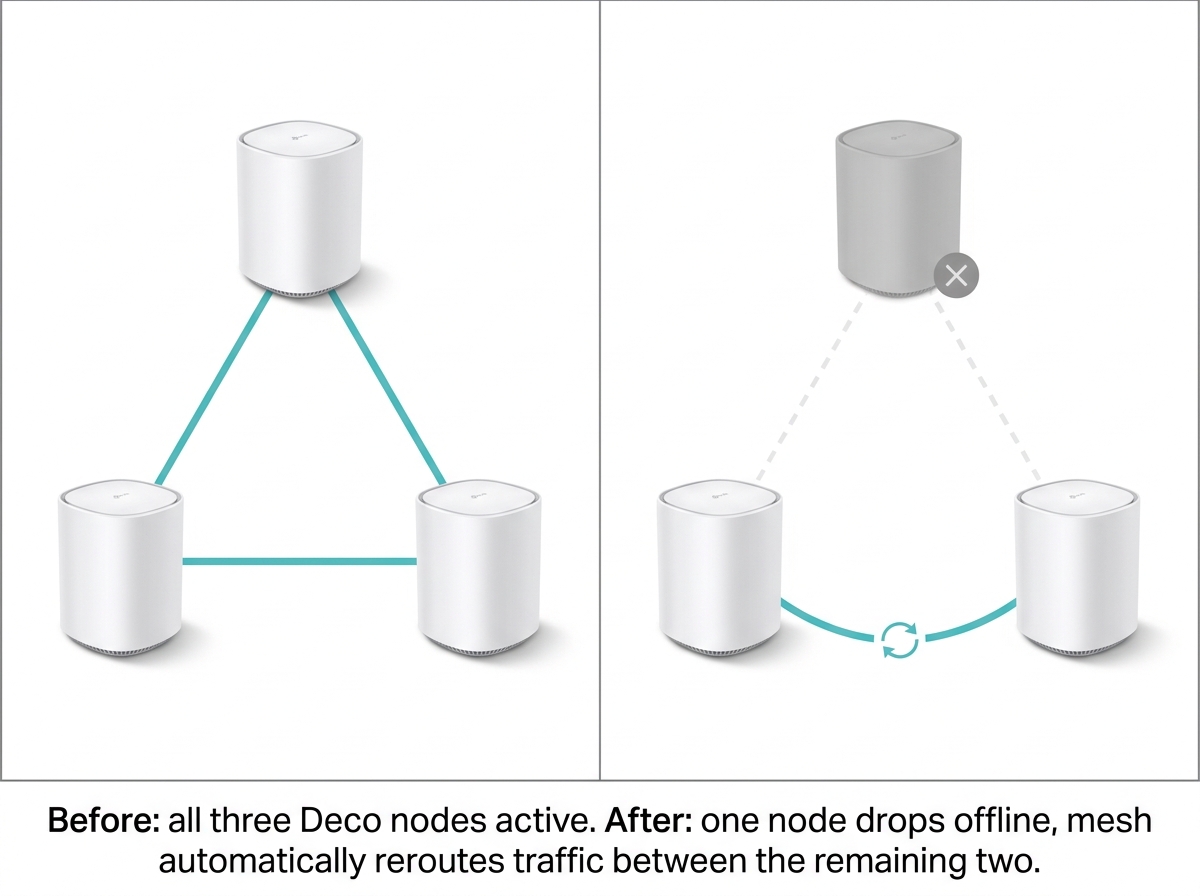
This setup removes dead zones and extends reliable internet connectivity across your entire home or office. Even if one node loses power or fails, the network instantly reroutes through the remaining nodes, a feature called self-healing, so connected devices stay online without interruption.
Understanding what a WiFi network is and how mesh technology builds on it helps you decide whether it is the right upgrade before you buy.
Why Mesh WiFi Matters for Filipino Homes
Philippine homes come in every shape: narrow rowhouses, multi-story townhouses, concrete apartments with thick walls, and sprawling family compounds. A single router placed near the modem rarely reaches every corner. The result is a slow connection in the bedroom, zero signal in the garage, and frustration when several household members are streaming, gaming, or on a work call at the same time.
This problem is sharper in the Philippines than in many other markets because of how homes here are built. Reinforced concrete floors and walls, common across PH housing from condos to subdivisions, absorb WiFi signals far more aggressively than the timber-frame construction. A 2.4 GHz signal can lose 70 to 90 percent of its strength passing through a single concrete wall, and a 5 GHz signal degrades even faster.
With the 2026 median fixed broadband speed in the Philippines now at 105.17 Mbps and median mobile speed at 59.64 Mbps, the bottleneck for most households is whether that speed actually reaches every room. Mesh WiFi was built to solve precisely this gap between the speed you are paying for and the speed you actually get at your desk, in your kid's bedroom, or in the room above the garage.
What Is a Mesh Router
A mesh router is the primary node in a mesh WiFi system, the unit that connects directly to your modem via Ethernet cable and acts as the gateway for every other node in the system. Unlike a traditional router working alone, a mesh router is built to operate as part of a coordinated system.
Each additional satellite node picks up the signal from the mesh router and rebroadcasts it, closing dead zones throughout the coverage area. The result is one unified network where your devices automatically connect to whichever node gives the strongest signal at that moment.
Mesh WiFi vs Traditional Router vs WiFi Extender
|
Feature |
Mesh WiFi System |
Traditional Router |
WiFi Extender |
|---|---|---|---|
|
Coverage area |
Whole home via multiple nodes |
Single room to a medium home |
Extends one weak zone only |
|
Dead zones |
Eliminated |
Common in large homes |
Reduced but not eliminated |
|
Network SSIDs |
One unified SSID |
One SSID |
Separate SSID per extender |
|
Device roaming |
Seamless and automatic |
Not applicable |
Manual reconnection is often needed |
|
Scalability |
Add nodes anytime |
Not scalable |
Limited, adds complexity |
|
Coverage per node |
Generally up to 185 sqm per node (varies by model, see product specs) |
Up to 100 to 140 sqm |
Extends 50 to 100 sqm |
|
Self-healing |
Yes, automatic rerouting |
No |
No |
|
Best for |
Large or multi-story homes |
Small apartments |
Single dead zone fix |
This table covers the basics. If you are still deciding between mesh and an extender specifically, the full breakdown of WiFi extenders can be easy to set up and cheaper upfront, but the trade-offs go deeper than coverage area alone. See Mesh WiFi vs. Extender: Which Is Better for the full comparison.
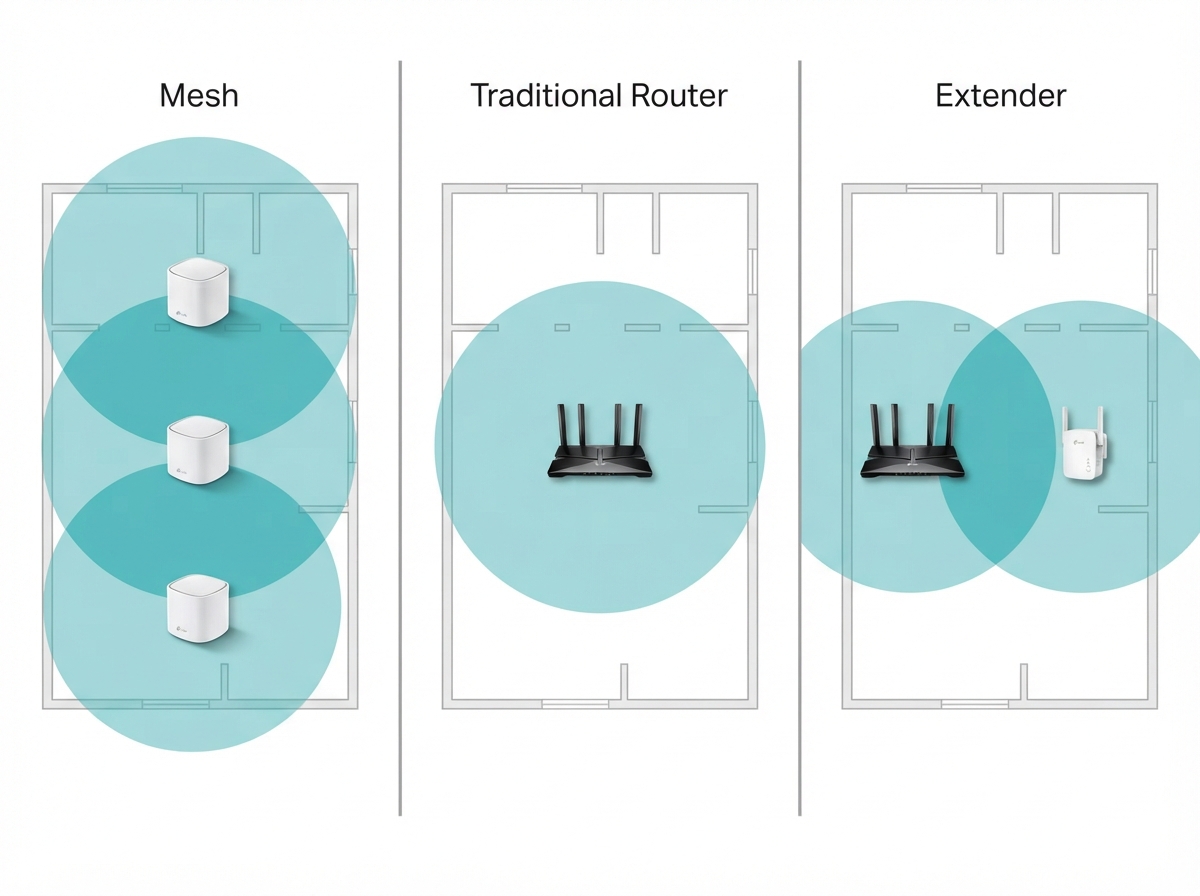
How Does Mesh WiFi Work
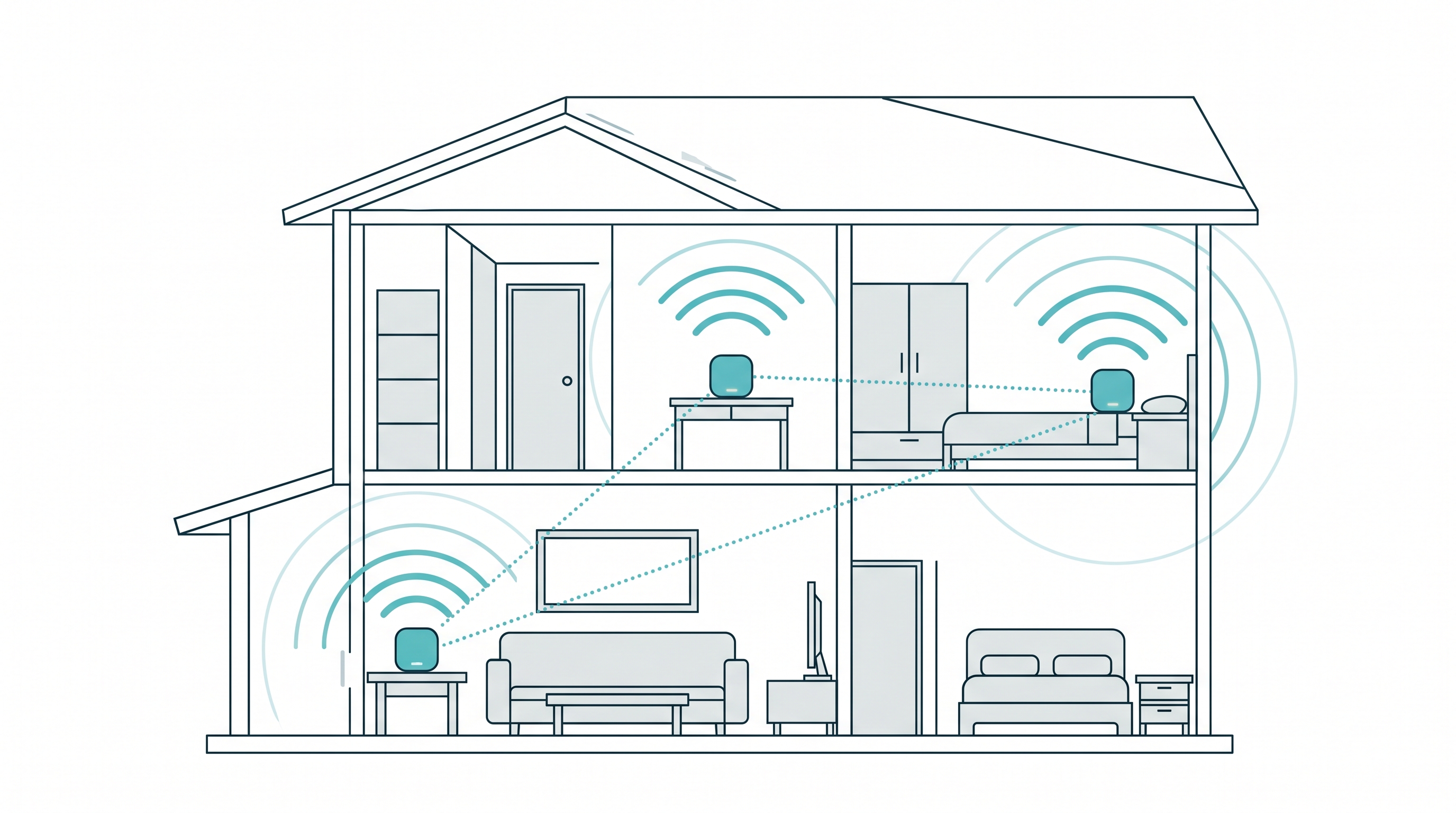
A mesh WiFi network runs on a distributed wireless architecture. The primary router connects to your modem via Ethernet and acts as the network gateway. Satellite nodes placed around your home connect to the primary router wirelessly or via Ethernet backhaul on premium systems and rebroadcast the signal to cover areas the primary router cannot reach on its own.
Most modern mesh systems use a dedicated backhaul channel, so the bandwidth your devices use is never shared with inter-node traffic. This is why mesh WiFi keeps fast speeds even as you move further from the primary router. It is worth noting that the industry also has an open mesh WiFi standard called EasyMesh, which lets certified devices from different vendors interoperate.
TP-Link's Deco systems use a separate, proprietary Deco Mesh technology rather than EasyMesh, which is why Deco units are designed to work together as a complete kit rather than mixed with other brands or with TP-Link's own EasyMesh-labeled routers and extenders.
Primary Router Connection
The primary router connects directly to your internet modem via an Ethernet cable and serves as the hub for the entire mesh system. It handles all communication between your local network and the internet, assigns IP addresses to every connected device, and manages traffic routing across all nodes.
Node Distribution and Backhaul
Satellite nodes are positioned around your home, ideally within line of sight of the primary router or an adjacent node, no more than one or two rooms apart. Each node communicates with the others on a dedicated backhaul band, keeping inter-node traffic separate from your device connections. This builds a broad, seamless WiFi network without speed loss across the coverage area.
Automatic Routing and Self-Healing
Each node continuously checks signal quality and latency across every pathway. As you move through your home, your device automatically switches to the nearest node in a process called seamless roaming, without dropping the connection. If a node goes offline, the system instantly reroutes traffic through the remaining nodes to ensure uninterrupted connectivity. This self-healing capability is one of the biggest technical advantages mesh has over routers and extenders.
Unified Network SSID
All nodes broadcast under a single network name and password. Unlike traditional routers paired with extenders, where each extender creates a separate SSID requiring you to switch networks manually, mesh systems present one unified network. Your devices connect to whichever node delivers the strongest signal automatically, with no action needed on your part.
What Are the Benefits of Using a Mesh WiFi Network
Mesh WiFi systems offer several advantages over traditional routers and extenders.
Consistent, wide coverage. Mesh networks suit large or multi-story homes, buildings with thick walls, or spaces with persistent dead zones. Because nodes are spread across the area, they close weak-signal gaps and deliver even coverage.
Seamless roaming. With a single network SSID, you experience no interruption when moving from room to room. The system automatically connects your device to the nearest, strongest node, with no manual switching required, which ensures a more reliable network experience throughout the day.
Easy expansion. Mesh WiFi systems are highly scalable. You can add more nodes to extend coverage without reconfiguring your entire setup. Moving to a bigger home or adding a floor is as simple as placing one more node.
Self-healing capabilities. Mesh networks reroute traffic automatically if a node goes offline. This minimizes interrupted connections and keeps the network reliable.
Simplified management. Most mesh WiFi systems come with a mobile app that makes setup and ongoing management straightforward. You can monitor connected smart devices, prioritize bandwidth, and adjust settings directly from your phone.
How Do You Set Up a Mesh WiFi Network
Setting up a mesh WiFi network is simple for most households. At a high level, it follows four steps: install the primary router and connect it to your modem, place the satellite nodes around your home in open areas away from thick walls, configure the network through the companion app, and connect your devices once the network is live.
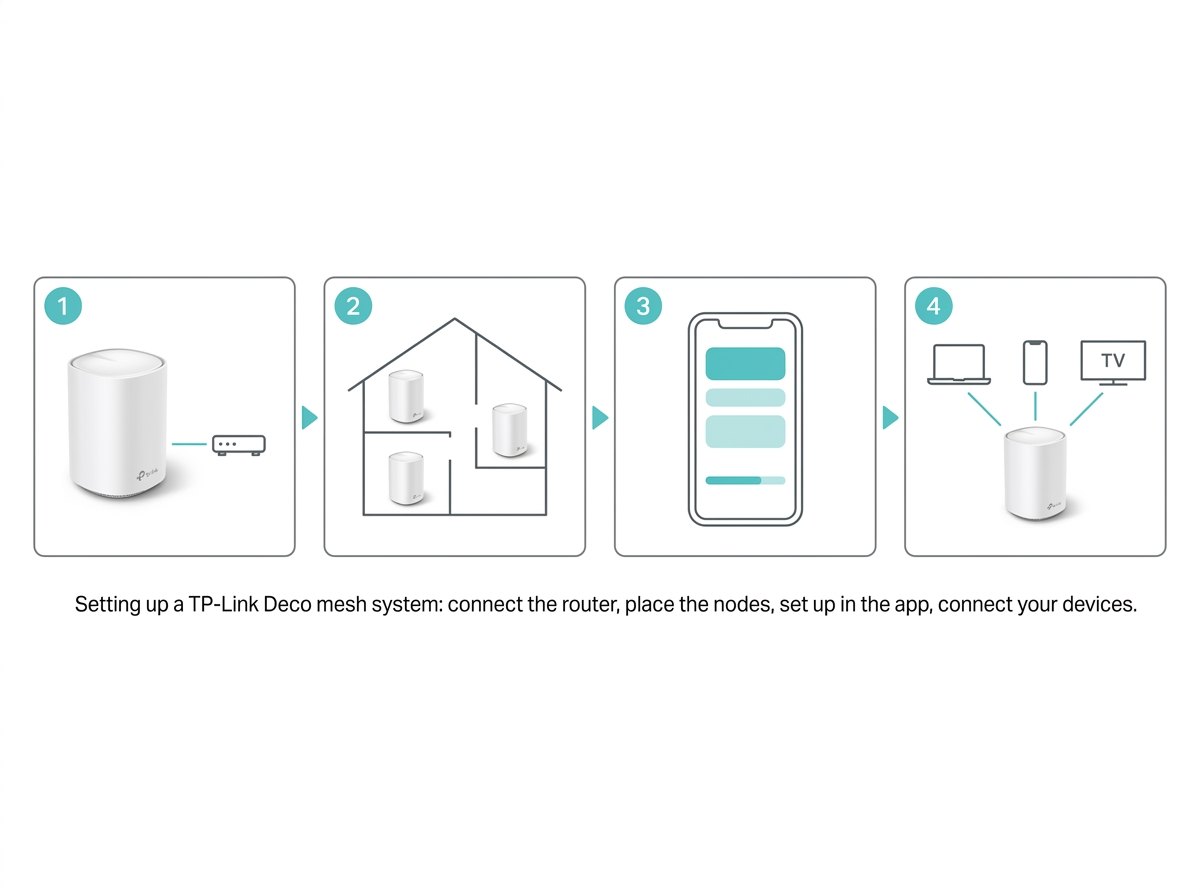 For the complete walkthrough, including exact node placement guidance for Philippine concrete homes and troubleshooting tips, see Setting Up Your Mesh WiFi System: The Basic Guide.
How Is Mesh WiFi Different From a Traditional Router
Coverage approach. Traditional routers broadcast from a central location, and signal strength drops the further you move away. Mesh WiFi uses multiple nodes to distribute the signal evenly across a wide area.
No dead zones. Traditional routers often need WiFi range extenders to cover weak spots, but extenders create network fragmentation and separate SSIDs that require manual switching. Mesh WiFi delivers a single, unified network with no dead zones.
Better for complex layouts. Homes with complex layouts, thick concrete walls, or multiple floors perform noticeably better with mesh WiFi. Nodes can be placed strategically to route around the obstacles that block a single WiFi router's signal.
Do You Really Need a Mesh WiFi Router
It depends on your home setup. If your current WiFi coverage is strong and consistent everywhere you use it, a mesh system may not be necessary.
You likely need mesh WiFi if:
-
Your home has multiple floors, thick concrete walls, or an irregular layout
-
You experience slow speeds in certain rooms but not others
-
You have many devices connected at once: phones, laptops, smart TVs, cameras, and smart home gear
-
A single router leaves dead zones that repositioning it still does not fix
If any of these apply, a mesh system will deliver a noticeable improvement. Once it is set up, it is also worth taking a few minutes to secure your mesh WiFi router to protect your data and your network.
Which TP-Link Mesh WiFi System Is Best for Your Home
TP-Link's range of mesh WiFi solutions covers households of every size and budget. The table below matches common use cases to the right Deco system.
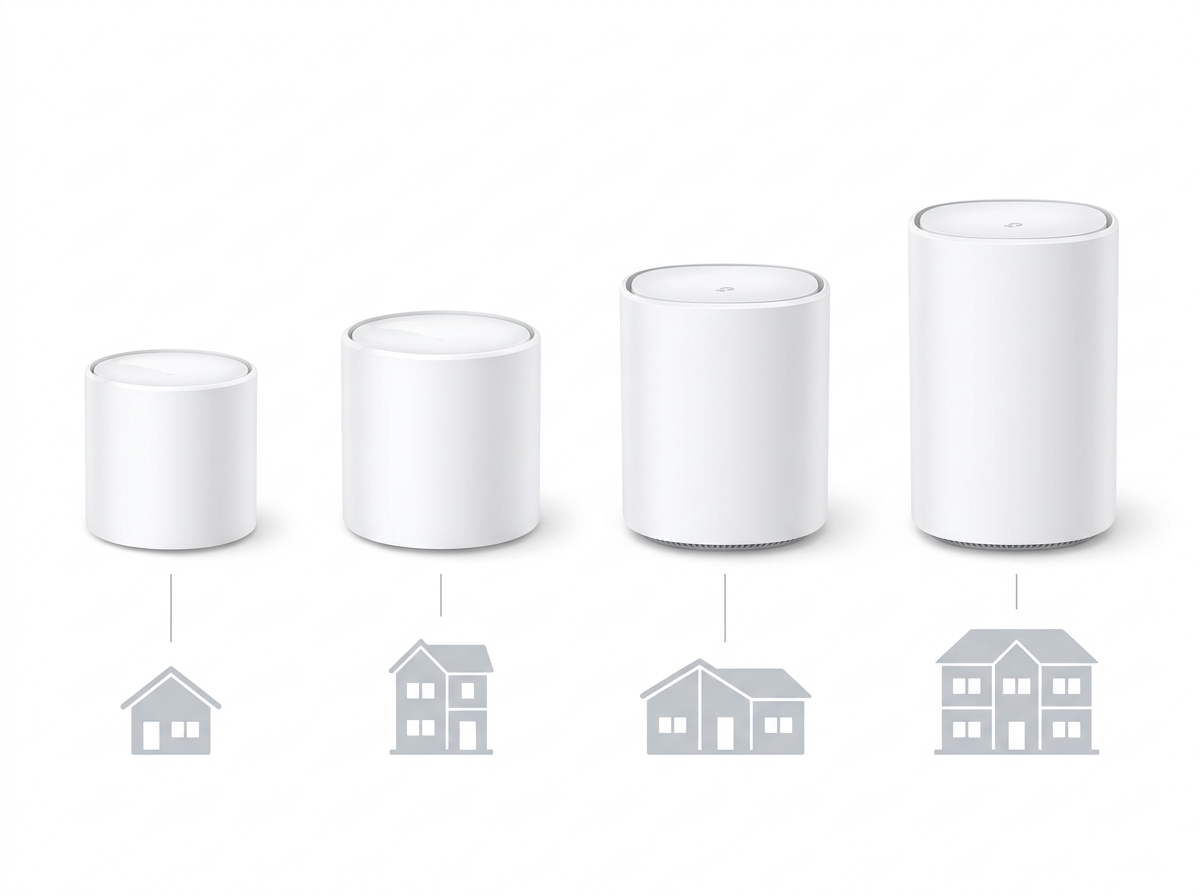
|
Use Case |
Recommended TP-Link Product |
Where to Find It |
|---|---|---|
|
Large home or crowded network with many smart devices, future-proof setup |
||
|
Medium to large home, solid mid-range WiFi 6 performance |
||
|
Budget-conscious home, entry-level WiFi 6 with reliable coverage |
||
|
Smart home integration, budget-friendly entry point |
Deco M4 (AC1200) — WiFi 5 |
|
|
Whole-home coverage up to 3.0 Gbps with IoT and parental controls |
If you already own a Deco M9 Plus (AC2200) — WiFi 5, it remains fully usable and can still expand with other Deco units in mixed setups. View Deco M9 Plus details if you need specs for an existing setup, but note that TP-Link has listed it as end of life, so it is no longer available for new purchase. The Deco M4 above is the current recommended entry point for the same smart-home, budget-conscious use case.
All Deco systems are available at tp-link.com/ph/home-networking/deco/ and at authorized retailers nationwide. For a deeper look at which model fits your specific home size, device count, and budget, see TP-Link's range of mesh WiFi solutions or the full Best Mesh WiFi System Philippines roundup.
Frequently Asked Questions
Do I need a mesh WiFi system for a small apartment?
Not necessarily, and a mesh system can be an unnecessary cost for a small unit. If your current WiFi coverage is already strong and consistent throughout your space, a single router is likely enough. Mesh systems deliver the most value in larger homes, multi-floor spaces, or units with thick concrete walls where a single router leaves real weak spots.
Can mesh WiFi work with my existing router?
Yes, some mesh systems can integrate with an existing router running in access point mode. That said, they perform best as a complete replacement system rather than an add-on. Using the full mesh setup avoids compatibility headaches and gives you the best performance and management experience through the app.
Does a mesh WiFi system require professional installation?
No, most mesh WiFi systems are designed for self-installation. TP-Link Deco products walk you through setup using a step-by-step mobile app, and most Philippine households complete the process in under 30 minutes. If your home has an unusual network setup, a technician can help, but it is rarely required.
Is mesh WiFi faster than regular WiFi?
Mesh WiFi is not inherently faster than a traditional router when measured at the same spot. What it delivers instead is consistent speed across a much larger area. In a home where a single router leaves weak zones, mesh WiFi will feel significantly faster, specifically in those previously underserved rooms.
How many nodes do I need for a three-story Philippine home?
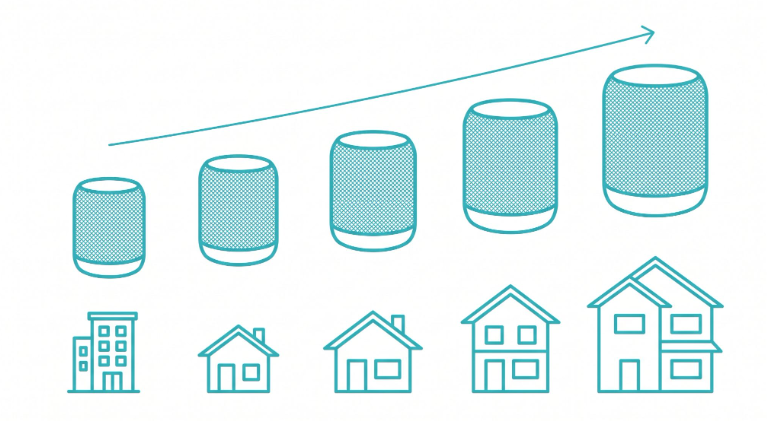
Three nodes typically provide full coverage for a standard three-story townhouse, one per floor. Homes with unusually thick walls or an irregular layout may benefit from a fourth node placed at a known weak spot. The Deco app includes a built-in signal strength guide that helps with exact placement.
Is mesh WiFi good for working from home in the Philippines?
Yes, a mesh system delivers a more reliable connection across your entire home, which matters when your broadband needs to support simultaneous video calls, file uploads, and household streaming at once. The QoS settings in the Deco app also let you prioritize work devices during business hours, which directly ensures a more reliable network experience for OFW families and WFH setups managing calls across time zones.
What is the difference between mesh WiFi and a WiFi extender?
Mesh WiFi uses multiple nodes under one unified network name that automatically route your connection through the strongest path. A WiFi extender amplifies an existing signal into a separate network name that often requires manual switching. Mesh is the more scalable, more seamless option for whole-home coverage, while an extender is a faster, cheaper fix for one isolated dead zone.
How far apart should mesh nodes be placed?
Most mesh nodes are best placed 9 to 15 meters apart, within line of sight of the primary router or an adjacent node when possible. In a typical Philippine home with concrete interior walls, keeping nodes no more than one or two rooms apart produces a more reliable connection than spacing them too far apart.
Final Thoughts
A mesh WiFi network is the right solution for anyone dealing with inconsistent coverage, dead zones, or the demands of a busy connected household. Seamless roaming, self-healing, scalable expansion, and single-app management together make it a clear step up from a traditional router and extender setup in any home where coverage has been a persistent headache.
For Filipino households, the right mesh system is the difference between daily frustration and a network that simply works. Whether you are weighing mesh against an extender, ready to walk through setup, or just want to see which Deco model fits your home, TP-Link's full range of mesh WiFi solutions is the place to start.