
How to upgrade the ISP information of TP-Link Wireless Dual Band 4G LTE Router (new logo)
 197761
본 내용은 다음 항목에 적용됩니다:
Step 1
Download the latest ISP file for your router from www.tp-link.com, then use unzip tools such as WinZIP or WinRAR to extract the file to a folder.
Note:
Please pay attention to the Notes of the ISP file you downloaded.
Step 2
Log into the router’s web management page:
Step 3
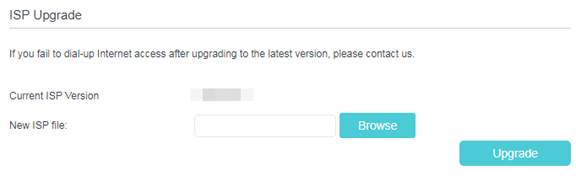
Go to Advanced > Network > ISP Upgrade. Click Browse to locate and select the latest ISP file, and click Upgrade.
Step 4
Wait a few moments for the upgrading.
Get to know more details of each function and configuration please go to Download Center to download the manual of your product.
해당 FAQ가 유용했나요?
여러분의 의견은 사이트 개선을 위해 소중하게 사용됩니다.