
How to manage network access on Wi-Fi Extender+ via Kasa
 51185
51185Kasa allows you to view and manage wireless clients (users) connecting to your extended network(s). You can get the details of the clients, block or unlock them.
Here takes RE270K as demonstration.
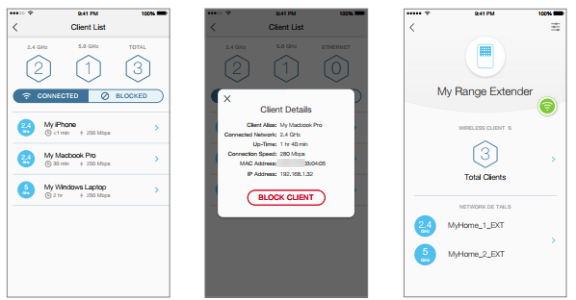
1. On the Devices screen, tap on the row of the Wi-Fi Extender+ to go to its controls.
2. Tap  to switch to the Extended Network view.
3. Tap on the  (hexagon client count) in the Wireless Clients section.
4. On the Client List screen, you can block the current wireless clients listed under the CONNECTED tab by tapping on the row of the client. To unblock a client, tap on the BLOCKED tab to view the blocked clients list, then tap on the row of the blocked client and confirm when prompted.
Get to know more details of each function and configuration please go to Download Center to download the manual of your product.
해당 FAQ가 유용했나요?
여러분의 의견은 사이트 개선을 위해 소중하게 사용됩니다.