How to enable the AI by NVR feature for detection on VIGI NVR
 10812
10812Contents
Configuration for AI by NVR feature
Recommended Deployment Scenarios for AI by NVR
Introduction
VIGI NVR features built-in AI algorithms that analyze video streams from front-end cameras in real time. This allows IPCs without AI or third-party IPCs to perform intelligent detection when paired with a VIGI NVR, enabling AI capabilities across existing surveillance systems.
The detection functions supported by VIGI NVR include:
- Motion Detection
- Line Crossing Detection
- Intrusion Detection
Requirements
- VIGI NVR
- VIGI IPC or Third-Party IPC
Configuration
Configuration for AI by NVR feature
When AI by NVR is enabled, events will be detected by the NVR. VIGI NVR supports Motion Detection, Line Crossing Detection, and Intrusion Detection.
Step 1. Add VIGI IPCs to the NVR using the TP-Link protocol or add third-party IPCs using the ONVIF protocol.
Note: To ensure detection accuracy, AI by NVR is not recommended for use with Pan & Tilt cameras, fisheye cameras, dual-lens cameras or when Corridor Mode is enabled.
For VIGI IPCs, Corridor Mode can be disabled by navigating to Settings > Camera > Display>Image and setting Rotation to Off.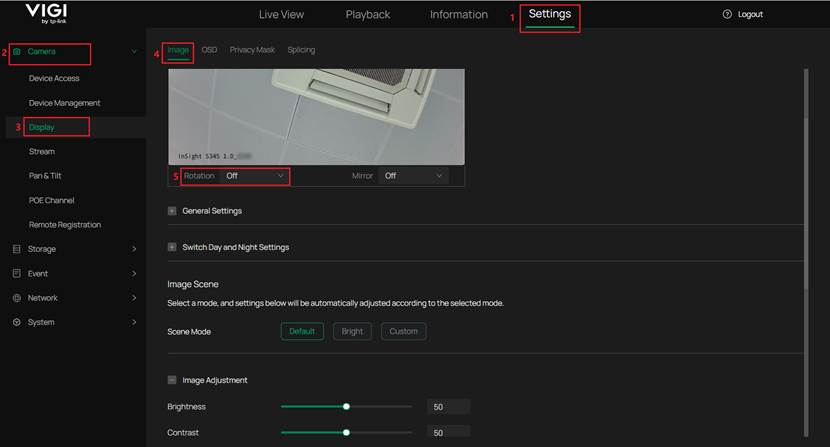
Step 2. Navigate to Settings > Camera > Stream > Video and it is recommended to set the sub-stream resolution higher than 640 * 360 for better detection accuracy.
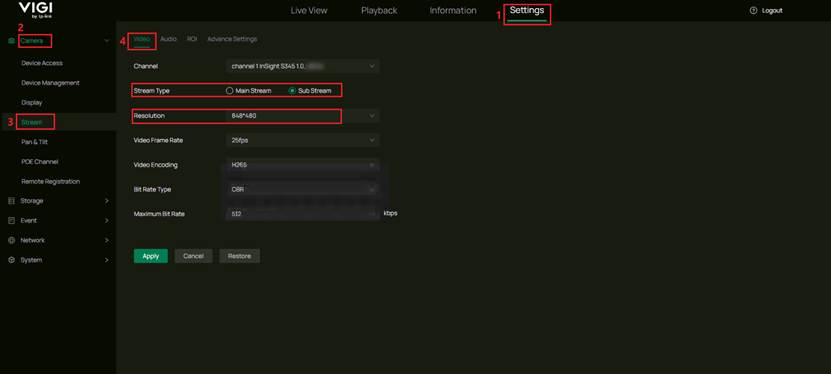
Step 3. Enable AI by NVR for the required detection types:
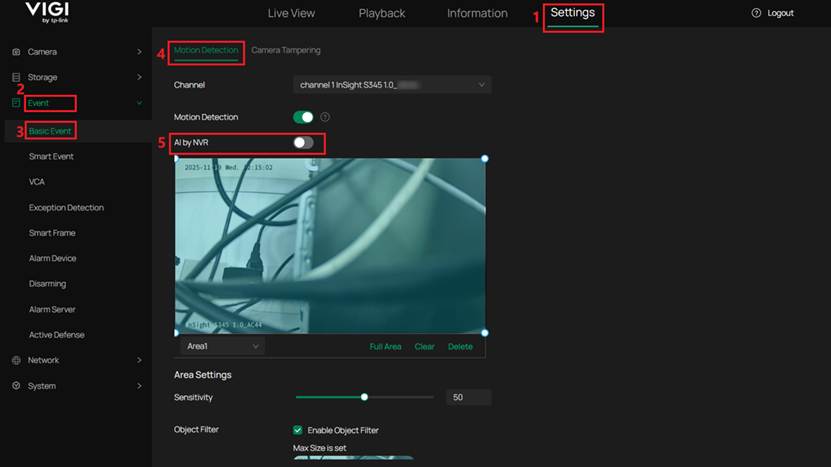
- Motion Detection: Navigate to Settings > Event > Basic Event > Motion Detection and enable the AI by NVR switch.
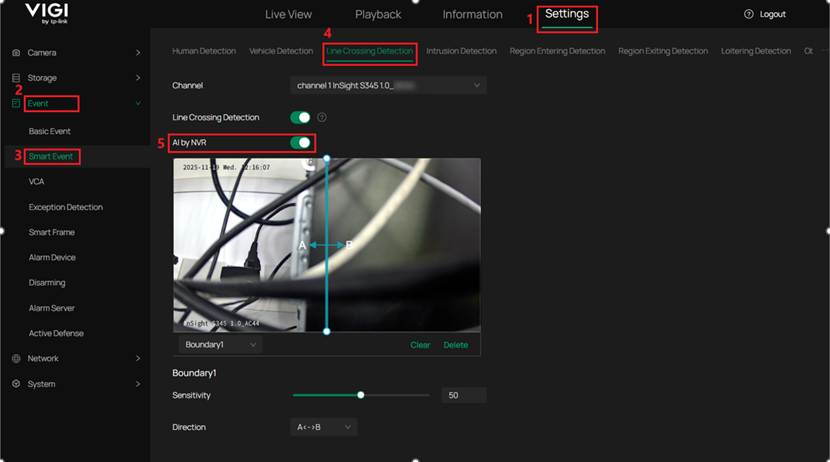
- Line Crossing Detection: Navigate to Settings > Event > Smart Event > Line Crossing Detection and enable the AI by NVR switch.
- Intrusion Detection: Navigate to Settings > Event > Smart Event > Intrusion Detection and enable the AI by NVR switch.
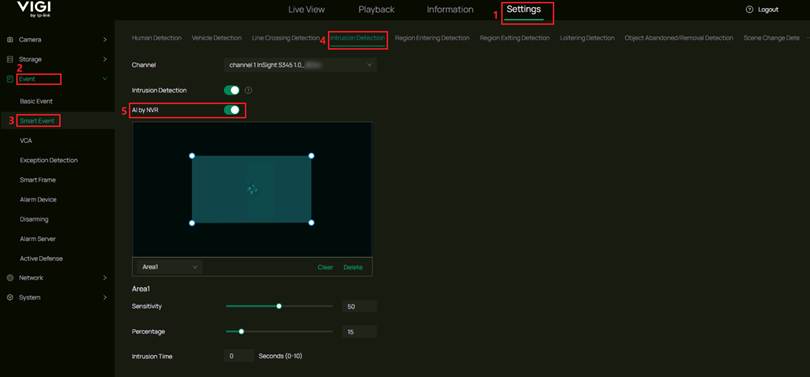
Note:
Feature Compatibility
- After enabling AI by NVR, Smart Detection can still be enabled as needed. When Smart Detection (Human Detection/Vehicle Detection) is enabled, an event is triggered only when a specific object enters the area.
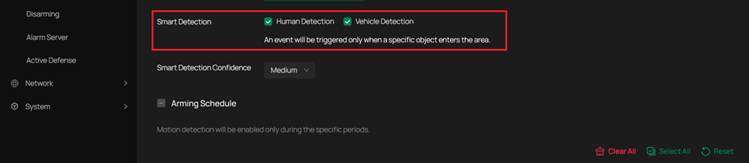
Channel Limitation
- Up to four channels can be configured for AI by NVR detection simultaneously.
Bandwidth Impact
- Enabling AI by NVR reduces the Bandwidth of Net Receive Idle. For example, the bandwidth decreases from 320 Mbps to 160 Mbps after the feature is enabled.
Feature Restrictions
- Independent video output is not supported when AI by NVR is enabled.
- Channel-Zero is not supported when AI by NVR is enabled.
Recommended Deployment Scenarios for AI by NVR
- AI by NVR detection performance varies with the number of channels enabled. When all four channels are enabled simultaneously, the detection efficiency may be lower than when only a single channel is enabled. Enabling fewer channels helps maintain more stable detection performance.
- Ensure the monitoring area is open and unobstructed. Reflective surfaces, occlusions, or complex backgrounds may reduce detection accuracy.
- Ensure proper lighting conditions and avoid strong backlight. Overly dark or overexposed environments can affect detection results.
- Maintain an appropriate monitoring distance. Ensure that the target appears clear within the image and occupies a suitable portion of the frame for reliable detection.
Conclusion
With the information and steps above, you will know how to apply AI by NVR according to your requirements.
Get to know more details of each function and configuration please go to Download Center to download the manual of your product.
QA
Q1: How does the interaction between the IPC and NVR change when AI by NVR is enabled?
A1: When AI by NVR is disabled, the IPC performs detection itself, the NVR sends detection settings to the IPC through ONVIF, and the IPC reports events to the NVR. When AI by NVR is enabled, the IPC only outputs video streams, and the NVR analyzes the video with its AI algorithm and generates events.
這篇faq是否有用?
您的反饋將幫助我們改善網站

