
What if I cannot connect to the Deco/ISP-customized mesh device default Wi-Fi when setting up the main Deco/controller device
 31658
31658Introduction
In an Easymesh network with two or more routers, the first router connected to the internet source serves as the controller, while the others act as agents.
This article provides troubleshooting instructions for when you cannot connect to the Deco/ISP-Customized mesh device's default Wi-Fi during setup of the main Deco/controller device.
Troubleshooting
Scenario 1: For Deco
Please unplug other Deco units in the package and only power on the main Deco first.
Step 1. Make sure the LED on the Deco is pulsing blue. If not, please hold the reset pinhole for 1s, then wait for 2 minutes till Deco changes from solid yellow to pulsing blue.
Step 2. Turn off the Wi-Fi/WLAN on the phone, and turn it back on.
Step 3. Restart your phone or try a different phone if possible.
Step 4. Set a different Deco as the main Deco.
Scenario 2: For the ISP-customized mesh device
Please unplug other mesh devices in the package and only power on the controller device first.
Step 1. Make sure the LED on the mesh device is pulsing blue. If not, please hold the reset pinhole for 5s until the LED turns pulsing yellow. And then wait for 2 minutes until the LED turns blue and starts pulsing.
Step 2. Move the phone closer to the controller device.
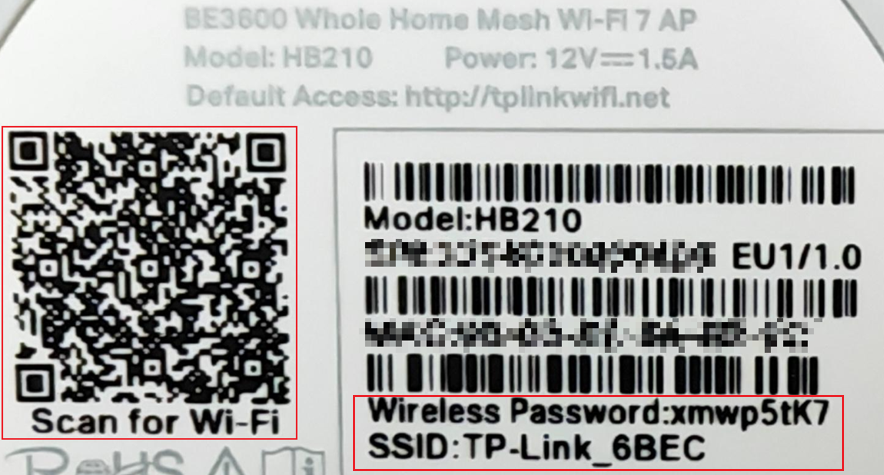
Step 3. Connect to the default Wi-Fi using the information on the label at the bottom of the router. You could connect to the Wi-Fi using the SSID and Wireless Password, or scan the QR code to connect.
Here we take HB210 as an example:
Step 4. Turn off the Wi-Fi/WLAN on the phone, and turn it back on.
Step 5. Restart your phone or try a different phone if possible.
Step 6. Set a different Mesh device as the controller device.
¿Es útil esta pregunta frecuente?
Sus comentarios nos ayudan a mejorar este sitio.


