How to choose and install an external fill light
 2572
2572External Fill Light Selection and Installation
External Fill Light Installation
Introduction
License plate recognition (LPR) cameras are typically deployed at vehicle entrances and exits or other common LPR application scenarios. Installing an external fill light helps improve license plate visibility in low-light environments or in scenarios affected by strong vehicle headlights. This guide provides instructions on how to choose and install an external fill light for optimal license plate recognition performance.
Requirements
- VIGI InSight LPR345Z
- External Fill Light
External Fill Light Selection and Installation
External Fill Light Selection
1. Power Recommendation and Installation Angle Adjustment
A power range of 15–30 W is recommended, as it can meet the illumination requirements of typical LPR scenarios. If overexposure occurs, reduce the fill light power accordingly or adjust the installation angle of the fill light to improve the illumination effect.
Figure 1 shows an overexposed image caused by excessive illumination, while Figure 2 demonstrates a clear improvement in license plate visibility after reducing the fill light power.
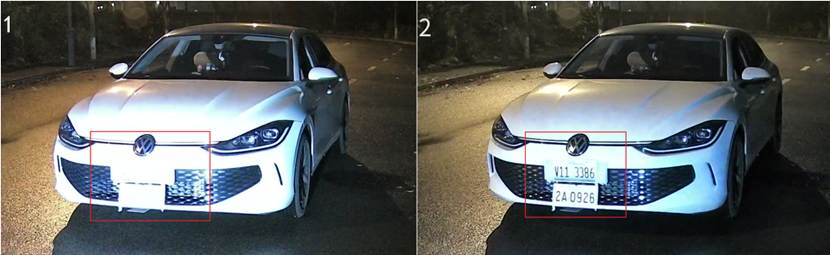
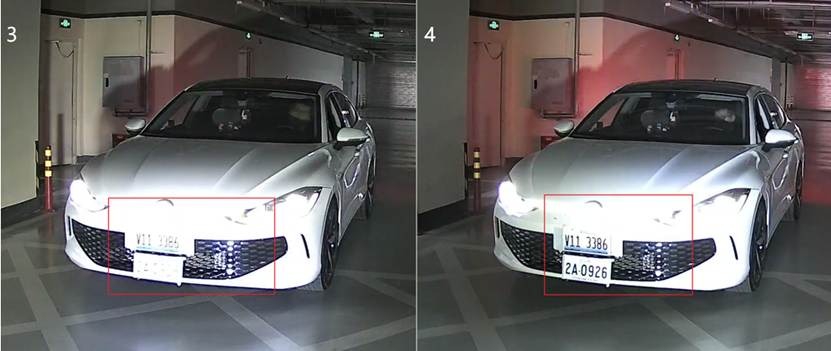
Figure 3 shows an example where the fill light is installed at an improper angle, resulting in suboptimal illumination of the license plate. Figure 4 demonstrates enhanced license plate visibility after optimizing the fill light angle.
2. Color Temperature Selection
A white light color temperature in the range of 4000 K to 6500 K is recommended, as it is close to natural daylight and helps reduce lighting differences between daytime and nighttime environments. This range provides balanced and neutral illumination, ensuring that the license plate area remains bright and clear while maintaining a natural-looking image.
It is recommended to perform basic testing based on the actual installation environment, such as surrounding road lighting conditions, to determine the most suitable setting. This helps ensure stable recognition performance across different time periods.
3. Illumination Angle Selection
An illumination angle in the range of 40° to 90° is recommended for short-distance, wide-area illumination. When vehicles are close to the LPR camera, a wider beam angle illuminates a larger area, ensuring that license plates can be clearly captured even when their position varies within the lane.
External Fill Light Installation
1. Installation Position
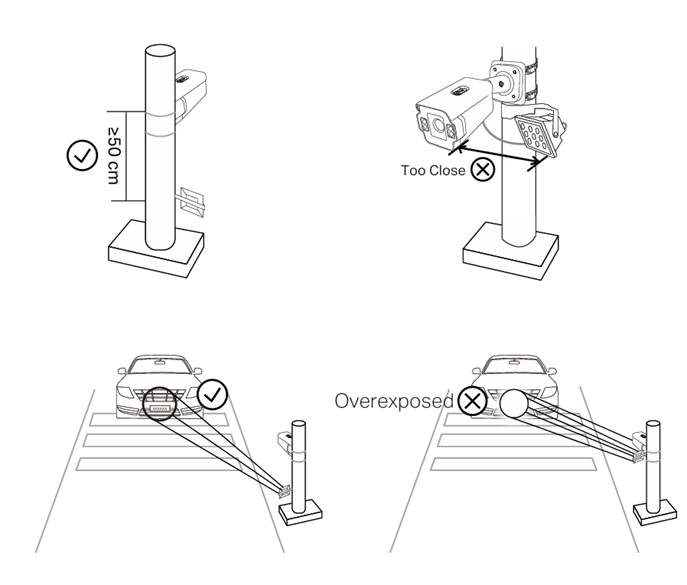
Ensure that the external fill light is installed at more than 50 cm from the LPR camera. Installing the fill light too close may cause overexposure in the captured image, as shown in the figure below.
2. Installation Angle
Set the beam angle to 15°–45° relative to the ground to provide effective illumination, while avoiding direct glare toward the driver’s eyes and preventing direct illumination of the license plate that may cause reflection or overexposure.
3. Illumination Direction
Use angled side illumination, positioning the fill light at 15°–45° relative to the vehicle’s driving direction. Avoid direct frontal illumination of the license plate to prevent reflection and overexposure.
Conclusion
With the guidance above, the external fill light can be properly selected and installed to support reliable license plate recognition.
Get to know more details of each function and configuration please go to Download Center to download the manual of your product.
Is this faq useful?
Your feedback helps improve this site.

TP-Link Community
Still need help? Search for answers, ask questions, and get help from TP-Link experts and other users around the world.