How to Configure a Firewall: Step-by-Step Guide
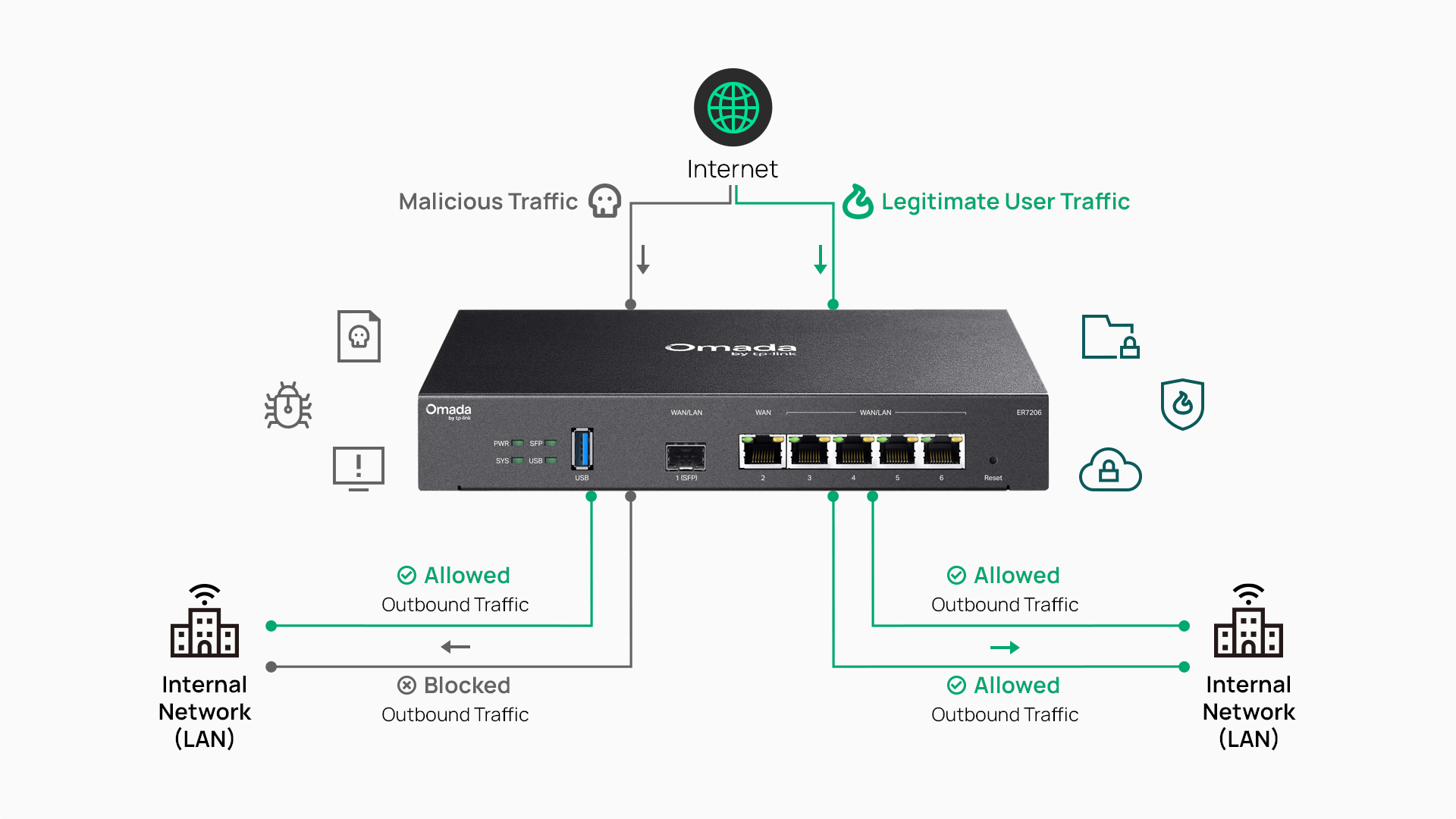
Firewall configuration is the process of creating and managing the rules and policies that control which traffic is allowed to enter and leave a business network. It includes setting up network zones, writing access rules, and maintaining those policies over time as the network's needs change.
A firewall is only as effective as the way it's configured. Loosely written or outdated rules can leave critical business systems exposed, even on capable hardware.
This guide covers a practical, step-by-step process for setting up and maintaining a business firewall, along with best practices and common mistakes to avoid before you start.
Key Takeaways
- Firewall configuration is the process of creating and managing the rules and policies that control traffic entering and leaving a business network.
- The guiding principle is least privilege: deny traffic by default, then explicitly allow only the users, devices, and services your organization requires.
- A secure deployment follows a repeatable process: secure the gateway, define network zones, configure firewall rules, enable logging, test policies, then document and maintain the configuration.
- Network segmentation using VLANs and a DMZ helps contain threats, protect critical business systems, and isolate sensitive traffic.
- Firewall configuration isn't a one-time task. Regular reviews, audits, and policy updates keep your network secure as users, applications, and business requirements evolve.
What Is Firewall Configuration?
Firewall configuration is the ongoing process of creating, ordering, and maintaining the rules that determine which network traffic a firewall allows or blocks. In practice, a firewall enforces an organization's network security policy by evaluating traffic against an ordered list of rules and taking actions such as permitting or denying traffic.
Firewall configuration relies on a few core concepts. Firewall rules and policies define what traffic is allowed or denied based on characteristics such as source, destination, and service. Network zones group devices and systems by trust level, such as an internal LAN, a guest network, or a DMZ (demilitarized zone) for public-facing servers.
Inbound traffic originates from outside the network and attempts to access internal resources, such as a remote employee accessing an internal file server. Outbound traffic originates from internal devices and attempts to access external resources, such as a workstation accessing a cloud application. Each direction typically warrants different rule sets.
These components work together to protect business resources without blocking the communication employees, applications, and services need. A retail network, for example, might allow point-of-sale systems to communicate with a payment processor while preventing those systems from communicating with the guest Wi-Fi network.
How a Firewall Evaluates Traffic
Firewalls evaluate traffic using packet filtering, stateful inspection, or both. Packet filtering examines each packet's header information, such as source and destination IP addresses, ports, and protocol, against configured rules. Stateful inspection goes further, tracking the state of active connections so the firewall can distinguish legitimate return traffic from unsolicited traffic.
Rules are processed in order, from top to bottom, and the firewall applies the first rule that matches a given connection. This is why rule order matters as much as rule content.
Modern business gateways typically combine firewall, routing, and VPN functions in a single device, which simplifies deployment for organizations without a dedicated security appliance.
Why Proper Firewall Configuration Matters
Proper firewall configuration matters because overly permissive rules allow unnecessary access to ports, services, or network segments, increasing the risk of unauthorized access and lateral movement within a business network. A single "allow any" rule can undo the protection that dozens of carefully written rules provide elsewhere in the policy.
Firewall configuration connects directly to business outcomes. It protects business-critical systems, including point-of-sale terminals, VoIP infrastructure, file servers, and customer data, from unauthorized access. It supports secure remote access for distributed teams, helps maintain uptime by reducing the risk of disruptive intrusions, and helps organizations meet internal security policies or industry compliance requirements.
Effective firewall configuration is a foundational part of network firewall security. It reduces risk without disrupting the legitimate business traffic that keeps daily operations running, which is the balance every configuration decision should aim for.
Before You Configure Your Firewall
A few prerequisites make the configuration process faster and reduce the chance of costly mistakes. Before making changes, confirm you have administrator access to the gateway or firewall, current firmware installed, an up-to-date map of network assets, and a written security policy defining what traffic should be allowed.
Firewall installation and configuration start with understanding your traffic: which services, users, and devices need which type of access, and which do not. This inventory becomes the foundation for every rule written in the steps that follow.
Business gateways with built-in firewall capabilities, such as the models in Omada's gateway lineup, handle this rule enforcement at the network edge. For deployments that need dedicated hardware without integrated Wi-Fi, wired gateways are a common starting point for teams building out firewall policy from the ground up.
How to Configure a Firewall: Step-by-Step
Configuring a firewall is a repeatable, ordered process rather than a single setting to toggle on. The six steps below move from securing the device itself to documenting the finished policy, and each one builds on the step before it.
Step 1: Secure the Firewall Gateway
Before creating any policies, secure the firewall gateway itself. Change default administrator credentials, update firmware to the current version, and disable management services that aren't in use, such as UPnP. Restrict administrative access to trusted management networks or specific IP addresses, and enable multi-factor authentication if the device supports it. A firewall with strong rules is still vulnerable if its own management interface is left exposed.
Step 2: Define Network Zones and Segmentation
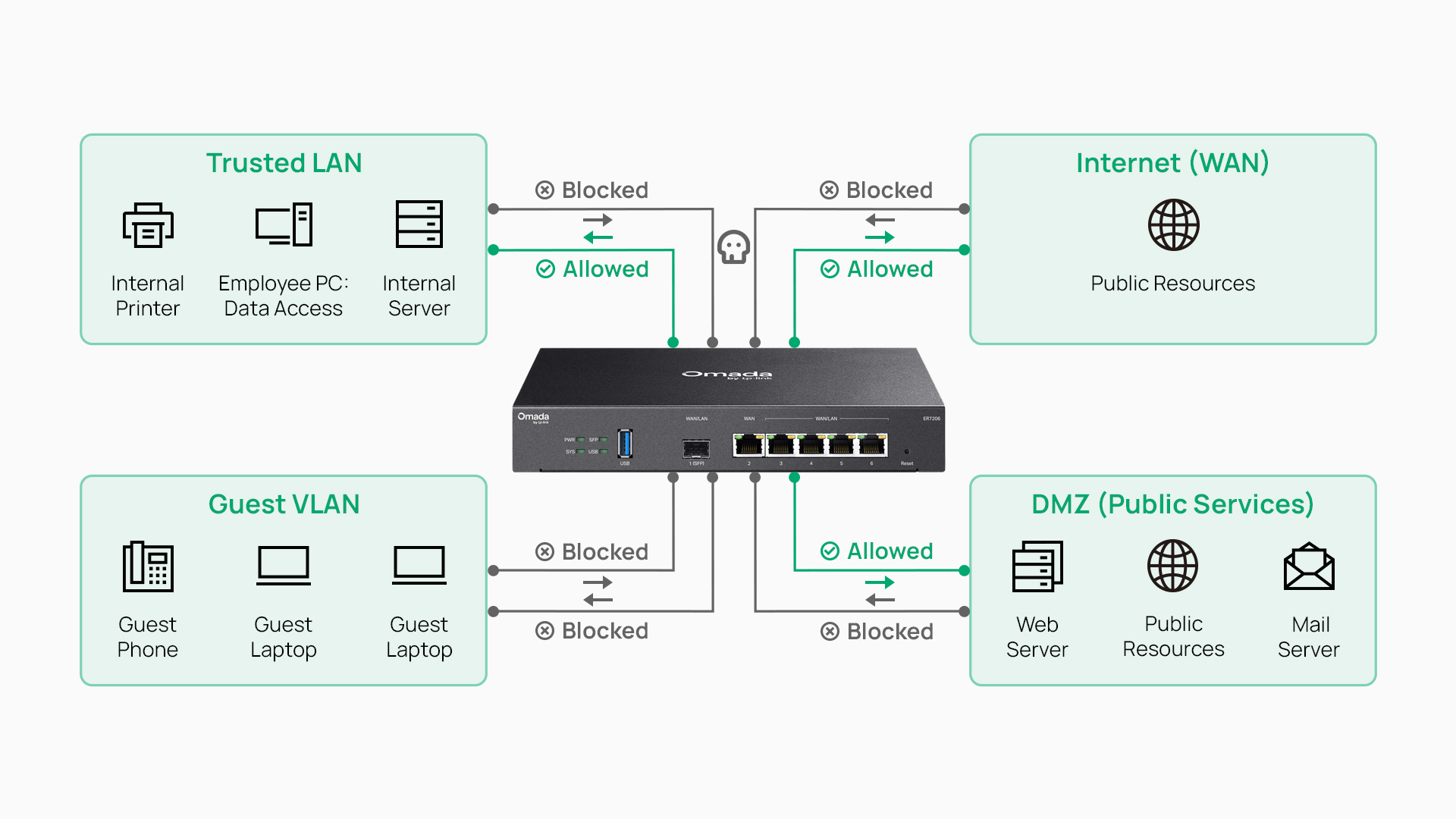
Organize business resources into security zones based on trust level. Common zones include employee LANs, guest networks, server networks, VoIP systems, IoT devices, and a DMZ for public-facing services. Use VLANs or other network segmentation methods to separate these resources before writing firewall policies between zones, since firewall rules are only as effective as the segmentation they're built on.
This same segmentation approach is what makes BYOD (bring your own device) security possible in mixed-device environments, where personal and corporate devices need to share a network without sharing access to sensitive systems.
Step 3: Configure Firewall Rules and Access Control Lists
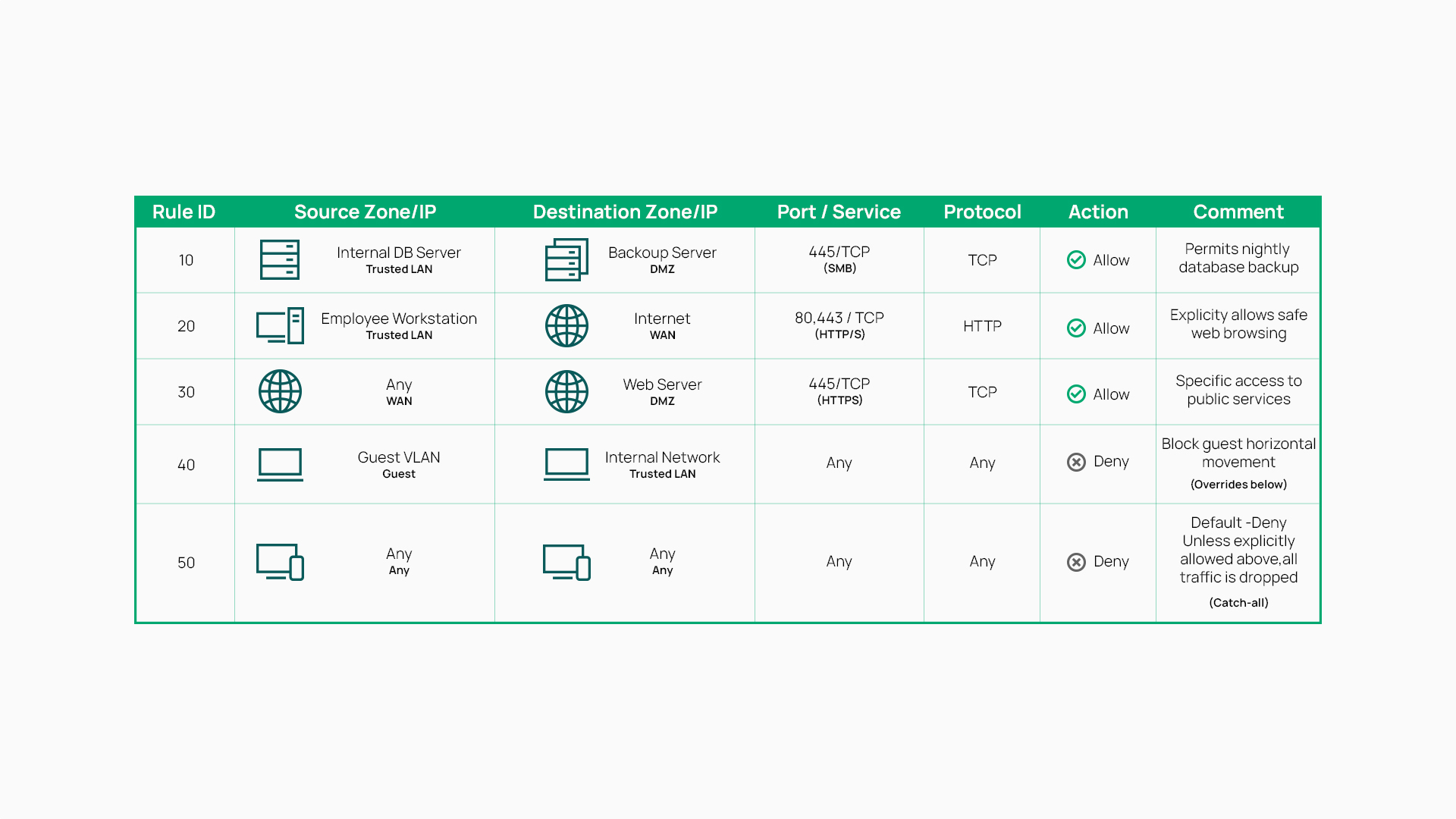
Configuring firewall rules starts with a default-deny structure: explicit allow rules define permitted traffic, and any traffic that doesn't match an allow rule is denied by default. Create allow rules based on source network, destination network, application or service, port, and protocol, ordering them from most specific to least specific.
Depending on the platform, these ordered rules may be organized as firewall policies or implemented using access control lists (ACLs). If your platform requires a manual catch-all deny rule rather than a built-in default action, place it at the bottom of the list, since the firewall applies the first matching rule and stops evaluating.
A practical example: isolating a guest network from internal resources might use a rule set like this.
| Source | Destination | Port/Protocol | Action |
|---|---|---|---|
| Guest VLAN | Gateway management interface | Management ports (such as TCP 80, 443) | Deny |
| Guest VLAN | Internal LAN | Any | Deny |
| Guest VLAN | Server VLAN | Any | Deny |
| Guest VLAN | Internet | TCP 80, 443 | Allow |
| Guest VLAN | Internet | TCP/UDP 53 | Allow |
| Any | Any | Any | Deny (default) |
This default-deny structure ensures guest devices can reach the internet and resolve domain names while having no explicit path into internal systems.
Step 4: Enable Logging and Monitoring
Enable logging for both permitted and blocked traffic so you have visibility into what the firewall is actually doing. Forward logs to a centralized monitoring platform or syslog collector rather than relying on local storage alone, and configure alerts for unusual activity or repeated policy violations. Logging turns a static rule set into something you can actually audit.
Step 5: Test the Configuration
Verify that firewall policies allow legitimate business traffic while blocking unauthorized access. Confirm there are no unnecessary open ports, and validate that communication between required network segments works as intended before considering the deployment complete.
To check firewall settings after deployment, review the active rule list for unexpected entries, confirm logging is capturing traffic as expected, and use built-in diagnostic tools or an authorized external port scan to verify that only intended ports and services are exposed.
Step 6: Document and Maintain
Document every firewall rule, its business purpose, and the systems it protects. This documentation becomes essential when troubleshooting or onboarding new IT staff. Schedule regular policy reviews, remove obsolete rules as the network evolves, and update configurations whenever new locations, services, or business applications are introduced.
Firewall Configuration Best Practices
These core principles support effective, ongoing firewall management across any business network:
- Follow least privilege: deny by default, and allow only what's explicitly needed.
- Review and audit firewall policies on a regular schedule, not just at initial setup.
- Minimize exposed ports and services to reduce the available attack surface.
- Segment critical business systems with VLANs, then apply firewall rules to control traffic between those segments.
- Keep gateway firmware current to maintain protection against known vulnerabilities.
- Back up firewall configurations before making changes, so you can roll back quickly if needed.
- Document every rule change, including who made it and why.
Common Firewall Configuration Mistakes to Avoid
Even experienced IT teams run into a handful of recurring firewall configuration mistakes. Recognizing them helps prevent configuration gaps that can contribute to security incidents, and the most common ones tend to fall into the following patterns:
- Overly permissive "allow any" rules, often introduced as a quick fix that's never revisited, undermine segmentation elsewhere in the policy.
- Unchanged default administrator credentials give attackers an easy path to the management interface.
- Unnecessary open ports or services expand the attack surface without adding business value.
- Insufficient segmentation for critical systems, such as point-of-sale or file servers, increases the risk that a compromised device can reach sensitive resources.
- Disabled or ignored logging removes the visibility needed to detect and investigate incidents after the fact.
- Accumulated unused or outdated rules make policies harder to audit and easier to misconfigure over time.
- Insufficient policy testing after changes can block legitimate traffic or, worse, leave a gap open.
- Infrequent policy reviews mean the configuration eventually stops matching how the business actually operates.
Ongoing policy management is just as important as the initial configuration.
Simplifying Firewall Configuration with Centralized Management
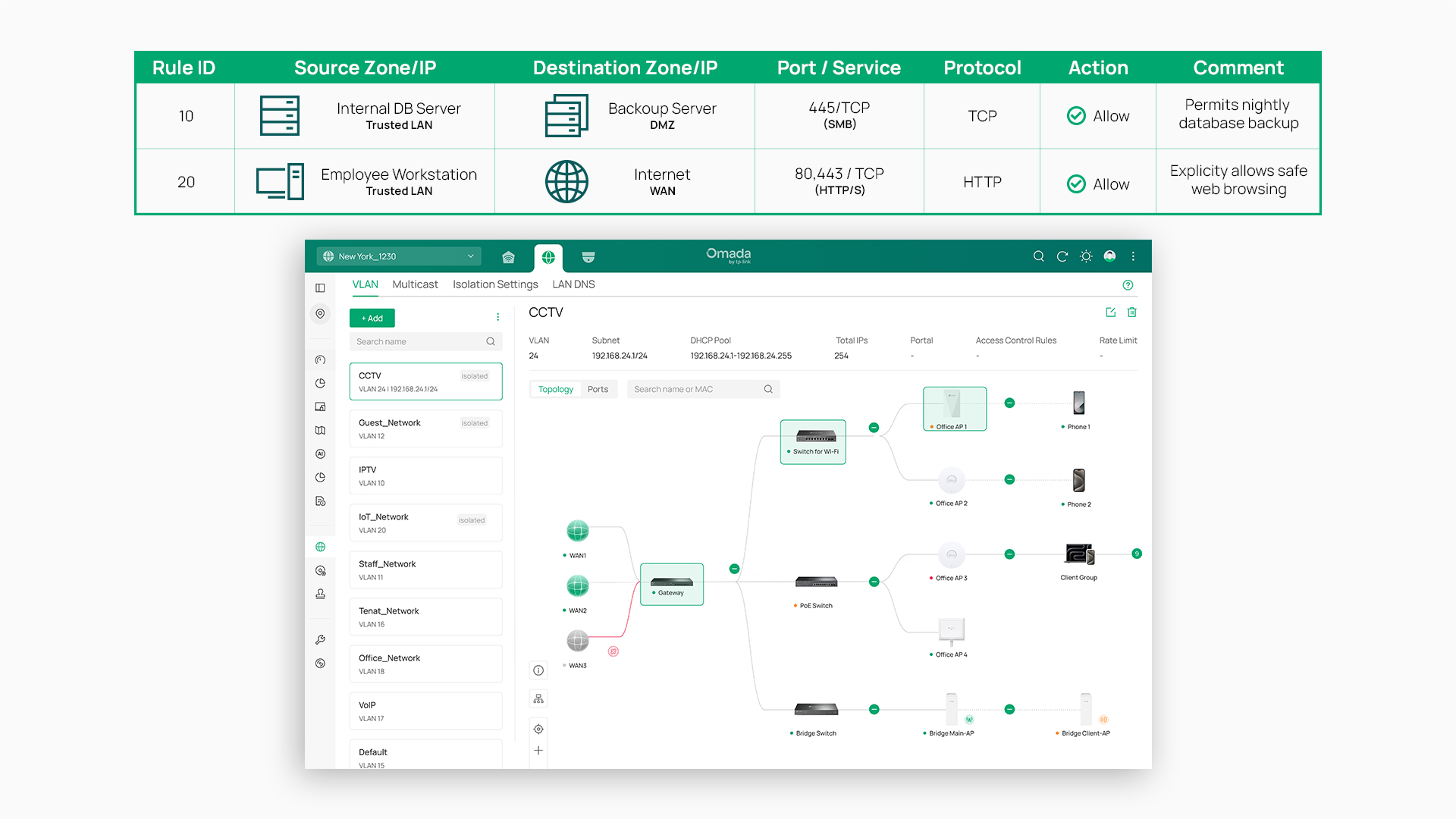
Managing firewall rules across one site is manageable with careful documentation. Managing them across multiple sites by hand tends to introduce errors and configuration drift, where policies at different locations gradually diverge from each other.
Centralized management addresses this by handling firewall configuration from a single interface across managed gateways. The Omada Fusion series brings gateway and controller functions together in one device, providing centralized control of network settings and security policies.
Other Omada gateways, such as the ER605, can also be managed through the Omada SDN (software-defined networking) controller. From the controller, administrators can manage firewall capabilities such as access control lists, DoS (denial-of-service) defense, and deep packet inspection (DPI) for application identification and traffic control. Consistent policies can then be deployed across sites, reducing the manual work involved in keeping distributed locations aligned with the same security policy.
For organizations managing multiple locations, this approach reflects a broader principle worth applying to firewall configuration in general: centralized security controls without the operational complexity of managing each site as an isolated system.
Planning Your Firewall Deployment
Effective firewall configuration is a repeatable process built on least privilege, segmentation, testing, and ongoing maintenance, not a single setup task completed once and forgotten. A firewall is only as strong as its configuration, and the steps outlined here (securing the gateway, defining zones, creating firewall rules, logging, testing, and documenting) give that configuration a solid foundation to build on as your network grows.
For teams managing firewall policies across one or many locations, exploring Omada gateways and the SDN controller is a helpful next step for understanding how centralized rule management can fit into an existing network.
Frequently Asked Questions
What is firewall configuration?
Firewall configuration is the process of creating and managing the rules and policies that control which traffic a firewall allows or blocks as it enters or leaves a business network.
How do I check my firewall settings?
Review the active rule list on your gateway or firewall for unexpected entries, confirm logging is enabled and capturing traffic, and use built-in diagnostic tools or an authorized external port scan to verify that only intended ports and services are reachable.
What are firewall rules?
Firewall rules are individual policy statements that define whether specific traffic is allowed or denied, based on criteria like source, destination, port, and protocol. The firewall evaluates them in order and applies the first matching rule.
What is the difference between inbound and outbound firewall rules?
Inbound rules control traffic originating from outside the network that is requesting access to internal resources, while outbound rules control traffic originating from internal devices that is requesting access to external resources. Most business networks apply stricter controls to inbound traffic.
What are the most common firewall configuration mistakes?
The most common mistakes include overly permissive "allow any" rules, shadow rules that earlier rules override and therefore never match, unchanged default credentials, unnecessary open ports, insufficient network segmentation, disabled logging, and skipping regular policy reviews as the network changes.
How often should I review my firewall configuration?
Most organizations benefit from reviewing firewall configurations regularly, often on a quarterly basis, along with additional reviews whenever new locations, applications, or services are introduced to the network.