How to Use the RTSP Stream Interface of VIGI NVR OpenAPI
Content
Check the NVR RTSP Configuration
Accessing Live View and Playback Streams via RTSP
Talk Audio Transmission Process
Introduction
VIGI NVR OpenAPI provides an RTSP-based Stream Interface for Live View, Playback, and Talk audio transmission. Live View and Playback allow clients to receive live or recorded audio and video streams, while the Talk function allows microphone audio to be transmitted to the selected camera channel.
These functions use RTSP to establish and control the sessions, Digest Authentication to verify access, and RTP to transmit the media data. For Live View and Playback, RTP can be transmitted over TCP or UDP, depending on the transport mode negotiated during the RTSP SETUP process. In the Talk workflow described in this article, microphone audio is transmitted through a separate Talk session over a dedicated TCP connection.
Requirements
- VIGI NVR that supports OpenAPI. (To check supported models, refer to Devices Supported by VIGI Open API)
- VIGI NVR OpenAPI Document
- An RTSP client or third-party platform that can reach the NVR over the network
Configuration
Check the NVR RTSP Configuration
The VIGI NVR OpenAPI Stream Interface is implemented based on RTSP. RTSP is enabled by default on the VIGI NVR, and the default RTSP port is 554. Before accessing Live View or Playback streams or establishing a Talk session, confirm that RTSP is enabled and check the configured RTSP port.
The following procedure uses the NVR web management page as an example.
Step 1. Log in to the NVR web interface using its IP address. Enter the username and password, then click Log In.
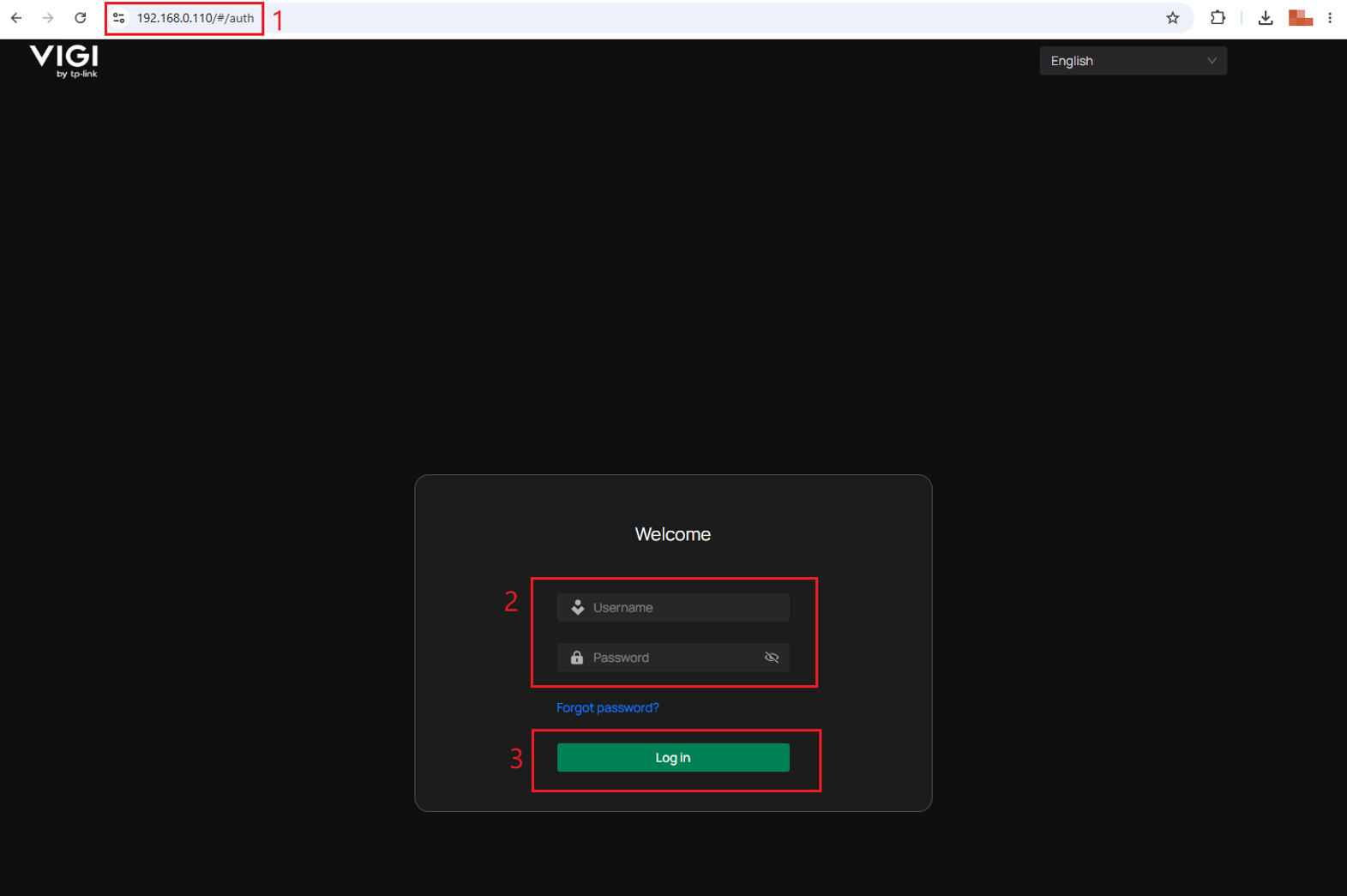
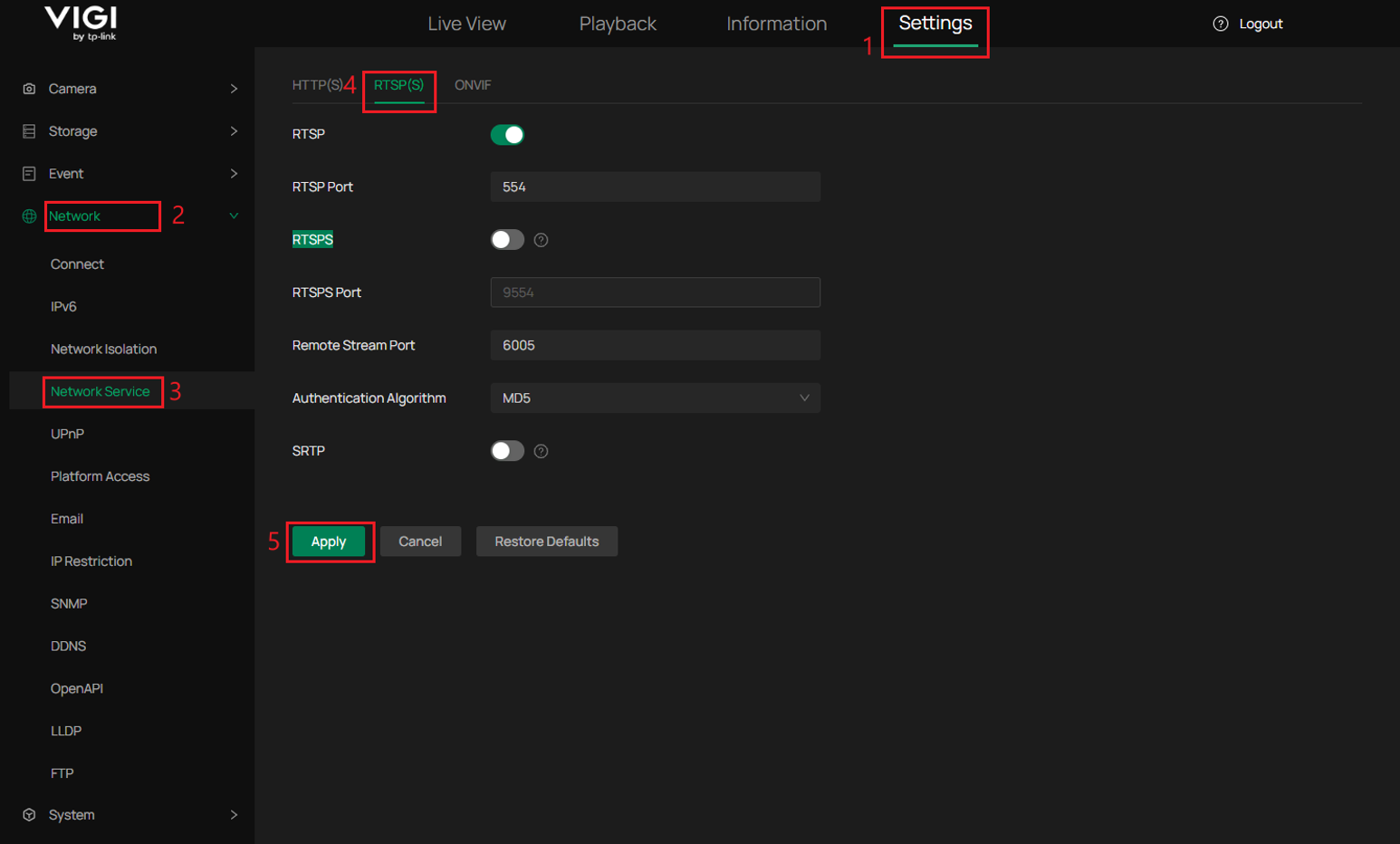
Step 2. Navigate to Settings > Network > Network Service > RTSP(S). Make sure the RTSP switch is enabled, and note the configured RTSP Port
Note: Make sure RTSPS and SRTP are disabled. Otherwise, third-party platforms may fail to access the stream through standard RTSP.
Accessing Live View and Playback Streams via RTSP
The VIGI NVR Live View and Playback interfaces use standard RTSP to establish and control streaming sessions, while RTP carries the audio and video data. Standard RTSP clients or third-party platforms can access the streams by using the corresponding URL and completing RTSP authentication and session setup.
The following workflow uses Live View as an example because Live View and Playback follow the same general process. For Playback, use the corresponding Replay URL and time range. For supported methods, URL formats, parameters, and Digest Authentication, refer to Sections 5.1–5.3 of the VIGI NVR OpenAPI Document and Q2 in the QA section of this article.
Step 1. Establish the RTSP Connection and Query the Supported Methods.
The client first establishes a TCP connection to the NVR through the configured RTSP port, which is 554 by default. The steps are as follows:
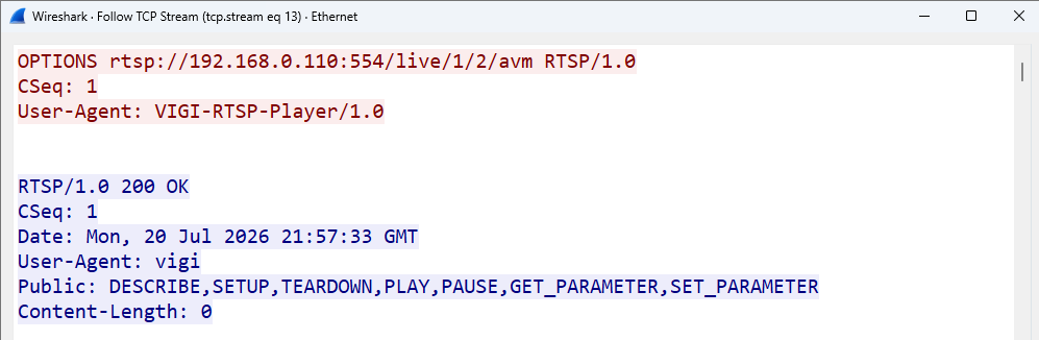
(1) The client sends an initial unauthenticated OPTIONS request to query the RTSP methods supported by the NVR.
|
/* No authentication request */ C->S : OPTIONS rtsp://192.168.0.110:554/live/1/2/avm RTSP/1.0\r\n CSeq: 1\r\n User-Agent: VIGI-RTSP-Player/1.0\r\n \r\n |
(2) The NVR returns 200 OK and lists the supported RTSP methods in the Public header.
|
S->C : RTSP/1.0 200 OK\r\n CSeq: 1\r\n Date: Mon, 20 Jul 2026 21:57:33 GMT\r\n User-Agent: vigi\r\n Public: DESCRIBE,SETUP,TEARDOWN,PLAY,PAUSE,GET_PARAMETER,SET_PARAMETER\r\n Content-Length: 0\r\n \r\n |
The following Wireshark capture shows the initial OPTIONS request and the corresponding 200 OK response from the NVR.
Step 2. Request the Media Description and Complete Digest Authentication.
The client sends an unauthenticated DESCRIBE request to obtain the media description of the requested stream. Because the request does not contain authentication information, the NVR responds with 401 Unauthorized and provides a Digest authentication challenge in the WWW-Authenticate header.
(1) The client sends an unauthenticated DESCRIBE request for the SDP media description.
|
/* No authentication request */ C->S : DESCRIBE rtsp://192.168.0.110:554/live/1/2/avm RTSP/1.0\r\n CSeq: 2\r\n User-Agent: VIGI-RTSP-Player/1.0\r\n Accept: application/sdp\r\n \r\n |
(2) The NVR returns 401 Unauthorized and provides the Digest authentication challenge in the WWW-Authenticate header.
|
S->C:\r\n RTSP/1.0 401 Unauthorized\r\n CSeq: 2\r\n User-Agent: vigi\r\n WWW-Authenticate: Digest realm="vigi", nonce="668a48d0", stale="FALSE"\r\n Content-Length: 0\r\n \r\n |
Note: The 401 Unauthorized response is an expected part of the Digest authentication process and does not indicate a final authentication failure.
(3) The client obtains the realm and nonce from the WWW-Authenticate header and uses them together with the username, password, current RTSP method, and request URI to calculate the Digest response. It then resends the DESCRIBE request with the Authorization header.
For example:
Method: DESCRIBE
Request URI:rtsp://192.168.0.110:554/live/1/2/avm
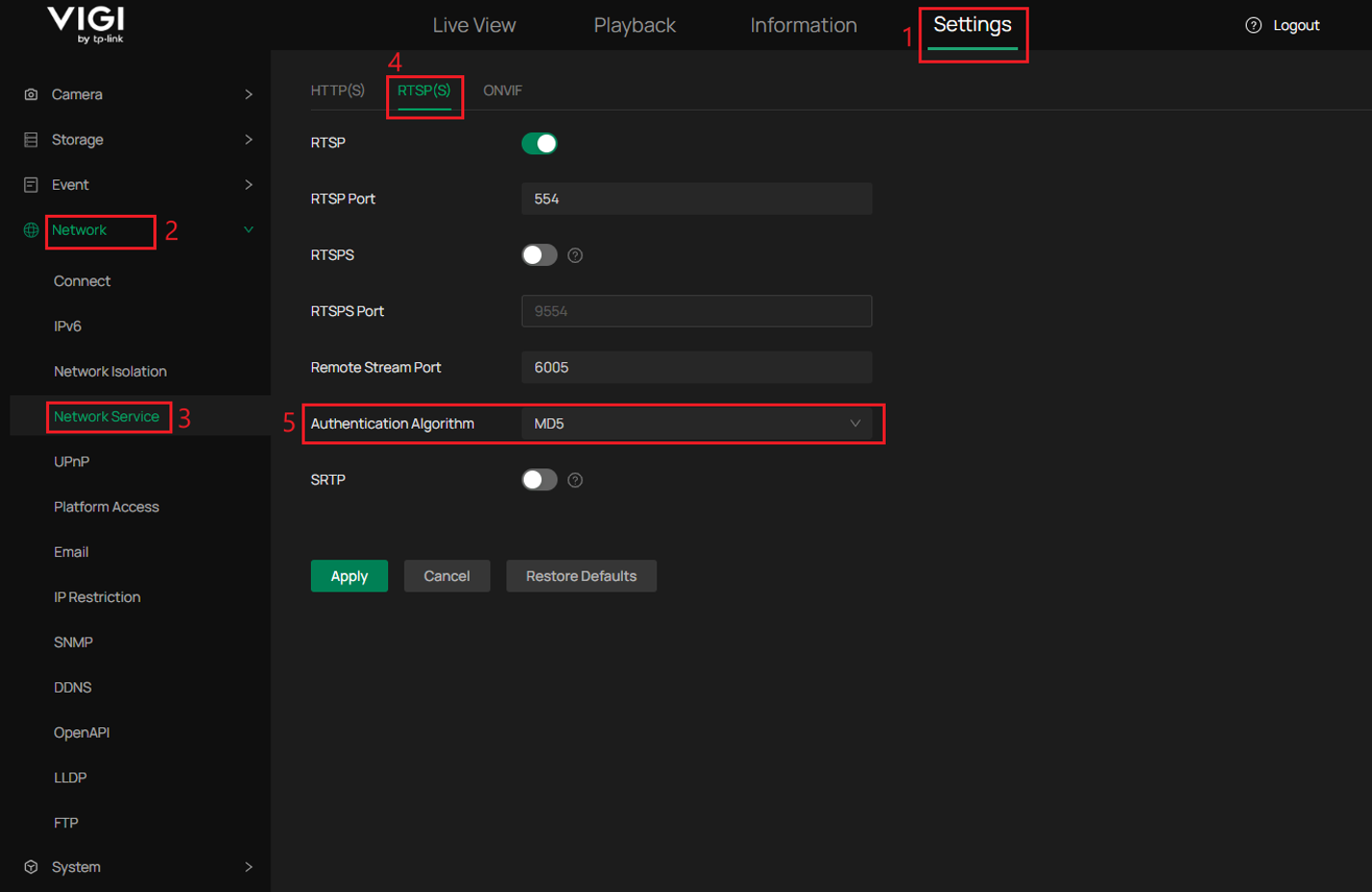
The Digest algorithm must match the Authentication Algorithm configured on the NVR.
In this example, the NVR is configured to use MD5.
HA1 = MD5(username:realm:password)
HA2 = MD5(method:request-uri)
response = MD5(HA1:nonce:HA2)
Note: Check the Authentication Algorithm under Settings > Network > Network Service > RTSP(S). The client must use the same algorithm when calculating the Digest response.
The client resends the DESCRIBE request with the Digest credentials included in the Authorization header.
|
C->S : DESCRIBE rtsp://192.168.0.110:554/live/1/2/avm RTSP/1.0\r\n CSeq: 3\r\n User-Agent: VIGI-RTSP-Player/1.0\r\n Accept: application/sdp\r\n Authorization: Digest username="admin", realm="vigi", nonce="668a48d0", uri="rtsp://192.168.0.110:554/live/1/2/avm", response="<calculated_digest_response>"\r\n \r\n |
(4) The NVR verifies the Digest response. If authentication succeeds, it returns 200 OK together with the SDP media description.
The SDP response describes the available media tracks and their codecs. In this example, track1 carries H.264 video, while track2 carries PCMA audio.
Note: track3 carries data defined by a VIGI proprietary protocol and is not required for standard video and audio streaming.
|
S->C : RTSP/1.0 200 OK\r\n CSeq: 3\r\n Date: Mon, 20 Jul 2026 19:01:11 GMT\r\n Content-Type: application/sdp\r\n Content-Length: 395\r\n \r\n <SDP> v=0\r\n s=Session streamed by "TP-Link RTSP Server"\r\n t=0 0\r\n m=video 0 RTP/AVP 96\r\n a=control:track1\r\n a=rtpmap:96 H264/90000\r\n a=fmtp:96 packetization-mode=1; profile-level-id=4D4032; sprop-parameter-sets=Z00AKpY1QPAET8s3AQEBQAABwgAAV+QB,aO48gA==\r\n m=audio 0 RTP/AVP 8\r\n a=control:track2\r\n a=rtpmap:8 PCMA/8000\r\n m=application/TP-LINK 0 RTP/AVP smart/0/25000\r\n a=rtpmap:95 TP-LINK/25000\r\n |
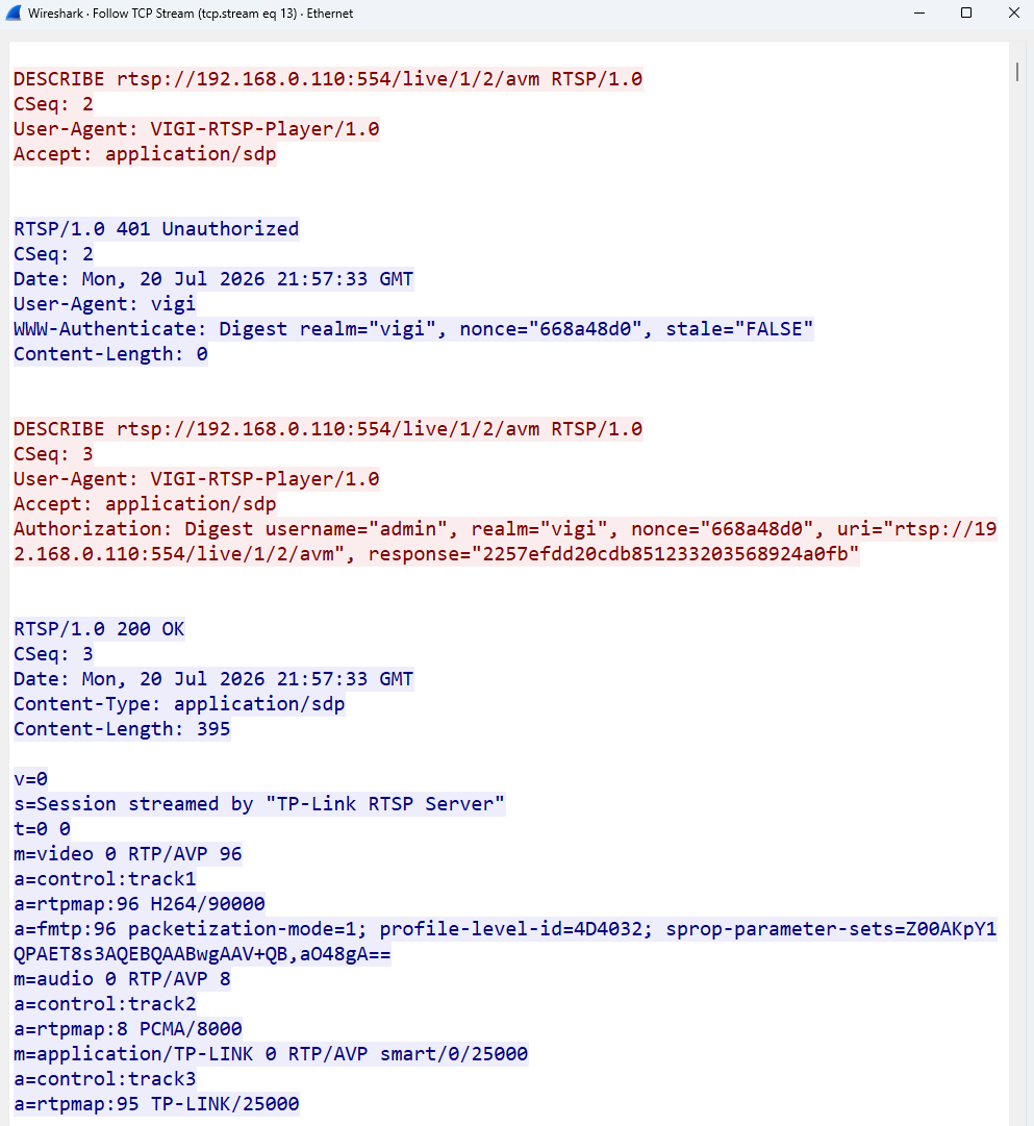
Step 3. Set Up the Media Tracks and Start RTP Transmission.
After successful authentication, the client sets up the required media tracks and negotiates the transport mode. Both RTP over UDP and RTP over RTSP/TCP are supported. This example uses RTP over RTSP/TCP with interleaved transport.
(1) The client sends separate SETUP requests for the required video and audio tracks and specifies the transport mode for each track. The NVR returns 200 OK for each request. In this example, both tracks use the same RTSP Session ID, and the client requests RTP over RTSP/TCP. Interleaved channels 0 and 1 are assigned to the video RTP and RTCP streams, while channels 2 and 3 are assigned to the audio RTP and RTCP streams.
|
C->S:\r\n SETUP rtsp://192.168.0.110:554/live/1/2/avm/track1 RTSP/1.0\r\n CSeq: 4\r\n User-Agent: VIGI-RTSP-Player/1.0\r\n Transport: RTP/AVP/TCP;unicast;interleaved=0-1\r\n Authorization: Digest username="admin", realm="vigi", nonce="668a48d0", uri="rtsp://192.168.0.110:554/live/1/2/avm/track1", response="<calculated_digest_response>"\r\n \r\n
S->C:\r\n RTSP/1.0 200 OK\r\n CSeq: 4\r\n User-Agent: vigi\r\n Session: 0x7fb484;timeout=60\r\n Transport: RTP/AVP/TCP;interleaved=0-1\r\n Content-Length: 0\r\n \r\n
C->S:\r\n SETUP rtsp://192.168.0.110:554/live/1/2/avm/track2 RTSP/1.0\r\n CSeq: 5\r\n Session: 0x7fb484\r\n User-Agent: VIGI-RTSP-Player/1.0\r\n Transport: RTP/AVP/TCP;unicast;interleaved=2-3\r\n Authorization: Digest username="admin", realm="vigi", nonce="668a48d0", uri="rtsp://192.168.0.110:554/live/1/2/avm/track2", response="<calculated_digest_response>"\r\n \r\n
S->C:\r\n RTSP/1.0 200 OK\r\n CSeq: 5\r\n User-Agent: vigi\r\n Session: 0x7fb484;timeout=60\r\n Transport: RTP/AVP/TCP;interleaved=2-3\r\n Content-Length: 0\r\n \r\n |
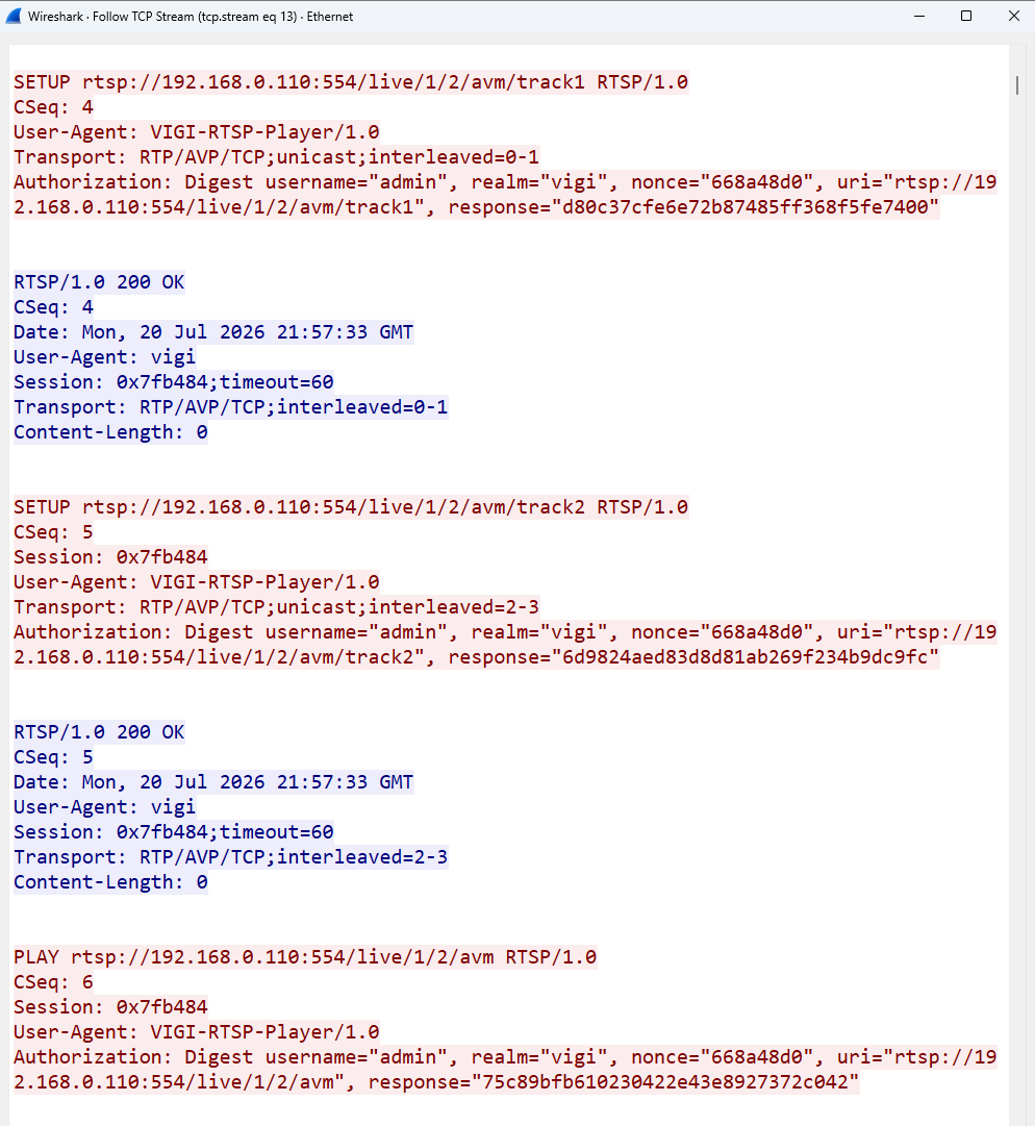
Note: In RTSP interleaved transport, the RTP and RTCP packets for multiple media tracks share the same TCP connection and are distinguished by their interleaved channel numbers.
(2) The client sends a PLAY request with the Session ID to start media transmission.
|
C->S:\r\n PLAY rtsp://192.168.0.110:554/live/1/2/avm RTSP/1.0\r\n CSeq: 6\r\n Session: 0x7fb484\r\n User-Agent: VIGI-RTSP-Player/1.0\r\n Authorization: Digest username="admin", realm="vigi", nonce="668a48d0", uri="rtsp://192.168.0.110:554/live/1/2/avm", response="<calculated_digest_response>"\r\n \r\n |
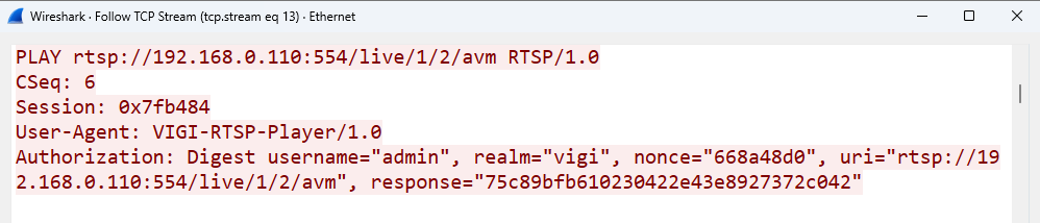
(3) The NVR returns 200 OK and starts transmitting the RTP media packets over the established RTSP TCP connection.
Note: In the Wireshark Follow TCP Stream view, the interleaved RTP data appears as binary content following the RTSP response.
|
S->C:\r\n RTSP/1.0 200 OK\r\n CSeq: 6\r\n Date: Mon, 20 Jul 2026 21:57:33 GMT\r\n User-Agent: vigi\r\n Session: 0x7fb484;timeout=60\r\n RTP-Info: url=rtsp://192.168.0.110:554/live/1/2/avm;seq=34976;rtptime=2315908260\r\n Content-Length: 0\r\n \r\n |
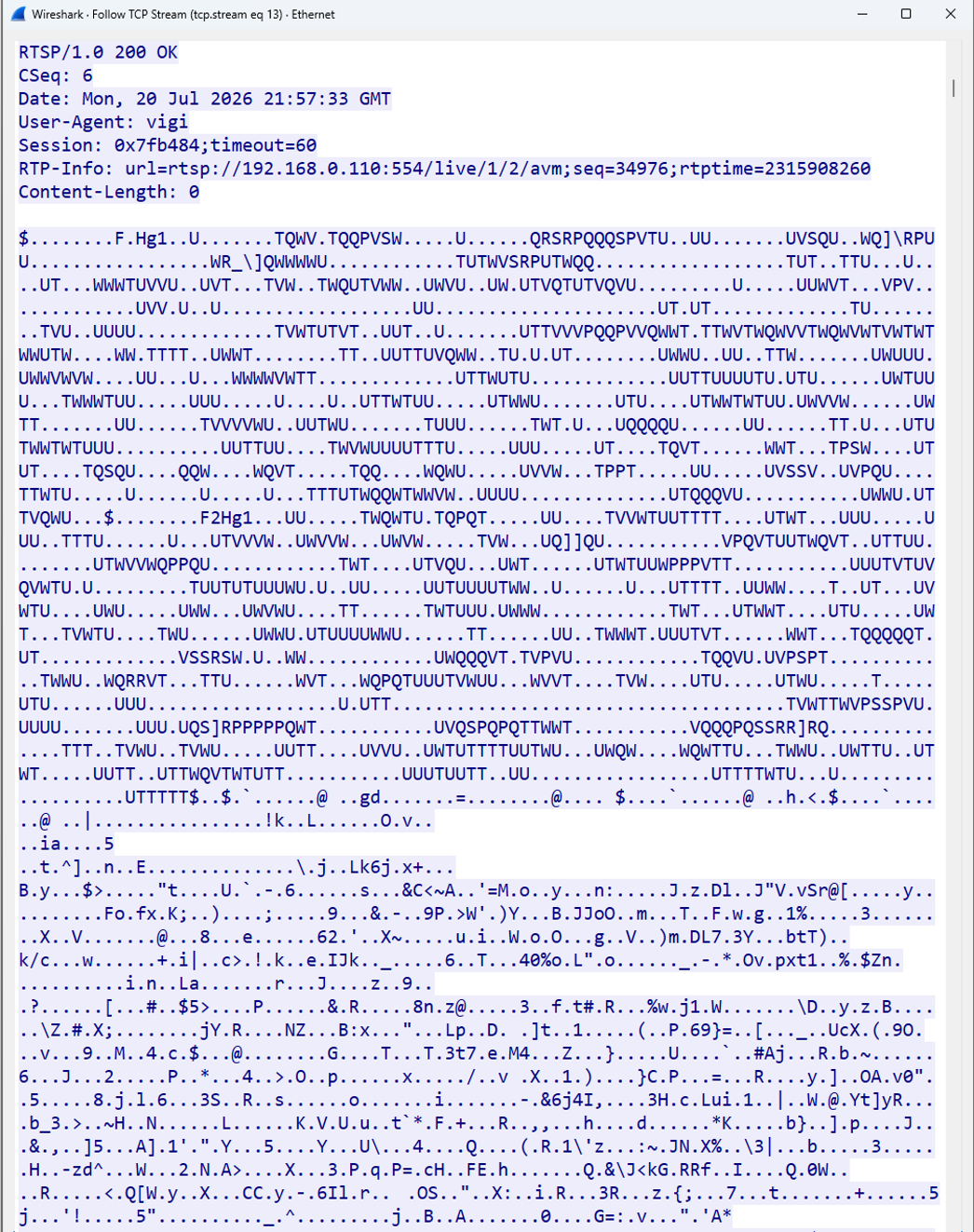
After the PLAY request is accepted, the client continuously receives RTP media packets through the negotiated transport. In this example, the media packets are transmitted over the established RTSP TCP connection using interleaved transport.
Step 4. Parse and Decode the RTP Media Packets.
After receiving the RTP media packets, the client parses and decodes them to render the live video and play the associated audio. The steps are as follows:
(1) Parse the RTP packet header.
The client reads fields such as the sequence number, timestamp, marker bit, and Payload Type. The sequence number is used to detect packet order and packet loss, while the timestamp is used for media timing and synchronization. The Payload Type is used together with the SDP a=rtpmap attributes to identify the corresponding codec and clock rate.
For the Payload Type values defined or recommended for VIGI NVR streams, refer to Appendix II, Payload Type, in the VIGI NVR OpenAPI Document. Dynamic Payload Types may vary, so the SDP information returned by the NVR should be used as the primary reference.
In this example:
a=rtpmap:96 H264/90000
a=rtpmap:8 PCMA/8000
Payload Type 96 carries H.264 video, while Payload Type 8 carries PCMA audio.
(2) Process the RTP payload.
The client removes the RTP header and extracts the encoded media payload. For H.264 video, the client reconstructs complete NAL units from the RTP payload, including fragmented or aggregated NAL units when applicable. For PCMA audio, the client extracts the G.711 A-law audio samples from the RTP payload.
(3) Decode and render the media.
The client passes the reconstructed video and audio data to the corresponding decoders. A media library such as FFmpeg can decode the H.264 video into a sequence of frames and convert the PCMA audio into playable PCM samples. The client then renders the video frames and outputs the audio through the playback device.
Note: The exact depacketization and decoding process depends on the codec identified in the SDP. The client must implement the corresponding RTP payload format and decoder for each supported codec.
Talk Audio Transmission Process
As described in Accessing Live View and Playback Streams via RTSP, the client receives video and audio from the NVR through the Live View session. This section describes the Talk process, in which the client captures microphone audio and transmits it to the NVR or to a camera managed by the NVR for output through the speaker.
The Talk function uses a VIGI-specific RTSP extension. The client must establish a separate Talk session and transmit the audio according to the required session commands, audio format, and RTP encapsulation rules.
Step 1. Establish a Separate RTSP Connection for Talk.
The client establishes a separate TCP connection to the NVR through the configured RTSP port. This connection is dedicated to Talk audio transmission and is independent of the Live View session. The client then sends an initial unauthenticated MULTITRANS request to the /multitrans URI.
Note: MULTITRANS is a proprietary RTSP extension implemented by VIGI NVR and may not appear in the Public header returned by the standard RTSP session.
|
C->S:\r\n MULTITRANS rtsp://192.168.0.110:554/multitrans RTSP/1.0\r\n CSeq: 1\r\n User-Agent: VIGI-Python-Talk/1.0\r\n Content-Type: application/json\r\n Content-Length: 0\r\n \r\n |

Step 2. Complete Digest Authentication.
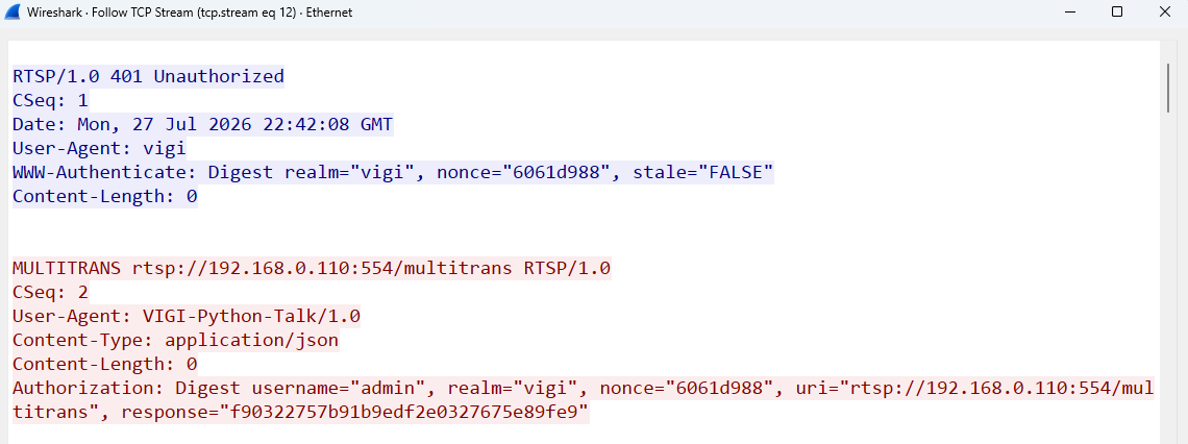
The initial MULTITRANS request does not include authentication information. The NVR therefore returns 401 Unauthorized together with a Digest authentication challenge. The client calculates the Digest response as described in the previous section and resends the MULTITRANS request with the Authorization header.
|
S->C:\r\n RTSP/1.0 401 Unauthorized\r\n CSeq: 1\r\n Date Mon, 27 Jul 2026 22:42:08 GMT \r\n User-Agent: vigi\r\n WWW-Authenticate: Digest realm="vigi", nonce=" f62dd168 ", stale="FALSE"\r\n Content-Length: 0\r\n \r\n
C->S:\r\n MULTITRANS rtsp://192.168.0.110:554/multitrans RTSP/1.0\r\n CSeq: 2\r\n User-Agent: VIGI-Python-Talk/1.0\r\n Content-Type: application/json\r\n Content-Length: 0\r\n Authorization: Digest username="admin", realm="vigi", nonce="6061d988", uri="rtsp://192.168.0.110:554/multitrans", response="<calculated_digest_response>"\r\n \r\n |
Step 3. Create the Talk Session.
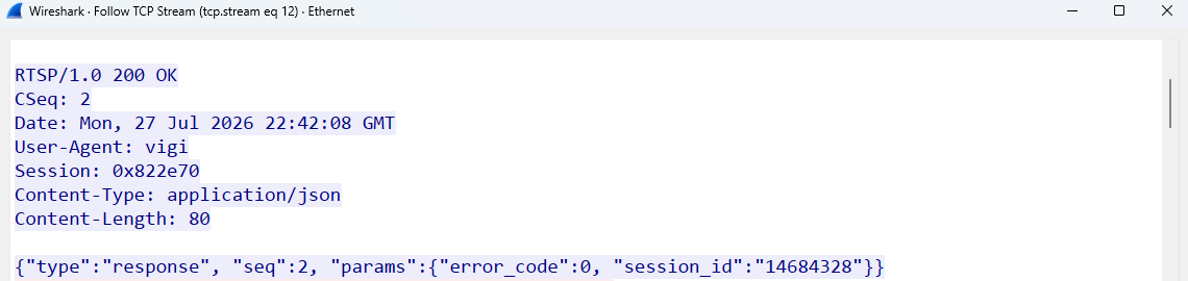
After the authenticated MULTITRANS request is accepted, the NVR returns 200 OK and creates a dedicated RTSP session for the talk connection. The response includes an RTSP Session value and a JSON session_id. The client should retain these values and use them as required by subsequent Talk interactions.
|
S->C:\r\n RTSP/1.0 200 OK\r\n CSeq: 2\r\n Date: Mon, 27 Jul 2026 22:42:08 GMT \r\n User-Agent: vigi\r\n Session: 0x822e60\r\n Content-Type: application/json\r\n Content-Length: 80\r\n \r\n {"type":"response","seq":2,"params":{"error_code":0,"session_id":"14684328"}} |
An error_code value of 0 indicates that the Talk session was created successfully.
Step 4. Send the Talk Command.
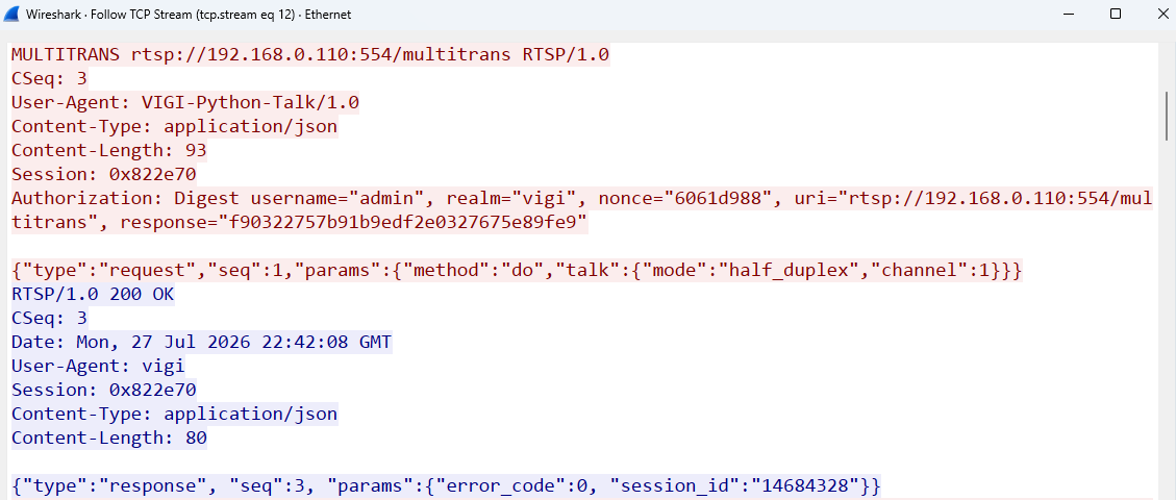
After the talk session is created, the client sends another authenticated MULTITRANS request containing a JSON talk command. The command specifies the talk mode and the target NVR channel whose camera speaker will play the uploaded audio.
|
C->S:\r\n MULTITRANS rtsp://192.168.0.110:554/multitrans RTSP/1.0\r\n CSeq: 3\r\n User-Agent: VIGI-Python-Talk/1.0\r\n Content-Type: application/json\r\n Content-Length: 93\r\n Session 0x822e60\r\n Authorization: Digest username="admin", realm="vigi", nonce="6061d988", uri="rtsp://192.168.0.110:554/multitrans", response="<calculated_digest_response>"\r\n \r\n {"type":"request","seq":1,"params":{"method":"do","talk":{"mode":"half_duplex","channel":1}}}
S->C:\r\n RTSP/1.0 200 OK\r\n CSeq: 3\r\n Date: Mon, 27 Jul 2026 22:42:08 GMT\r\n User-Agent: vigi\r\n Session: 0x822e60\r\n Content-Type: application/json\r\n Content-Length: 80\r\n \r\n {"type":"response","seq":3,"params":{"error_code":0,"session_id":"14684328"}} |
An error_code value of 0 indicates that the Talk command was accepted successfully.
Step 5. Prepare, Encapsulate, and Transmit the Talk Audio Data.
After the Talk command is accepted, the client captures microphone audio and converts it to the required Talk audio format.
Recommended audio settings:
- Codec: G.711 μ-law
- Sample rate: 16 kHz
- Audio Channel: Mono
- Packet size: 1056 bytes
- Transmission interval: 66 ms per packet
Alternative transmission profile:
- Packet size: 640 bytes
- Transmission interval: 40 ms per packet
If the microphone uses a different native audio format, such as 48 kHz PCM, the client application must resample the audio to 16 kHz, convert it to mono, and encode it as G.711 μ-law before transmission
Each encoded audio block is encapsulated in an RTSP interleaved binary frame and transmitted over the dedicated Talk TCP connection.
The following example uses the recommended 1056-byte transmission profile.
|
$(1B) |
Chn ID (1B) |
Length (2B) |
Raw Audio Data |
|
0x24 |
0x00 |
0x04 0x20 |
Example: 1056-byte G.711 μ-law payload |
The values shown above are taken from the test implementation:
- 0x24 is the RTSP interleaved-frame identifier.
- 0x00 is the interleaved Channel ID configured by the client application for Talk audio data.
- 0x04 0x20 indicates that the following raw audio data is 1056 bytes long.
- The data following the interleaved header is raw G.711 μ-law audio and does not contain an RTP header.
The Length field must match the actual audio payload size. When the alternative profile is used, the Length field is 0x02 0x80, indicating a 640-byte audio block.
For details about the Talk audio packet structure, refer to Section 5.4 Talk, in the VIGI NVR OpenAPI Document.
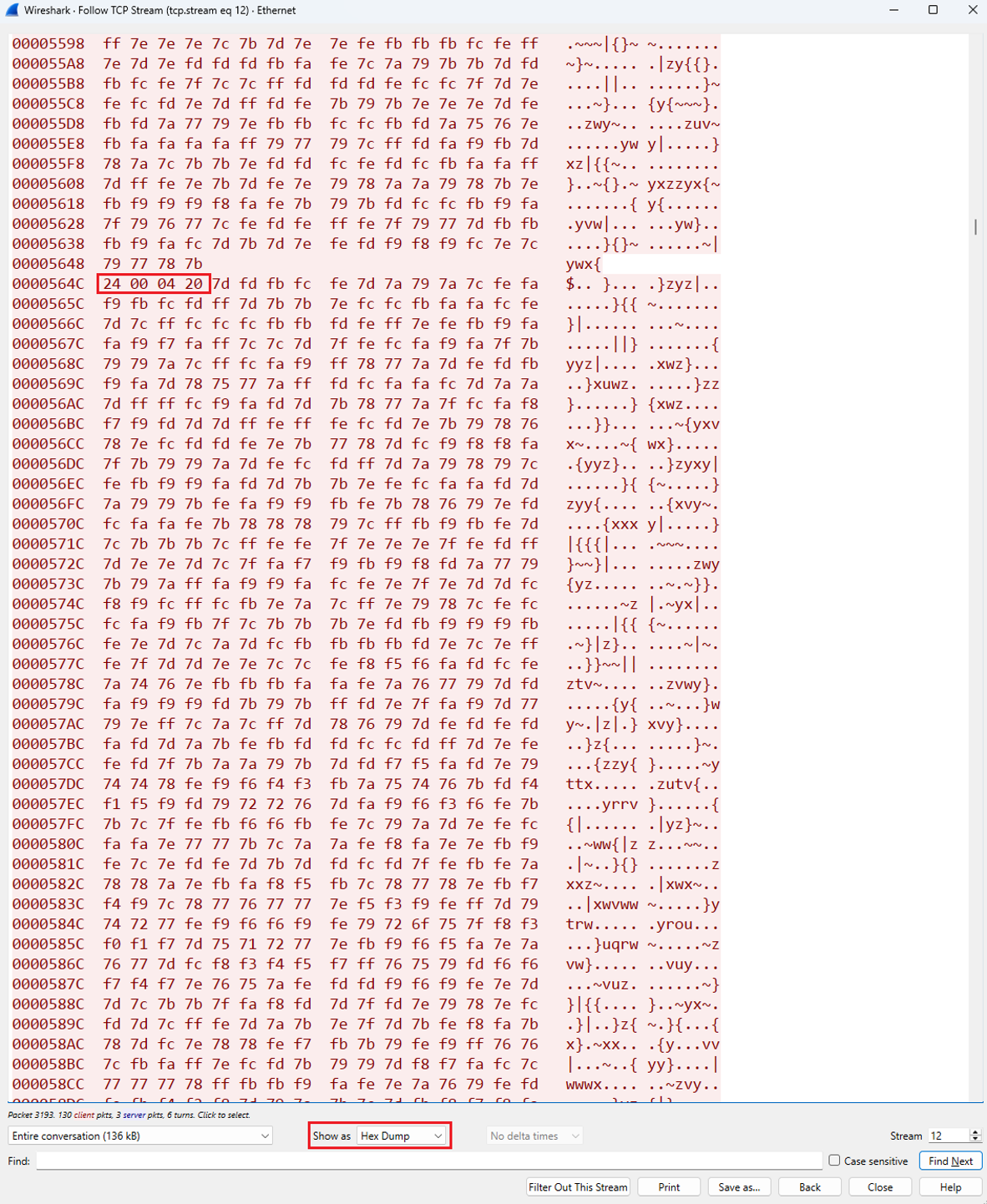
Note: The highlighted bytes in the following Wireshark Hex Dump correspond to the example frame shown above
Conclusion
The VIGI NVR Stream Interface allows third-party clients to access Live View and Playback streams through standard RTSP and RTP workflows. In the workflow described in this article, talk audio transmission uses a separate VIGI-specific Talk session to upload microphone audio to the selected camera channel.
QA
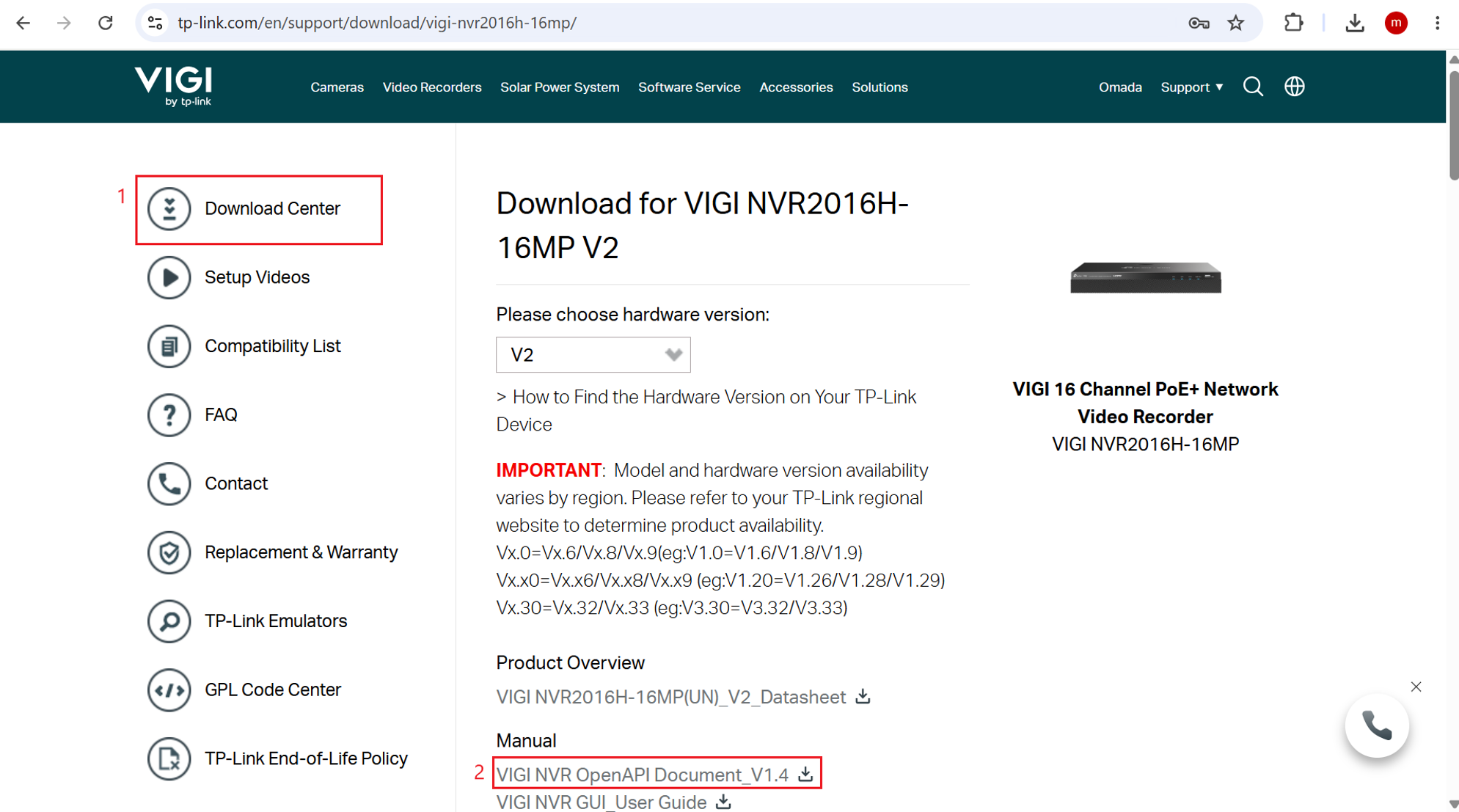
Q1: Where can I find the VIGI NVR OpenAPI Document?
A1: Go to Download Center, search for the NVR model, and open the product download page. Under Manual, download the corresponding VIGI NVR OpenAPI Document.
Q2: What are the RTSP URL formats for Live View and Playback?
A2: The RTSP URL formats are as follows.
Live View:
rtsp://<IP>/live/<channel>/<stream>/avm
Playback:
rtsp://<IP>/replay/<channel>/<stream>/avm?starttime=<starttime>&endtime=<endtime>
- channel: NVR channel number.
- stream: 1 for the main stream and 2 for the substream.
- starttime and endtime: Specify the playback start and end times using YYYYMMDDtHHMMSSz for UTC+0. On supported firmware, replace z with l and enter the playback time in the NVR’s local time zone; no UTC conversion is required.
Examples:
Live View URL example:
rtsp://192.168.0.240/live/1/1/avm
Playback URL example using UTC+0:
rtsp://192.168.0.240/replay/1/1/avm?starttime=20260720t154500z&endtime=20260720t161000z
Playback URL example using the NVR local time:
rtsp://192.168.0.240/replay/1/1/avm?starttime=20260720t084500l&endtime=20260720t091000l
Note: The l suffix requires firmware support.
Q3. Why does the RTSP stream contain video but no audio?
A3: If the SDP includes an audio track, the client must send a separate SETUP request for that track. If only the video track is set up, the client receives video without audio.
Q4: What audio format should the client application use for Talk audio transmission?
A4: The client application should encode microphone audio using the following settings:
- Codec: G.711 μ-law
- Sample rate: 16 kHz
- Audio channels: Mono
- Recommended packet size: 1056 bytes
- Recommended transmission interval: 66 ms
Alternatively, the client application may transmit a 640-byte audio block every 40 ms.
If the microphone uses a different native audio format, the client application must convert the audio to 16 kHz mono before encoding it as G.711 μ-law.
To learn more about each function and configuration, please visit Support Home to download or check the manual for your product.
Czy ten poradnik FAQ był pomocny?
Twoja opinia pozwoli nam udoskonalić tę stronę.



TP-Link Community
Still need help? Search for answers, ask questions, and get help from TP-Link experts and other users around the world.
z United States?
Uzyskaj produkty, wydarzenia i usługi przeznaczone dla Twojego regionu.