Your Guide to the Tapo Smart Home Ecosystem in the Philippines
By Laviet Joaquin, Head of Marketing, TP-Link Philippines | Published: June 22, 2026
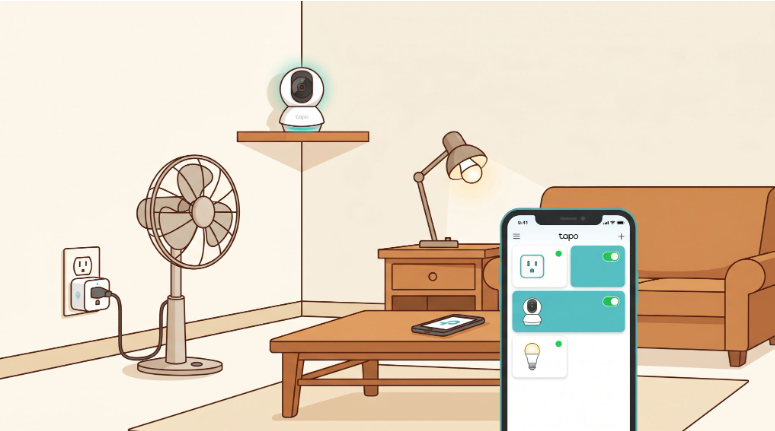
Quick Answer
-
A Tapo smart home starts with any single device, a smart plug, a camera, or a smart bulb that connects to your existing home Wi-Fi and is controlled through the free Tapo app. You do not need a hub, special wiring, or technical knowledge to begin.
-
The Tapo P110 smart plug with energy monitoring shows exactly how much each appliance costs on your Meralco bill in pesos per month and lets you schedule auto-off for devices you forget to turn off. It works on resistive loads only, like lamps, fans, chargers, and desktop PCs, not on air conditioners, refrigerators, or washing machines.
-
Every Tapo device added after your first one works in the same app, triggers the same automations, and responds to the same voice commands. The ecosystem grows as your needs grow, with no re-setup required and no mandatory subscription.
Every month, Filipinos receive their Meralco bill and wonder which appliance is eating the most electricity. Or they leave for work and remember midway through EDSA that they forgot to turn off the electric fan in the sala. Or they want to check if the yaya arrived on time, whether the kids got home safely, or whether someone opened the cabinet they told their household helper not to open.
A Tapo smart home does not require rewiring your house or calling an electrician. It starts with a smart plug you push into an outlet or a camera you screw onto a shelf, and you control it from your phone.
Table of Contents
Tapo Turns Ordinary Philippine Homes Into Smart Homes Without Renovation
Smart Plugs Tell You Exactly How Much Each Appliance Costs on Your Meralco Bill
Tapo Cameras Let Filipinos Monitor Their Homes Remotely With No Monthly Subscription
Smart Lighting With Tapo Is a Zero-Wiring Upgrade for Any Filipino Home
Smart Sensors and the Tapo H200 Hub Let Your Home React to What Actually Happens
The Right Tapo Starter Kit for a Typical Filipino Home
Five Tapo Automations Every Filipino Household Should Set Up
Tapo Works With Google Assistant and Alexa for Hands-Free Control
How to Secure Your Tapo Devices in a Philippine Household
Tapo Turns Ordinary Philippine Homes Into Smart Homes Without Renovation
Tapo is TP-Link's consumer smart home brand, available in the Philippines through authorized stores and official Lazada and Shopee listings. The entire ecosystem is built around one principle: no new wiring, no special hub required for most devices, and one app for everything.
Most Tapo devices connect directly to your 2.4 GHz home Wi-Fi network. You download the free Tapo app, plug in the device, and follow the setup guide in the app, and it is done. The Tapo app works on Android and iOS, and Tapo devices are compatible with Google Assistant, Amazon Alexa, and select Matter-certified devices with Apple HomeKit.
This matters specifically for the Philippines because most Filipino homes are rentals, condos, or older houses where permanent electrical changes are not an option. Tapo's plug-and-use design means you can take every device with you when you move. Nothing is mounted permanently unless you choose to mount it.
Smart Plugs Tell You Exactly How Much Each Appliance Costs on Your Meralco Bill
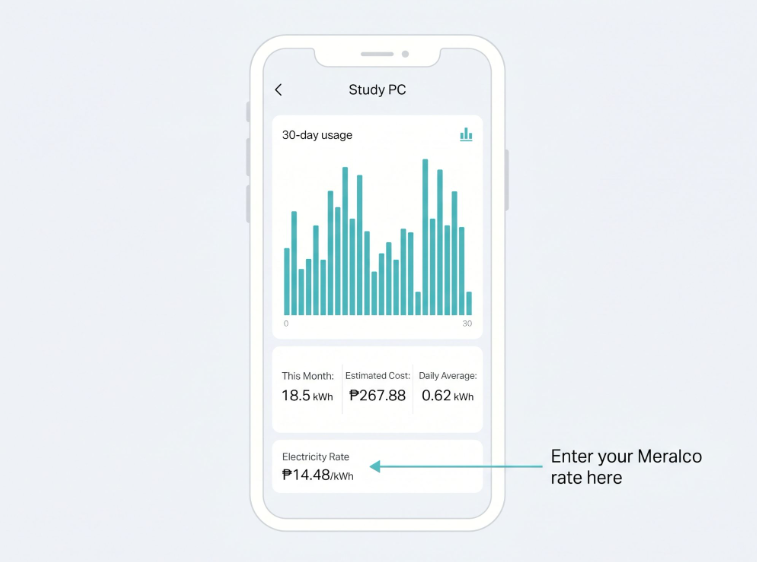
The most immediately practical Tapo device for any Filipino household is the Tapo P110 or P110M smart plug with energy monitoring. You plug it into any wall outlet, plug your appliance into it, and the Tapo app shows you real-time power consumption in watts, in kilowatt-hours, and in pesos when you enter your Meralco per-kWh rate directly into the app.
Most Filipino households have no idea which specific appliance is responsible for the spike in their monthly bill. The P110 answers that question with data. A TV you leave on all day, a gaming PC that runs overnight, and a desktop computer the kids use for school, the Tapo app shows you exactly how much each one costs per month at your actual Meralco rate. You can then set schedules to shut them off automatically or use the Auto-Off timer to cut power after a set number of hours.
Important load restriction: The P110 and P110M are rated for resistive loads only, such as lamps, electric fans, coffee makers, rice cookers, and phone chargers. They are not designed for inductive loads, which include appliances with motors: air conditioners, refrigerators, and washing machines. Using a smart plug with these appliances can damage the plug and void the warranty.
If your Meralco bill has been climbing and you want to see which appliance is actually responsible, browse tapo.com/ph/ the P110 and P110M are listed under Smart Plugs, and the energy monitoring setup takes under five minutes once the plug is paired to the Tapo app.
Tapo Cameras Let Filipinos Monitor Their Homes Remotely With No Monthly Subscription
Home security is one of the strongest reasons Filipino households invest in a smart home setup. Whether you want to check on children, household helpers, or the front door while stuck in traffic, Tapo cameras provide live video from anywhere on your phone, and the basic features require no ongoing subscription.
Motion detection, two-way audio, and live streaming all work on a free Tapo account. Recorded footage is saved locally to a microSD card inside the camera. For households that want cloud backup or a 30-day video history, the optional Tapo Care subscription adds that, but it is not required for the core monitoring features.
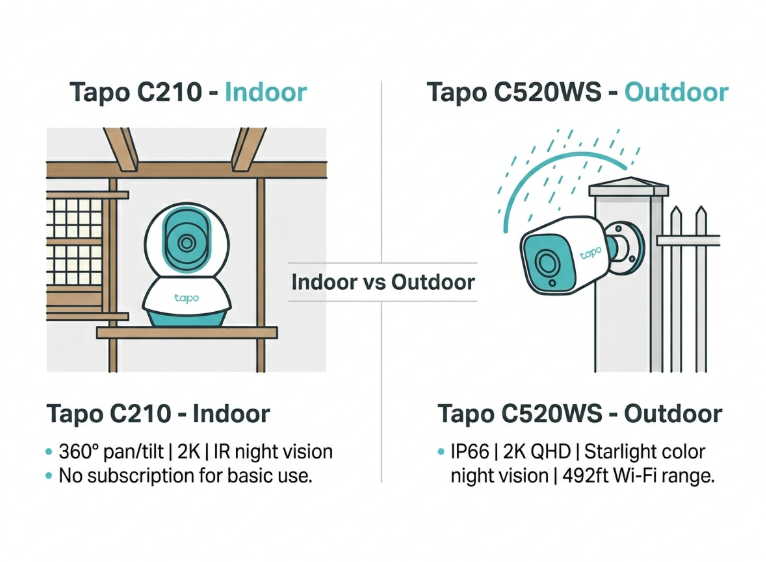
Choosing between indoor and outdoor: C210 vs C520WS
For indoor use, the Tapo C210 is the most widely available and recognized Tapo camera in the Philippines. It covers 360 degrees horizontal and 114 degrees vertical with pan and tilt control from the app, records in 2K resolution, and sees up to 30 feet in the dark using infrared night vision. It is the right camera for monitoring the sala, bedroom, or front door area from the inside.
For outdoor use, the Tapo C520WS is built for Philippine conditions. IP66 waterproofing handles the rainy season, typhoon-adjacent rain, and the heat that outdoor enclosures face. It carries starlight-color night vision using an F1.6 lens, meaning it captures full-color footage in low light without requiring a spotlight to activate.
The C520WS also pans and tilts 360 degrees horizontally and 130 degrees vertically and connects to your Wi-Fi up to 492 feet in open areas, usable for gates, driveways, and garden placements, even when the Wi-Fi router is inside the house.
Both cameras connect to the same Tapo app and appear in the same device list. You can view live feeds from both simultaneously from your phone while commuting, at the office, or anywhere with mobile data.
Smart Lighting With Tapo Is a Zero-Wiring Upgrade for Any Filipino Home
Smart lighting is the most visible change a Tapo setup brings to daily life, and it requires no electrician. The Tapo L530E smart bulb screws into any standard E27 lamp socket, the most common socket in Filipino homes. It connects to your Wi-Fi, appears in the Tapo app, and you can change its color, brightness, and on/off schedule from your phone.
For households that want to keep their existing wall switch but add phone and voice control, the Tapo smart bulb runs on Wi-Fi independently of the switch. Turning the switch off physically cuts power to the bulb and disconnects it from Wi-Fi until the switch is flipped back on. If you want to retain full smart control, including when the physical switch is off, a Tapo smart switch that replaces the existing wall switch maintains power to the bulb at all times. Check with the Tapo Philippines team on the current PH-available smart switch models.
A practical schedule most Filipino households set: living room lights turn on at sunset automatically, then dim to 30% brightness at 9 PM when the household typically winds down, and shut off at midnight. The Tapo app uses your device location to determine local sunset time, so you set it once, and it adjusts as the year progresses.
If your home has multiple lamps and you want to automate lighting across the sala, bedrooms, and dining area from one app, go to tp-link.com/ph/home-networking/smart-bulb/ to see the full L-series lineup from single color-changing bulbs to LED light strips for ambient setups.
Smart Sensors and the Tapo H200 Hub Let Your Home React to What Actually Happens
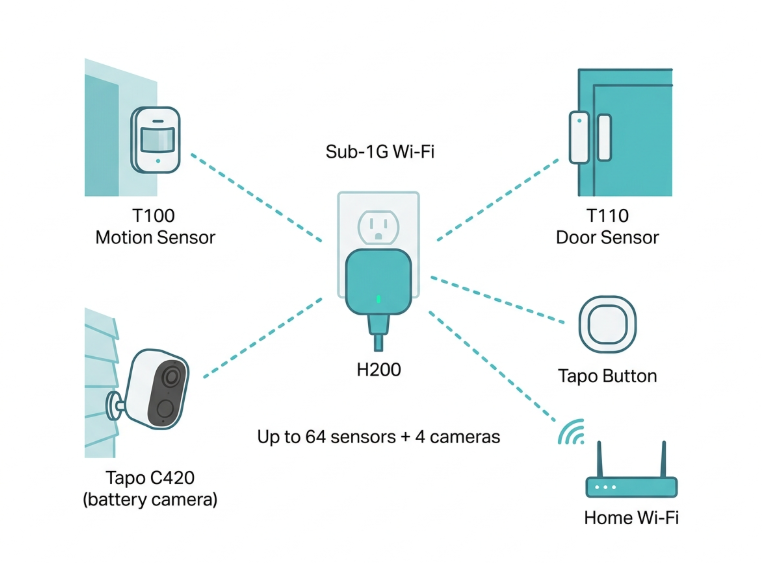
Wi-Fi smart devices cover plugs, cameras, and bulbs well. But the Tapo ecosystem also includes battery-powered motion sensors (Tapo T100) and door/window contact sensors (Tapo T110) that connect via a low-power Sub-1G wireless protocol through the Tapo H200 smart hub rather than directly to Wi-Fi. These sensors use up to 10 times less battery than Wi-Fi sensors, and you can place them anywhere in your home regardless of Wi-Fi signal strength.
The Tapo H200 hub plugs into any outlet and connects to your home Wi-Fi. Once paired, it acts as the bridge for all Sub-1G sensors and buttons and also provides local storage for compatible battery-powered Tapo cameras, specifically the Tapo C420 and C400 series outdoor wire-free cameras. The hub supports up to 64 sensors, buttons, and Sub-1G switches, plus up to 4 compatible cameras or video doorbells simultaneously. Note: the C210 and C520WS store footage on their own microSD cards directly when they connect to the Tapo app over Wi-Fi and do not require the H200 hub.
For Filipino households with OFW members abroad or family members working in another city, sensor automations answer the questions that normally require a phone call: Did the kids get home? (Door sensor on the front gate triggers a notification.) Is someone in the bodega who should not be? (Motion sensor on the bodega door.) Is the helper awake and moving? (Motion sensor in the kitchen.) These are peace-of-mind automations that reduce the anxiety of managing a household remotely.
If you want to build a sensor-based smart home starting from the hub outward, tp-link.com/ph/home-networking/smart-hub/tapo-h200/ shows every device the hub supports and the current PH-available sensor models.
The Right Tapo Starter Kit for a Typical Filipino Home
Below is the recommended starting point for a typical Filipino household: a 3 to 5-bedroom house or apartment with one or two floors, a household of 4 to 6 people, one helper, and a Meralco or regional utility bill. This is not the complete Tapo product catalog; it is the practical starting lineup for Philippine conditions.
|
Device |
Model |
Best for Philippine Context |
Notes |
|---|---|---|---|
|
Smart plug with energy monitor |
Tapo P110 / P110M |
Lamps, electric fans, coffee makers, phone chargers |
Enter your Meralco per-kWh rate in the Tapo app to see peso-cost estimates per appliance per month. Not for inductive loads - do not use with AC, refrigerator, or washing machine. |
|
Indoor security camera |
Tapo C210 |
Monitoring the living room, front door, sala, and bedroom from work |
Pan/tilt 360-degree, 2K resolution, IR night vision to 30ft, local microSD storage. No subscription needed for basic motion alerts. |
|
Outdoor security camera |
Tapo C520WS |
Driveway, gate, garden, balcony |
IP66 weatherproof, starlight color night vision, 360-degree pan/tilt. Handles Philippine rain and outdoor heat. |
|
Smart bulb |
Tapo L530E |
Any E27 lamp socket - sala, bedroom, dining area |
16 million colors, dimmable, no hub needed. Screw in and connect to Wi-Fi. Compatible with Google Assistant and Alexa. |
|
Smart hub (for sensors) |
Tapo H200 |
Central hub for door sensors, motion sensors, and Sub-1G battery cameras |
Connects up to 64 sensors and 4 compatible cameras (C420, C400, D230). Enables Sub-1G low-power wireless for battery-saving sensors throughout the home. |
|
Smart sensors |
Tapo T100 (motion) / T110 (door/window) |
Gates, doors, cabinets, rooms |
Pairs with H200 hub. Up to 10x longer battery life vs Wi-Fi sensors. Useful for kumustahan alerts: "Nakabukas ba ang pintuan?" |
Product availability and specifications confirmed from official TP-Link Philippines listings as of June 2026. Prices and models subject to change; verify current availability at tapo.com/ph or tp-link.com/ph/where-to-buy/
Five Tapo Automations Every Filipino Household Should Set Up
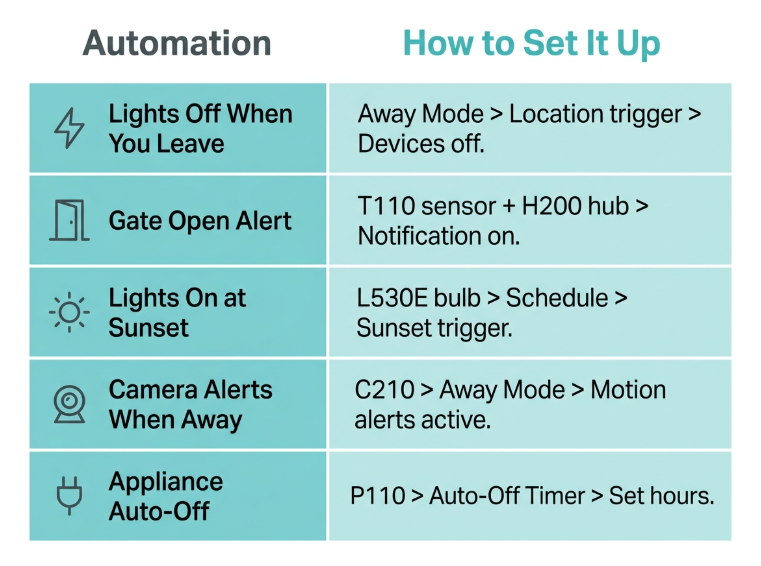
Automations are what separate a smart home from a collection of remotely controlled devices. Once your Tapo devices are connected, these five automations take under five minutes each to configure in the Tapo app and eliminate common daily friction points in a Filipino household.
|
Automation |
How to Set It Up in the Tapo App |
|---|---|
|
Turn off all lights when you leave |
Use Away Mode on your smart plugs and bulbs. Set a schedule or use location-based automation when your phone leaves your home Wi-Fi, and devices switch off. |
|
Get an alert when the front gate opens |
Pair a T110 door/window sensor on the gate with the H200 hub. Enable notification in the Tapo app, and you will receive a push notification the moment it opens. |
|
Sala lights turn on automatically at sunset |
In the Tapo app, set a schedule on your L530E bulb based on sunset time. The Tapo app uses your device's location to calculate the local sunset automatically. |
|
Camera alerts only during away hours |
Use Tapo's Home/Away Mode. When you mark yourself as Away, the C210 activates motion alerts. When you are Home, alerts pause. |
|
Appliance auto-off after a set time |
Use the Auto-Off timer on any P110 plug. Set it to shut off after 2 hours, useful for electric fans, curling irons, and appliances you often forget to turn off. |
All automations are set in the Tapo app under the Automations tab. Tap the + button, select the trigger (time, sensor event, location), set the action (turn on/off a device, send a notification, activate a scene), and save. No programming knowledge needed.
Tapo Works With Google Assistant and Alexa for Hands-Free Control
All Tapo smart home devices support voice control through Google Assistant and Amazon Alexa. For Filipino households that already have a Google Nest speaker or a smart TV running Google Assistant, linking your Tapo account takes two minutes: open the Google Home app, add TP-Link Tapo as a linked service, sign in with your Tapo account, and all your devices appear in Google Home. You can then say, "Hey Google, turn off the sala fan," or "Hey Google, show me the front door camera," from anywhere in the house.
Select Tapo devices, including the P110M smart plug, are also Matter certified, meaning they can be added to Apple Home and used with Siri on iPhones. Matter support provides long-term flexibility: as more smart home brands adopt the standard, Matter-certified Tapo devices will work alongside devices from other brands within the same app or voice assistant.
How to Secure Your Tapo Devices in a Philippine Household
Smart home devices that connect to your Wi-Fi are only as secure as your network. For Filipino households, three steps significantly reduce the risk of unauthorized access to cameras and smart plugs.
First, use a strong, unique Wi-Fi password. If your current Wi-Fi password is your phone number or your name, change it. WPA3 encryption (available on current TP-Link Archer and Deco routers) provides the strongest protection.
Second, set a strong Tapo account password and enable two-factor authentication in the Tapo app. This ensures that even if someone gets your Wi-Fi password, they cannot access your camera feed without your Tapo account login.
Third, keep firmware updated. The Tapo app sends notifications when firmware updates are available for your devices. These updates patch security vulnerabilities and improve performance. Install them promptly.
For households with household helpers, consider placing cameras in common areas (sala, kitchen, front door) and keeping cameras out of private spaces. Philippine law (Republic Act 9995, the Anti-Photo and Video Voyeurism Act) applies to private recordings. Transparency with household members about cameras in common areas is both an ethical and legally sound approach.
Frequently Asked Questions
Do Tapo smart devices work with any router brand or only TP-Link routers?
Tapo devices work with any 2.4 GHz Wi-Fi network from any router brand, including your ISP-provided modem-router, a Globe Broadband unit, a PLDT Home Fibr router, or a Converge unit. They are not exclusive to TP-Link routers. The only requirement is that your network broadcasts on 2.4 GHz, which all current Philippine ISP modems and consumer routers do by default.
Can I use Tapo devices even when the internet goes down?
Schedules and automations already set in the Tapo app continue to run locally on most devices during an internet outage, because the schedule is stored on the device itself. Remote control from outside your home, viewing the camera while at work, requires an active internet connection on both ends. Local control within your home Wi-Fi network also continues during an internet outage for most Tapo devices. The exception is cloud-based features like motion clip storage to Tapo Care and remote viewing, which need internet connectivity to function.
How many Tapo devices can I have in one home?
The Tapo app supports managing multiple devices simultaneously on one account, and there is no hard limit on device count. For practical purposes, your home Wi-Fi router determines the real ceiling. Most current TP-Link Archer routers handle 20 to 50 or more simultaneous device connections. If you plan to add more than 10 to 15 smart home devices, upgrading from your ISP-provided modem-router to a dedicated TP-Link Archer or Deco router ensures stable connectivity for all of them.
Is there a monthly fee to use Tapo?
The core Tapo app and all device features, remote control, scheduling, motion alerts, energy monitoring, and two-way audio are completely free with no monthly fee. The only paid option is Tapo Care, an optional cloud storage subscription that adds 30-day video history and encrypted cloud backup for cameras. Basic local microSD storage and all non-cloud features remain free indefinitely.
What is the difference between Tapo cameras and VIGI cameras?
Tapo cameras are designed for home users to monitor apartments, houses, and small spaces through the Tapo app on their personal phone. They are plug-and-play, require no IT knowledge, and basic features are free. VIGI cameras are TP-Link's commercial surveillance line, designed for businesses that need professional NVR systems, centralized multi-camera management software, and integration with business IT infrastructure. A Filipino homeowner who wants to watch the front door while at the office buys a Tapo camera. A store owner who wants 8 cameras recording to a dedicated NVR for business security buys VIGI.
Does the Tapo H200 hub work with the C210 and C520WS cameras?
The Tapo H200 hub connects sensors, buttons, and Sub-1G battery-powered cameras, specifically the Tapo C420 and C400 series, and the Tapo D230 video doorbell. The C210 and C520WS are Wi-Fi cameras that connect directly to your home network and store footage on their own built-in microSD cards. They do not require the H200 hub and are not connected through it. The H200 is primarily for sensors (T100, T110) and battery-wire-free cameras that use the Sub-1G low-power wireless protocol.
Final Thoughts
A Tapo smart home in the Philippines does not begin with a full installation; it begins with one device you actually need right now. For most Filipino households, that first device is the P110 smart plug to finally see which appliance is spiking the electricity bill at ₱14.48/kWh or the C210 camera to check on the home while stuck in Metro Manila traffic.
Every device you add after that works in the same app, triggers the same automations, and responds to the same voice commands. The ecosystem grows as your needs grow; no re-setup is required, no new app to learn, and no subscription required to use the core features.
Start with the device that solves your most immediate problem:
-
Which appliance is spiking your Meralco bill? A Tapo P110 on the suspected device shows the exact peso cost within 24 hours. Find it under "Smart Plugs" on tapo.com/ph/
-
Worried about what is happening at home while you are at work or in traffic? The Tapo C210 gives you live video and motion alerts for free, no subscription, no complicated setup, just a 2K pan/tilt camera in the Tapo app
-
Want to automate your sala lights on a sunset schedule or dim them at bedtime without getting up? Browse tp-link.com/ph/home-networking/smart-bulb/ and start with one L530E in the lamp you use most
-
Building toward a sensor-based smart home where the front gate notifies you when the kids arrive? Start with the tp-link.com/ph/home-networking/smart-hub/tapo-h200/ to see which sensors and devices work together in the Philippine lineup
Disclosure: Product specifications, device features, and compatibility information in this article are accurate as of the publication date and may change. Meralco electricity rates vary monthly. The ₱14.48/kWh figure reflects the June 2026 Meralco rate (₱14.4833/kWh per Meralco advisory June 11, 2026). Always verify the current rate on your Meralco bill before calculating estimates. Always refer to the official Tapo Philippines and TP-Link Philippines websites for current product listings, specifications, and pricing.
By Laviet Joaquin, Head of Marketing, TP-Link Philippines | Published: June 22, 2026
_20240115095948u.jpg)


