
Catalogue
TL-PA7017P KIT_Datasheet
AV1000 Gigabit Pass-through Powerline Starter Kit
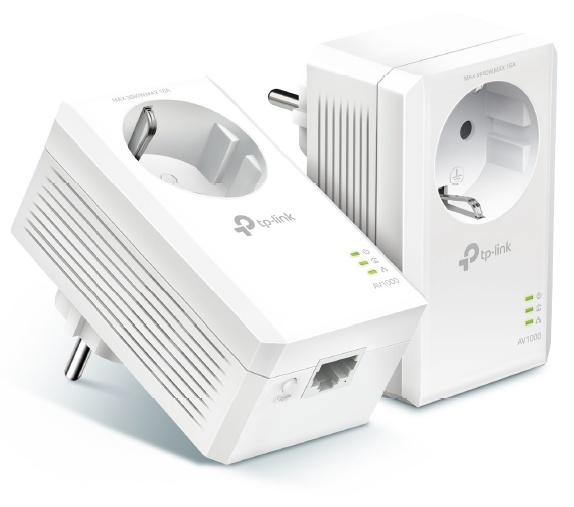


* TL-PA7017P KIT (European version) is used for demonstration here. Images may differ from your actual product.
Highlights
Plug and Play
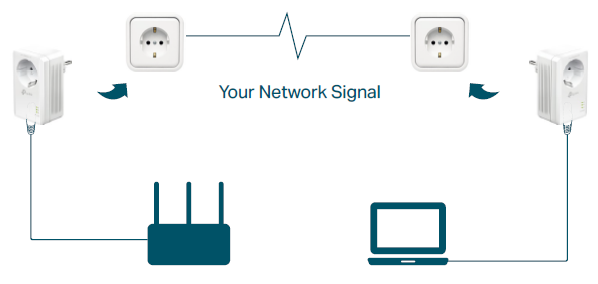
Powerline adapters and extenders must be deployed in a set of two or more, and be connected to the same electrical circuit.
Compact Design
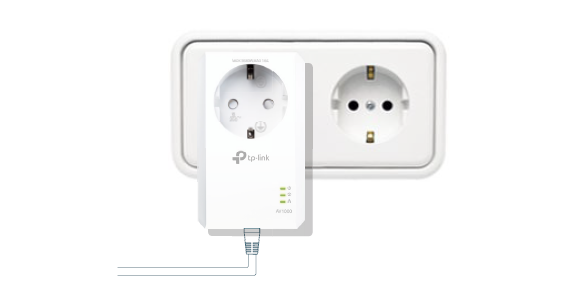
The ultra-compact design allows the adapter to be plugged into socket without blocking other sockets.
Get Reliable Gigabit Network from Any Outlet
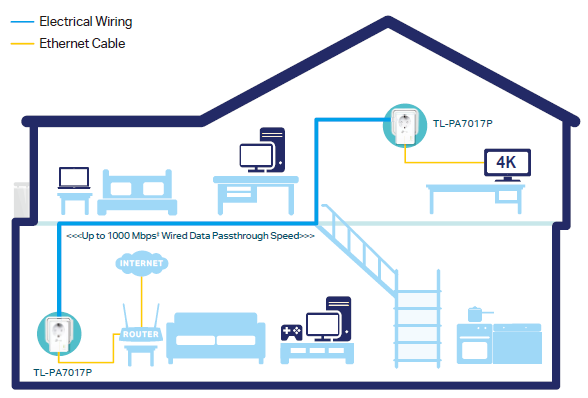
The AV1000 Gigabit passthrough Powerline Starter Kit brings internet to any area with a power outlet using your home’s electrical wiring.
• No need for new wires or drilling
• Network passes through walls and floors
 |
Power Saving§ Automatically switches to “Power-Saving” mode when not in use, reducing its energy consumption by up to 85%. |
 |
HomePlug AV2 Standard Compliant‡ The HomePlug AV2 standard creates high-speed data transfer rates of up to 1000 Mbps‡ to support all your online activities. |
 |
Gigabit Ethernet for Reliable Connections One Gigabit Ethernet port provides reliable high-speed wired connections for game consoles, smart TVs, STB and more. |
Features
Speed
· Ultra-fast Powerline Speed – HomePlug AV2 standard compliant, high-speed data transfer rate of up to 1000 Mbps, ideal for Ultra HD streaming and online gaming
· Gigabit Ethernet Port – Provides warp-speed wired connection for 4K HD video streaming, lag-free gaming and more
Range
· 300-meter Range – Up to 300 meters/1,000 feetmover existing electrical wiring
Reliability
· Mains Filter – Mains Filter inside the outlet reducesm electrical noise interference and improves powerline communication performance
Ease of Use
· Plug and play – Plug and play, no configuration required
· No new wires – No new wires, use existing electrical wiring to expand your home network
· Keep your outlet – An integrated socket lets you power regular devices as normal, and a built-in noise filter prevents them from interrupting the powerline signal
· TP-Link tpPLC – Allows you to easily manage your network using the tpPLC Utility from Download Center at https://www.tp-link.com/support
Security
· Pair Button – 128-bit AES encryption easily at a push of "Pair" button
Energy Saving
· Power Saving – Power Saving Mode helps reducing power consumption by up to 85%§
Specifications
Hardware
· Standards and Protocols: HomePlug AV2, HomePlug AV, IEEE 1901, IEEE 802.3, IEEE 802.3u, IEEE 802.3ab
· Power Consumption: Maximum: 3.26W, Typical: 2.58W, Standby: 0.83W (EU/FR/CH version); Maximum: 3.26W, Typical: 2.58W, Standby: 0.83W (UK version); Maximum: 2.54W, Typical: 2.05W, Standby: 0.83W (US version)
· Compatibility: Compatible with any powerline adapters /extenders and routers†
· Coverage: Connects more devices by adding more adapters or connecting an access point or a switch
· Range: Up to 300 meters/1000 feet over existing electrical wiring‡
· Interface: Gigabit Ethernet Port, Power Socket
· Button: Pair Button
· LED Indicator: Power, Powerline, Ethernet
· Dimensions (W x D x H): 2.3 × 1.7 × 3.7 in (58 × 42 × 95 mm)
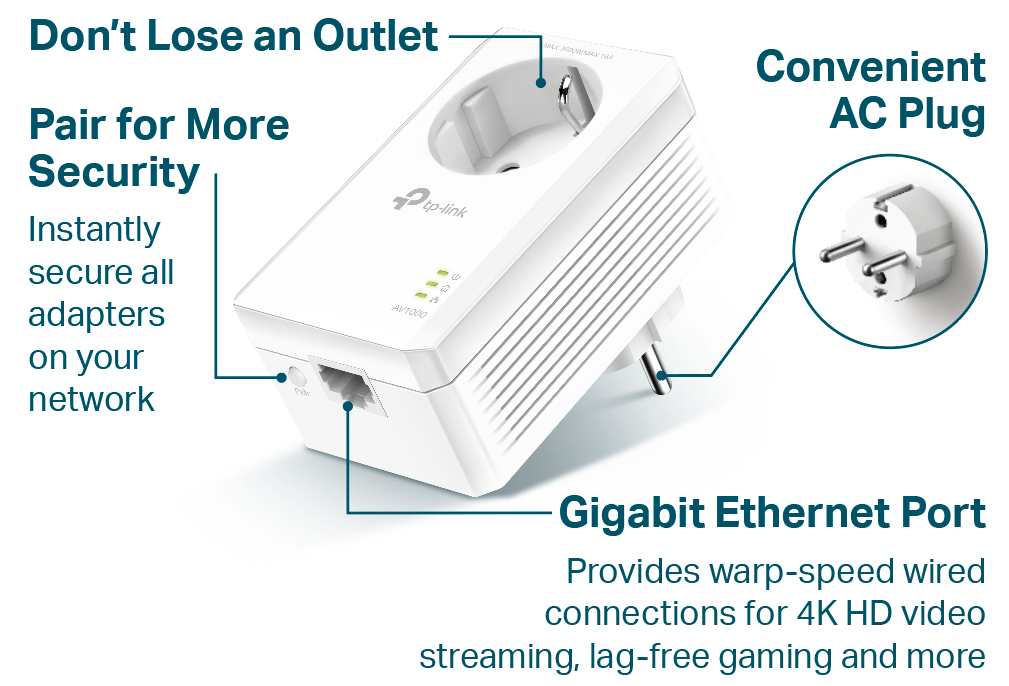
* TL-PA7017P KIT (European version) is used for demonstration here. Images may differ from your actual product.
Software
· Modulation Technology: OFDM (PLC)
· Powerline Security: 128-bit AES Encryption
Others
·Certification: CE, FCC, RoHS, UL
· Package Contents:
AV1000 Gigabit Passthrough Powerline Adapter
2 × TL-PA7017P
2 × Ethernet Cable
1 × Quick Installation Guide
·System Requirements: Windows11/10/ 8.1/8/7/Vista/XP, Mac OS X, Linux
· System Requirements for tpPLC Utility: Windows 11/10/8.1/8/7 and Mac OS 10.15 or later
· Environment:
Operating Temperature: 0°C~40°C (32°F ~104°F)
Operating Humidity: 10%~90% non-condensing
_20260224094512b.png)
For more information, please visit https://www.tp-link.com/products/details/?model=TL-PA7017P+KIT_V5 or scan the QR code left.
Specifications are subject to change without notice. Other brands and product names are trademarks or registered trademarks of their respective holders.
† Compatible with all HomePlug AV and AV2 Standard Powerline adapters. This product may not be compatible with routers or gateways with firmware that has been altered, is based on open source programs, or are non-standard or outdated.
‡ Maximum Powerline signal rates are the physical rates derived from HomePlug AV/AV2 specifications. Actual Powerline data throughput and Powerline range are not guaranteed and will vary as a result of network conditions and environmental factors, including electrical interference, volume of traffic and network overhead, AFCI circuit breaker, and Powerline being in a separate circuit.
§ The Power Saving feature takes effect when your appliances are disconnected or turned off. Actual power saving data will vary in different network conditions and environments.
©2026 TP-Link