如何在 VIGI App中更新 VIGI 設備的韌體
TP-Link VIGI 攝影機上的韌體可以使用 TP-Link VIGI App進行更新。請確認您已下載此App,然後繼續以下步驟。

在你開始之前:
請登入您的 TP-Link ID 並確保您可以控制您的 VIGI 設備。
更新所有 VIGI 設備的韌體
這裡我們以VIGI C540W為範例。
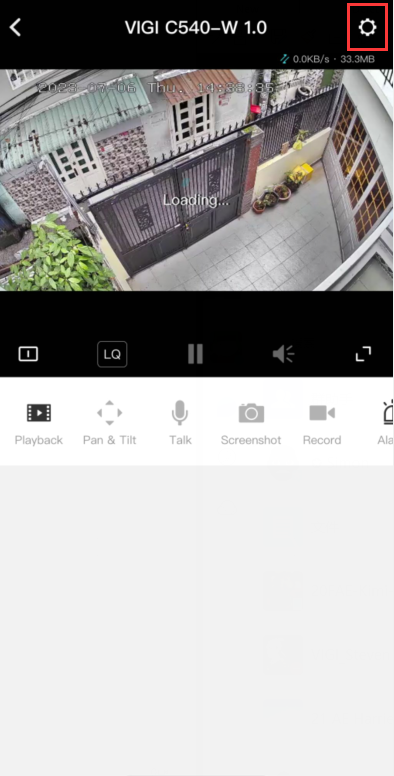
Step 1. 點選您的攝影機會跳轉至 即時影像 頁面。然後,點擊 更多設定。
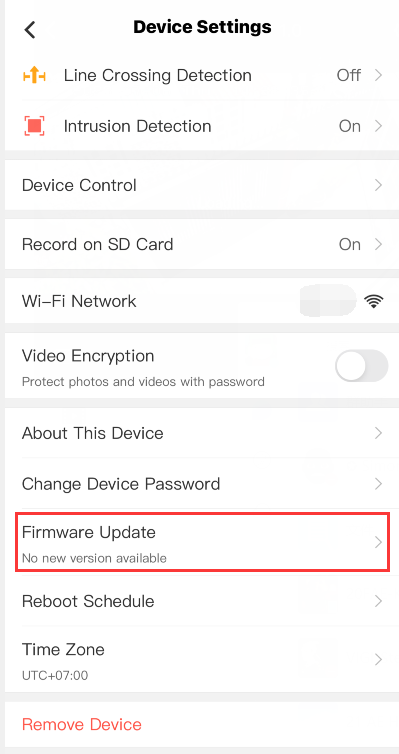
Step 2. 點擊 設備設定 頁面上的 韌體更新。
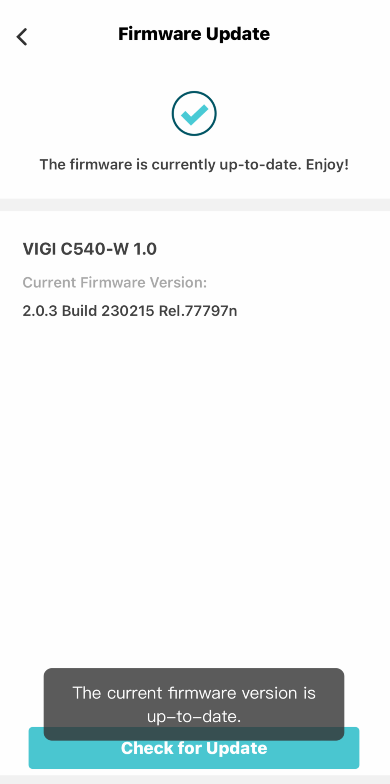
Step 3. 在 韌體更新 頁面,VIGI App會自動為您檢查更新。您也可以點擊 檢查更新 來手動檢查攝影機的更新。
更多相關文章
這篇faq是否有用?
您的反饋將幫助我們改善網站



TP-Link Community
Still need help? Search for answers, ask questions, and get help from TP-Link experts and other users around the world.