How to Choose a Suitable VIGI NVR
Contents
Camera bandwidth and NVR bandwidth
PoE ports and camera connectivity
HDD interfaces and storage capacity
Number of HDD interfaces and maximum capacity
Recording duration and storage requirements
Automatic Network Replenishment (ANR)
ONVIF and third-party camera compatibility
Camera compatibility considerations
Introduction
A network video recorder (NVR) is a device used to manage IP cameras and store video recordings. VIGI NVRs provide centralized camera management, live viewing, recording, playback, and remote monitoring.
VIGI offers various NVR models designed for different surveillance requirements, ranging from small businesses to larger installations.
When selecting an NVR, customers should consider several factors, including the number of cameras, network bandwidth, PoE requirements, storage capacity, and supported features.
Number of channels
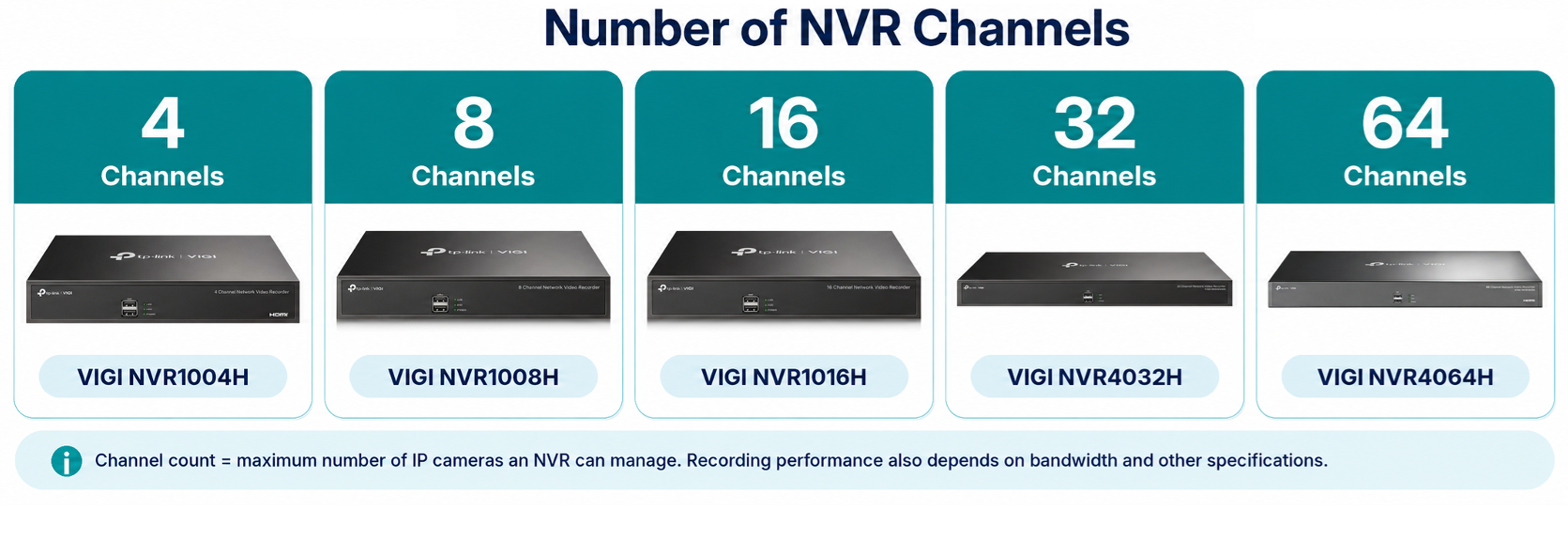
The number of channels determines the maximum number of IP cameras an NVR can manage simultaneously.
VIGI offers NVR models with different channel capacities, including 4, 8, 16, 32, and 64 channels. Customers should choose an NVR based on their current camera requirements while considering potential future expansion. Some examples of available VIGI NVRs are shown in the picture below.
Example:
A business plans to install six IP cameras. An 8-channel NVR would be suitable, supporting all six cameras while allowing two additional cameras to be added in the future.
However, if the business expects to expand beyond eight cameras, selecting a 16-channel NVR would be more appropriate.
Note: The number of channels does not necessarily equal the number of physical PoE ports. Cameras connected through an external network switch also occupy NVR channels.
Camera bandwidth and NVR bandwidth
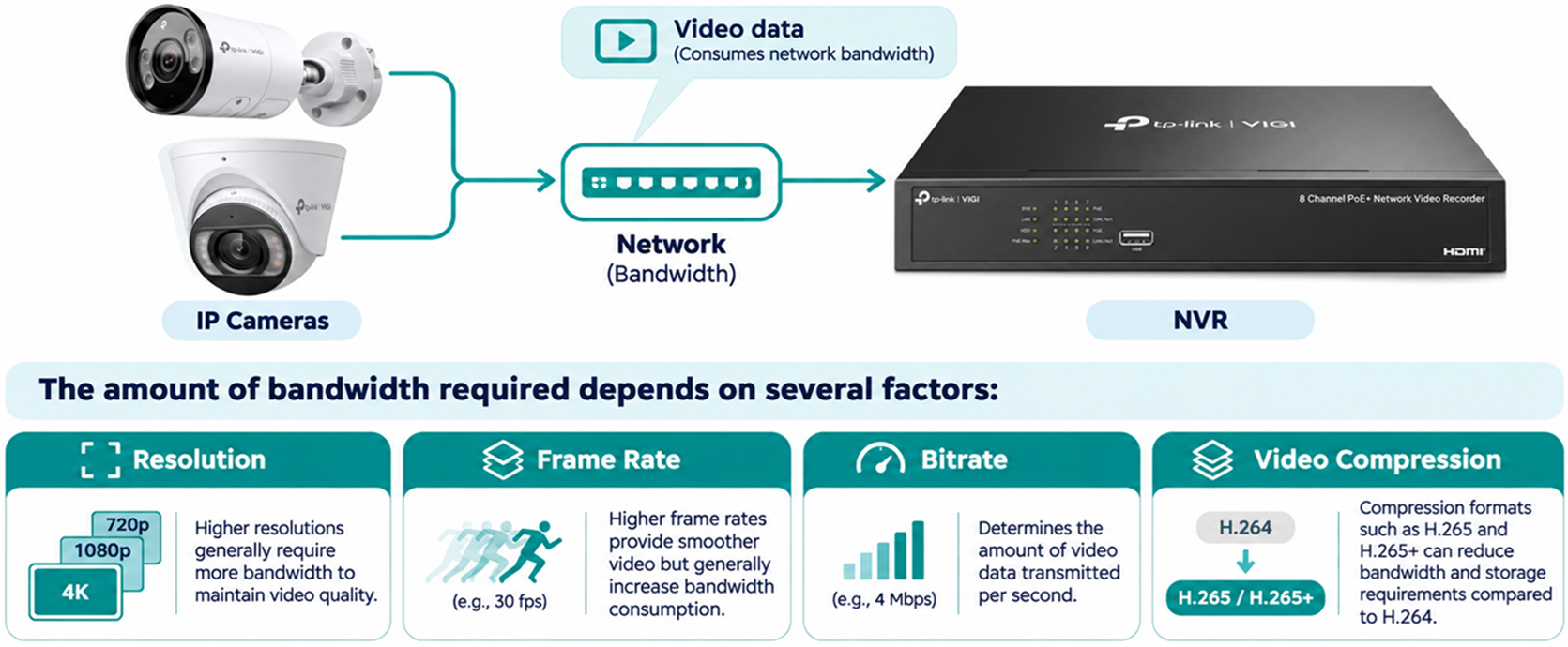
Each IP camera transmits video data to the NVR, consuming network bandwidth. The amount of bandwidth required depends on several factors:
- Resolution: Higher resolutions generally require more bandwidth to maintain video quality.
- Frame rate: Higher frame rates provide smoother video but generally increase bandwidth consumption.
- Bitrate: Determines the amount of video data transmitted per second.
- Video compression: Compression formats such as H.265 and H.265+ can reduce bandwidth and storage requirements compared to H.264.
When selecting an NVR, customers should understand the difference between incoming bandwidth, outgoing bandwidth, and decoding capability.
Incoming bandwidth
Incoming bandwidth refers to the maximum amount of video data the NVR can receive from connected cameras. The combined bandwidth of all camera streams received by the NVR must remain within its incoming bandwidth limit.
Example:
An NVR supports 80 Mbps of incoming bandwidth, and eight cameras are configured to transmit video at 8 Mbps each.
|
Specification |
Bandwidth |
|
Camera bitrate |
8 Mbps |
|
Number of cameras |
8 |
|
Combined camera bandwidth |
64 Mbps |
|
NVR incoming bandwidth |
80 Mbps |
|
Remaining bandwidth |
16 Mbps |
In this example, the combined camera bandwidth is within the NVR's incoming bandwidth limit. However, customers should allow additional capacity for bitrate fluctuations, additional video streams, and network overhead.
Outgoing bandwidth
Outgoing bandwidth refers to the maximum amount of video data the NVR can transmit to other devices, such as computers or mobile phones accessing live video or recordings.
Customers requiring multiple simultaneous remote viewers should consider the NVR's outgoing bandwidth capacity.
Decoding capability
Decoding capability determines how many video streams an NVR can decode simultaneously at specific resolutions and frame rates for live viewing or playback.
For example, an NVR may support decoding eight 4MP streams or four 8MP streams simultaneously at 30 fps.
This does not necessarily mean the NVR is limited to recording only four 8MP cameras. Recording capability also depends on the number of channels, supported recording resolution, and incoming bandwidth.
Note: Incoming bandwidth, outgoing bandwidth, and decoding capability are separate specifications. Customers should verify all three when choosing an NVR.
PoE ports and camera connectivity
Power over Ethernet (PoE) allows compatible IP cameras to receive both electrical power and network connectivity through a single Ethernet cable.
VIGI offers both PoE and non-PoE NVR models, as well as models supporting wireless camera connectivity. When selecting an NVR, customers should consider the following requirements.
Number of PoE ports
The number of PoE ports determines how many cameras can connect directly to the NVR's PoE interfaces.
For example, an NVR with eight PoE ports can directly connect and power up to eight compatible PoE cameras, provided the power requirements are met. Cameras can also be connected through external network switches, provided there is sufficient channel and bandwidth capacity.
PoE standards
Different IP cameras may require different PoE standards. Common standards include:
- IEEE 802.3af (PoE): Supports up to 15.4 W per power-sourcing port.
- IEEE 802.3at (PoE+): Supports up to 30 W per power-sourcing port.
Customers should verify that the NVR supports the required PoE standard and maximum power consumption of each camera.
PoE power budget
The total PoE power budget determines the maximum combined power available to all cameras connected to the NVR's PoE ports. This is different from the maximum power supported by an individual PoE port.
Example 1:
The example below shows a VIGI NVR1008H-8MP connected to four VIGI C385 cameras and four VIGI C445 cameras.
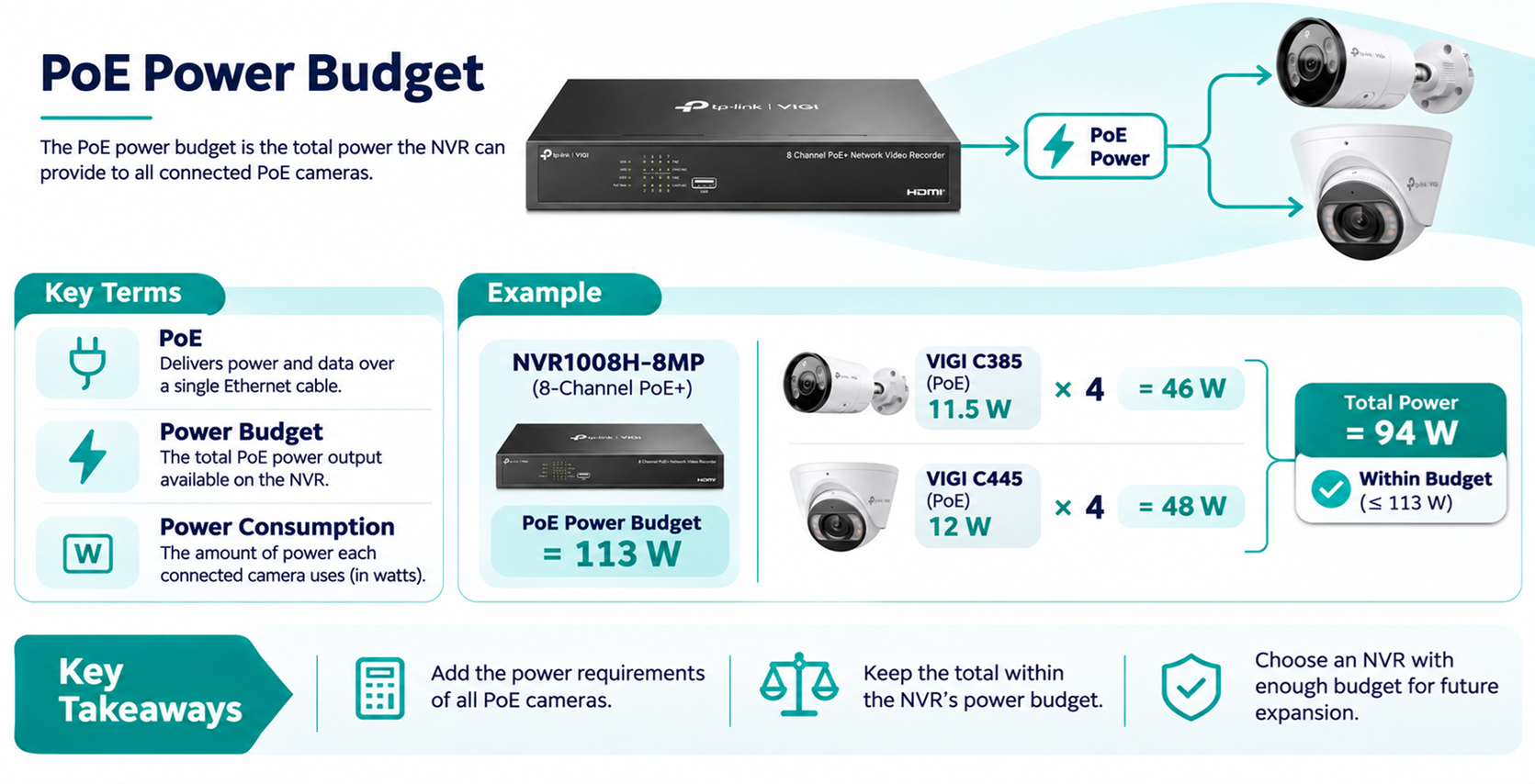
The eight cameras have a combined maximum power consumption of 94 W, which is within the VIGI NVR1008H-8MP's 113 W PoE budget.
Example 2:
The VIGI NVR2008H-8MP V1 has a total PoE power budget of 93 W. Eight VIGI C445 cameras, each requiring up to 12 W, would consume a total of 96 W, exceeding the NVR's PoE budget by 3 W.
|
Specification |
Power |
|
Number of cameras |
8 |
|
Maximum power per camera |
12 W |
|
Total required power |
96 W |
|
NVR PoE budget |
93 W |
|
Power deficit |
3 W |
In this example, the total camera power requirement exceeds the NVR's PoE budget.
Customers should select an NVR with a larger PoE budget or use an external PoE switch to power some cameras.
Note: Camera power consumption may increase when features such as infrared illumination, supplemental lighting, or pan-and-tilt motors are operating. Customers should consider the camera's maximum rated power consumption when calculating PoE requirements.
Other connectivity options
Non-PoE NVRs can manage IP cameras connected through the network, provided the cameras have an appropriate power source.
Certain VIGI NVR models also support wireless camera connections. Customers should consider their existing network infrastructure and whether wired or wireless connectivity is more suitable for their installation.
HDD interfaces and storage capacity
VIGI NVRs use Hard disk drives (HDDs) to store video recordings. Different NVR models support different numbers of SATA HDD interfaces and maximum storage capacities.
Customers should consider the following factors when selecting an NVR.
Number of HDD interfaces and maximum capacity
SATA interfaces determine how many internal HDDs can be installed in the NVR.
For example, an NVR with two SATA interfaces can accommodate two compatible HDDs, providing additional storage capacity compared with a single-HDD model.
Customers should verify the number of SATA interfaces and maximum supported capacity per HDD in the product specifications.
RAID and storage redundancy
Some VIGI NVR models support RAID for storage redundancy, while others use multiple HDDs as independent storage devices. Having multiple SATA interfaces does not necessarily mean RAID is supported.
Customers requiring storage redundancy should verify the supported RAID modes for their NVR model, hardware version, and firmware version. RAID configurations may reduce usable storage capacity and provide protection against specific HDD failure scenarios.
Note: RAID does not replace separate backups of important recordings. Customers should also consider HDD compatibility, rebuild times, storage performance, and the risk of multiple HDD failures.
Preinstalled HDDs
Some VIGI NVR models include a preinstalled HDD, while others require customers to purchase and install HDDs separately.
For example, certain VIGI NVR models are available with 2 TB or 4 TB preinstalled HDD options.
Customers should check whether the selected model includes an HDD and whether additional storage can be installed.
Recording duration and storage requirements
The required storage capacity depends on several factors:
- Number of connected cameras
- Camera resolution and bitrate
- Video compression format
- Continuous or event-based recording
- Required recording retention period
Example:
Eight cameras recording continuously at 4 Mbps each would require approximately 9.89 TB of storage over 30 days. Customers should select an NVR and HDD configuration with sufficient usable capacity to meet the required retention period.
Storage consumption may be reduced through supported compression technologies, such as H.265+, or event-based recording.
Customers can use the VIGI Storage Capacity Calculator to estimate their storage requirements.
Automatic Network Replenishment (ANR)
Some supported VIGI camera and NVR combinations provide Automatic Network Replenishment (ANR).
When the network connection between a camera and NVR is interrupted, the camera can temporarily store recordings on its SD card. Once connectivity is restored, the NVR retrieves the missing recordings.
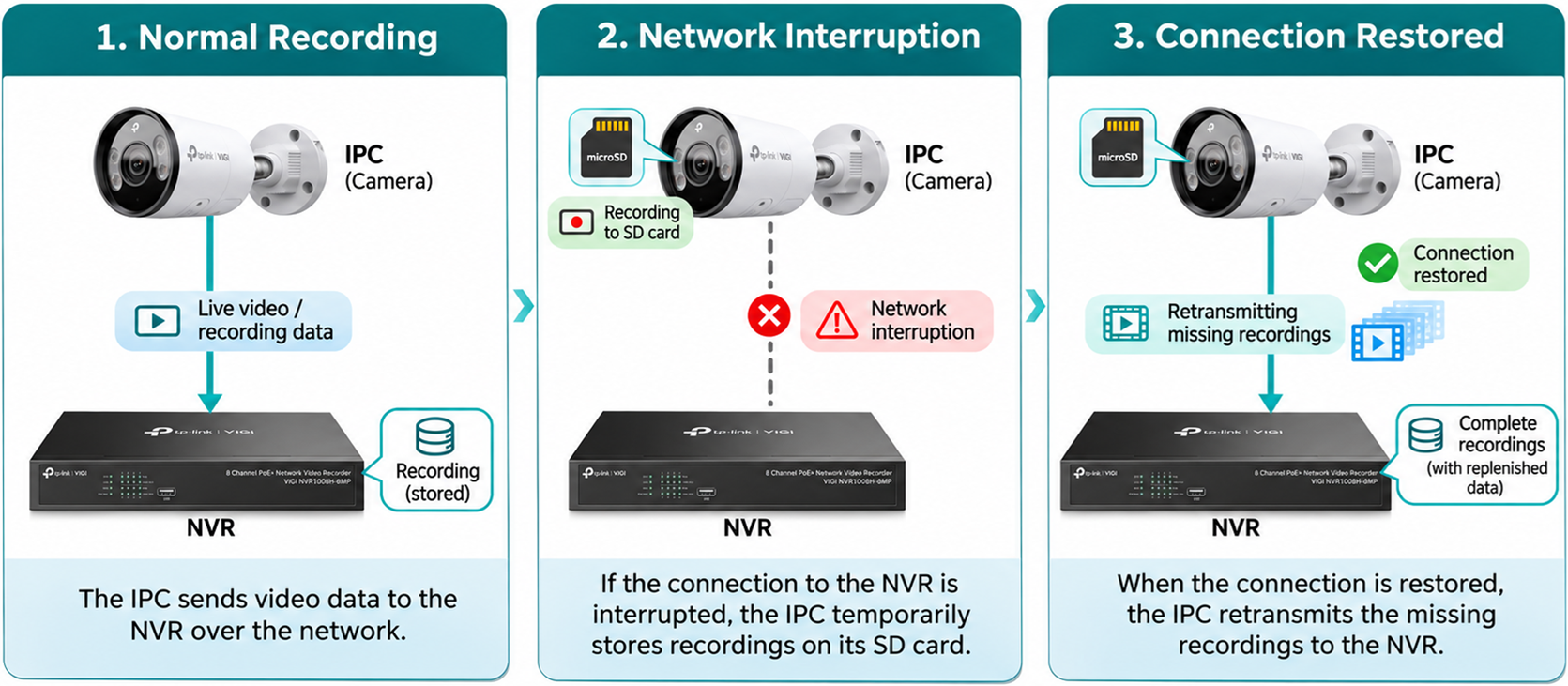
Customers requiring improved recording continuity should check whether their selected camera and NVR firmware support ANR.
Note: ANR requires a supported camera with a working SD card and a compatible NVR equipped with an HDD. Actual recording duration depends on recording settings, scene activity, and available storage.
ONVIF and third-party camera compatibility
ONVIF (Open Network Video Interface Forum) develops industry standards that enable interoperability between IP cameras, NVRs, and video management systems from different manufacturers.
VIGI NVRs support ONVIF, allowing customers to integrate compatible third-party IP cameras into their surveillance systems without necessarily replacing their existing cameras.
ONVIF profiles
ONVIF defines different profiles that specify supported functions and capabilities.
|
Profile |
Description |
|
Profile S |
Basic video streaming and related camera functions |
|
Profile T |
Advanced video streaming, including H.264/H.265 and supported event functions |
|
Profile G |
Video recording, storage, and retrieval functions |
Supported ONVIF profiles may vary by NVR model and firmware version. Before deployment, customers should verify the ONVIF profiles and versions supported by both the NVR and IP camera (IPC), particularly when connecting third-party cameras, to ensure compatibility and confirm supported functions.
Using third-party cameras
Example:
A business has four existing ONVIF-compatible IP cameras and plans to install four additional VIGI cameras.
Rather than replacing all eight cameras, the business may use an 8-channel VIGI NVR to manage them together, provided the third-party cameras are compatible and the NVR's bandwidth and other specifications are sufficient.
Camera compatibility considerations
Although ONVIF enables interoperability between different manufacturers, not all camera features are guaranteed to work. Basic functions such as video streaming and recording may be supported, while advanced features such as intelligent detection, event notifications, or camera configuration may be limited.
Customers should verify the supported ONVIF profiles and required functions before purchasing an NVR for use with existing third-party cameras.
Note: Some third-party cameras can also be added to VIGI NVRs through RTSP for basic video streaming and recording when ONVIF is unavailable.
Additional considerations
In addition to the specifications above, customers should consider the following features when selecting an NVR.
Intelligent features
Some VIGI NVRs support intelligent detection features such as motion detection, line-crossing detection, intrusion detection, and human/vehicle classification.
Depending on the model and firmware, intelligent detection may be processed by the camera or by the NVR.
- AI by camera: The camera performs the intelligent analysis and provides the results to compatible management devices.
- AI by NVR: The NVR processes supported video streams to perform intelligent detection.
Customers should verify the supported AI functions and maximum number of channels available for simultaneous AI processing. Enabling AI by NVR may also reduce the maximum incoming bandwidth and disable certain features, such as Channel-Zero. These limitations vary by NVR model and firmware version.
Local and remote management
VIGI NVRs support local management through compatible displays using HDMI or VGA connections, as well as supported web interfaces.
Depending on the model and software, remote monitoring and centralized management may also be available through supported VIGI and Omada management platforms.
Customers managing multiple sites should verify compatibility with their preferred management platform and its available features.
Conclusion
When selecting a suitable VIGI NVR, customers should consider more than just the number of cameras.
The NVR should provide sufficient channel capacity, incoming bandwidth, PoE power, and storage capacity to meet the surveillance system's requirements.
Additional specifications, including decoding capability, camera compatibility, intelligent features, and management options, should also be considered.
For detailed specifications, refer to the product page and datasheet of the selected VIGI NVR model.
Note: Specifications and supported features may vary by model, hardware version, and firmware version.
To learn more about each function and configuration, please visit Support Home to download or check the manual for your product.
QA
Q1: Why can't I add more cameras when my NVR still has available PoE ports?
A1: Check the NVR's maximum channel capacity and incoming bandwidth. Available PoE ports do not guarantee additional cameras can be added if other limits have been reached.
Q2: Why do my IP cameras disconnect or restart when connected to the NVR's PoE ports?
A2: Check whether the combined camera power consumption exceeds the NVR's total PoE budget or whether an individual camera exceeds the port's power limit.
Q3: Why does my NVR experience video lag or missing recordings even though it has enough channels?
A3: Check the combined camera bitrate against the NVR's incoming bandwidth limit. Reduce camera bitrate or resolution if necessary, and verify network connectivity.
Q4: Why can't my NVR display all connected cameras at their highest resolution simultaneously?
A4: The NVR may have reached its decoding capability. Reduce the live-view resolution or number of simultaneously displayed streams. Recording capability is calculated separately.
Q5: Why does remote live viewing buffer while local recording works normally?
A5: Check the NVR's outgoing bandwidth, available network upload speed, and number of simultaneous remote viewers. Reduce streaming quality if necessary.
Q6: Why are my recordings overwritten sooner than expected?
A6: Check the available HDD capacity, camera bitrate, recording schedule, and retention settings. Continuous recording and higher bitrates increase storage consumption.
Q7: Can I connect third-party IP cameras to a VIGI NVR?
A7: Yes. Compatible third-party cameras can connect through ONVIF or RTSP. However, some advanced functions, such as intelligent detection and camera configuration, may not be supported.
Q8: Why can't my VIGI NVR detect or connect to a third-party ONVIF camera?
A8: Ensure the camera is initialized, ONVIF is enabled, and the network connection is working. Verify the camera's IP address, credentials, and ONVIF compatibility.
Q9: Why are recordings not restored after the camera reconnects to the NVR using ANR?
A9: Verify that both devices support ANR, the camera's SD card is functioning, and the NVR has a working HDD. Also check the recording schedule and available storage.
Q10: Can I expand my NVR's storage capacity by installing additional HDDs?
A10: This depends on the model. Check the number of available SATA interfaces and maximum supported HDD capacity. Some models support multiple HDDs, while others support only one.
Looking For More
Is this faq useful?
Your feedback helps improve this site.



TP-Link Community
Still need help? Search for answers, ask questions, and get help from TP-Link experts and other users around the world.