What Is Wi-Fi 7? Speed, Specs & Benefits Explained
Every few years, a new Wi-Fi generation arrives promising faster speeds and better performance. Most of the time, the upgrade is incremental, but not necessarily a fundamental change in how wireless networking works. Wi-Fi 7 is different.
The IEEE 802.11be standard, officially known as Wi-Fi 7, raises the throughput ceiling while also changing how devices connect to the network.
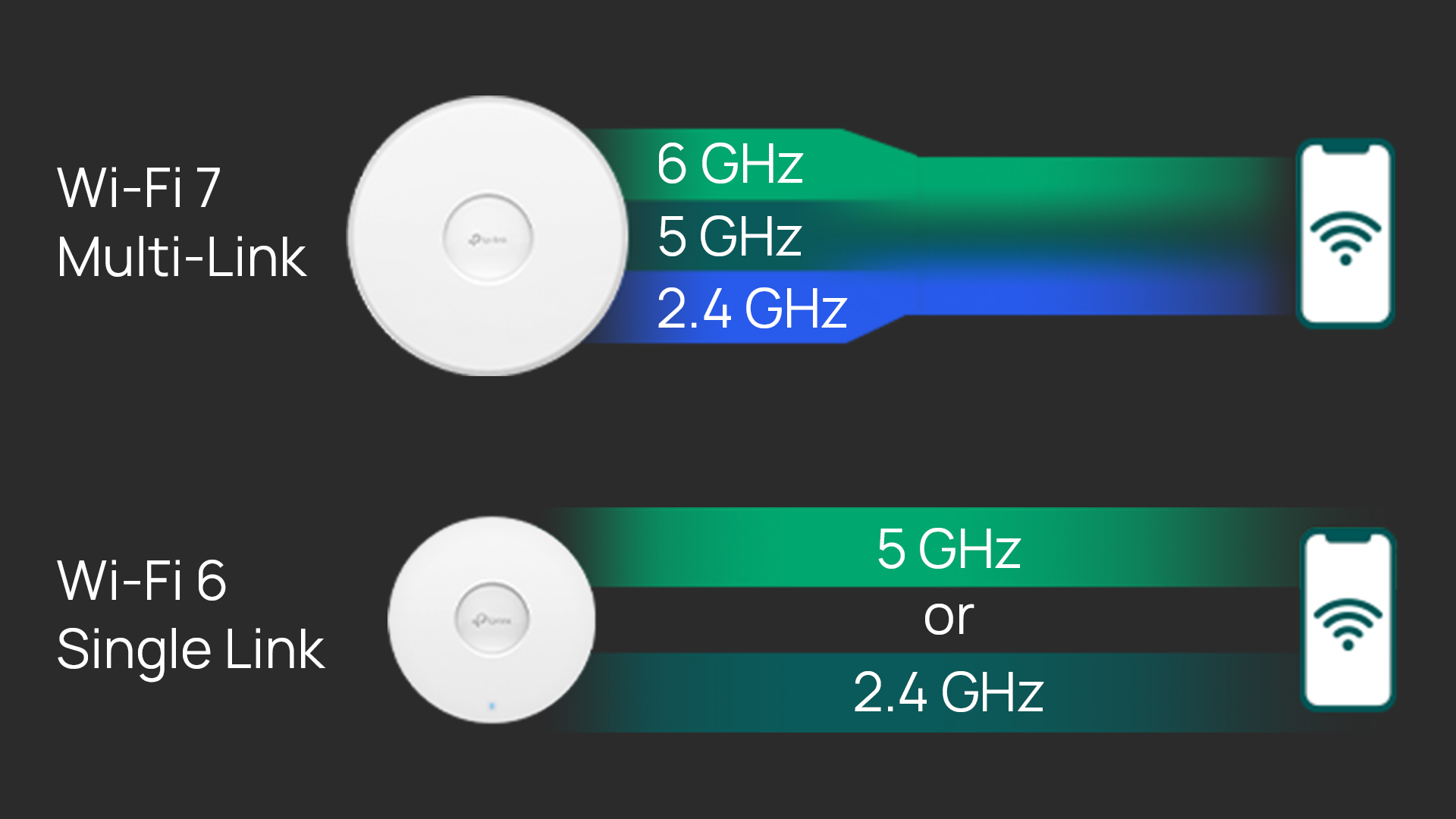
Where every previous standard forced a device to pick one radio band and stay there, Wi-Fi 7 lets devices use multiple bands simultaneously — including the 6 GHz band, which offers a cleaner, less congested channel than older frequencies — treating them like lanes on a highway rather than a single road.
That upgrade has real advantages for how networks handle congestion, latency, and reliability in business environments.
What Is Wi-Fi 7?
Wi-Fi 7 (802.11be) is the latest commercially deployed IEEE wireless networking standard, ratified in 2024. It operates across the 2.4 GHz, 5 GHz, and 6 GHz bands, supports channel widths up to 320 MHz, and uses 4096-QAM modulation. Wi-Fi 7 is the first standard with Multi-Link Operation (MLO), which is the ability for a device to transmit and receive across multiple bands at the same time.
What matters most is what those numbers enable for your network. Wi-Fi 7 is best for environments where existing infrastructure is showing its age:
-
Offices where video calls drop as occupancy increases
-
Hotel lobbies where guest Wi-Fi slows to a crawl by evening
-
Schools where dozens of student devices compete for the same airtime
-
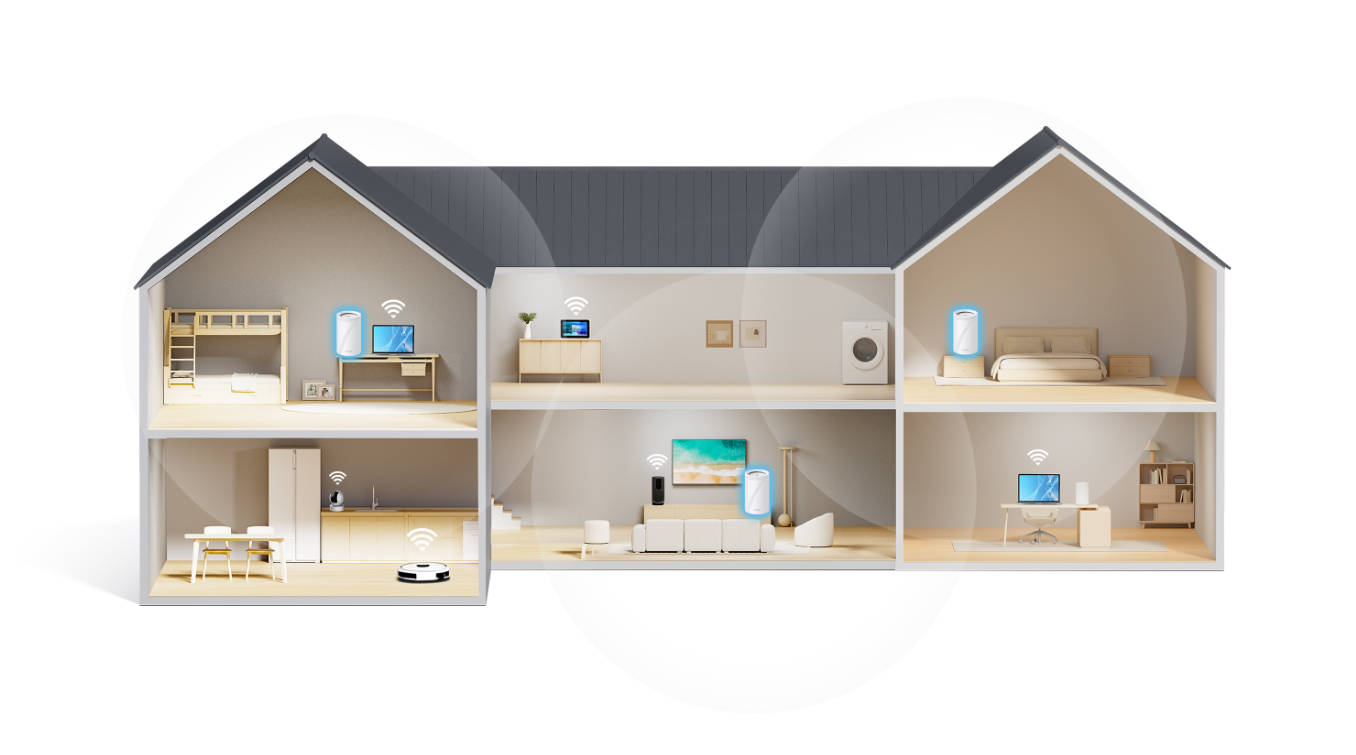
Multi-dwelling units (MDUs) like apartments and condos, where overlapping networks and high device density create interference
Wi-Fi 7 addresses these challenges through more available spectrum, smarter resource allocation, and a fundamentally different link architecture.
Wi-Fi 7 Release Date
Wi-Fi 7 officially launched in 2024, with the IEEE 802.11be standard marking the next major evolution in wireless networking. Since then, Wi-Fi 7 access points and supporting infrastructure have become commercially available, with adoption steadily growing across business settings.
Organizations are deploying Wi-Fi 7 now, through network upgrades that meet the demand for higher bandwidth, lower latency, and more complex device ecosystems.
Wi-Fi 7 Benefits: What Actually Changed?
The latest Wi-Fi 7 benefits aren't just faster speeds. The standard introduces several structural improvements that change how the network behaves under load.
320 MHz channel bandwidth
Doubles the maximum channel width of Wi-Fi 6, allowing significantly more data to move at once, which is especially valuable for high-throughput environments like offices with heavy video, cloud, or data usage.
4K-QAM (4096-QAM)
Increases the amount of data carried per transmission compared to Wi-Fi 6, improving efficiency when signal conditions are strong.
Multi-Link Operation (MLO)
Allows devices to connect across multiple bands simultaneously instead of choosing just one, reducing latency and improving reliability under load.
More spatial streams (up to 16x16 MU-MIMO)
Doubles the number of simultaneous data streams, increasing capacity in dense device settings like offices, campuses, or multi-unit buildings.
Multi-RU (Resource Unit) allocation
Enables devices to use multiple segments of spectrum at once, improving how bandwidth is distributed and reducing inefficiencies in busy networks.
Preamble puncturing
Allows the network to avoid only the portions of a channel affected by interference instead of dropping the entire channel width, maintaining throughput in crowded wireless environments.
Wi-Fi 7 Specs: What the Numbers Mean
How Fast Is Wi-Fi 7?
Wi-Fi 7’s max speed is up to 46 Gbps, which represents a theoretical ceiling achieved under ideal lab conditions. While that may not apply to daily business operations, what matters more is how the IEEE 802.11be performs under actual network load.
Wi-Fi 7 can deliver multi-gigabit throughput across all three bands (6 GHz, 5 GHz, and 2.4 GHz combined), with several gigabits available on the 6 GHz band alone. By comparison, Wi-Fi 6 tops out at 9.6 Gbps theoretically, with real-world performance typically falling below that.
The difference isn’t that a single device suddenly gets dramatically faster speeds. It’s that Wi-Fi 7 sustains higher throughput across many devices at once. In comparable environments, that translates to roughly 2–2.5× more usable capacity.
For most business networks, that’s an important upgrade: not just peak speed, but reliable consistency. As more devices connect and demand increases, Wi-Fi 7 holds performance steady under pressure.
Channel Bandwidth: Why 320 MHz Matters
While Wi-Fi 6 supports channels up to 160 MHz wide, Wi-Fi 7 doubles that to 320 MHz, meaning more data can move at once.
That increase only works if there’s enough open spectrum to support it. The 6 GHz band, first introduced with Wi-Fi 6E, provides that space. Unlike the 2.4 GHz and 5 GHz bands, which are crowded with traffic from years of legacy devices and networks, 6 GHz is largely uncongested and offers a more expansive range of spectrum for newer Wi-Fi standards.
With Wi-Fi 7’s 320 MHz channels, performance stays consistent instead of degrading as demand increases, even in high-density environments like conference rooms or hotel lobbies.
4096-QAM Modulation: More Data Per Transmission
Modulation determines how much data can be packed into each wireless transmission. Wi-Fi 6 uses 1024-QAM, while Wi-Fi 7 increases that to 4096-QAM, boosting the amount of data carried in each transmission under the same signal conditions.
For business use, the benefit is most noticeable in strong signal environments, such as close to the access point or in well-designed networks with consistent coverage. With 4096-QAM, Wi-Fi 7 maintains higher throughput in these conditions by increasing how much data each transmission can carry.
Multi-Link Operation: The Defining Change
Multi-Link Operation (MLO) is the most significant architectural shift Wi-Fi 7 introduces, and the one most worth understanding when evaluating the standard.
In previous Wi-Fi generations, a device connected to one band at a time. If that band became congested, performance dropped, and switching meant re-associating with another band, often causing brief interruptions. MLO changes this by allowing devices to maintain simultaneous connections across multiple bands, such as 5 GHz and 6 GHz, and dynamically use whichever path is least congested.
The impact is immediate for businesses. Traffic can be distributed across multiple links instead of competing on one, increasing overall throughput. Latency drops because data doesn’t have to wait behind congestion, and reliability improves because performance doesn’t hinge on a single connection.
With Wi-Fi 7 and MLO, performance stays stable under load, whether it’s video conferencing, real-time transactions, or high-density device environments, reducing dropped connections, buffering, and slowdowns.
MU-MIMO: Serving More Clients at Once
MU-MIMO (Multi-User, Multiple Input, Multiple Output) allows an access point to communicate with multiple devices simultaneously using separate spatial streams. Wi-Fi 6 supports up to eight streams, while Wi-Fi 7 increases that ceiling to 16.
More spatial streams mean more devices can be served at the same time, rather than waiting their turn. In environments like open-plan offices, classrooms, or retail spaces, this reduces the slowdown that typically occurs as device counts rise.
With Wi-Fi 7, higher stream capacity helps maintain performance as more clients connect.
Reduced Latency: Why It Matters Beyond Speed
Speed gets the attention, but latency determines how applications actually feel in use. A video call with noticeable delay becomes frustrating. A VoIP call with jitter breaks down. Even fast connections feel slow when latency is high.
Wi-Fi 7 reduces latency through a combination of improvements: MLO routes traffic over the fastest available path, Multi-RU allocation reduces wait times for transmission, and more efficient scheduling keeps data moving under load. The result is lower and more consistent latency compared to Wi-Fi 6.
This means that real-time applications stay responsive under pressure, delivering a smoother, more reliable experience where delays would otherwise be noticeable.
Backward Compatibility: What Happens to Existing Devices
Wi-Fi 7 access points are fully backward compatible with earlier standards, including Wi-Fi 6 and Wi-Fi 5. Devices connect using the highest standard they support, and the network manages that mix automatically, so there’s no separate networks or manual configuration required.
This makes upgrades simple. Moving to Wi-Fi 7 infrastructure doesn’t mean replacing every device at once. Existing hardware continues to operate normally on 2.4 GHz and 5 GHz, while newer devices can take advantage of features like MLO and the 6 GHz band.
As devices are refreshed over time, the network delivers increasing performance and capacity without requiring another infrastructure upgrade.
Is Wi-Fi 7 Right for Your Network?
Wi-Fi 7 addresses real problems that affect business networks under load. The speed improvements are noticeable, but the more important gains are in how the network behaves when it's busy: less congestion, lower latency, and more consistent performance across a large and growing device count.
The strongest case for Wi-Fi 7 is in environments that are already pushing the limits of Wi-Fi 6: offices with high device density, hospitality deployments handling heavy guest traffic, schools managing hundreds of concurrent connections, and any environment running latency-sensitive applications like video conferencing or VoIP at scale. For these environments, upgrading to Wi-Fi 7 infrastructure delivers measurable operational improvements that employees and guests will notice.
For smaller or less demanding deployments, Wi-Fi 6 remains a sound choice. And because Wi-Fi 7 is fully backward compatible, there's no pressure to replace client devices — the infrastructure upgrade pays off over time as Wi-Fi 7-capable devices join the network.
For a broader look at the full access point lineup, explore the Omada Wi-Fi access points collection.