
Pourquoi mon CPL ne peut-il pas être détecté par les autres ?
 197663
1. Assurez-vous qu'il n'y a pas d'ampèremètre ou d'appareil similaire dans le circuit électrique où les deux CPL sont branchés, sinon ils ne pourront pas communiquer parce que l'ampèremètre bloque la transmission du signal.
2. Ce n'est qu'avec le même nom de réseau qu'ils peuvent se détecter et communiquer entre eux. Pour connaître le nom du réseau, connectez vos périphériques Powerline à l’ordinateur. Exécutez l'utilitaire Powerline, accédez à l' onglet Confidentialité , puis vous verrez le nom du réseau comme ci-dessous:
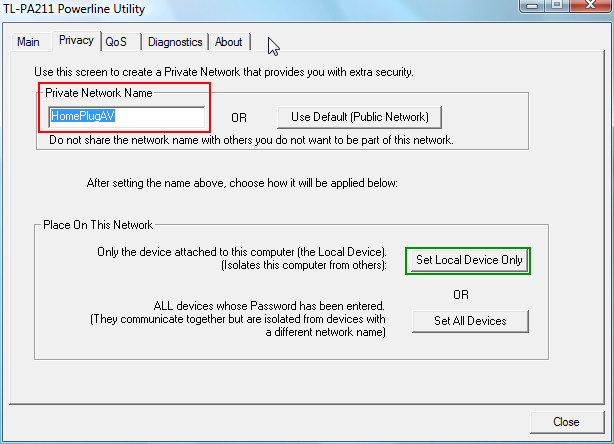
Si les noms de réseau privé sont différents, s'il vous plaît changer le nom de chaque appareil à la même, ou cliquez sur « Utiliser par défaut (réseau public ) » pour en faire le nom par défaut. Ensuite, cliquez sur le bouton « Set Local Device Only »;
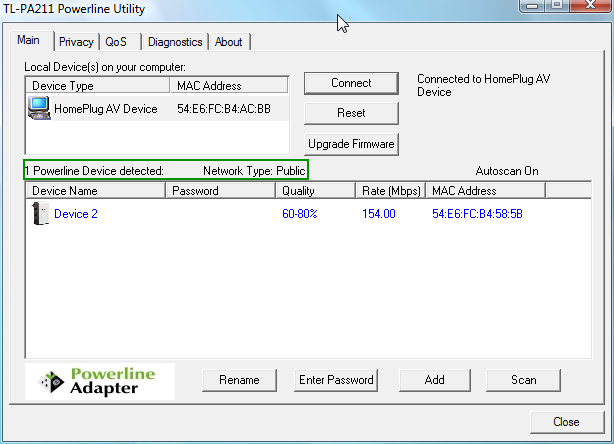
Avec le même nom de réseau, le périphérique peut être détecté avec succès.
Le type de réseau s'affichera comme public si vous utilisez le nom par défaut, sinon il affichera comme privé .
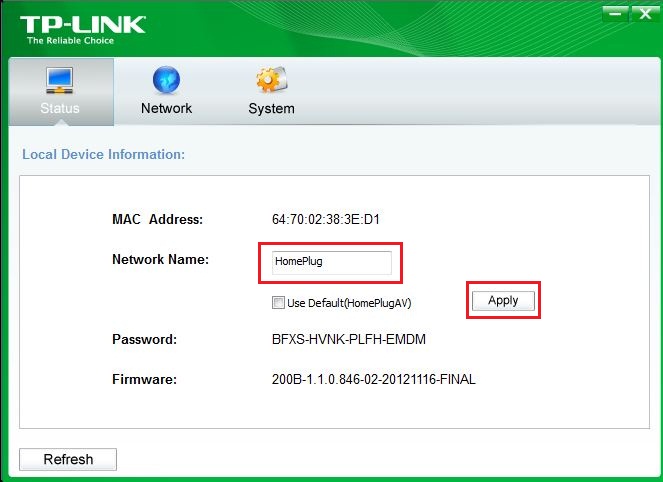
Le nouvel utilitaire de version est le suivant:
3. Après avoir changé le nom du réseau, si les périphériques ne parviennent toujours pas à se retrouver, réinitialisez-les et branchez les deux périphériques dans une barrette d'alimentation. Vérifiez les voyants de l'automate lorsque le voyant est stable (attendez environ une minute).
Si les deux voyants du PLC sont allumés, cela signifie qu'ils fonctionnent bien. Utilisez-les dans l'environnement réel et réessayez.
Si, après toutes les tentatives ci-dessus, les voyants de l’API sont toujours éteints, veuillez contacter le support TP-Link pour un diagnostic plus approfondi.
Est-ce que ce FAQ a été utile ?
Vos commentaires nous aideront à améliorer ce site.


