


NVR vs DVR for Business Security: Making the Decision
Published: August 11, 2026 | Last Updated: August 11, 2026
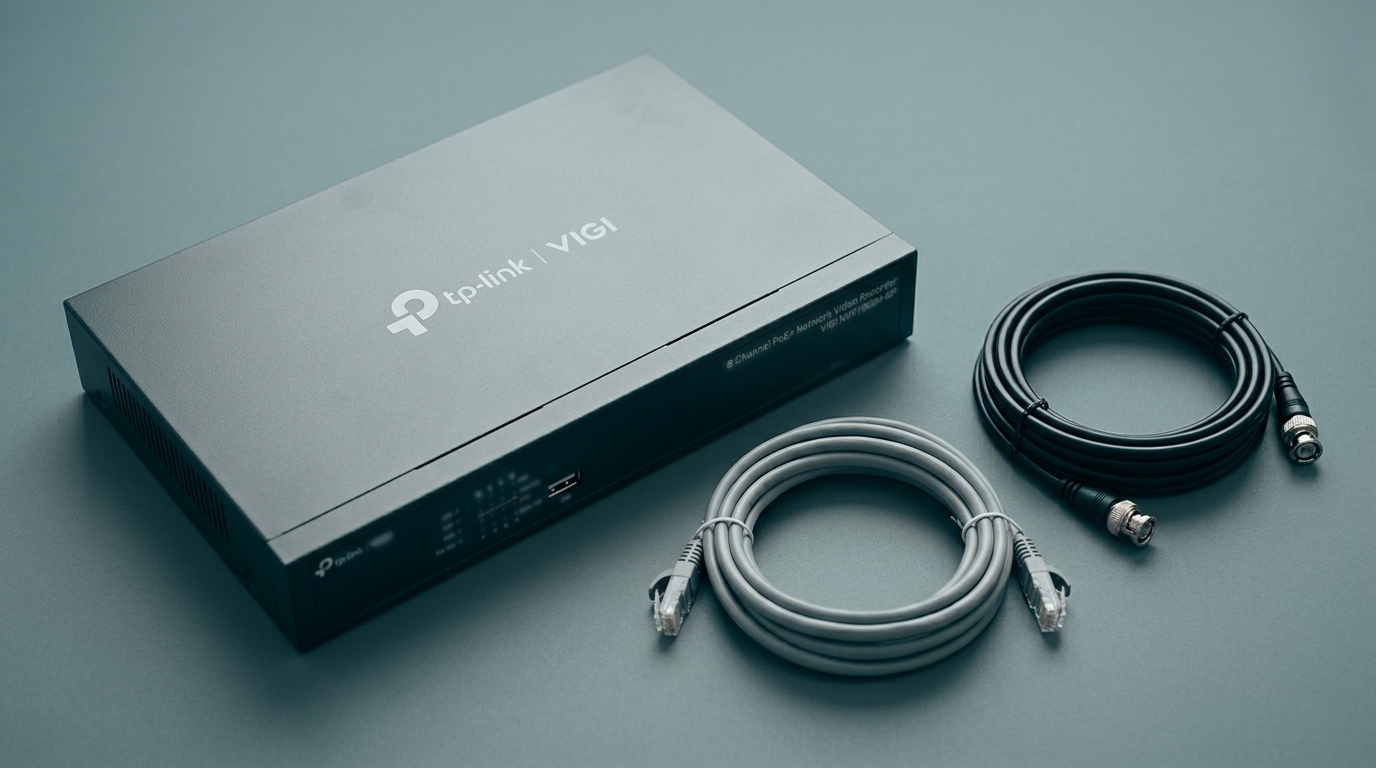
Quick Answer
- The recorder follows the cameras, not the other way round. Analog cameras need a DVR and IP cameras need an NVR, and swapping later means replacing the cameras and usually the cabling too.
- A DVR is still a reasonable answer where usable coax is already in the building, and the requirement is basic, which is a real situation rather than a courtesy.
- The common claim that IP systems expose every camera to your network does not describe a VIGI system with Network Isolation switched on, where cameras sit on the recorder's own subnet and cannot be reached from your LAN.
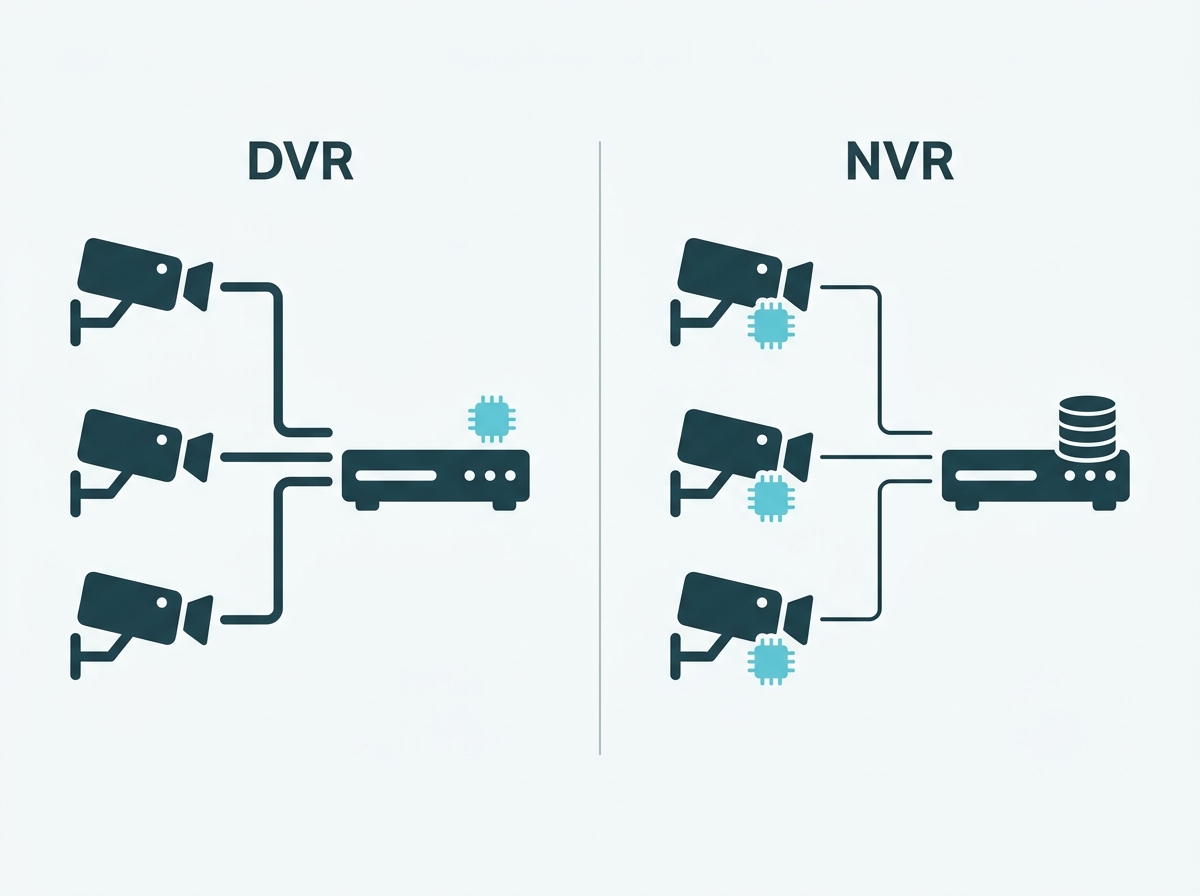
The choice is not which recorder is better. It is which camera technology your system runs on, because the two are not interchangeable. A DVR records analog cameras over coaxial cable and does the video processing itself. An NVR records IP cameras over network cable, and each camera processes and encodes its own video before sending it. That difference decides your cabling, your resolution ceiling, how you power the cameras, and what switching between them would cost you later, which is why it is a decision worth making deliberately at the start rather than discovering halfway through a rollout.
Table of Contents
What Actually Separates an NVR From a DVR?
What Does the Choice Change About Recording and Storage?
When Does a DVR Still Make Sense?
Do IP Cameras Really Add Network Exposure?
What Does Switching From DVR to NVR Involve?
Which Should a Business Choose?
What Actually Separates an NVR From a DVR?
Where the video gets turned into a digital file. Everything else follows from that.
A DVR, a digital video recorder, works with analog cameras. The camera captures the image and sends a raw signal down a coaxial cable to the recorder, and the recorder does the encoding. The intelligence sits centrally, and the cameras are comparatively simple devices.
An NVR, a network video recorder, works with IP cameras. Each camera encodes its own video and sends a finished digital stream over network cable. The recorder stores, indexes, and serves it. The intelligence is distributed to the cameras, which is also why IP cameras can run detection and classification on the device while analog cameras generally cannot.
The practical consequence is compatibility. Cameras built for one do not work with the other without a converter, so the recorder decision and the camera decision are one decision.
One note of disclosure, since this is a VIGI page: VIGI builds network video recorders and does not build DVRs. Where this article says a DVR is the right answer, that is not a recommendation we benefit from, and it is worth reading with that in mind.
What it means for you: decide the camera technology first. The recorder follows from it, and treating them as two separate purchases is how businesses end up with equipment that cannot talk to each other.
What Does the Choice Change About Recording and Storage?
More than most comparisons cover, and this is the half that actually shapes what your system can do day to day.
Compression, and therefore storage. IP cameras encode their own video, which means they can use modern compression. VIGI cameras and recorders support H.265 and H.265+, and TP-Link's own material puts the saving at roughly half the file size of H.264 at comparable quality, based on laboratory testing. Across several cameras recording continuously, that compounds into either a smaller drive or a longer retention period from the same drive.
Two separate recorder limits, not one. An NVR publishes a channel count and a total incoming bandwidth figure, and they are different constraints. A recorder can have enough channels for your cameras and still not have the bandwidth to carry them all at the settings you want. There is a third figure too, decoding capability, which decides how many channels can be displayed at full resolution simultaneously.
Storage sizing runs from retention, not from the box. How many days you need decides the capacity, rather than the capacity deciding how many days you get. VIGI's capacity calculator works this out from resolution, bit rate, encoding type, and camera count, and it is worth running before choosing either recorder type, because the answer differs between them.
Search and export. An IP system records footage already tagged by the camera, including event types where classification is enabled, which makes finding a specific clip a filter rather than a scrub through a timeline. That matters more than it sounds, because retrieving footage under time pressure is the situation the whole system exists for.
Recorder selection more broadly, including channels, drive bays, and sizing, is covered in our guide to choosing a surveillance video recorder.
What it means for you: work out your retention period and run it through the calculator for both options before deciding. The storage cost difference between the two is real, and it is not the part people compare.
When Does a DVR Still Make Sense?
Three situations, and they are legitimate rather than concessions.
Usable coaxial cabling is already in the building. This is the strongest case. If an older building was wired for analog years ago and the cable is in good condition and reaches where you need cameras, reusing it avoids the most expensive part of a new installation, which is pulling cable through finished walls and ceilings.
The requirement is genuinely basic. If the job is knowing that something happened in a low-traffic area, and nobody needs to identify a stranger at a distance or filter alerts by object type, the extra capability of an IP system is capability you are paying for and not using.
Budget is the binding constraint right now. Analog systems sit lower in the market, and a working basic system today can be worth more than a better system deferred.
One thing that has changed and is worth knowing: analog is not stuck at the resolution it had a decade ago. HD-over-coax formats have raised the ceiling considerably, so the gap between the two on image quality is narrower than older comparisons suggest. IP still leads at the top end and on analytics, but if you are assessing an existing analog system, read its actual specification rather than assuming it is standard definition.
What it means for you: check the condition and reach of any existing coax before assuming it must be replaced. If it is sound and it goes where you need, that is a genuine saving and a genuine reason to stay analog for now.
Do IP Cameras Really Add Network Exposure?
On a flat network, yes. On a recorder with isolated PoE ports, largely no, and this is where most comparisons stop too early.
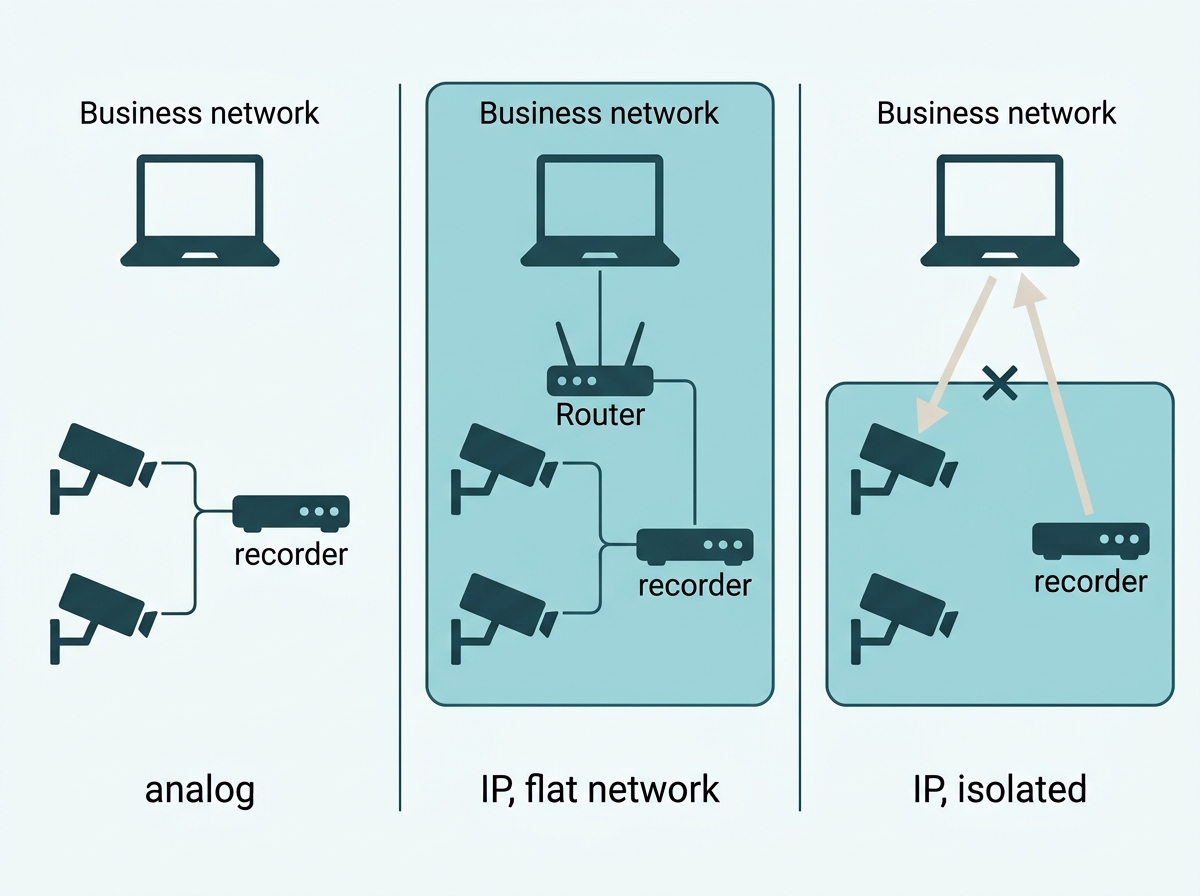
The usual argument runs like this: in an analog system only the recorder touches the network, while in an IP system every camera is a networked device, so there are more things to secure. As a description of IP cameras plugged into your ordinary office switches, that is fair.
It stops being a fair description when the cameras are on the recorder's own PoE ports. VIGI recorders support Network Isolation, which separates those ports from the LAN port into different subnets and puts the cameras on an internal range the recorder manages, defaulting to 192.168.253.x. Once enabled, a computer on your main network cannot reach those cameras at all, and TP-Link's own verification step is that a ping from a LAN PC fails. The recorder keeps recording and displaying them normally.
So the honest comparison is three-way rather than two-way. Analog cameras are off the network entirely. IP cameras on a flat business network are on it alongside your computers. IP cameras on an isolated recorder subnet are on a network of their own that your other devices cannot reach. The middle case is the one the exposure argument describes, and it is a configuration choice rather than a property of IP systems.
How isolation is configured, and what it changes about addressing, is covered in our guide on PoE camera setup. How camera networks fit a wider network design, including segmentation across a business, belongs to network infrastructure planning rather than to a recorder comparison.
What it means for you: if network exposure is your concern with IP, ask whether the recorder supports isolation and whether it will be switched on, rather than treating the concern as a reason to stay analog.
Can a Business Run Both?
Yes, and there are two ways to do it, which are not the same and get confused with each other.
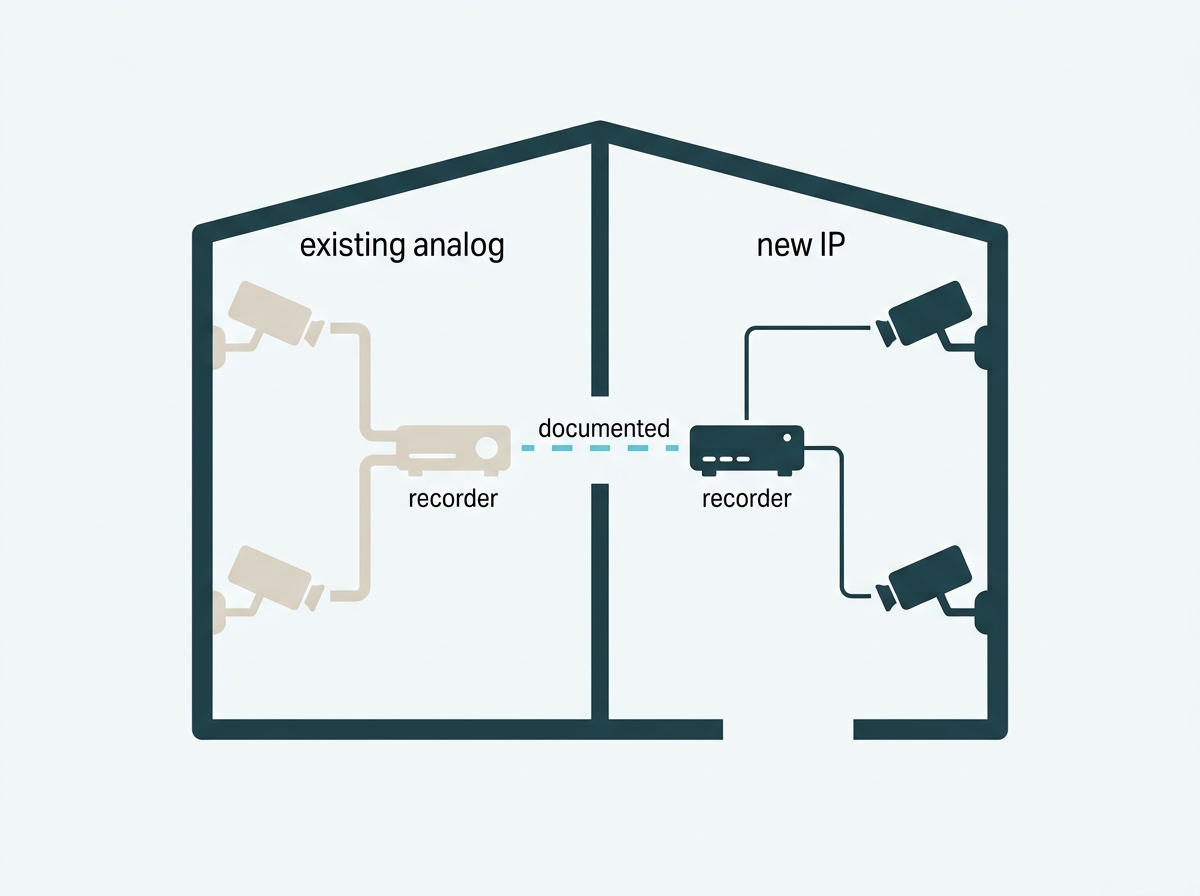
Two separate systems. An analog system covering one area and an IP system covering another, each with its own recorder. This is straightforward, and it suits a business retrofitting IP cameras into part of a building while leaving working analog equipment alone elsewhere.
One hybrid recorder. Some recorders, often sold as XVRs, accept both analog and IP inputs on the same box. That keeps everything in one interface and one set of recordings, at the cost of buying into a product category that sits outside VIGI's range.
A mixed estate is a normal outcome of upgrading gradually rather than a design flaw. What matters is that somebody knows which cameras are on which system, because a mixed estate that nobody has documented is the one that produces the "we thought that area was covered" conversation.
What it means for you: if you are phasing in an upgrade, decide whether you are running two systems or replacing the recorder with a hybrid, and write down which cameras sit where. That document is worth more than it sounds two years later.
What Does Switching From DVR to NVR Involve?
Replacing the cameras, and usually the cabling. That is the honest answer, and it is the number that decides whether an upgrade happens now or later.
Analog cameras do not work on an NVR without a converter, so a switch means new cameras across every position you are converting. The cabling question is separate: coax and network cable are different, so unless you are using converters, each converted position needs a network cable run. In a finished building, pulling that cable is frequently the higher cost of the two.
There is a saving on the other side of the ledger. PoE means each new position needs one cable rather than a data run plus a power run, so the cabling you do pull is simpler than the analog installation it replaces, and there is no electrician needed at each camera position.
Which is why phasing usually beats a single cutover. Convert the positions where the extra capability actually pays, meaning entrances, tills, and anywhere identification matters, and leave working analog on low-value coverage until it fails.
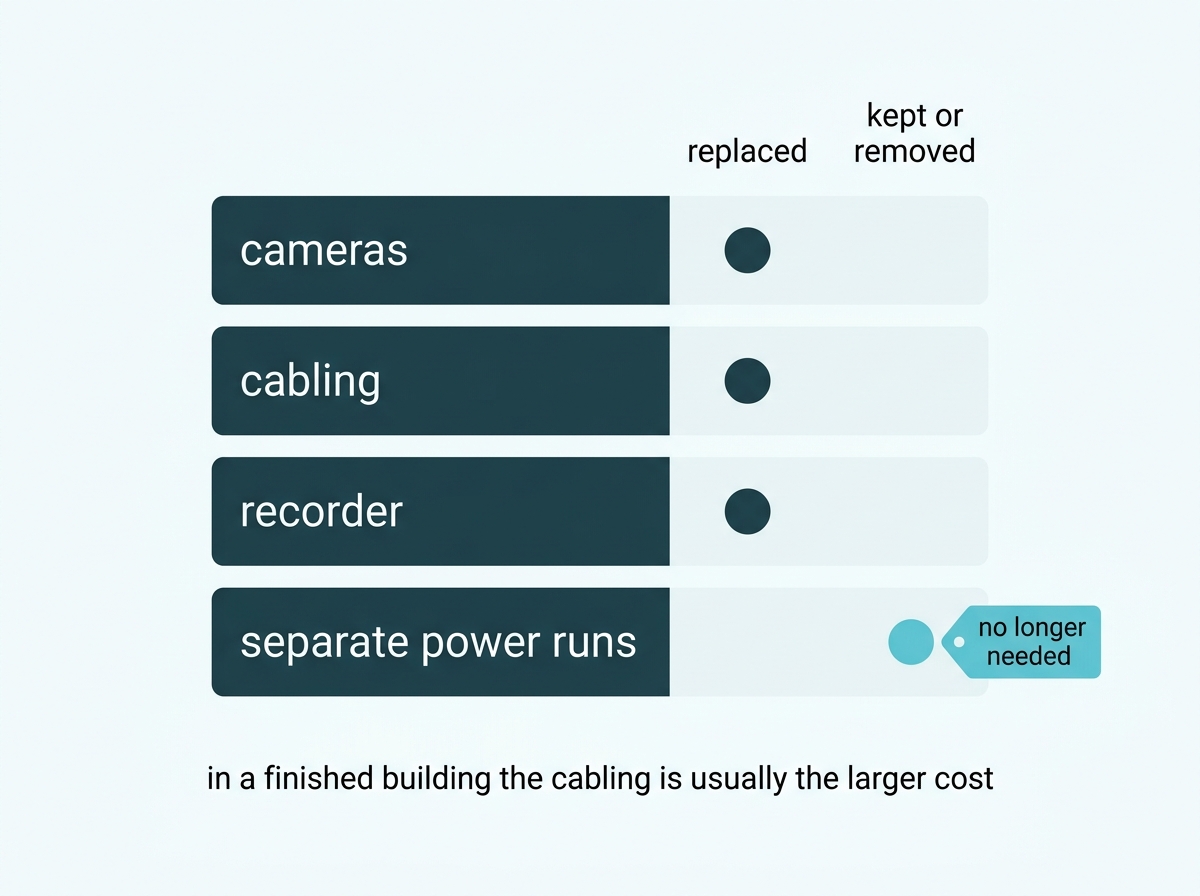
What it means for you: price the cable runs before the cameras, because in an existing building that is where the cost of switching actually sits.
Which Should a Business Choose?
Three questions decide it, in this order.
Is there usable coax already in the building? If yes, and it reaches where cameras are needed, analog is genuinely cheaper to work with and deserves consideration rather than dismissal. If no, you are pulling cable either way, and the reason to pull coax rather than network cable is thin.
Does any position need to identify rather than just detect? Entrances, tills, and anywhere you would need to recognize a stranger point toward IP, both for the resolution and for the classification that makes footage searchable afterwards.
Do you need alerts that mean something? Filtering by human or vehicle rather than by any movement is an IP camera capability. If nuisance alerts are the reason nobody looks at the current system, that is an argument for IP on its own.
Feature-to-Benefit: The Practical Comparison
|
|
DVR with analog cameras |
NVR with IP cameras |
|
Cabling |
Coaxial, plus a power run per camera |
Network cable, single run per camera with PoE |
|
Where video is encoded |
At the recorder |
At each camera |
|
Detection and classification |
Generally not available at the camera |
Available on the camera, including human and vehicle classification |
|
Compression |
Older formats, larger files for the same quality |
H.265 and H.265+, roughly half the file size of H.264 in lab testing |
|
Network exposure |
Cameras off the network entirely |
Depends on configuration, and isolation removes most of it |
|
Best case for it |
Sound existing coax, basic requirement, tight budget |
New cabling anyway, identification needed, alerts that must be filtered |
Analog needs two cable types and keeps the cameras off the network, while IP needs one cable per camera, puts the encoding and the analytics on the camera, and stores footage more efficiently. Analog is the better answer when the cable is already there, and the requirement is modest. IP is the better answer when you are pulling cable regardless, or when any position needs to identify someone rather than simply notice them.
To compare recorders by channel count, bandwidth, and storage, browse VIGI network video recorders, or explore VIGI's NVR lineup. How the recorder decision fits the wider storage and retention picture is covered in Video Storage & Recording Systems for CCTV.
What it means for you: answer the coax question first, because it is the only one where the building decides rather than you. The other two are about what you need the footage to do.
Frequently Asked Questions
Can I use IP cameras with a DVR, or analog cameras with an NVR?
Not directly, since each recorder is built for its own camera technology and the two encode video in different places. Hybrid recorders, often called XVRs, accept both on one box, and converters exist for individual cameras, but a standard DVR or NVR is matched to one type. This is why the recorder and camera decisions are really one decision.
Is an NVR always better than a DVR for business security?
No. An NVR delivers higher resolution, on-camera detection and classification, and more efficient compression, but a DVR remains sensible where sound coaxial cabling already runs to the positions you need, where the requirement is basic, or where budget is the binding constraint today.
Are NVR systems less secure because every camera is on the network?
Not necessarily, and it depends on how they are connected. IP cameras plugged into ordinary business switches do sit on the same network as your computers. IP cameras on a VIGI recorder's own PoE ports with Network Isolation enabled sit on a separate internal subnet that devices on the main network cannot reach at all, while recording continues normally.
Can a business run analog and IP systems at the same time?
Yes, either as two separate systems with their own recorders, or on a single hybrid recorder that accepts both. Phased upgrades commonly produce this, and the important part is documenting which cameras sit on which system, since undocumented mixed estates are how coverage gaps go unnoticed.
Does switching from DVR to NVR mean replacing all the cameras?
Yes, for any position you convert, since analog cameras will not run on an NVR without a converter. The higher cost in a finished building is usually the cabling rather than the cameras, because coax and network cable are different runs, which is why converting the highest-value positions first is often better than a single cutover.
Does an IP system need less storage than an analog one?
Often, for the same footage, because IP cameras support H.265 and H.265+ compression, which TP-Link's laboratory figures put at roughly half the file size of H.264 at comparable quality. Actual savings vary with how much movement is in the scene, so size storage from your retention period rather than from a compression claim.
Which system costs less to maintain?
It depends less on the recorder type than on what the equipment supports. The checkable things are whether firmware updates can be automated or applied in batch, whether the recorder raises alerts for disk problems and offline cameras, and whether devices can be managed remotely, all of which appear on a specification sheet and are worth comparing directly.
Final Thoughts
The NVR versus DVR decision is really a camera decision with a recorder attached, and it is worth making once, deliberately, rather than revisiting position by position. What settles it is rarely a feature list. It is whether there is usable coax in the building already, whether any position needs to identify someone rather than notice them, and whether you need alerts that can tell a person from a passing animal.
Where an existing analog system is sound, and the requirement is modest, staying analog is a defensible answer, and it is worth saying that on a page belonging to a company that only makes network video recorders. Where you are pulling cable anyway, the case for IP is strong, and the argument that it exposes every camera to your network describes a flat network rather than a recorder with isolated PoE ports.
If you are weighing an upgrade rather than a new build, bring a VIGI specialist three things: what cabling already exists and whether it is sound, which positions need to identify someone rather than just record activity, and how many days of footage you need to keep. You will get back a straight answer on which positions are worth converting first, a recorder sized to the bandwidth and storage that implies, and an honest view on which existing cameras are worth leaving alone.