


WPA2 vs WPA3: What's the Difference for Business WiFi?
Published: August 4, 2026 | Last Updated: August 4, 2026
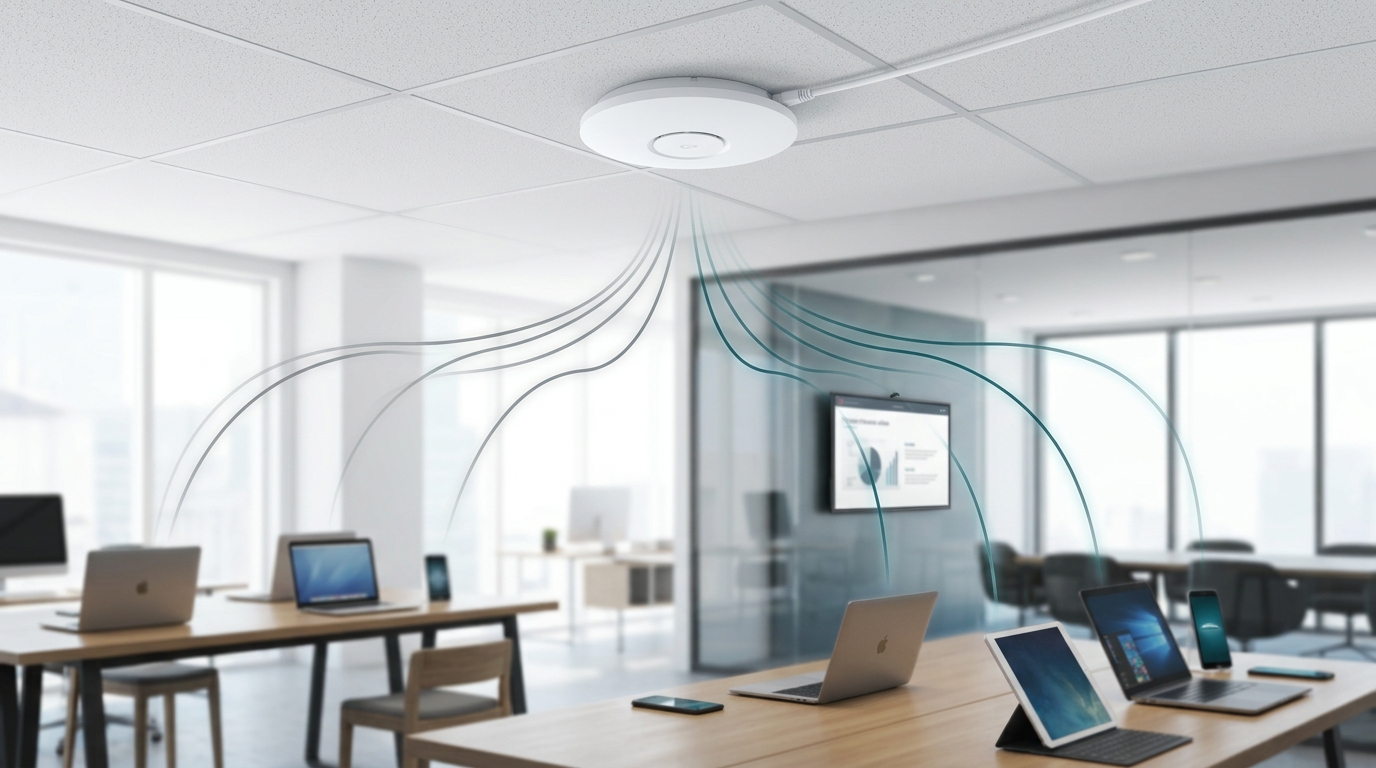
WPA2 and WPA3 differ in three ways that matter: how devices authenticate, whether management frames are protected, and what happens when someone captures your handshake. WPA3 replaces WPA2's shared-key handshake with Simultaneous Authentication of Equals, which gives each device its own session encryption and removes the offline password-guessing exposure WPA2 was built with. It also makes Protected Management Frames mandatory. What it does not do, in the Personal mode most businesses run, is change the cipher.
Quick Answer
- SAE is the real upgrade. WPA2 derives every device's session from one shared password, so a captured handshake can be attacked offline at leisure. WPA3's SAE removes that, and adds forward secrecy so past traffic stays protected even if the password later leaks.
- The cipher does not change in WPA3-Personal. Both use 128-bit AES-CCMP. GCMP-256 appears only in WPA3-Enterprise 192-bit mode, which targets government and finance rather than the average office.
- Mixed mode has a known weakness. WPA2/WPA3 transition mode is vulnerable to a documented downgrade attack, so treat it as a migration bridge with mitigations rather than a finished state.
Table of Contents
What Is the Real Difference Between WPA2 and WPA3?
Does WPA3 Use Stronger Encryption Than WPA2?
What Are Protected Management Frames?
Should You Run WPA3-Only or Mixed Mode?
What Is the Risk in WPA2/WPA3 Mixed Mode?
What Should You Know About WPA3-Enterprise?
What Is the Real Difference Between WPA2 and WPA3?
The difference is the handshake. WPA2 uses a Pre-Shared Key model where every device on the network derives its session from the same password. WPA3 replaces that with Simultaneous Authentication of Equals, which gives each device individualized encryption even though everyone still types the same network password.
That one change closes WPA2's structural weakness. Under WPA2, an attacker within range can capture a device's handshake and then attack the password offline, on their own hardware, for as long as they like, with no further contact with your network. SAE removes that possibility, because the exchange cannot be replayed offline in the same way. It also adds forward secrecy, meaning traffic captured today cannot be decrypted later even if the password is eventually compromised.
Worth being precise about why this matters more than the vulnerability histories that usually dominate this comparison. WPA2's offline dictionary exposure is a property of how it was designed, not a bug that a patch fixed. It is still there on a fully updated WPA2 network today.
What it means for you: if your Wi-Fi password is short, memorable, and printed on a card at reception, WPA2 is the version of that risk you can do the least about. SAE is what changes the math.
Feature-to-Benefit: WPA2 vs WPA3 Compared
|
|
WPA2 |
WPA3 |
What this means in practice |
|
Authentication |
Pre-Shared Key, shared across all devices |
Simultaneous Authentication of Equals |
Decides whether a captured handshake can be cracked offline |
|
Per-device session encryption |
No, derived from one shared key |
Yes, individualized per device |
Limits what one compromised session exposes |
|
Forward secrecy |
No |
Yes |
Traffic captured today stays unreadable if the password leaks later |
|
Cipher, Personal mode |
128-bit AES-CCMP |
128-bit AES-CCMP, unchanged |
The cipher is not where the WPA3-Personal gain comes from |
|
Cipher, Enterprise 192-bit mode |
Not available |
GCMP-256 with BIP-GMAC-256 |
Relevant to government, defense, finance, healthcare, not the average office |
|
Protected Management Frames |
Optional, commonly disabled |
Mandatory |
Blocks forged deauthentication and disconnection attacks |
|
Open network protection |
None |
Opportunistic Wireless Encryption |
Encrypts guest traffic with no password required |
WPA2 authenticates every device from one shared key, offers no forward secrecy, treats management frame protection as optional, and gives an open network nothing at all. WPA3 authenticates each device individually through SAE, provides forward secrecy, requires Protected Management Frames, and adds Opportunistic Wireless Encryption for open networks. Both use 128-bit AES-CCMP in Personal mode, and the stronger GCMP-256 cipher appears only in WPA3-Enterprise 192-bit mode.
Does WPA3 Use Stronger Encryption Than WPA2?
In Personal mode, no. WPA3-Personal uses 128-bit AES-CCMP, exactly as WPA2 does. The security improvement comes from the handshake and from mandatory management frame protection, not from a new cipher.
The stronger cipher does exist, but it is narrower than most comparisons suggest. WPA3-Enterprise offers an optional 192-bit mode built on Suite-B cryptography, using GCMP-256 for encryption and BIP-GMAC-256 for management frame protection. It aligns with the NSA's CNSA requirements and is aimed at government, defense, financial, and healthcare deployments where those standards are mandated. A retail chain or a professional services firm running WPA3-Personal is not using it and does not need it.
This is worth knowing before you audit your own network. Seeing CCMP on a correctly configured WPA3 SSID does not mean something failed to apply. It means you are running WPA3-Personal as designed.
What it means for you: do not evaluate the upgrade on cipher strength, because in Personal mode there is no cipher change to evaluate. Evaluate it on offline attack resistance and forward secrecy, which is where the actual difference lives.
What Are Protected Management Frames?
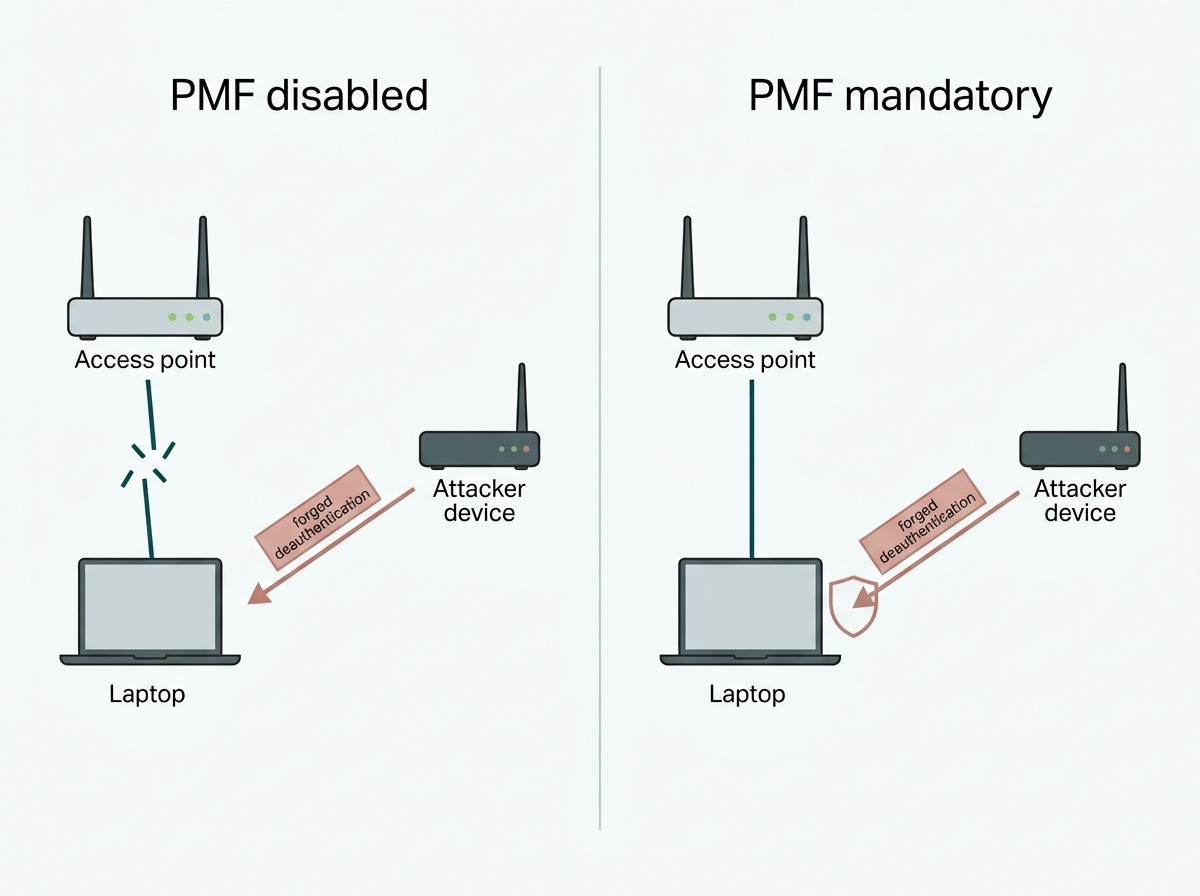
Protected Management Frames, or PMF, cryptographically protect the frames that manage a Wi-Fi connection rather than carry its data. Without them, an attacker can forge a deauthentication frame and knock a device off the network without any access to it.
WPA3 makes PMF mandatory, and it is also the mechanism that addresses the deauthentication vector underlying the Key Reinstallation Attack disclosed against WPA2 in 2017. That vulnerability was patched through software updates at the time and is not a live reason to abandon WPA2 today, but it is the reason SAE and mandatory PMF were designed the way they were.
On Omada, PMF is configured per SSID under Wireless Networks, WLAN, with three settings. Disable turns it off. Capable allows clients that do not support PMF to associate. Mandatory requires it, and clients without PMF support will fail to connect. When you select 6 GHz or WPA3 encryption, Disable is no longer selectable, and the setting defaults to Capable, which keeps older clients able to join.
Two operational details are worth checking before you plan around this. PMF is supported across Omada EAPs with a specific set of exceptions: EAP110-Outdoor V3 and V4, EAP115-Bridge V1, EAP110 V4, EAP115 V5, EAP690E HD V1, and EAP225-Wall V2. And PMF configuration is available only on the Omada Controller, not in Standalone mode or through the app. If a client will not associate after you enable it, the documented troubleshooting path is to set encryption back to WPA2 with PMF disabled and retest to confirm the client is the cause.
What it means for you: check your access point models against that exception list before planning a WPA3 rollout, and confirm you are managing through the Controller rather than Standalone if PMF is part of the plan.
Should You Run WPA3-Only or Mixed Mode?
Run WPA3-only where every device that needs to connect supports it. Use mixed mode where they do not, and treat it as temporary.
For a network where all connecting devices support WPA3, there is little reason not to run it as the sole security mode. Resistance to offline password attacks and per-device session encryption are both meaningfully better, and running WPA3-only closes the downgrade exposure covered in the next section.
Most business networks are not that clean. Older laptops, printers, IoT sensors, and legacy equipment frequently support WPA2 only, and a WPA3-only SSID simply locks them out. Mixed mode advertises both protocols on the same SSID, so WPA3-capable devices connect over SAE while older devices continue on WPA2. On Omada, this is set per SSID under Advanced Settings, where WPA Mode offers WPA2, WPA3, or the mixed option.
The judgment worth making deliberately is which devices are holding you in mixed mode. Often it is a small number of identifiable items: a label printer, a handful of sensors, a conference room display. Those can frequently be moved onto their own SSID and their own VLAN, which lets the main network go WPA3-only sooner. Our guide to network segmentation covers how those zones should be drawn.
What it means for you: list the devices that cannot do WPA3 before assuming you need mixed mode network-wide. It is usually a shorter list than expected, and isolating it is often faster than waiting for hardware to age out.
What Is the Risk in WPA2/WPA3 Mixed Mode?
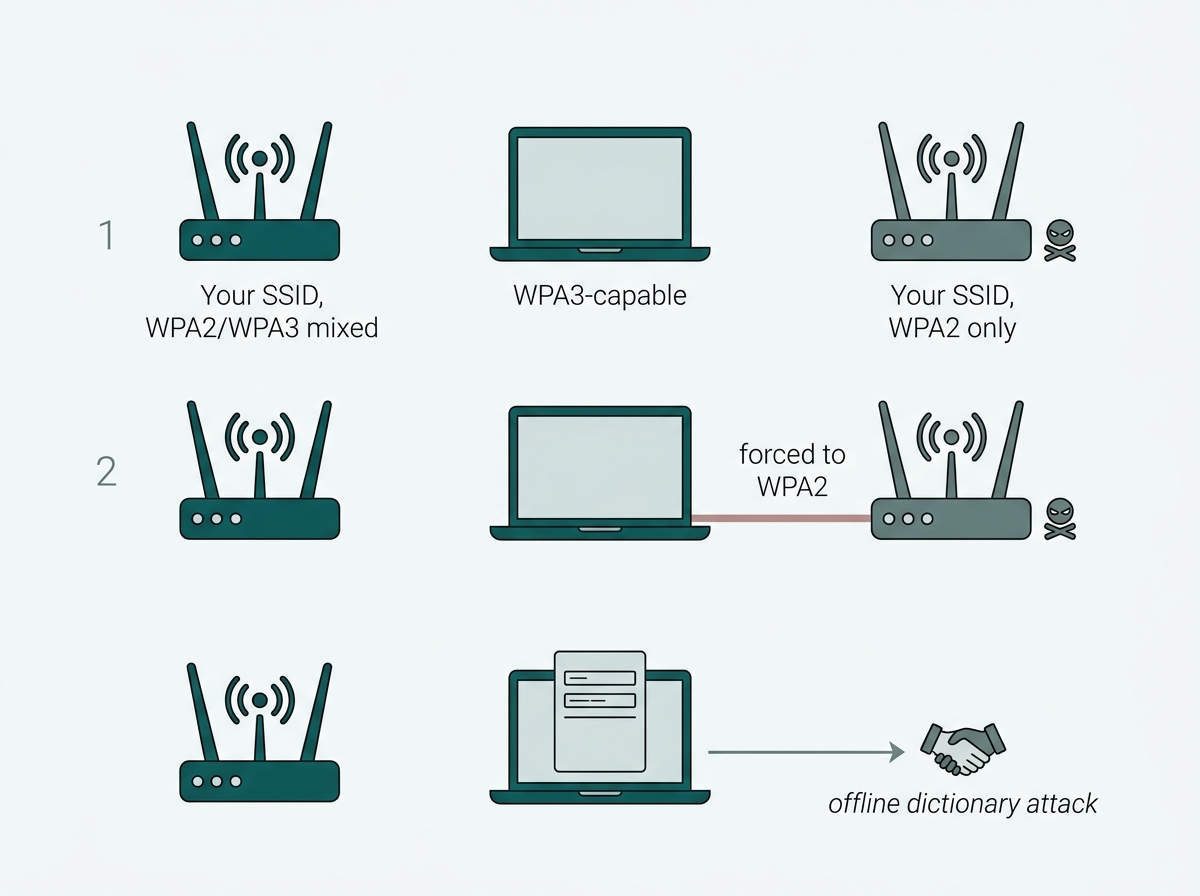
Mixed mode is vulnerable to a documented downgrade attack. Because the network accepts WPA2 connections using the same password, an attacker can stand up a rogue access point advertising your SSID as WPA2-only, induce a WPA3-capable device to connect to it, capture that WPA2 handshake, and attack the password offline.
This was published in 2019 by Mathy Vanhoef and Eyal Ronen as part of the Dragonblood research into WPA3's handshake. Their conclusion was direct: unless the downgrade is mitigated, WPA3 operating in transition mode does not prevent the dictionary attacks it was designed to stop. The attack does not require breaking WPA3. It just avoids it.
That does not mean mixed mode is wrong. The compatibility problem it solves is real, and locking essential devices off the network to avoid a conditional attack is rarely the right trade. It means mixed mode should be run as a bridge with its weaknesses acknowledged, not settled into indefinitely:
- Treat it as time-limited. Document why it is enabled and what has to change before it can be turned off. Review it when hardware is replaced rather than never.
- Use a strong passphrase. The downgrade attack ends in an offline dictionary attack, so passphrase strength is what determines whether the captured handshake is worth anything. A long random passphrase makes the whole chain uneconomic.
- Isolate the legacy devices. Moving WPA2-only equipment to a separate SSID and VLAN lets the primary network run WPA3-only.
- Watch for rogue access points. The attack begins with an access point impersonating your network, which is the same mechanism as an evil twin. Our guide to secure guest Wi-Fi networks covers what rogue AP detection does and does not do about it.
- Note the 6 GHz exception. The 6 GHz band requires WPA3 and mandatory PMF, so transition mode does not apply there. A 6 GHz SSID is WPA3-only by design.
What it means for you: if you are already on mixed mode, the highest-value change today is not the protocol setting. It is the passphrase, and the list of devices keeping you there.
What Should You Know About WPA3-Enterprise?
WPA3-Enterprise uses 802.1X authentication with individual credentials per user rather than a shared password, and it adds mandatory Protected Management Frames on top of what WPA2-Enterprise provided. It suits organizations that already run a RADIUS server and need per-user access control.
The practical caution is that WPA3-Enterprise support varies across vendors, hardware models, and firmware versions in ways that WPA3-Personal generally does not. Full 192-bit mode in particular is not available on every access point, and TP-Link support has confirmed that not all EAP models support WPA3 fully. That is not a reason to avoid WPA3-Enterprise. It is a reason to verify the specific model and firmware against the exact security mode you intend to enforce, rather than selecting the strictest-sounding option and assuming it is what the network is actually applying.
If you are considering the 192-bit mode specifically, confirm it against the datasheet for your model before designing around it, since it constrains which EAP types can be used as well as which cipher.
For the wider toolkit businesses use alongside Wi-Fi encryption, see network security tools for business. To see Omada's business Wi-Fi platform with WPA3 and mixed-mode support, explore Omada business Wi-Fi.
What it means for you: treat the WPA3-Enterprise security mode as something to test and confirm rather than configure and trust, and check 192-bit availability per model rather than per product line.
Frequently Asked Questions
Is WPA3 backward compatible with WPA2 devices?
Not on a WPA3-only network. Most WPA3-capable access points offer a mixed mode advertising both WPA2 and WPA3 on the same network name, so older devices connect over WPA2 while newer ones use WPA3. That mode carries a known downgrade weakness, so it is best treated as a migration step rather than a permanent configuration.
Does WPA3 use stronger encryption than WPA2?
Not in Personal mode. WPA3-Personal uses 128-bit AES-CCMP, the same cipher as WPA2. The improvement comes from the SAE handshake, forward secrecy, and mandatory Protected Management Frames. The stronger GCMP-256 cipher appears only in WPA3-Enterprise 192-bit mode, which targets government, defense, finance, and healthcare deployments.
What is the risk of running WPA2/WPA3 mixed mode?
Because mixed mode accepts WPA2 connections with the same password, an attacker can create a rogue access point advertising your network as WPA2-only, force a WPA3-capable device onto it, capture the handshake, and attack the password offline. This was documented in the 2019 Dragonblood research. A long random passphrase and isolating legacy devices onto their own SSID are the practical mitigations.
What are Protected Management Frames and do I need them?
PMF cryptographically protects the frames that manage a Wi-Fi connection, blocking forged deauthentication attacks that would otherwise disconnect devices at will. WPA3 makes PMF mandatory. On Omada, it is set per SSID as Disable, Capable, or Mandatory, and selecting WPA3 or 6 GHz removes Disable as an option.
Do I need to replace my access points to get WPA3?
Only if the current hardware does not support it at all. Many access points gain WPA3 through a firmware update rather than replacement, though older equipment may need replacing. Check PMF support separately, since a specific set of Omada EAP models does not support it.
What is the difference between WPA3-Personal and WPA3-Enterprise?
WPA3-Personal uses a shared password with individualized per-device encryption through SAE, which suits most small and mid-size offices. WPA3-Enterprise uses 802.1X authentication with per-user credentials against a RADIUS server, and offers an optional 192-bit mode for environments with strict cryptographic requirements.
Should I turn off WPA2 entirely once WPA3 is available?
Yes, where every device that needs to connect supports WPA3, since running WPA3-only closes the transition mode downgrade exposure. Where legacy devices exist, consider moving them to a separate SSID and VLAN so the primary network can go WPA3-only rather than keeping the whole network in mixed mode.
Final Thoughts
WPA3 is a real upgrade over WPA2, and it is worth being precise about where the upgrade actually lives. It is not the cipher, which is unchanged in Personal mode. It is SAE removing the offline password attack that WPA2 was designed with, forward secrecy protecting traffic captured today against a password leaked tomorrow, and mandatory Protected Management Frames closing off forged disconnection attacks.
The part most comparisons leave out is that mixed mode, the configuration nearly every business actually runs, has a published downgrade attack against it. That does not make it the wrong choice, because locking essential devices off the network is usually worse. It makes it a bridge that deserves a passphrase strong enough to survive an offline attack, and a plan for getting off it.
If you are working out where your network stands, the useful exercise takes an afternoon: list every device that connects, mark which ones cannot support WPA3, and check your access point models against PMF support. That list tells you whether you can go WPA3-only now, or whether a separate SSID for the legacy devices gets you there faster than waiting. Bring it to an Omada specialist along with your controller version, and you will get back a per-SSID recommendation, the PMF setting each one should carry, and a straight answer on which of your access points need firmware rather than replacement. Explore Omada business Wi-Fi to see WPA3, mixed mode, and PMF configuration across the access point range.