


PoE Switch Guide: Standards, Power Budget, and Planning for Business
Published: August 4, 2026 | Last Updated: August 4, 2026

A PoE switch delivers electrical power and network data to a device over the same Ethernet cable, so a ceiling access point or an outdoor camera needs one cable run instead of a cable plus an electrician. Choosing one comes down to two numbers: the PoE standard each device requires, and the switch's total PoE budget across all ports. Getting the standard wrong means a device that will not power on. Getting the budget wrong means intermittent failures months later that are hard to trace.
Quick Answer
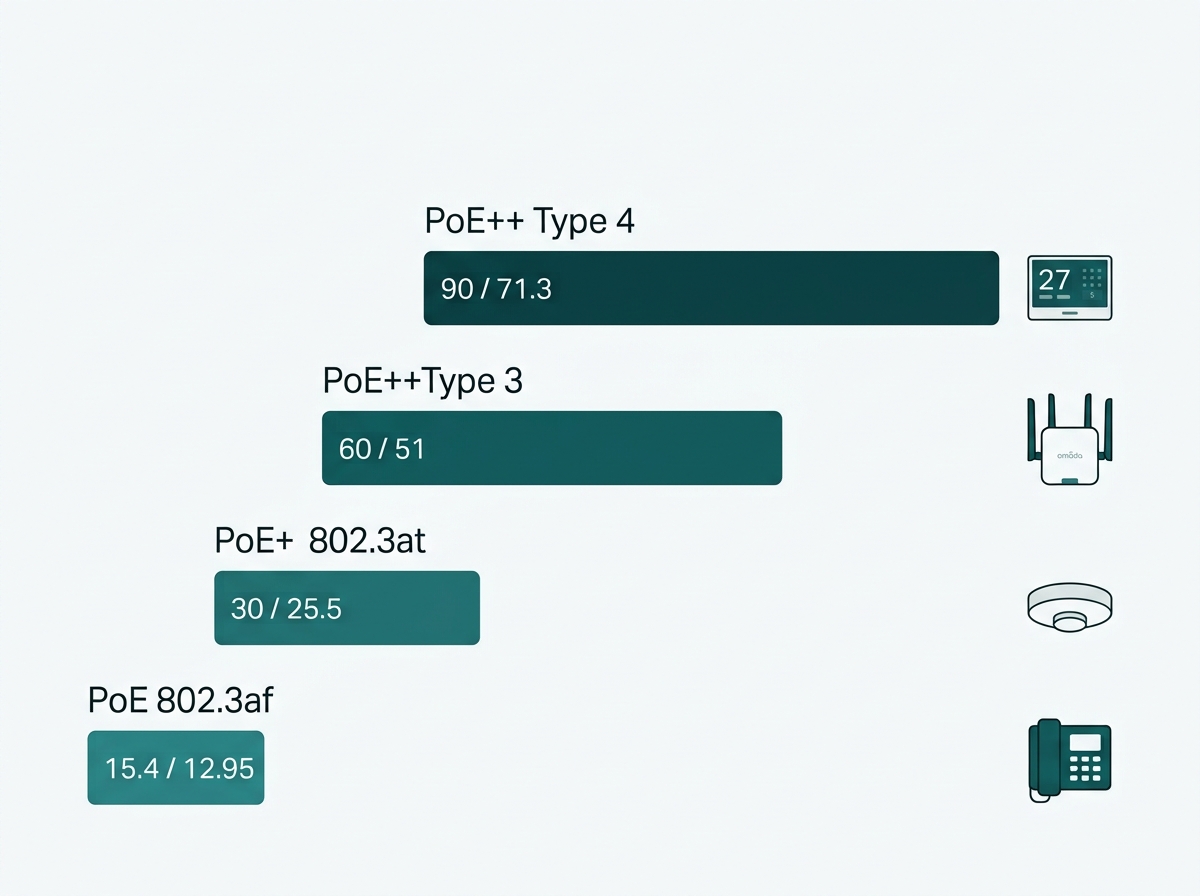
- Match the standard to the device, not the switch. PoE (802.3af) delivers 15.4W at the port, PoE+ (802.3at) 30W, PoE++ (802.3bt) 60W as Type 3 or 90W as Type 4. Each is backward compatible downward.
- Total PoE budget is the real constraint, not per-port wattage. A switch can have 24 PoE+ ports rated 30W each and a 250W total budget, which means fewer than nine of them can draw full power at once.
- Switches reserve power by the class a device declares, not by what it actually draws, unless the switch supports 802.3bt Autoclass. Budget against class maximums or you will undercount.
Table of Contents
What Is a PoE Switch and How Does It Work?
What Is the Difference Between PoE, PoE+, and PoE++?
How Do You Match the PoE Standard to Your Devices?
How Do You Calculate the PoE Budget You Need?
When Should You Use a PoE Injector Instead?
How Far Can PoE Travel, and What Cable Do You Need?
What Is a PoE Switch and How Does It Work?
A PoE switch is a network switch that delivers electrical power to connected devices through the same Ethernet cable carrying their data, using standard network wiring rather than a separate power line.
Before any power flows, the switch runs a detection and classification handshake. It sends a low-voltage probe looking for a signature resistance that identifies the device as PoE-capable, then reads the power class the device declares, and only then energises the port at the negotiated level. A standard non-PoE device plugged into the same port receives data only and is in no danger, because power is never delivered without that handshake completing. The switch also keeps monitoring: a device drawing more than its negotiated class will have its port shut down.
Every IP camera, VoIP phone, and access point needs both a network connection and a power source. Running them separately means an electrician at every device location and two cable paths for one piece of equipment. PoE collapses that into one run.
What it means for you: you cannot damage a compliant device by plugging it into a compliant PoE port. The handshake is the safety mechanism, and it is why standards compliance is worth checking on cheap switches.
What Is the Difference Between PoE, PoE+, and PoE++?
The difference is how much power reaches the device. Three IEEE standards cover it, and 802.3bt splits into two types that are far apart in practice.
Feature-to-Benefit: PoE Standards Compared
|
Standard |
IEEE spec |
Power at switch port |
Guaranteed at device |
Typical devices |
|
PoE |
802.3af (Type 1) |
15.4W |
12.95W |
VoIP phones, fixed IP cameras, sensors |
|
PoE+ |
802.3at (Type 2) |
30W |
25.5W |
Wi-Fi 6 access points, PTZ cameras, intercoms |
|
PoE++ Type 3 |
802.3bt |
60W |
51W |
Multi-radio access points, AV and conferencing equipment |
|
PoE++ Type 4 |
802.3bt |
90W |
71.3W |
Wi-Fi 7 access points, digital signage, LED lighting |
802.3af delivers 15.4W at the switch port, with 12.95W guaranteed at the device, which is enough for VoIP phones and fixed cameras. 802.3at raises that to 30W at the port and 25.5W at the device, which covers Wi-Fi 6 access points and PTZ cameras. 802.3bt Type 3 delivers 60W at the port and 51W at the device. Type 4 delivers 90W at the port and 71.3W at the device, which is what high-power devices such as Wi-Fi 7 access points and digital displays require. Omada's PoE switch range tops out at 90W per PoE++ port, matching the Type 4 figure.
You will sometimes see 100W quoted for PoE++. The standard permits it as a ceiling under controlled conditions, but 90W is the figure switches are built and sold to, so treat 90W as the number that matters when specifying hardware.
Each standard is backward compatible downward, so a PoE++ switch powers an older PoE or PoE+ device correctly with no reconfiguration. The reverse does not work: a device needing more than the port can supply will not power up, or will run in a reduced-feature mode without announcing it.
How Do You Match the PoE Standard to Your Devices?
The device being powered decides the standard, not the switch. Read the power requirement off each device's spec sheet and choose the lowest standard whose device-side figure exceeds it.
A basic IP camera or a desk VoIP phone rarely needs more than standard PoE. A modern access point supporting Wi-Fi 6 or newer usually needs PoE+ at minimum. Note that PoE is available on unmanaged switches as well as managed ones, so powering cameras is not by itself a reason to move up, as our guide to managed and unmanaged switches sets out. A PTZ camera with a built-in heater, a Wi-Fi 7 access point, or a digital display often needs PoE++ to reach full power. Buying below the requirement means those devices either will not power on or will silently run degraded, which is harder to diagnose than an outright failure.
Switching is one layer of a larger design, and the order in which these decisions should be made is covered in our network infrastructure and design guide.
What it means for you: build the device list before shortlisting switches. The highest-power device on that list sets your minimum standard, and everything below it is covered by backward compatibility.
How Do You Calculate the PoE Budget You Need?
Total the power your devices will reserve, then choose a switch whose rated PoE budget sits comfortably above that total rather than level with it. Per-port wattage tells you what one device can draw. Total budget tells you how many can draw it at once.
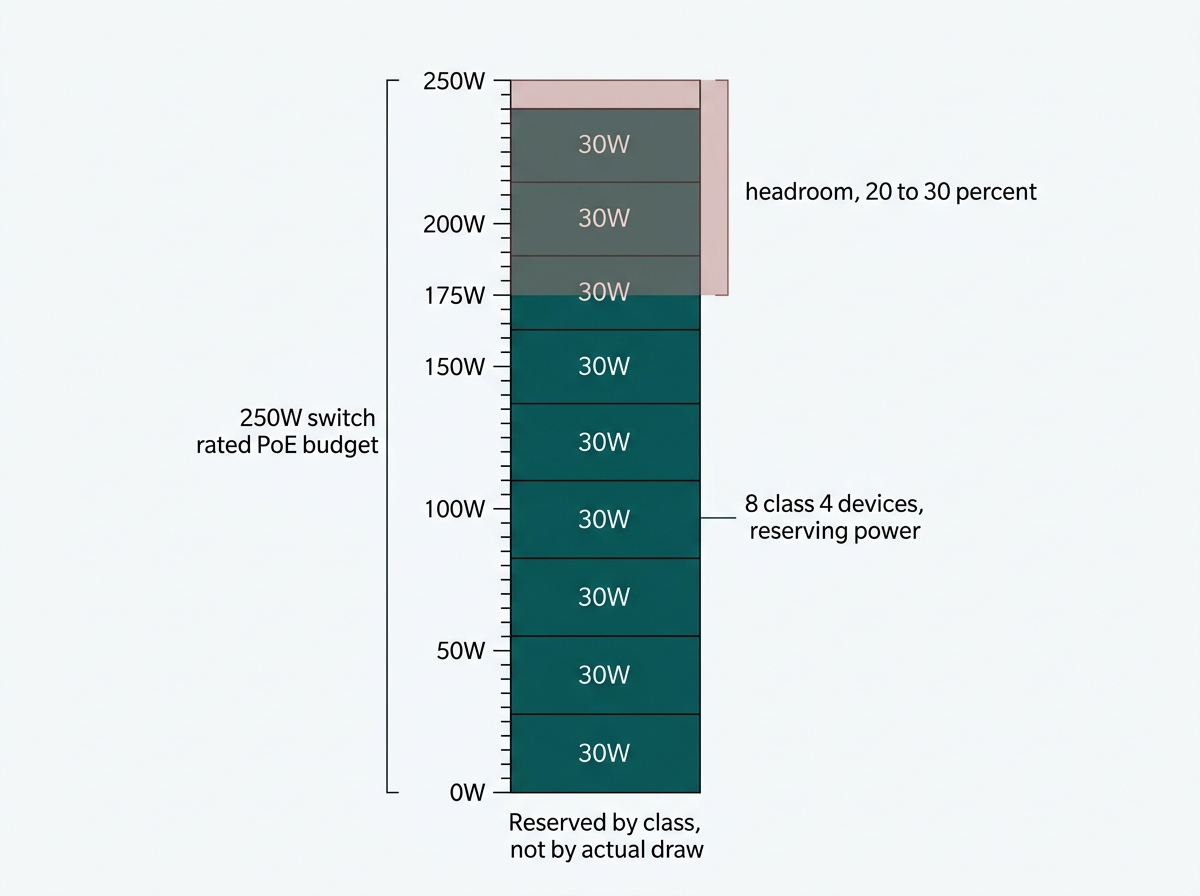
This is where planning usually goes wrong, and it rarely surfaces during installation. It surfaces months later. A switch rated for a 250W PoE budget does not mean every port can draw its maximum simultaneously. It means the sum of everything connected has to stay under that ceiling. Omada's TL-SL1226P makes the gap concrete: 24 PoE+ ports rated 30W each, with a 250W total budget. Twenty-four ports, but fewer than nine of them can draw full PoE+ at the same time.
There is a second complication that catches people out. A switch reserves power according to the class a device declares during the handshake, not according to what the device actually draws. A Class 4 access point that idles at 12W may still have 30W held for it. The 802.3bt standard introduced Autoclass, where the switch measures real consumption and allocates only what is needed, but where Autoclass is not in play, you are budgeting against class maximums. Adding up typical draw will undercount.
Then there is the number on the box itself. Omada states across its PoE switch pages that PoE budget calculations are based on laboratory testing, that the actual budget is not guaranteed, and that it varies with client limitations and environmental factors. The vendor is telling you the rating came from a lab bench, and your building is not a lab bench. Heat, cable length, cable quality, and ambient temperature all take a share.
Which is why planning to the rated maximum is planning to a number nobody warrants. Sizing the switch 20 to 30 percent above your total reserved draw is the working convention, and while that range is a planning habit rather than a published specification, the reason behind it is documented. On a 250W-rated switch, that means keeping reserved load to roughly 175 to 200W. A deployment that reserves 240W against that same switch technically fits and has almost no margin, and that is the configuration that turns into random device reboots once a cable run degrades slightly or the comms room warms up in April.
What it means for you: list every device, use its class maximum rather than its typical draw, and shortlist switches rated meaningfully above that total. If your total lands within a few percent of a switch's rating, move up a model.
When Should You Use a PoE Injector Instead?
Use a PoE injector when you need to add power to a single connection on a switch that does not support PoE. Use a PoE switch when you are powering several devices.
An injector adds PoE capability to one link. That makes it the right tool for bringing one camera or one access point onto an existing non-PoE network. It is the wrong tool for a multi-device deployment, where the cost of several injectors plus the cable management around them quickly exceeds the price difference of a proper PoE switch, and where you lose the central power budgeting and per-port control a switch gives you.
What it means for you: one device, injector. Two or more, switch. The crossover comes faster than the unit prices suggest, once you count the clutter.
How Far Can PoE Travel, and What Cable Do You Need?
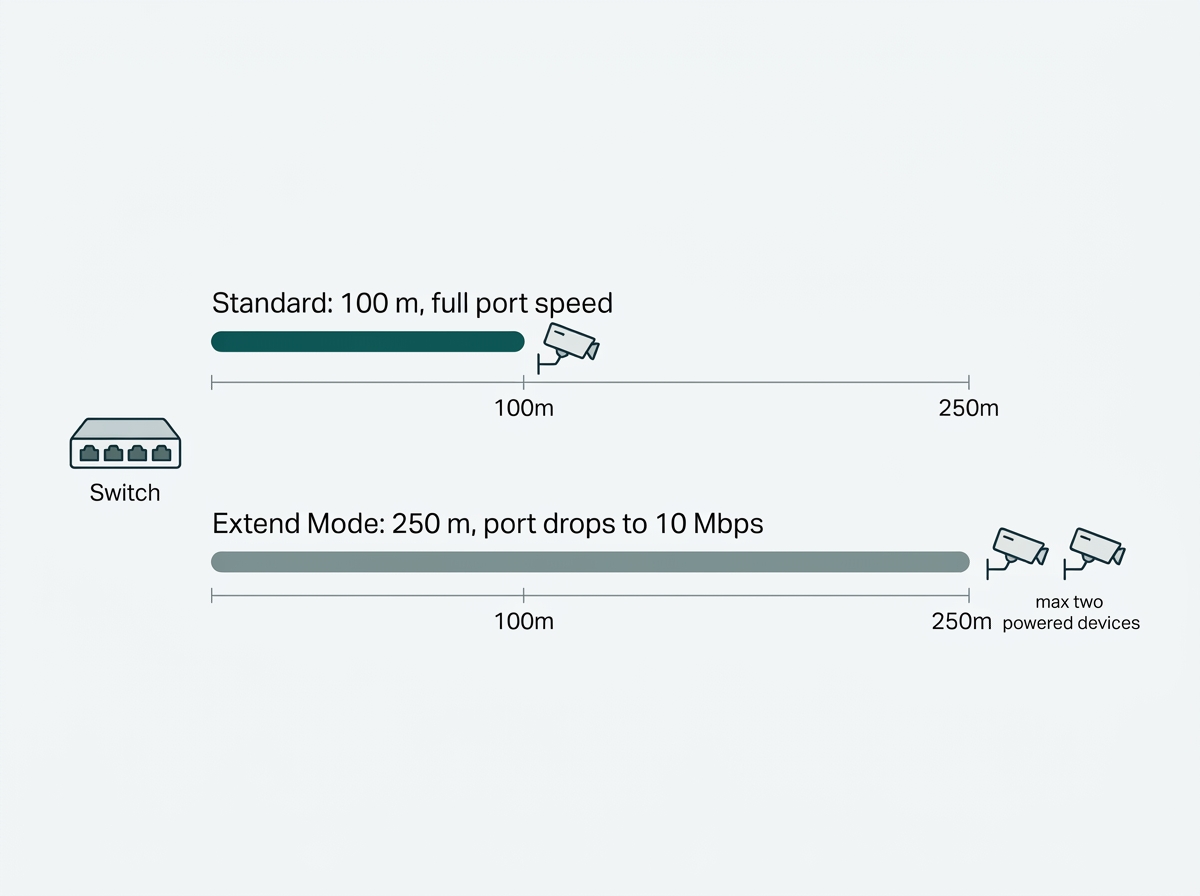
Standard Ethernet, PoE included, is limited to 100 meters per run. Beyond that, signal quality falls below a usable threshold regardless of which PoE standard is in use.
Some Omada PoE switches offer an Extend Mode that pushes PoE reach to 250 meters, with the port dropping to 10 Mbps in exchange. That trade suits surveillance cameras and other low-bandwidth devices at distance, in warehouses, car parks or across multi-building sites. Two practical limits come with it. Extend Mode supports up to two powered devices, and actual reach varies with the powered device's consumption and with cable quality and type. On Omada controllers running version 5.15.22.40 or above, it is enabled under Site, Home, Quick Config. On earlier versions, you get the same result by setting the port link speed manually to 10 Mbps under Devices, Switch, Ports, Profile Overrides.
Cable grade matters less than it is often made to sound. PoE and PoE+ run fine on Cat5e for most installations. PoE++ Type 3 also runs on Cat5e or better under the standard, with Cat6 recommended for longer runs and dense cable bundles, where heat build-up rather than the standard is the constraint. Cat6A is a sensible specification for a new install and is worth the small premium if you are pulling cable anyway, but it is not a requirement for PoE++, and an existing Cat5e or Cat6 plant is not automatically disqualified.
For the switch types PoE deployments typically run on, see how a network switch works more broadly. To see PoE switch models built for surveillance and business deployments, explore Omada PoE switches.
Frequently Asked Questions
What is the difference between PoE, PoE+, and PoE++?
The difference is power per port. PoE (802.3af) supplies 15.4W at the switch and 12.95W at the device. PoE+ (802.3at) supplies 30W and 25.5W. PoE++ (802.3bt) comes in two types: Type 3 at 60W and 51W, and Type 4 at 90W and 71.3W. Each standard is backward compatible with devices built for the lower ones.
Can I damage a device by plugging it into a PoE switch port?
No, provided the switch is standards-compliant. A PoE switch runs a detection and classification handshake before energising a port, so a non-PoE device receives data only and is unaffected. The switch also shuts down a port if a device draws more than its negotiated class.
Does a PoE switch reserve full power for a port even if the device uses less?
Usually yes. The switch reserves power according to the class the device declares during the handshake, not what it actually draws, so a Class 4 device idling at 12W can still have 30W held for it. The 802.3bt standard added Autoclass, which measures real consumption and allocates only what is needed, but where that is unavailable, you should budget against class maximums.
How do I know how much PoE budget I need?
Total the class maximum of every device that will connect, not the typical draw, then choose a switch rated 20 to 30 percent above that total. The margin exists because a rated budget is measured under laboratory conditions, and real-world capacity varies with cable, heat, and environment.
What is a PoE injector and when should I use one?
A PoE injector adds PoE to a single Ethernet connection on a switch that does not support it. It suits bringing one device onto an existing non-PoE network. For two or more devices, a PoE switch is cheaper and easier to manage once you account for injector cost and cabling.
How far can a PoE cable run before it stops working?
Standard Ethernet, PoE included, is limited to 100 meters per run. Some Omada switches offer an Extend Mode reaching 250 meters with the port speed dropping to 10 Mbps, which suits surveillance cameras. Extend Mode supports up to two powered devices, and actual distance varies with device consumption and cable quality.
Do I need Cat6A cable for PoE++?
No. PoE++ Type 3 runs on Cat5e or better under the standard, with Cat6 recommended for longer runs and dense bundles where heat is the concern rather than the specification. Cat6A is worth specifying for a new install if you are pulling cable anyway, but existing Cat5e or Cat6 cabling is not automatically disqualified from PoE++.
Final Thoughts
Choosing a PoE switch comes down to two numbers. The standard each device requires, which decides whether it powers on at all, and the total PoE budget with enough margin that it stays powered on in August as reliably as in January. Getting the standard wrong produces an obvious failure you fix on day one. Getting the budget tight produces intermittent reboots months later that get blamed on the cameras.
Both are avoidable with the same fifteen minutes of work: list every device you intend to power, write down each one's class maximum rather than its typical draw, total it, and shortlist switches rated comfortably above that number rather than level with it.
If you want that list checked before you buy, send an Omada specialist your device inventory, your longest cable run, and whether anything sits beyond 100 meters. You will get back a switch recommendation with the PoE budget already sized, the right standard for your highest-draw device, and a flag on anything that needs Extend Mode or a different cable grade. Explore Omada PoE switches to compare per-port power and total budget across the range, and confirm the PoE budget for your shortlisted model on its datasheet rather than the category page, since budgets vary widely within a series.