


How to Secure Guest WiFi: Isolation, Encryption, and Evil Twin Protection
Published: August 4, 2026 | Last Updated: August 4, 2026

A secure guest WiFi network needs three separate things, and they protect against three different failures. Isolation keeps guest devices away from staff systems, servers, and payment terminals. Encryption protects what guest traffic looks like while it travels over the air. Monitoring catches an access point impersonating your network. A login page is none of these. The most common mistake is assuming that a captive portal in front of an open network amounts to security.
Quick Answer
- Isolation and encryption solve different problems. Isolation protects the business from the guest. Encryption protects the guest's traffic from anyone listening nearby.
- A captive portal is access control, not encryption. Securing the air requires WPA2, WPA3, or Wi-Fi Enhanced Open on the SSID, which encrypts an open network with no password at all.
- Rogue AP detection finds an evil twin but cannot stop one. Omada's controller lists unauthorised access points and does not block them, so detection has to be paired with client behaviour rules and wired access control.
Table of Contents
What Makes a Guest WiFi Network Secure?
Does a Captive Portal Encrypt Guest WiFi?
What Is an Evil Twin Attack on Guest WiFi?
Can Omada Block a Rogue Access Point?
Which Controls Does a Secure Guest Network Need?
What Makes a Guest WiFi Network Secure?
A guest network is secure when guests can reach the internet and nothing else, when their traffic is encrypted over the air, and when someone is watching for access points impersonating yours.
The foundation is isolation. A properly isolated guest network keeps visitor devices from seeing or reaching staff computers, point-of-sale systems, security cameras, or anything else on the business network, even though all of it runs through the same physical hardware. Without isolation, a guest network is not a separate network at all; it is a second entry point onto the one everything else depends on. Isolation also has to work between guests, not just between guests and the business, since a cafe or waiting room puts strangers on the same network by design.
Those two isolation layers are the setup work, and our guest Wi-Fi best practices and DPA compliance guide covers the configuration steps and the Philippine privacy obligations that come with a captive portal. What isolation cannot do is protect traffic in the air or stop a guest connecting to the wrong access point. Those are the gaps this article covers, and they sit inside the wider layered model described in our network security guide for Philippine businesses.
What it means for you: if your guest network is isolated and you consider the job finished, you have protected the business and done nothing for your guests. Both matter, and only one of them is covered by a VLAN.
Does a Captive Portal Encrypt Guest WiFi?
No. A captive portal is access control. It decides who gets on and can collect consent or contact details, and it does nothing to encrypt the wireless connection itself.
On an open network with no encryption, every guest's traffic travels in plaintext over the air, readable by anyone nearby with basic tools, whether or not they had to click through a login page first. A captive portal served over plain HTTP compounds it, because the credentials or details a guest types into that page are exposed exactly like the rest of the traffic.
The apparent trade is between security and convenience: a password protects the air but has to be shared, printed on receipts, and changed. Wi-Fi Enhanced Open removes the trade. Built on Opportunistic Wireless Encryption, it encrypts an open, no-password network, which is precisely the cafe, hotel, and restaurant case. Another client on the same network can still capture the frames but cannot decrypt them. On Omada, the 6 GHz band supports it by default, and 2.4 GHz and 5 GHz depend on EAP firmware compatible with Omada Controller 5.14 or above.
One limit is worth stating plainly, because it leads directly to the next section. Enhanced Open encrypts but does not authenticate. It protects against passive listening and gives a guest no way to confirm that the access point they joined is yours.
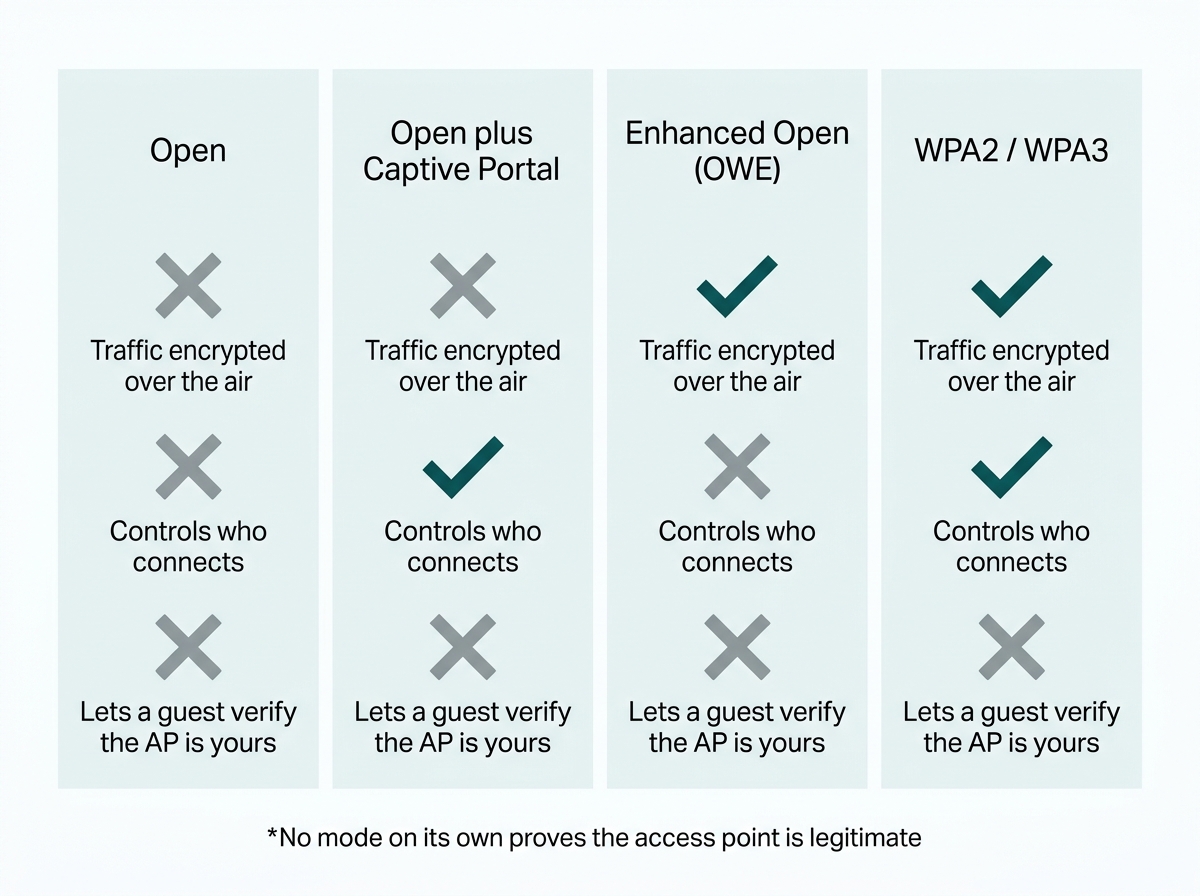
What it means for you: if your guest SSID is open today, Enhanced Open is the upgrade that costs your guests nothing, subject to checking your firmware. It is not a defence against a fake access point.
What Is an Evil Twin Attack on Guest WiFi?
An evil twin is a rogue access point broadcasting the same network name as your legitimate guest WiFi, set up so guests connect to the attacker instead of the business.
This threat targets guest networks specifically, and it barely applies to internal staff-only networks. The reason is structural: it depends on users who have no way to verify which access point is legitimate before joining. Staff can be told which network is real and can have it provisioned for them. A walk-in customer choosing from a list of network names cannot tell the difference, and neither can their phone. A guest who connects to the fake network hands over their traffic, and potentially credentials typed into a spoofed portal, with nothing visibly different from their side.
Encryption does not close this. A guest joining a rogue access point gets an encrypted connection to the attacker, which is worse than useless because it looks correct. Isolation does not close it either, since the attack happens before the guest ever reaches your network.
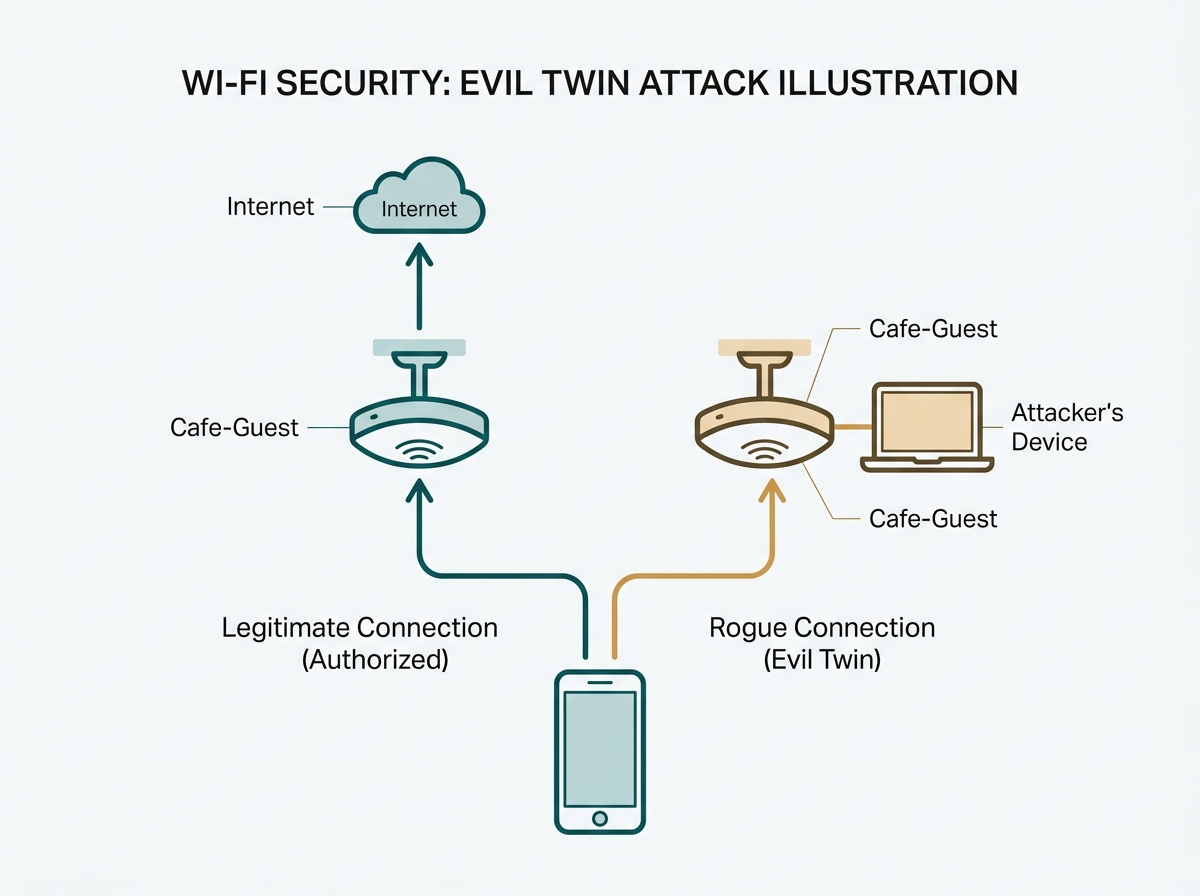
What it means for you: print or display your exact SSID where guests can see it, and treat any second network with a similar name near your premises as worth investigating rather than ignoring.
Can Omada Block a Rogue Access Point?
No. Omada's controller detects rogue access points and lists them, and it does not offer a native capability to actively block or disrupt a rogue access point's operation. Detection is visibility, not enforcement.
It is worth being precise about what the feature does. The controller flags any access point that has not been adopted into your managed network as untrusted and shows it under Insights, Rogue APs, on controller firmware 5.15 or above. In standalone mode, detection is enabled per device under Configuration, Rogue AP Detection, Enable Rogue Status.
There is a practical consequence that catches people out. The list includes every access point the controller can observe, which potentially means every neighbouring business's network too. In a mall, an office tower, or a mixed-use building, most entries on that list are legitimate networks belonging to somebody else. What the feature produces is a list requiring interpretation, not an alarm that tells you something is wrong. The signal you are looking for is a second access point advertising a network name that matches yours.
Because the platform will not block the device, protection comes from the two directions Omada's own guidance points to. On the client side, manage what devices are allowed to join automatically: have staff forget unnecessary saved public networks and avoid auto-connecting to unverified ones, since automatic reconnection to a familiar SSID is the mechanism an evil twin exploits. On the wired side, use network access control and 802.1X authentication on wired ports, so that a rogue access point physically plugged into a wall socket cannot bridge onto internal infrastructure even if nobody spots it.
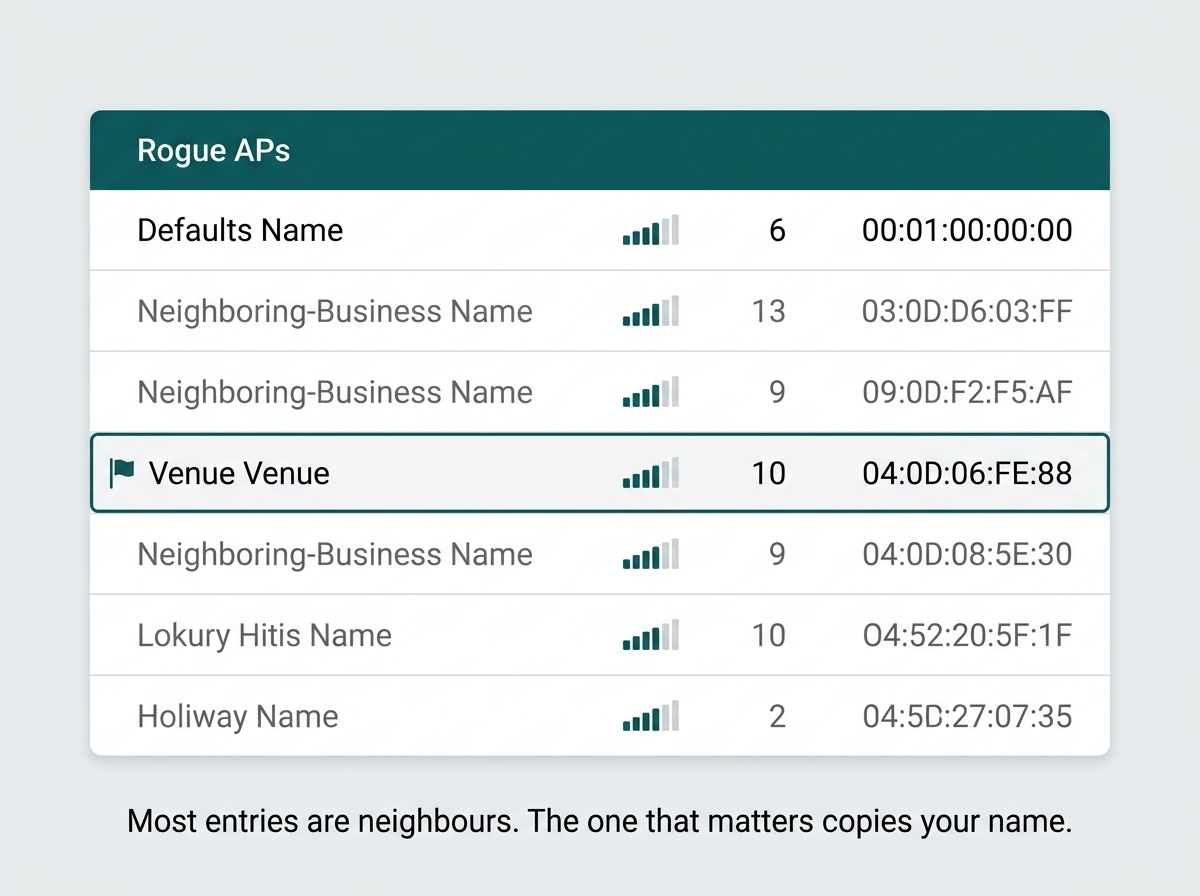
What it means for you: put a recurring calendar reminder against the Rogue APs list rather than treating it as a monitoring system that will contact you. If nobody reviews the list, the feature is doing nothing.
Which Controls Does a Secure Guest Network Need?
|
Control |
What it protects against |
What it does not do |
|
VLAN segmentation with default-deny rules |
Guest devices reaching staff systems, servers, or POS terminals |
Nothing about traffic in the air or about which AP a guest joins |
|
Client isolation at SSID level |
One guest device reaching another on the same network |
Nothing outside that network |
|
WPA3, WPA2, or Enhanced Open encryption |
Passive eavesdropping on guest traffic over the air |
Verifying that the access point is legitimate |
|
HTTPS-secured captive portal |
Credentials and portal content being read or tampered with in transit |
Encrypting the rest of the guest's traffic |
|
Per-device bandwidth limits |
One guest degrading POS or VoIP performance on the shared connection |
Any security threat directly |
|
Rogue AP monitoring |
Nothing on its own. Provides visibility into unauthorised APs nearby |
Blocking or disrupting a rogue AP |
|
NAC and 802.1X on wired ports |
A rogue device plugged into a wall port bridging onto the internal network |
Wireless-only rogue APs running on their own connection |
|
Session timeouts |
Idle authenticated sessions staying open longer than needed |
Anything during an active session |
VLAN segmentation and client isolation handle who a guest can reach, encryption handles what their traffic looks like in the air, an HTTPS portal protects the login exchange, bandwidth limits and session timeouts limit operational damage, rogue AP monitoring provides visibility without enforcement, and wired access control stops an unauthorised device bridging in. No single row covers another row's job, which is why a guest network needs the combination rather than the strongest one.
The configuration steps for the isolation and bandwidth rows, along with the Data Privacy Act obligations that come with collecting anything at a captive portal, are covered in the guest Wi-Fi best practices and DPA compliance guide. For the wider toolset used alongside guest network security, see network security tools for business. To see the platform with guest isolation and captive portal built in, explore Omada business Wi-Fi.
What it means for you: work down the table and mark which rows you actually have. Most businesses find they have the first two and none of the rest.
Frequently Asked Questions
Is a captive portal enough to secure a guest Wi-Fi network?
No. A captive portal controls access and can collect consent or identity, and it does not encrypt the wireless connection. Encryption on the SSID, whether WPA2, WPA3, or Wi-Fi Enhanced Open, is a separate and necessary layer alongside the portal.
Can guest Wi-Fi be encrypted without giving guests a password?
Yes. Wi-Fi Enhanced Open, built on Opportunistic Wireless Encryption, encrypts an open network with no password required, so guests connect as easily as on an open SSID while their traffic stays unreadable to others nearby. On Omada, 6 GHz supports it by default, while 2.4 GHz and 5 GHz depend on EAP firmware compatible with Omada Controller 5.14 or above.
What is an evil twin attack on guest Wi-Fi?
An evil twin is a rogue access point broadcasting the same network name as a legitimate guest network. Guests who connect to the fake access point instead of the real one expose their traffic, and potentially credentials typed into a spoofed login page, to the attacker with no visible difference from their side.
Can rogue access points be automatically blocked?
Not on Omada. The controller provides detection and a list of rogue access points under Insights, and does not offer a native capability to block or disrupt one. Protection means pairing that visibility with client rules about auto-connecting to unverified networks and with NAC or 802.1X on wired ports.
Should guest Wi-Fi use WPA2 or WPA3?
WPA3 where the client devices support it, since it offers stronger protections. WPA2 remains necessary in mixed environments because some legacy clients and IoT devices cannot connect to a WPA3 or PMF-required SSID at all. The larger risk than the version choice is running guest Wi-Fi with no encryption.
Does client isolation matter if guests are already isolated from the main network?
Yes. Isolation from the internal network and isolation between guest devices are two separate protections. Without device-to-device isolation, one guest's device can potentially reach another guest's device on the same network, which matters anywhere strangers share the same Wi-Fi.
Why do bandwidth limits matter for guest Wi-Fi security?
Unlimited bandwidth on a guest network lets one user degrade performance for business-critical systems such as point-of-sale or VoIP sharing the same internet connection, turning a performance problem into a business continuity risk.
Final Thoughts
Secure guest WiFi is not one setting. It is isolation, encryption, and monitoring, each closing a gap the others leave open. Isolation keeps guest traffic away from your systems and away from other guests. Encryption protects what travels over the air, and Enhanced Open now does that without asking guests for a password. Monitoring is the only thing that surfaces an evil twin, and on Omada it surfaces one without stopping it, which is why detection has to be paired with client rules and wired access control.
The honest summary is that a guest network is public-facing by definition, so it needs ongoing attention in a way an internal network does not. The Rogue APs list is worth nothing if nobody opens it.
If you are building or reviewing a guest network, the fastest way to find your gaps is to work down the controls table above and mark what you actually have configured today. Bring that list to an Omada specialist along with your venue type and roughly how many guests connect at once, and you will get back which gaps matter for your setting and which hardware and firmware you need to close them. Explore Omada business Wi-Fi to see guest isolation and captive portal support across the access point range, and check Enhanced Open availability on the datasheet for the model you are considering.