


Business VPN: Site-to-Site vs Remote Access Explained
Published: August 3, 2026 | Last Updated: August 3, 2026
A business VPN comes in two models. A site-to-site VPN connects two entire networks with a permanent encrypted tunnel, so devices at a branch can reach resources at headquarters as though they shared a local network. A remote access VPN connects one device, a laptop or phone, to the central network on demand. Choosing between them is straightforward once you know which problem you are solving. The harder decision comes after the tunnel works: how much of the internal network that connection is allowed to reach.
Quick Answer
-
Site-to-site VPNs link locations permanently and usually run over IPsec, which was designed for network-to-network connections between fixed gateways.
-
Remote access VPNs connect individual devices on demand, commonly over WireGuard or OpenVPN, and are activated when someone needs them rather than staying up.
-
The tunnel is not the whole control. On Omada gateways, WireGuard's Allowed Address field determines which subnets a peer can reach, and setting it to 0.0.0.0/0 grants far broader access than most setups intend.
Table of Contents
What Are the Two Types of Business VPN?
Which VPN Protocol Should a Business Use?
Why Do Site-to-Site VPNs Usually Use IPsec?
Should You Use WireGuard Instead?
What Does a VPN Not Protect You From?
What Are the Two Types of Business VPN?
Business VPNs fall into two models: site-to-site and remote access.
A site-to-site VPN connects two entire networks to each other, typically two office locations. The tunnel is permanent and always on, and devices at either site can reach approved resources at the other without anyone manually connecting. A remote access VPN connects an individual device to a central network on demand, activated when that person needs it rather than staying up continuously.
The distinction matters because they solve different problems. Site-to-site links branches to headquarters. Remote access lets a specific person reach the office network from wherever they happen to be. A business with both branches and remote staff needs both, configured separately.
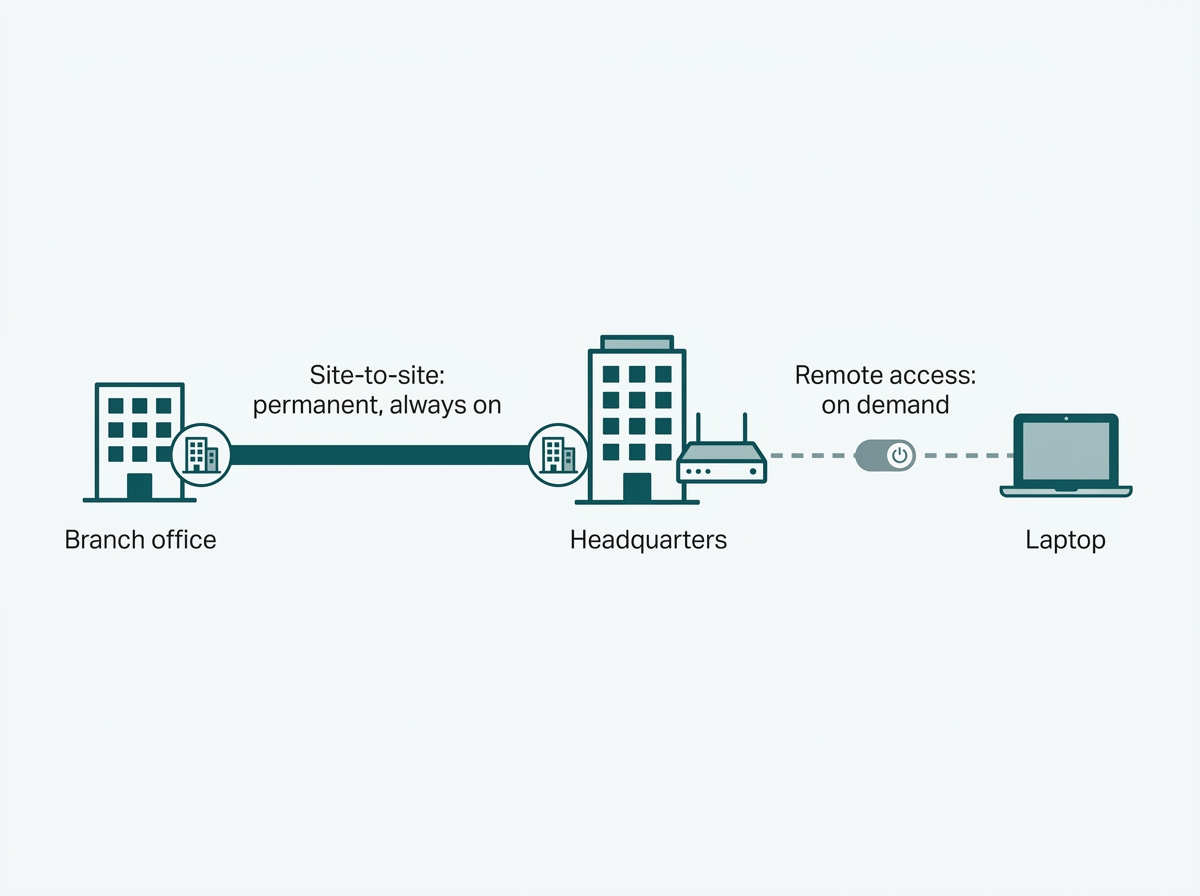
What it means for you: name the problem before choosing a protocol. Two buildings that always need each other is a site-to-site job. One person who sometimes needs the office is a remote access job. Building the wrong one is more common than picking the wrong protocol.
What Does a VPN Actually Do?
Whichever model is deployed, a VPN does three things: it encrypts data so it cannot be read in transit, it authenticates both ends so an imposter cannot pose as a legitimate site or user, and it verifies data integrity so tampering in transit is detectable.
Those three functions are the whole of what the tunnel provides. Protocols differ mainly in how they implement them and what kind of connection they suit.
What it means for you: encryption, authentication, and integrity are transport guarantees. None of them says anything about what a verified, encrypted connection is permitted to do once it arrives.
Which VPN Protocol Should a Business Use?
|
Protocol |
Best suited for |
What you get |
What to watch |
|
IPsec |
Site-to-site links between fixed locations |
Widely supported, strong encryption, purpose-built for network-to-network tunnels |
More configuration overhead than WireGuard |
|
WireGuard |
Both site-to-site and remote access |
Small modern codebase, runs at the kernel layer, less configuration to get right |
Newer, so support varies by gateway model and firmware |
|
IKEv2 |
Remote access, especially mobile devices |
With the MOBIKE extension, holds the VPN session open when a device moves to a different network or interface. Microsoft's recommended replacement for PPTP and L2TP |
Usually paired with IPsec, so it inherits IPsec's setup complexity, and the mobility behavior depends on MOBIKE being supported at both ends |
|
OpenVPN |
Remote access for individual users |
Flexible and widely supported across client platforms |
Higher overhead and generally slower than WireGuard |
|
SSL VPN |
Browser-based access with no client software |
Convenient for occasional or tightly limited access |
Browser-scoped, so it suits specific applications rather than full network access |
|
L2TP over IPsec |
Legacy compatibility only |
Broad device support on older systems |
Double encapsulation adds overhead, and it has been superseded by IKEv2 |
|
PPTP |
Nothing. Do not deploy it |
Fast |
Cryptographically broken. Formally deprecated by Microsoft, removed by Apple |
IPsec is the default for permanently connecting two fixed offices. WireGuard is the modern option for either model, with the caveat that support depends on your gateway. IKEv2, with its MOBIKE extension enabled, suits remote access from phones and laptops that move between networks. OpenVPN remains a flexible remote access choice, and SSL VPN suits browser-only access to a specific application. L2TP over IPsec should be treated as legacy compatibility rather than a design choice, and PPTP should not be deployed at all.
What it means for you: for most businesses, the choice is IPsec for branches and either WireGuard or IKEv2 for people. If a proposal you have been given specifies PPTP, that alone is reason to question the rest of it.
Why Do Site-to-Site VPNs Usually Use IPsec?
Site-to-site VPNs usually use IPsec because it operates at the network layer, authenticating and encrypting individual packets between two gateways rather than requiring per-application configuration.
Once the tunnel between two sites is established, it stays up continuously, and every device at either location can reach approved resources at the other without any user action. That is exactly the behavior a branch-to-headquarters link needs, and it is why a business connecting two offices almost always reaches for IPsec first. The protocol was designed for network-to-network connections, and the always-on model matches how a branch office actually works.
What it means for you: if the requirement is "the branch should just work, permanently," IPsec is the well-trodden path and the one your gateway vendor will have the most documentation for.
Should You Use WireGuard Instead?
WireGuard is worth using when you want a simpler configuration, and your gateway supports it, and it works for both site-to-site links and remote access for individual devices.
It has a much smaller codebase than IPsec, runs at the kernel layer, and generally takes less configuration to get working correctly. That combination is why newer business gateways increasingly offer it alongside the established protocols. The practical constraint is support: WireGuard availability depends on the gateway model, hardware version, and firmware release, so the datasheet for your specific device is the thing to check rather than the product category.
What it means for you: WireGuard is usually the easier build if your hardware offers it. Confirm on the datasheet for your exact model before designing around it.
What Does a VPN Not Protect You From?
A VPN does not decide what a connection is allowed to reach. It secures the tunnel, and a separate configuration decision controls scope. Treating the tunnel as the entire security measure is the most common mistake in business VPN setup.
The failure mode is granting a remote connection full run of the internal network the moment it authenticates. A properly encrypted, properly authenticated tunnel that terminates into unrestricted access to every internal subnet is doing its job perfectly while producing an outcome nobody intended. If the device at the far end is compromised, the tunnel faithfully carries the attacker to everything.
On Omada gateways, this scope is set by a specific field. Under Settings, VPN, WireGuard, Peers, each peer has an Allowed Address value that defines which address segments traffic may pass through. Omada's documentation is explicit that if you do not include a subnet there, the peer has no access to it. The field does double duty: for outgoing packets the allowed-address list behaves as a routing table, and for incoming packets it behaves as an access control list. Entering 0.0.0.0/0 sends everything through the tunnel, which is convenient and is also how blanket access happens without anyone deciding it should.
Scoping properly means entering only the subnet or resource that the peer legitimately needs. A remote laptop that requires the file server does not need the subnet holding the CCTV recorder, the payment terminals, or the building management system. Restricting the Allowed Address to what the role actually requires means a compromised endpoint reaches that one subnet instead of the entire company.
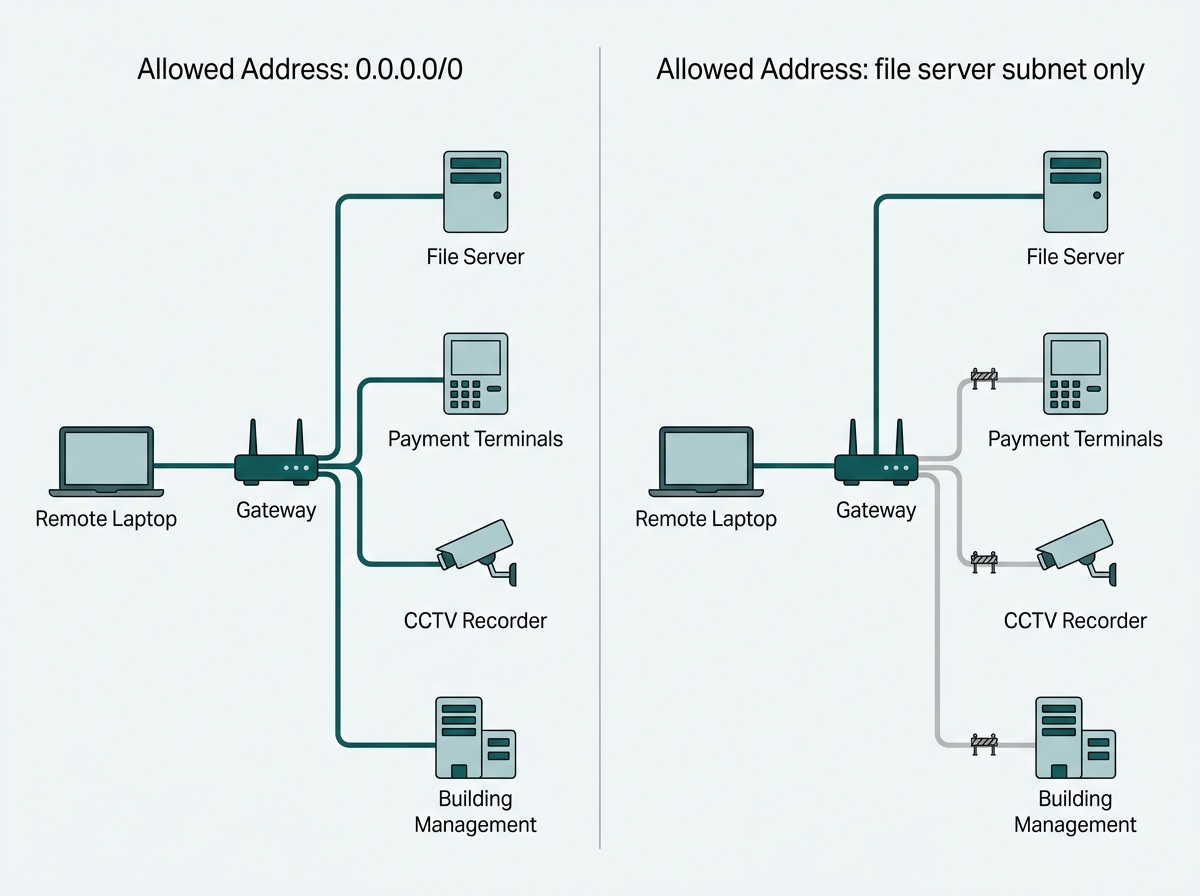
What it means for you: after the tunnel comes up, open the peer configuration and read the Allowed Address value. If it says 0.0.0.0/0 and that was not a deliberate decision, you have a scoping job to do rather than a working VPN.
For a broader set of tools that pair with VPNs in a layered security approach, see network security tools for business, and for the wider threat landscape a VPN is one part of defending against, see cybercrime avoidance for businesses. To see the gateway options behind both connection models, explore Omada VPN gateways for business.
Frequently Asked Questions
What is the difference between site-to-site and remote access VPN?
A site-to-site VPN permanently connects two entire networks, typically two office locations, and stays up without user action. A remote access VPN connects an individual device to a network on demand, activated when that person needs access.
Which VPN protocol should a small business use?
IPsec is the standard choice for site-to-site connections between fixed locations. For remote access, WireGuard is the simplest modern option where the gateway supports it, while IKEv2 with the MOBIKE extension suits mobile devices that move between networks without dropping the session.
Is PPTP safe to use for a business VPN?
No. PPTP's encryption and MS-CHAPv2 authentication have been breakable for over a decade. Microsoft formally deprecated it in Windows Server, Windows RRAS no longer accepts incoming PPTP connections, and Apple removed support from iOS 10 and macOS Sierra. Use IKEv2, WireGuard, or IPsec instead.
Does a VPN alone secure a business network?
No. A VPN encrypts and authenticates the connection itself, but what a connected device can reach once inside depends on a separate scoping decision made during setup. A VPN without scoped access can grant far broader network access than intended.
Can a VPN slow down internet speeds?
Yes, to some degree, since encrypting and tunnelling traffic adds overhead. WireGuard is generally faster than OpenVPN, while its performance against IPsec depends on the hardware and whether encryption is offloaded, so the effect is reduced rather than eliminated.
Is a business VPN the same as a consumer VPN app?
No. Consumer VPN apps route an individual's traffic through a third-party provider's servers for privacy. A business VPN connects specific offices or authorised users directly to the company's own network infrastructure.
How does access scoping work in a VPN setup?
Access scoping defines which internal subnets or resources a VPN connection may reach, instead of granting full network access once the tunnel connects. On Omada gateways, this is the Allowed Address field on each WireGuard peer, where a subnet you leave out is a subnet the peer cannot reach.
Final Thoughts
Choosing a business VPN starts with naming the problem. Connecting two office locations permanently calls for site-to-site, typically over IPsec. Letting individual staff reach the network from outside calls for remote access, most often over WireGuard or IKEv2 today.
The protocol matters less than the decision made after the tunnel is already working: how much of the internal network that connection is allowed to touch. A VPN secures the connection. The Allowed Address value decides what the secured connection can reach, and leaving it at 0.0.0.0/0 turns a correctly encrypted tunnel into more access than anyone intended.
If you are planning branch links or remote access and want the scoping right the first time, an Omada specialist can map it with you: which sites connect permanently, which people connect on demand, and which subnets each peer should actually be able to reach. Bring your site count and a list of the internal resources each group needs, and you will get back a gateway recommendation with the peer scoping already worked out. Explore Omada VPN gateways for business to see the hardware behind both models, and confirm WireGuard support on the datasheet for your chosen model before you build.