


Office Network Topology Examples: Star vs Tree for Business Networks

Published: July 30, 2026 | Last Updated: July 30, 2026
Office network topology is the layout that determines how devices connect to switches, how switches connect, and how traffic reaches the internet. Most offices run one of three patterns: a star, where every device cables back to one central switch, a tree, where multiple stars stack under a shared backbone, or a hybrid of both. The right one depends on how many floors and departments the network spans and on whether one failed switch should be able to take the whole building offline.
Quick Answer
-
A star topology suits a single-floor office. Every device cables back to one central switch, which is simple to troubleshoot and easy to expand, but leaves that switch as a single point of failure.
-
A tree topology suits spans and/or multi-department offices. It stacks several stars under a backbone so a failure on one floor stays on that floor.
-
Full mesh is rarely justified in an office. Link count grows as n(n-1)/2, so eight switches would need 28 interconnects, and a redundant core uplink delivers most of the protection for a fraction of the cost.
Table of Contents
What Is Network Topology in an Office?
What Is a Star Topology, and Why Do Most Small Offices Run One?
When Should an Office Move to a Tree Topology?
What Is the Core, Distribution, and Access Model?
Which Topology Types Fit Which Office?
What Is the Most Common Office Topology Mistake?
Is a Full Mesh Backbone Worth It for an Office?
What Is Network Topology in an Office?
Network topology is the physical and logical layout of how devices in a network connect and communicate. In an office, it is the pattern by which computers, printers, access points, and switches link back to the network core, and it shapes both performance and how far a single failure can spread.
An office network is not just a router and some cables. It is a layout decision, and most offices default to whichever pattern was easiest to wire rather than one designed for how the space is actually used. That default is almost always a star topology, because a star is what happens naturally when every desk gets its own cable back to a central switch.
What it means for you: you already have a topology, whether anyone chose it or not. The question is whether it matches your floor plan or just your cable routes.
What Is a Star Topology, and Why Do Most Small Offices Run One?
In a star topology, every device connects individually to a central switch that handles all traffic between them. It is the default layout for a single-floor office: each desk's Ethernet drop runs back to a switch in a wiring closet or rack, and that switch becomes the point every conversation passes through.
Star topology is popular because it is easy to troubleshoot and easy to grow. A single cable failure affects only the device on that cable, and adding capacity means adding ports or another switch. The trade is a concentration of risk. Everything depends on one switch, so if it fails or saturates, the whole floor goes with it.
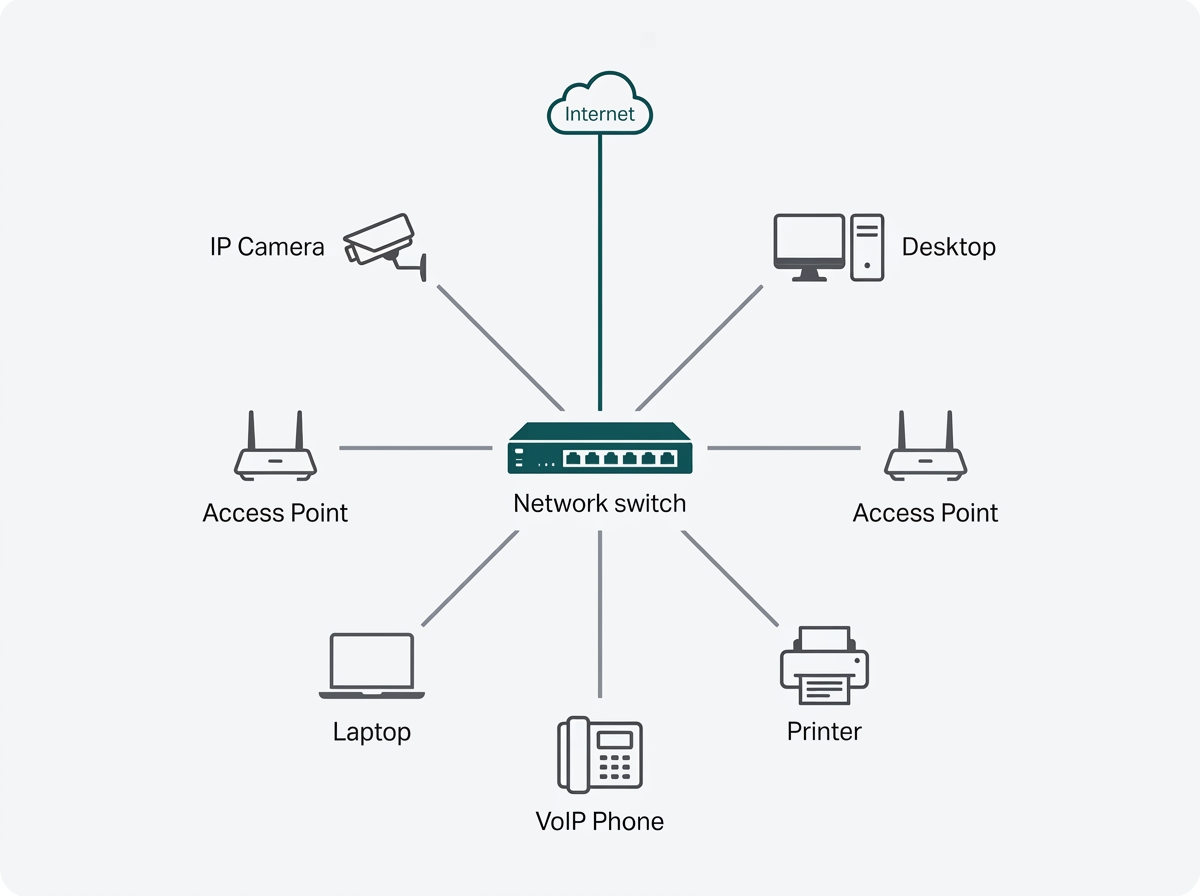
What it means for you: if your office is one floor and one switch reaches every desk, you are running a star, and that is fine. Plan for what happens the day that switch fails, because in this layout the answer is everyone.
When Should an Office Move to a Tree Topology?
An office should move to a tree topology when it spans multiple floors or physically separate departments, because a single flat star stops isolating faults at that scale.
A tree topology, also called a hierarchical design, is not a different concept so much as several star topologies stacked and connected through a backbone. The practical benefit is fault isolation. If an access switch on the second floor fails, only the second floor loses connectivity, and the rest of the building keeps working.
A flat star spanning an entire building with every device hanging off one switch has no such containment, so one overloaded or failing switch affects everyone at once.
What it means for you: the trigger is not headcount; it is separation. Two floors, two buildings, or two departments that should not be able to take each other down are all reasons to stack rather than flatten.
What Is the Core, Distribution, and Access Model?
The core, distribution, and access model is the standard three-layer structure a tree topology follows. The access layer is where end devices connect, including desktops, IP phones, printers, and access points, usually through a switch on each floor.
The distribution layer aggregates traffic from multiple access switches and applies policy, routing between subnets and VLANs, and enforcing filtering rules. The core layer is the backbone, moving large volumes of traffic between distribution points and out to the internet connection at speed.
Most offices do not need all three as separate hardware. A two-story office typically runs one access switch per floor, both uplinking to a single device that handles inter-floor routing and internet access. That arrangement has a name: a collapsed core, or two-tier design, where the core and distribution functions live in the same box.
This layout decision sits downstream of several others, from cabling standards to segmentation planning, and our network infrastructure and design guide covers the order those decisions should be made in.
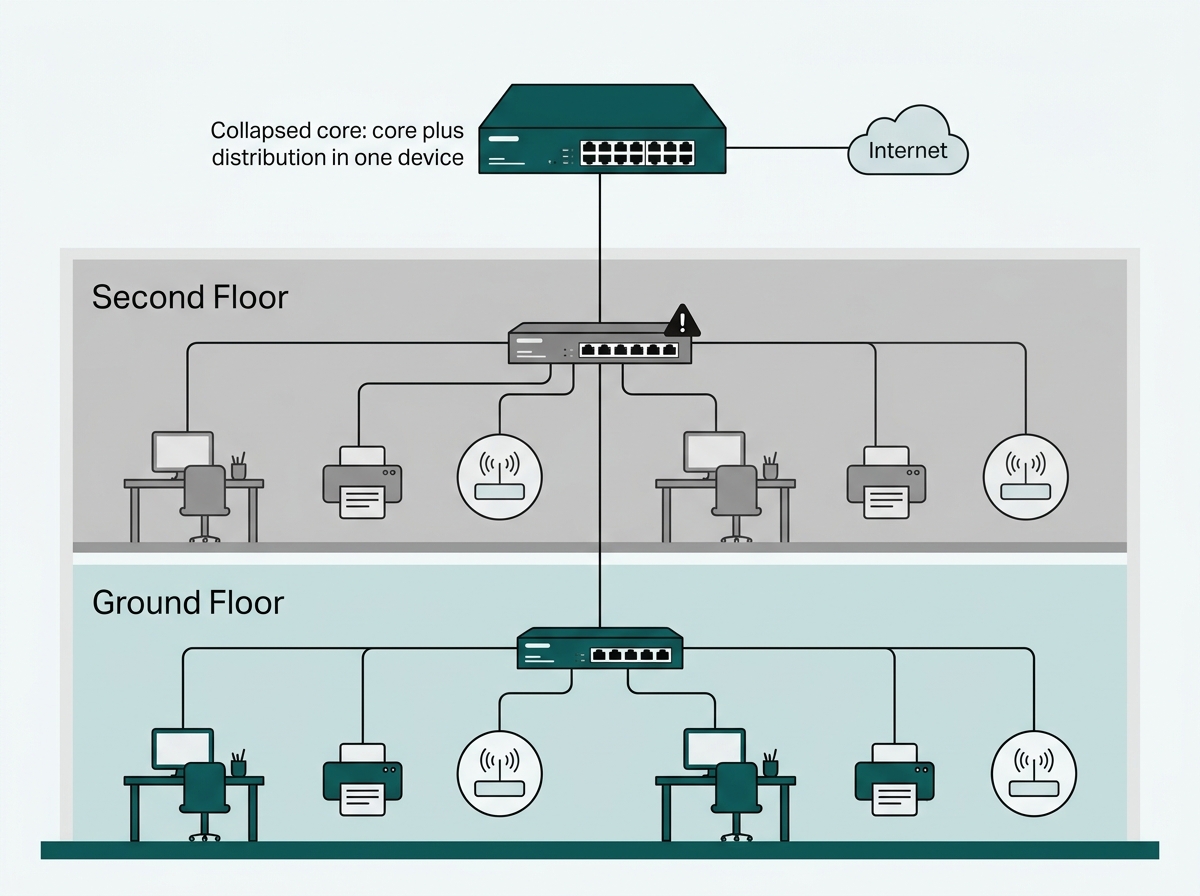
What it means for you: ask whether you need three layers or two. For most offices under a few hundred users, a collapsed core is the right build, and the money saved belongs in redundancy at that core instead.
Which Topology Types Fit Which Office?
|
Topology |
Structure |
Best for |
Main weakness |
What this means in practice |
|---|---|---|---|---|
|
Star |
All devices to one central switch |
Single-floor offices, small deployments |
The central switch is a single point of failure |
Cheapest and simplest, but one failure takes the floor down |
|
Tree / Hierarchical |
Multiple stars stacked via core, distribution, access |
Multi-floor or multi-department offices |
More complex to plan and cable |
Contains faults to one floor or department |
|
Mesh (partial) |
Selected devices are interconnected directly |
Backbone links needing high redundancy |
Expensive and complex to scale |
Reserved for the few links that must never drop |
|
Hybrid |
Combination of the above by layer |
Most real enterprise deployments |
Requires deliberate design, not default |
What you end up with when each layer is chosen on purpose |
A star puts every device on one central switch and suits a single-floor office, at the cost of concentrating all risk in that switch. A tree stacks several stars under a core and suits multi-floor or multi-department offices, at the cost of more planning and cabling.
A partial mesh interconnects selected devices directly and is worth it only on backbone links that need real redundancy. A hybrid mixes these by layer and is what most working enterprise networks actually look like once each layer has been chosen deliberately rather than inherited.
What Is the Most Common Office Topology Mistake?
The most common mistake is designing the layout around cabling convenience instead of around where people actually sit. The usual form it takes is the hallway deployment: access points and switch drops placed down a central corridor because that is where the cable run is easy.
The reason it happens is practical rather than careless. Corridors commonly have drop ceilings or existing access panels, so running cable down a hallway is fast and cheap, while cabling into individual rooms often is not. The layout looks efficient on the plan. The problem is that it puts the signal in the corridor and asks it to reach through walls at an angle into every room where people are working, which is precisely where coverage then falls short.
There is a second cost that is less obvious. A corridor carries a signal a long way in one direction while attenuating sharply to the sides, so hallway access points placed in line of sight of each other interfere with far more of their neighbors than room-mounted units would.
Users also feel it as a sharp signal drop when they turn from the corridor into a room, forcing a fast handover to another access point. Placing the unit inside the room instead turns the walls into a buffer that limits co-channel and adjacent-channel interference, which is why room placement has been the stronger default since Wi-Fi 5.
Hallway placement is not always wrong. In an office where plain coverage is the objective, the density is low, and the access points are not close enough together to interfere, a corridor deployment is a reasonable choice.
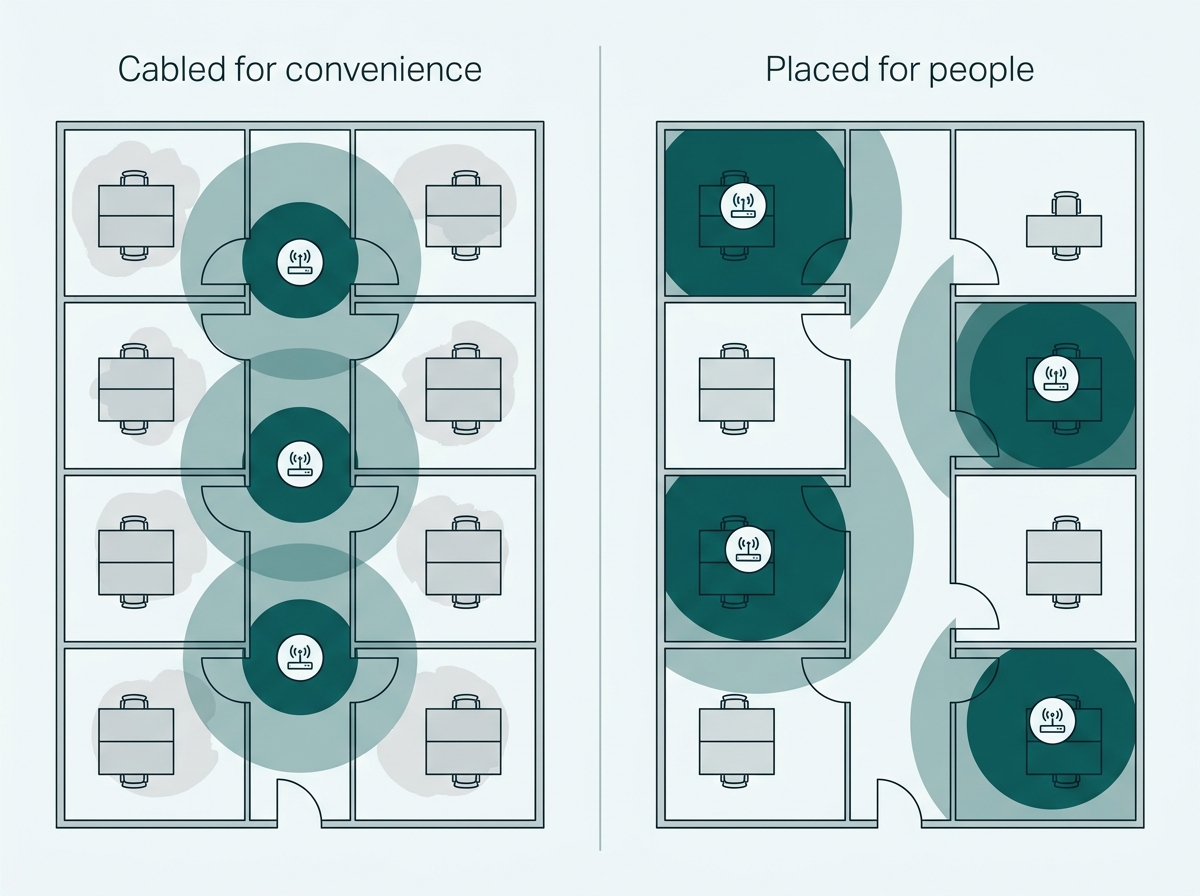
What it means for you: walk the floor plan and mark where people sit before marking where cable is easy to run. If those two maps disagree, the coverage complaints you get later will follow the second one.
Is a Full Mesh Backbone Worth It for an Office?
A full mesh, where every switch connects directly to every other switch, gives maximum redundancy because no single path failure isolates a segment. For a typical office, it is not worth the cabling and configuration cost.
The arithmetic explains why. A full mesh needs n(n-1)/2 links, so four switches need six interconnects, six switches need fifteen, and eight switches need twenty-eight. Each of those is a port consumed, a cable run, and a configuration to maintain.
Full mesh earns its cost in environments with no tolerance for downtime, such as data centers or hospitals. For an office, redundancy at the core layer, a second uplink or a standby switch, delivers most of the same protection at a fraction of the complexity.
For more on the devices sitting at the core of any of these topologies, see how a router works, and for the physical side of building out a tree or star layout, see cable management best practices. To talk through the right topology for your specific office layout, talk to an Omada network specialist.
What it means for you: count the links before pricing the switches. If the mesh math is producing double-digit interconnects for an office network, the budget belongs in core redundancy instead.
Frequently Asked Questions
What is the most common network topology for a small office?
Star topology, where every device connects individually to a central switch. It is simple to troubleshoot and scales easily by adding switch ports, which makes it the default for most single-floor offices.
What is the difference between a star and a tree topology?
A tree topology is several star topologies connected through a backbone, used when an office spans multiple floors or departments. A single star has one central switch, while a tree links several star segments hierarchically so a failure in one segment does not spread.
What is the core, distribution, and access model?
It is the three-layer approach to tree topology design. The access layer is where end devices connect, the distribution layer aggregates traffic and applies routing and filtering policy, and the core layer is the high-speed backbone connecting everything to the internet.
What is a collapsed core, and does my office need one?
A collapsed core is a two-tier design where the core and distribution functions run on the same device instead of separate hardware. Most mid-size offices should use one, since a dedicated three-layer build is difficult to justify below a few hundred users.
Is mesh topology worth it for an office network?
Rarely. Full mesh offers the highest redundancy, but the link count grows as n(n-1)/2, so eight switches would need twenty-eight interconnects. It is mainly justified in environments with no downtime tolerance, such as data centers, rather than standard offices.
Why does access point placement matter more than cable convenience?
Placing access points along a hallway because the cabling is easier forces signal through walls at an angle into the rooms where people work, weakening coverage where it is needed most. Room placement uses the walls as a buffer against interference instead, though hallway placement can still be acceptable in low-density offices where coverage rather than capacity is the goal.
Does topology choice affect network security?
Indirectly, but meaningfully. A tree topology with clear layers makes it far easier to apply VLAN segmentation and access controls at the distribution layer, which is difficult to organize cleanly in a flat, single-switch star network.
Final Thoughts
Most office networks end up with whichever topology was easiest to cable rather than the one suited to how the space is used. A single-floor office usually does fine on a star. Anything spanning multiple floors or departments benefits from a tree, most often built as a collapsed core, so one switch failing does not take the whole building offline.
The decision that matters most is not choosing between exotic topology types. It is placing access points and switches for the people using the space instead of for the shortest cable run. Get that right, and you avoid the coverage gaps and troubleshooting time that come from designing around convenience.
You do not have to map that on your own. Send an Omada network specialist your floor plan, your floor count, and roughly how many devices need to connect, and you will get back a topology recommendation built around where your people actually sit, including where the access points and switch drops should land. It costs nothing, and it is considerably cheaper than rewiring a floor after the complaints start. Talk to an Omada network specialist to get started.