


Guest WiFi Best Practices: How to Isolate Guest Traffic and Stay DPA-Compliant
Published: July 13, 2026 | Last Updated: July 30, 2026
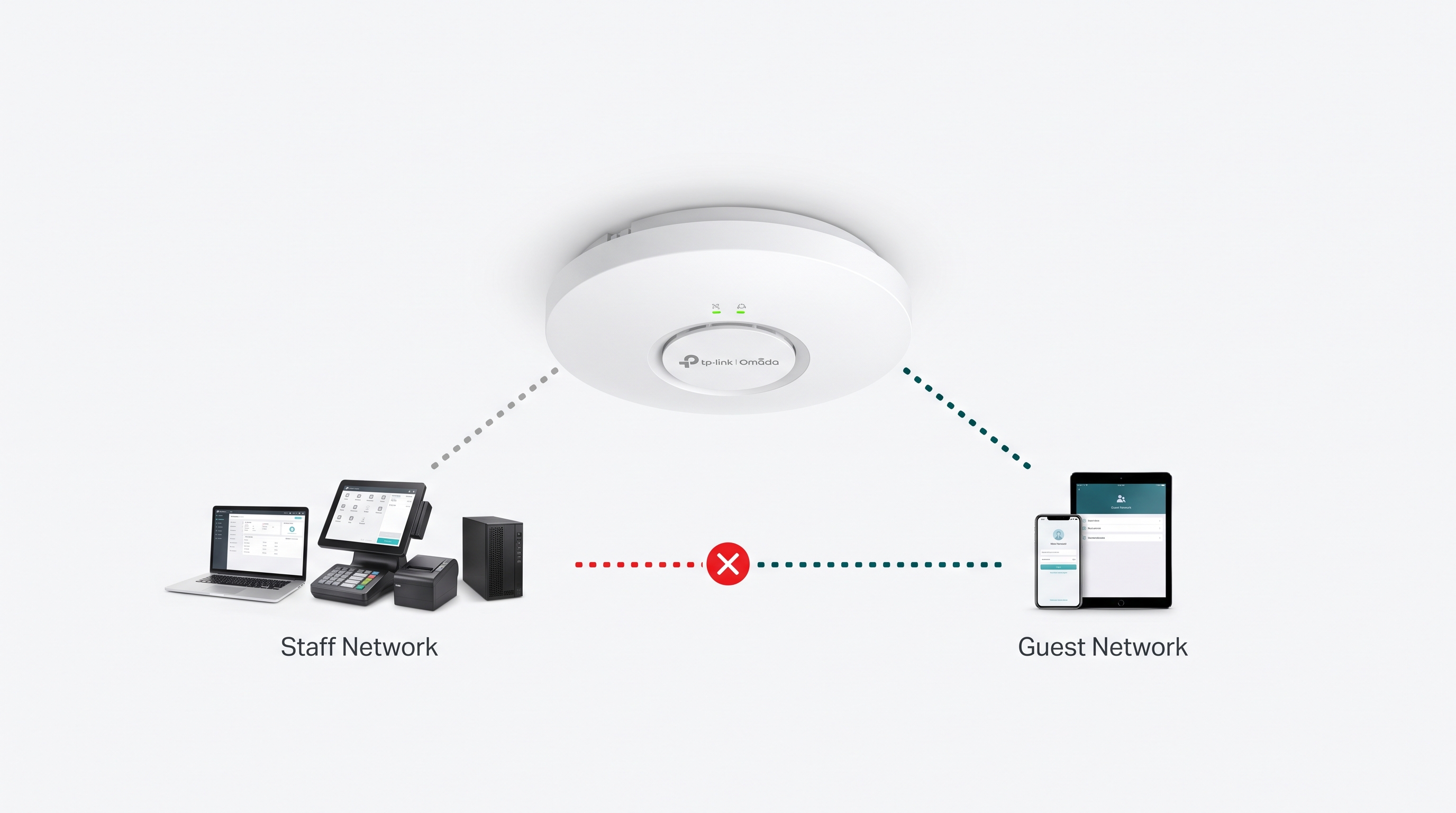
Guest WiFi done right is two problems solved together: a genuinely isolated network that keeps guest devices away from staff systems and POS terminals, and a captive portal that collects login data honestly under Philippine privacy law. Skipping either one is how a free amenity turns into a security incident or a privacy complaint.
Quick Answer
-
Guest WiFi should sit on its own SSID and VLAN, completely isolated from staff devices, servers, and point-of-sale systems, with no path between the two networks.
-
Any data collected at a captive portal login, such as name, number, email, or a social login, counts as personal data processing under the Data Privacy Act of 2012, regardless of whether the WiFi is free.
-
Most Philippine businesses don't need an NTC permit for free guest WiFi, but a captive portal with pre-checked marketing consent boxes runs into real Data Privacy Act exposure.
Table of Contents
Guest WiFi Needs Its Own Isolated Network
What Should a Guest WiFi Captive Portal Collect Under Philippine Law
Do You Need Government Permission to Offer Free Guest WiFi
How Do You Set Up Guest WiFi the Right Way
Guest WiFi Needs Its Own Isolated Network
Every guest network should sit on its own SSID and VLAN, with traffic blocked from reaching staff devices, servers, or point-of-sale systems on the main network. It's the baseline that the National Institute of Standards and Technology recommends for any wireless network carrying both internal and external users: separate WLANs for guest and internal use, with no path from one to the other.
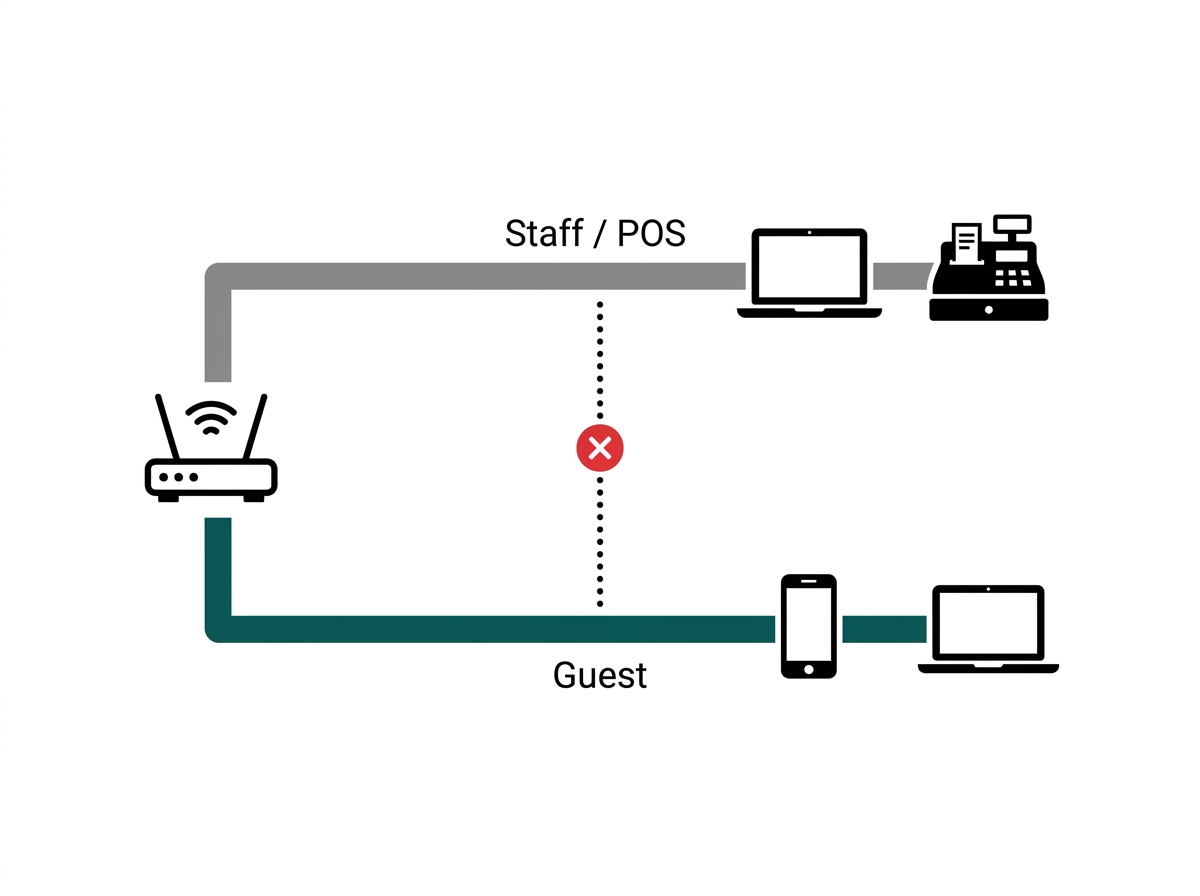
What it means for you: a cafe's or salon's POS terminal should always sit on the main business network, never the guest network, since guest devices sharing a broadcast domain with a payment terminal is exactly the exposure segmentation is meant to prevent. The same logic applies to office guest WiFi protecting staff laptops, file servers, and security cameras. Every access point and controller needed to enforce this separation is covered in our full business Wi-Fi setup guide, which sits under our wider guide to business WiFi solutions for Philippine businesses.
What Should a Guest WiFi Captive Portal Collect Under Philippine Law
Any data a captive portal collects at login, such as name, mobile number, email, or a social login, counts as personal data processing under the Data Privacy Act of 2012 (RA 10173), which applies regardless of whether the WiFi itself is free.
Feature-to-Benefit: Captive Portal Data Collection
|
Data Requested at Login |
Legal Basis Needed |
Practical Benefit of Getting This Right |
|---|---|---|
|
Name and mobile number |
Explicit, specific consent |
Avoids DPA exposure while still letting a hotel or retail location collect basic contact info for support follow-up. |
|
Email for marketing |
Separate, unbundled consent |
Protects the business from deceptive design pattern complaints while still allowing a genuine opt-in marketing list to grow. |
|
Social media login (Facebook WiFi) |
Consent via the platform, plus your own notice. |
Keeps the convenience of one-tap login without skipping the business's own disclosure obligation. |
|
Device MAC address only (no personal info) |
Generally lower risk |
Lets a business log connections for network management without triggering the same consent burden as named data. |
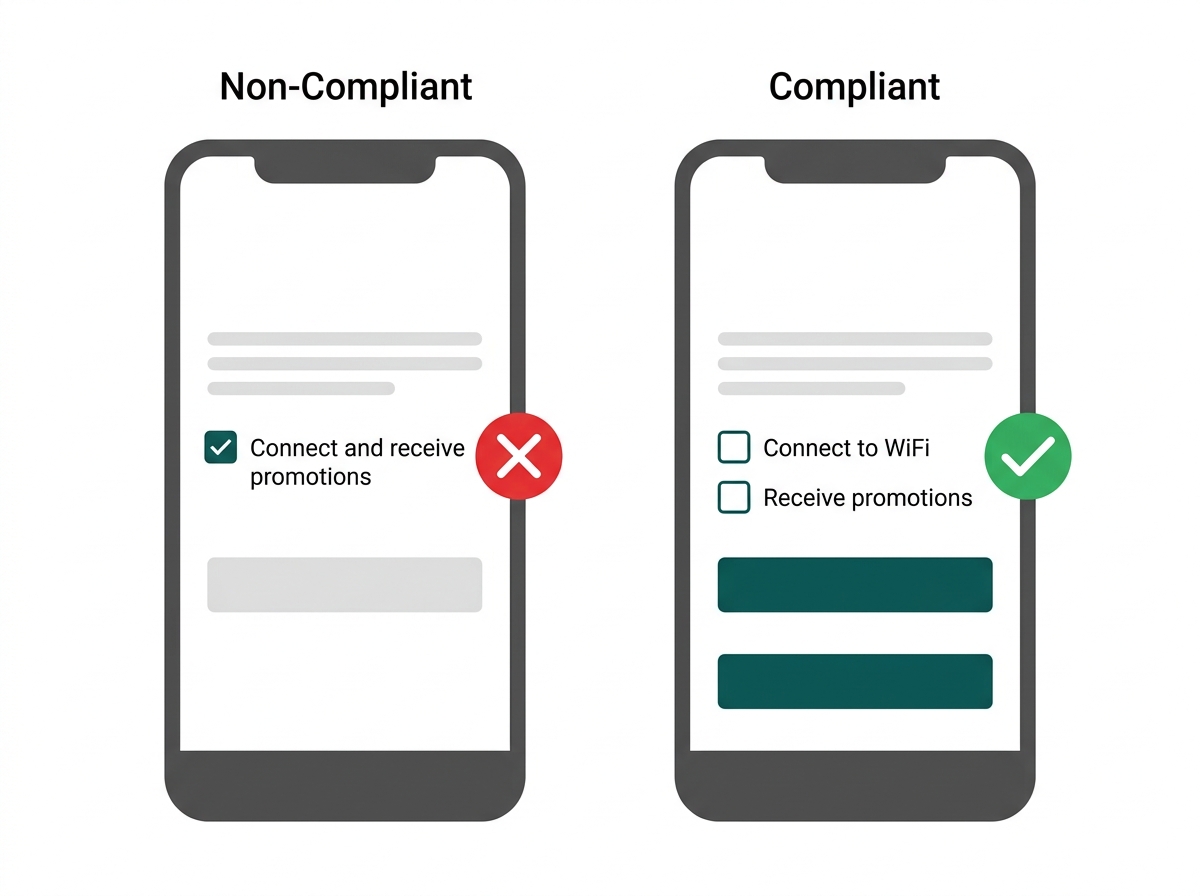
The National Privacy Commission's Guidelines on Consent (NPC Circular No. 2023-04) require that consent be specific, granular, and never implied. A guest clicking "Connect" is not the same as a guest agreeing to receive marketing text messages, and those two things need separate, unbundled consent checkboxes, neither prechecked by default.
What it means for you: a hotel front desk or retail captive portal that bundles "Connect to WiFi" with a pre-checked "Yes, send me promotions" box is exactly the deceptive design pattern the NPC has warned against, and it puts the business's consent basis at legal risk, not just its guest experience.
Do You Need Government Permission to Offer Free Guest WiFi
No, not for the internet access itself. NTC value-added-service (VAS) registration applies to businesses reselling internet access for a fee, the model behind coin-operated Piso WiFi setups, not to a business offering free WiFi as an amenity to its own customers or visitors.
What it means for you: offering WiFi for free doesn't exempt a business from the Data Privacy Act. If the captive portal collects any personal data at all, like name, number, email, or a social login, DPA obligations apply regardless of price.
How Do You Set Up Guest WiFi the Right Way
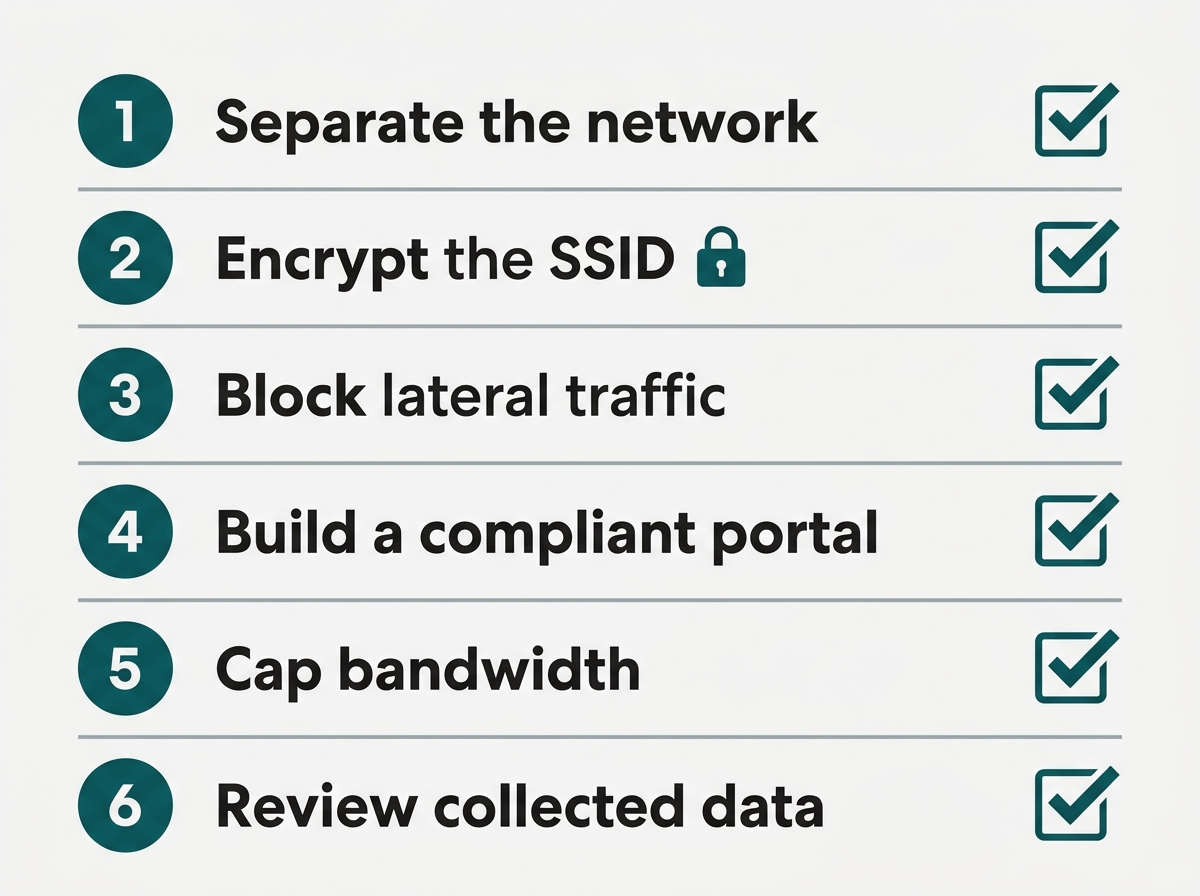
Setting up compliant, secure guest WiFi comes down to six steps: separate the network, encrypt the SSID, block lateral traffic, build a compliant captive portal, cap bandwidth, and review the data being collected.
-
Create a dedicated guest SSID on its own VLAN, isolated from the network segment carrying staff devices, servers, and point-of-sale systems.
-
Set encryption on the guest SSID. Use WPA3 where guest devices support it, WPA2 where older phones and IoT clients still need it, or Wi-Fi Enhanced Open if you want no password at all while still encrypting traffic over the air. On Omada, 6 GHz supports Enhanced Open by default, while 2.4 GHz and 5 GHz require EAP firmware compatible with Omada Controller 5.14 or later.
-
Block guest-to-guest and guest-to-LAN traffic at the controller so one guest device can't see another or reach anything on the main network.
-
Build the captive portal login with a short, plain-language notice covering what's collected and why, with any marketing consent as a separate, unchecked opt-in rather than bundled into the connect button.
-
Set a per-device bandwidth cap on the guest network so one guest streaming or downloading heavily doesn't degrade WiFi for staff or other customers.
-
Periodically review and delete collected guest login data that's no longer needed, consistent with the data minimization principle under the Data Privacy Act.
What it means for you: most businesses that think they have guest WiFi set up have done steps 1 and 4 and nothing else. Working through all six is usually a single afternoon in the controller, not a project.
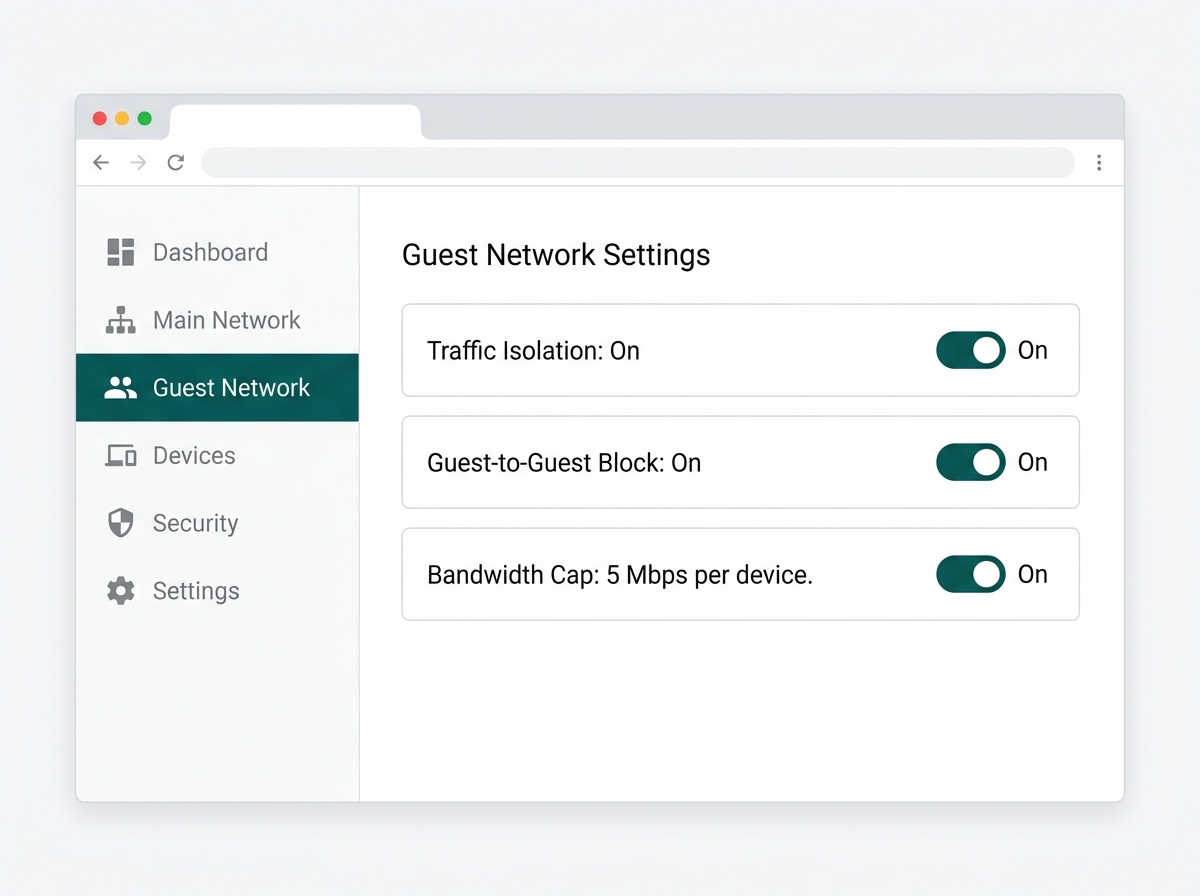
The Omada WiFi access point lineup supports built-in guest network isolation and a compliant captive portal out of the box, wired back to a PoE switch and managed from the same Omada controller that runs the rest of the office network.
Frequently Asked Questions
Can guests see files on my main office network if I don't separate the WiFi?
Yes, potentially. Without VLAN segmentation and traffic isolation, devices on the same network can often discover shared folders, printers, and other devices broadcasting on the local network. This is the core risk a separate guest SSID is designed to eliminate, and it's a bigger exposure than most business owners realize until it's demonstrated to them.
Do I need consent to collect a guest's name and email at login?
Yes. Under the Data Privacy Act and NPC Circular No. 2023-04, collecting personal data through a captive portal requires specific, informed consent, clearly stating the purpose before the guest provides the information. A consent notice buried in fine print after the fact doesn't satisfy this requirement, so the notice needs to appear before or at the point of data collection.
Is a "free WiFi in exchange for your email" splash page legal in the Philippines?
It can be, as long as consent to use that email for marketing is a genuine, unbundled choice rather than a forced condition of connecting. Making marketing consent a hidden precondition for "free" access risks running into the deceptive design pattern concerns the NPC has explicitly flagged, so the safer design always separates "connect to WiFi" from "opt in to marketing."
Does guest WiFi need its own password, or can it be open?
Either works, as long as "open" doesn't mean unencrypted. A password-free network paired with a captive portal keeps access simple for guests and is usually the better experience for a cafe or retail location, but a genuinely open SSID leaves guest traffic readable to anyone nearby with basic tools. Wi-Fi Enhanced Open, built on Opportunistic Wireless Encryption, gives you both: nothing for the guest to type, and encrypted traffic over the air. On Omada, the 6 GHz band supports it by default, while 2.4 GHz and 5 GHz depend on EAP firmware compatible with Omada Controller 5.14 or above.
How long can a business keep collected guest WiFi login data?
Only as long as needed for the stated purpose, consistent with the data minimization principle under the Data Privacy Act. Businesses should set a retention period, disclose it in the consent notice, and actually delete data once that period passes rather than keeping it indefinitely by default.
Does a coin-operated Piso WiFi business face the same rules as free guest WiFi?
No, not entirely. Piso WiFi and similar paid resale models fall under NTC's value-added-service registration requirements that free guest WiFi does not trigger. A business reselling internet access for a fee has a separate regulatory obligation on top of the same Data Privacy Act consent rules that apply to any captive portal collecting personal data.
Final Thoughts
Neither half of this is technically hard. The isolation is a VLAN and a few controller rules. The consent fix is a checkbox that isn't pre-ticked. What makes guest WiFi go wrong is treating them as two separate jobs, so the network gets segmented properly while the portal quietly collects more than it should, or the consent notice is airtight while guest devices still sit on the same segment as the POS terminal.
If you're setting this up or auditing what you already have, work down the five steps above and mark what's actually configured today: separate network, blocked lateral traffic, unbundled consent, capped bandwidth, and a retention period someone enforces. Most businesses find they have the first two and not the rest.
The Omada WiFi access point lineup supports guest network isolation and a compliant captive portal out of the box, managed from the same controller running the rest of your network. Bring your venue type and roughly how many guests connect at once to an Omada specialist, and you'll get back which access points fit and how the guest policy should be configured.
This article is for general business guidance and is not legal advice. Businesses with specific Data Privacy Act or NTC compliance questions should consult a licensed Philippine lawyer or the National Privacy Commission directly.