
Comment se connecter au réseau WiFi à l'aide de l'utilitaire / client intégré sous Windows 7?
 81342
81342Étape 1
Cliquez avec le bouton droit de la souris sur " Mon ordinateur " et sélectionnez " Gérer ".
Étape 2
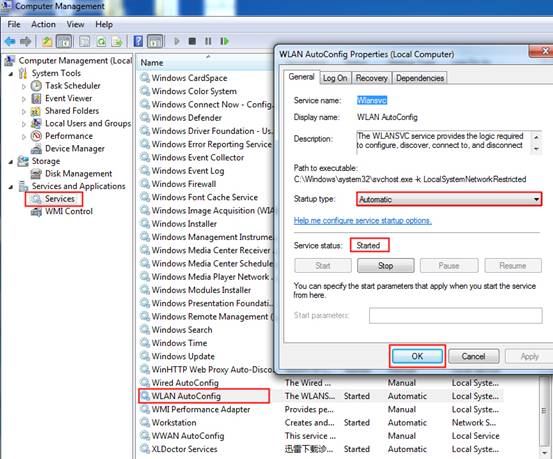
Sélectionnez " Services " dans le menu de gauche et recherchez / activez " WLAN AutoConfig ".
Étape 3
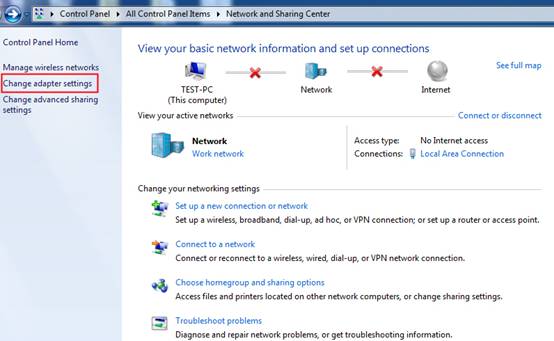
Cliquez sur Démarrer -> Panneau de configuration , sélectionnez et cliquez sur Centre Réseau et partage ou Réseau et Internet-> Afficher l'état et les tâches du réseau , puis cliquez sur Modifier les paramètres de l'adaptateur .
Étape 4
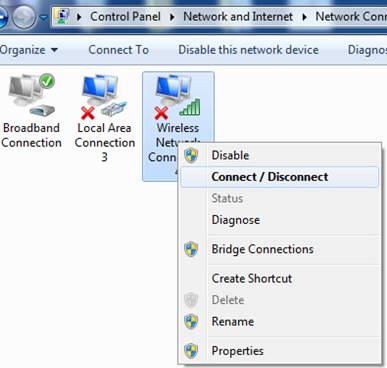
Sélectionnez la connexion sans fil, cliquez dessus avec le bouton droit et sélectionnez Connecter / Déconnecter .
Étape 5
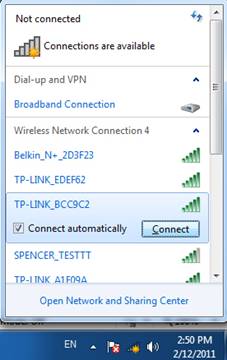
Dans le coin droit, une petite fenêtre contextuelle affiche les réseaux sans fil. Cliquez sur le bouton Actualiser pour afficher le réseau sans fil. Sélectionnez celui qui convient, puis double-cliquez dessus ou cliquez sur Connecter.
Étape 6
Si le réseau sans fil est sécurisé, vous devrez entrer le mot de passe pour vous y connecter, puis cliquez sur OK .
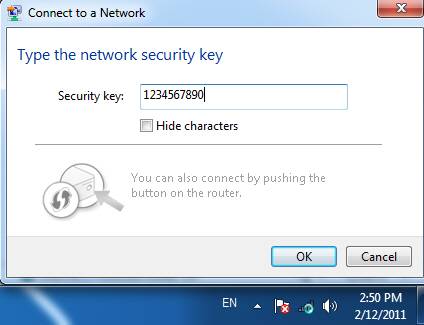
Après quelques minutes, il se connectera au réseau WiFi.

Est-ce que ce FAQ a été utile ?
Vos commentaires nous aideront à améliorer ce site.