
Comment réinitialiser les produits TP-Link aux paramètres d'usine
 2636265
Avis: Une réinitialisation matérielle restaurera votre appareil aux paramètres d'usine. Vous devez reconfigurer le périphérique à partir de zéro ou vous pouvez charger le fichier de configuration que vous avez sauvegardé avant la réinitialisation.
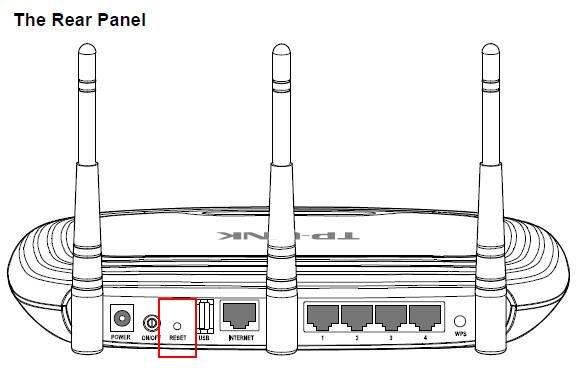
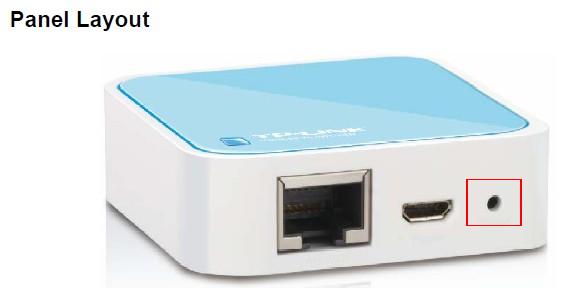
Pour la plupart des produits (routeur filaire, routeur sans fil, routeur modem ADSL2 +, TD-8616, TL-MR3420 V1, TL-MR3220 V1, TL-MR3040)
Appuyez directement sur le bouton RESET du panneau arrière / disposition du panneau et maintenez-le enfoncé avec une broche pendant environ 6 à 10 secondes lorsque le périphérique est en cours d'exécution. Relâchez le bouton de réinitialisation et attendez le redémarrage du périphérique. Si tous les voyants clignotent, s’éteignent et s’allument lentement pendant le processus, cela signifie que le périphérique a été réinitialisé avec succès.
For ADSL
Procédure de réinitialisation matérielle du routeur de modem TP-Link ADSL aux paramètres d'usine
Pour certains routeurs avec bouton WPS / RESET
Comment réinitialiser les produits TP-Link avec le bouton WPS / RESET sur les paramètres d'usine
Pour point d'accès sans fil / extension de portée sans fil
Pour adaptateur CPL
Comment réinitialiser l'adaptateur CPL au réglage d'usine par le biais d'un utilitaire
Pour le serveur d'impression
Comment réinitialiser le serveur d'impression TP-Link sur les paramètres d'usine
Pour caméra IP
Comment réinitialiser la caméra IP aux paramètres d'usine
Pour interrupteurs
Procédure de restauration des commutateurs de la série JetSteam (TM) sur les paramètres d'usine
Procédure de restauration du commutateur géré complet de couche 2 sur les paramètres d'usine
Comment restaurer le commutateur géré L2 lite aux paramètres d'usine
Comment réinitialiser matériellement Web Smart Switch sur les paramètres d'usine
Veuillez vous rendre au Centre de téléchargement pour télécharger le manuel de votre produit afin d’obtenir des détails plus spécifiques.
Est-ce que ce FAQ a été utile ?
Vos commentaires nous aideront à améliorer ce site.


